A Bookmarks Plugin With Global File Store For Neovim Written In Lua.
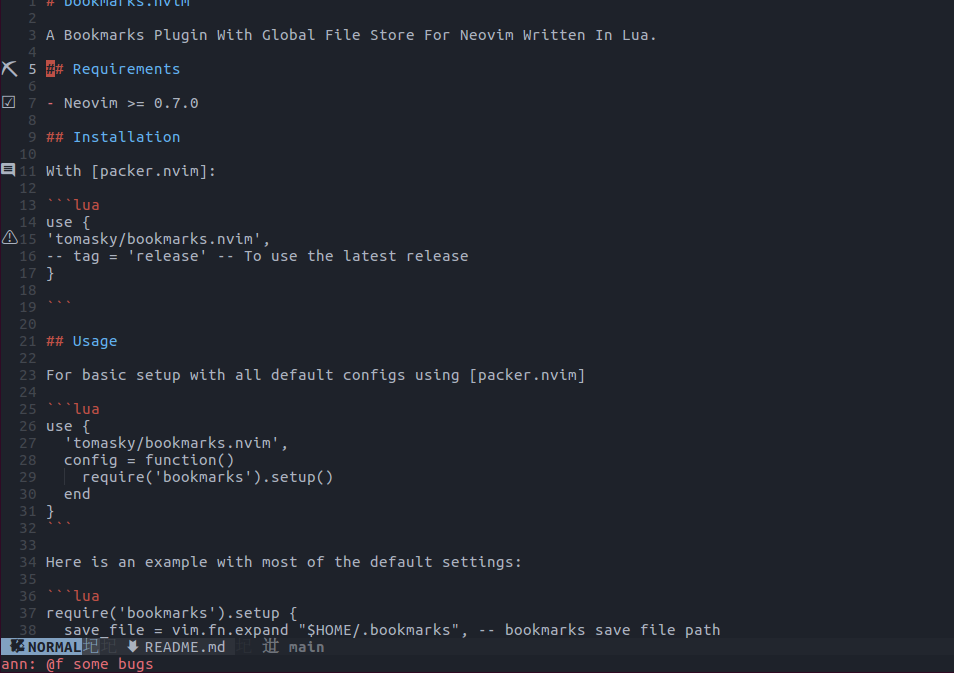
- Display different icons according to annotation keywords
- An annotation that does not start with
@uses its first character as the icon, so emoji work too: annotate a line with🎯 fix thisand the sign shows🎯
- An annotation that does not start with
- Show annotations inline as virtual text at the end of the line
- off by default; set
virt_text = trueor callrequire('bookmarks').toggle_virt_text()
- off by default; set
- open bookmarks in a quickfix list
- set
auto_close_list = trueto close the list after jumping to a bookmark - set
qf_position = "right"to open it as a vertical split instead of at the bottom - bookmarks belonging to the current project's scope are listed first
- set
- keep a project's bookmarks inside the project
:BookmarkScopeturns the current file's directory into a scope and writes a.bmsfile there; its bookmarks are stored with paths relative to that directory, so they can be committed and survive the project being moved- running
:BookmarkScopeagain deletes the file and its bookmarks
- store the files as JSON or MessagePack
format = "mpack"uses Neovim's own MessagePack codec: smaller files and a decoder that does not scan text, at the cost of them no longer being readable, diffable or hand-editable- either format is read whichever one is configured, so changing the option never loses an existing file
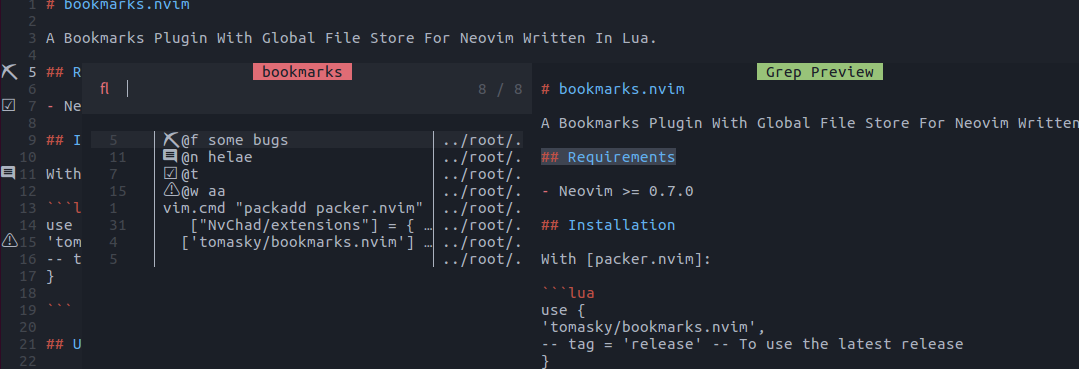
- search marks with Telescope
- press
<C-d>to delete the selected bookmark
- press
- Neovim >= 0.7.0
With packer.nvim:
use {
'tomasky/bookmarks.nvim',
-- tag = 'release' -- To use the latest release
}
For basic setup with all default configs using packer.nvim
use {
  'tomasky/bookmarks.nvim',
  -- after = "telescope.nvim",
  event = "VimEnter",
  config = function()
    require('bookmarks').setup()
  end
}
Here is an example with most of the default settings:
require('bookmarks').setup {
-- sign_priority = 8, --set bookmark sign priority to cover other sign
save_file = vim.fn.expand "$HOME/.bookmarks", -- bookmarks save file path
scope_file = ".bms", -- per-project bookmarks file created by :BookmarkScope
format = "json", -- store the files as "json" or "mpack" (MessagePack)
save_on_exit = true, -- write the save file on exit; set false to control saving yourself
auto_close_list = false, -- close the quickfix window after jumping to a bookmark
qf_position = "bottom", -- where the quickfix window opens: "bottom" or "right"
virt_text = false, -- show annotations as virtual text at the end of the line
keywords = {
["@t"] = "☑️ ", -- mark annotation startswith @t ,signs this icon as `Todo`
["@w"] = "⚠️ ", -- mark annotation startswith @w ,signs this icon as `Warn`
["@f"] = "⛏ ", -- mark annotation startswith @f ,signs this icon as `Fix`
["@n"] = " ", -- mark annotation startswith @n ,signs this icon as `Note`
-- annotations that do not start with @ use their first character instead
},
on_attach = function(bufnr)
local bm = require "bookmarks"
local map = vim.keymap.set
map("n","mm",bm.bookmark_toggle) -- add or remove bookmark at current line
map("n","mi",bm.bookmark_ann) -- add or edit mark annotation at current line
map("n","mc",bm.bookmark_clean) -- clean all marks in local buffer
map("n","mn",bm.bookmark_next) -- jump to next mark in local buffer
map("n","mp",bm.bookmark_prev) -- jump to previous mark in local buffer
map("n","ml",bm.bookmark_list) -- show marked file list in quickfix window
map("n","mx",bm.bookmark_clear_all) -- removes all bookmarks
map("n","mr",bm.bookmark_reload) -- reload bookmarks, drop dead entries, and save
map("n","mt",bm.toggle_virt_text) -- toggle inline annotation text
map("n","ms",bm.toggle_scope) -- toggle a project-local scope file
map("n","tb","<Cmd>Telescope bookmarks list<CR>") -- toggle Telescope bookmarks list
-- map("n","bm","<Cmd>BookmarkScope<CR>") -- add or remove the current directory from the scope
end
}require('telescope').load_extension('bookmarks')Then use :Telescope bookmarks list or require('telescope').extensions.bookmarks.list()
- gitsigns.nvim most of lua functions come from this plugin
- vim-bookmarks inspired by this vim plugin
- possession.nvim some util functions