Privacy fork: the file-sharing/upload feature has been removed. This build makes no network requests — all viewing and rendering happens locally. See Privacy & Data Use.
A comprehensive audio, image, PSD, video, CSV, DBC, ARXML, A2L, ASC, BLF, MF4, Excel, Word, PowerPoint, PDF, Parquet, JSONL, Mermaid, PlantUML, and HWP viewer extension for VSCode and Cursor.

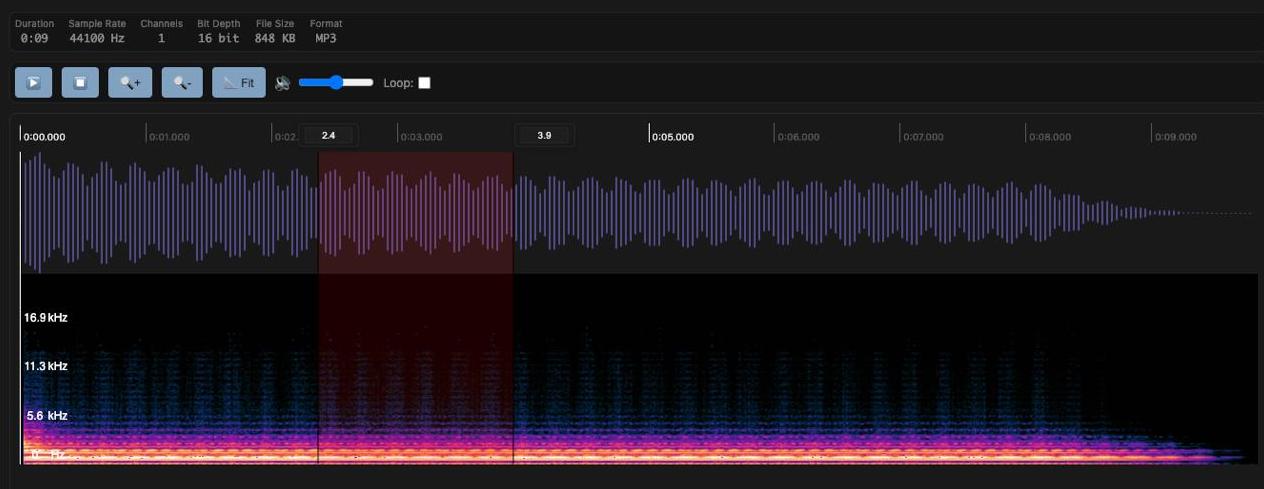
- Waveform Visualization: Real-time audio waveform display
- Spectrogram: Frequency analysis with spectrogram view
- Region Selection: Set start/end times for specific regions
- Loop Playback: Repeat playback of selected regions
- Volume Control: Real-time volume adjustment
- Playback Speed: Multiple playback speed options
- Audio Information: Duration, sample rate, channels, bit depth, file size, format display
- MP3, WAV, PCM (raw s16le mono 16kHz), AIFF/AIF/AIFC, AMR/AWB, OGG, FLAC, AC3, AAC, M4A
Note: playback still depends on the VS Code webview browser engine supporting the underlying codec.
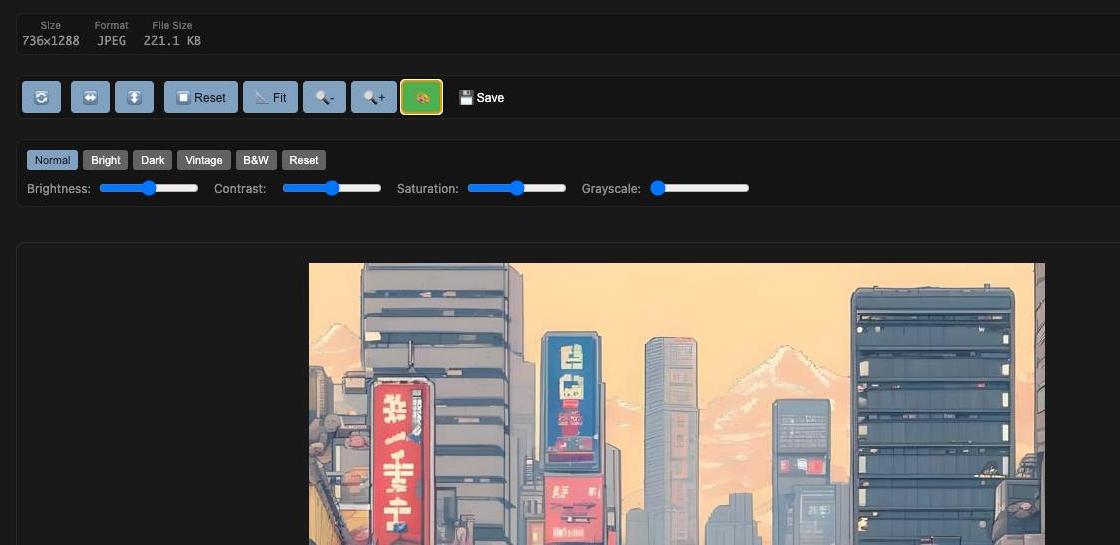
- Zoom Controls: 10% ~ 500% zoom in/out
- Rotation: 90-degree left/right rotation
- Flip: Horizontal/vertical flip
- Fit to Screen: Automatic screen size fitting
- Image Filters: Brightness, contrast, saturation, grayscale adjustments
- Filter Presets: Normal, Bright, Dark, Vintage, B&W presets
- Save Functionality: Save filtered images to workspace
- Keyboard Shortcuts: Quick operation shortcuts
- Image Information: Resolution, format, and file size information display
- JPG, JPEG, PNG, GIF, BMP, WebP, SVG
- Layer Panel: Tree view of layers and groups (folders) with indent by depth
- Per-Layer Visibility: Eye button to show/hide each layer independently
- View Button: Open a single layer in a modal for closer inspection
- Composite vs Layer-by-Layer: When all layers are visible, the full composite is shown; when any layer is hidden, the canvas is redrawn from visible layers only (leaf layers; group merged canvases are skipped to keep visibility correct)
- Transparency: Checkerboard background for transparent areas
- File Information: File name, file size, and document dimensions (width × height px)
- Powered by: ag-psd for PSD parsing and canvas output
- PSD (Adobe Photoshop Document)
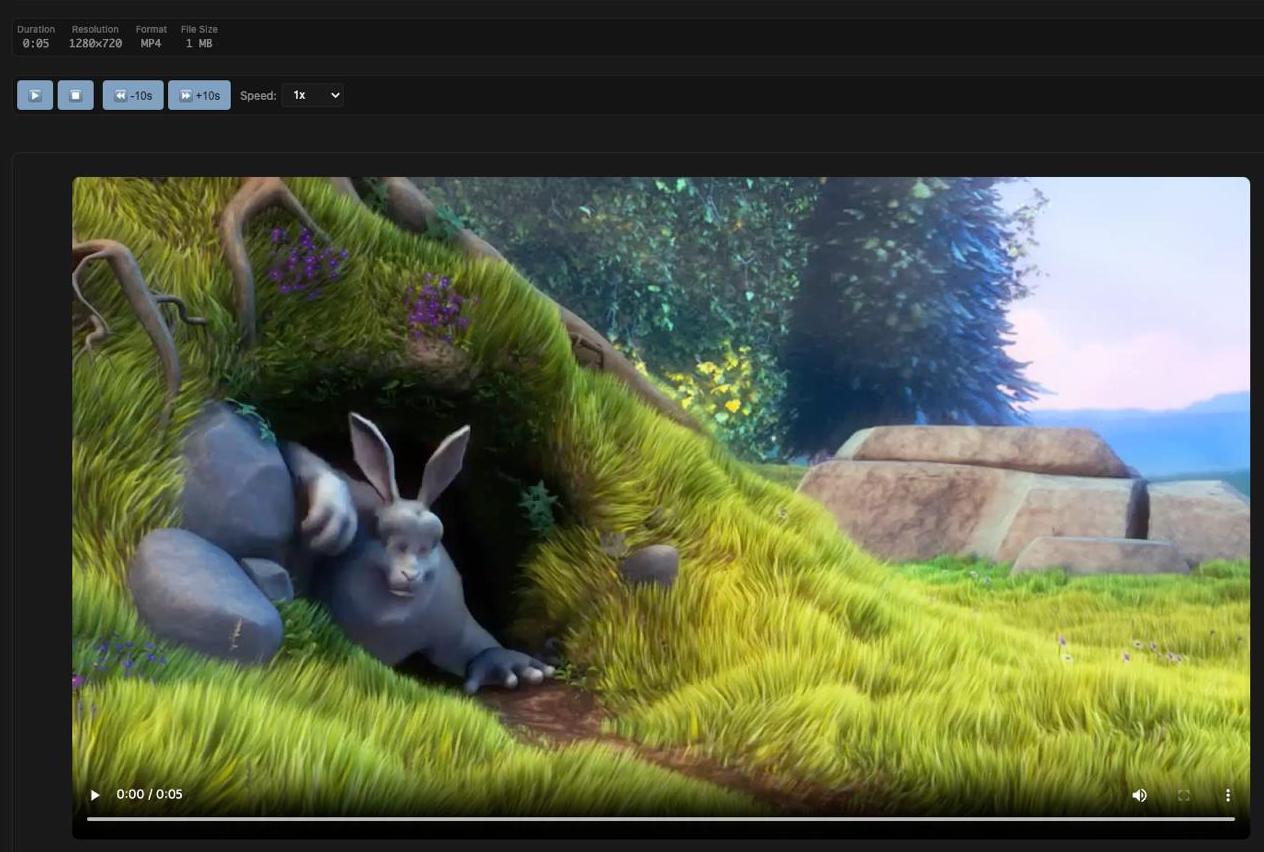
- Playback Controls: Play/pause/stop
- Loop Regions: Set start/end times and loop playback
- Playback Speed: 0.25x ~ 4x playback speed control
- Skip Controls: 10-second forward/backward skip
- Volume Control: Real-time volume adjustment
- Keyboard Shortcuts: Spacebar, arrow keys, etc.
- Video Information: Resolution, duration, and file size display
- MP4, MPEG-TS (TS/MTS/M2TS), AVI, MOV, WMV, FLV, WebM, MKV
Note: .ts files share an extension with TypeScript source files, so automatic viewer association may require using Open With instead of a default file binding.
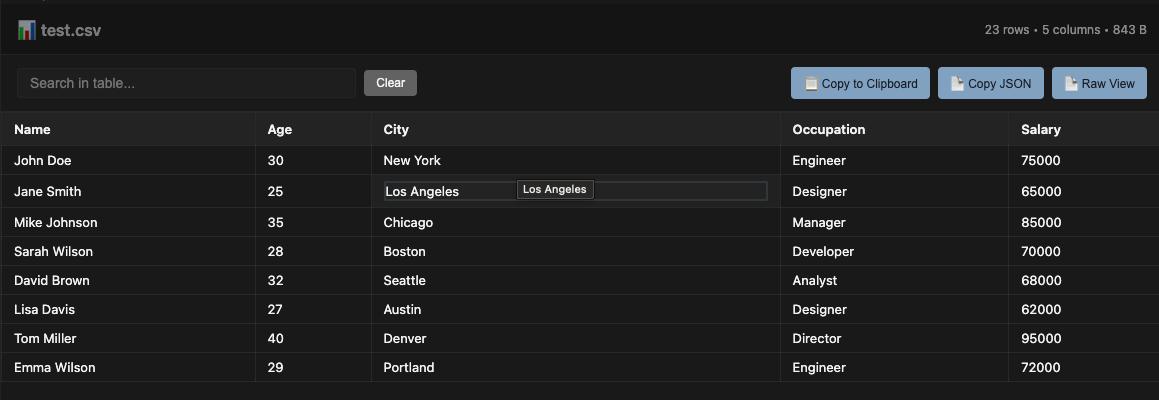
- Table Display: Clean, sortable table view of CSV data
- Search & Filter: Real-time search across all columns
- Column Sorting: Click headers to sort by any column (numeric/text aware)
- Pagination: Handle large datasets with page navigation
- Copy to Clipboard: Copy filtered data to clipboard (tab-separated format)
- Statistics View: Display detailed file and data statistics
- Keyboard Shortcuts: Ctrl+F for search, Ctrl+C for copy
- File Information: Row count, column count, and file size display
- Responsive Design: Works on different screen sizes
- Delimiter Detection: Automatically detects comma, semicolon, tab, and pipe-delimited text formats
- CSV (Comma-Separated Values)
- TSV (Tab-Separated Values)
- Message Overview: Browse CAN messages with ID, hexadecimal ID, DLC, transmitter, and signal count
- Signal Table: Inspect start bit, bit length, byte order, signedness, scale, offset, range, unit, and receivers
- Search & Filter: Search across messages/signals/comments and filter by CAN node
- Comments & Value Tables: Shows
CM_comments andVAL_enumerations when present - Raw Source View: Keep the original DBC text available beside the structured view
- DBC (CAN database)
- ARXML Structure View: Summarizes AUTOSAR packages, named CAN-related elements, and references
- A2L Block View: Lists ASAP2 blocks and counts key sections such as
MEASUREMENT,CHARACTERISTIC, andIF_DATA - ASC Log Preview: Parses Vector ASCII CAN/CAN FD events into a searchable table
- BLF Header Preview: Detects Vector BLF
LOGGfiles and shows binary header/hex preview - MF4 Header Preview: Detects ASAM MDF 4 files and summarizes known MDF block markers
- Search & Raw Preview: Search across extracted tables and inspect the original text preview for text-based formats
- ARXML (AUTOSAR XML)
- A2L (ASAM MCD-2 MC / ASAP2)
- ASC (Vector ASCII CAN log)
- BLF (Vector Binary Logging Format header preview)
- MF4 (ASAM MDF 4 header and block marker preview)
- Multi-Sheet Support: Switch between sheets via dropdown
- Table Display: Clean table view of sheet data
- Search & Filter: Real-time search across all columns
- Pagination: Handle large datasets with page navigation
- Copy to Clipboard: Copy filtered data (tab-separated)
- Copy as JSON: Export current sheet data as JSON
- Raw View: Toggle between table and raw JSON view
- File Information: Sheet name, row count, column count, file size
- Keyboard Shortcuts: Ctrl+F search, Ctrl+C copy
- XLSX (Excel Workbook)
- XLS (Excel 97-2003)
- Document View: Renders
.docxwithdocx-previewfor improved layout fidelity - DOC Support: Opens
.docvia standalone legacy HTML fallback, with LibreOffice conversion fallback only when needed - Native Legacy Rendering: Preserves more
.docparagraph styling, table structure, and readable legacy text decoding - Embedded Workbook Preview: Shows extracted worksheet tables and simple SVG chart previews when legacy
.docfiles contain embedded workbook data - Zoom Controls: Zoom in/out and reset (Ctrl+/-, Ctrl+0)
- Print: Print document (Ctrl+P)
- File Information: File name and file size
- Powered by: docx-preview for DOCX rendering
- DOCX (Microsoft Word Document)
- DOC (Microsoft Word 97-2003)
- Slide View: Reads
.pptxand legacy.pptfiles and renders slide content in order - Title + Bullet Extraction: Displays slide title and bullet text content
- Legacy PPT Layout Recovery: Preserves more title/body/subtitle placement, slide sizing, and discovered shape/image positioning for
.ppt - Packaged PDF.js Rendering: Uses bundled
pdf.jsassets for environments where external CDN access is blocked - Slide Jump: Jump to any slide from a dropdown
- Zoom Controls: Zoom in/out and reset (Ctrl+/-, Ctrl+0)
- File Information: File name, file size, and slide count
- Powered by: JSZip for PPTX archive parsing
- PPT (Microsoft PowerPoint 97-2003)
- PPTX (Microsoft PowerPoint Presentation)
- Page View: Page-by-page rendering with thumbnail sidebar
- Zoom Controls: Zoom in/out and reset
- Annotations: Add text/signature, select, move, and delete annotations
- Password-Protected PDFs: Open encrypted PDFs with an in-viewer password prompt
- Text Size Control: Choose annotation font size when inserting text
- Page Editing: Reorder pages (drag & drop) and delete pages
- Merge PDF: Merge another PDF into the current document
- Save Flows: Save and Save As with state synchronization after save
- Document View: Opens
.hwpand.hwpxfiles directly inside Omni Viewer - Integrated Routing: Works with the same signature-based viewer detection flow used across the extension
- Powered by: rhwp (
@rhwp/core) for upstream parsing and rendering - Upstream-Friendly Integration: Runtime assets are synced from
node_modules/@rhwp/corevianpm run sync:rhwp, so future rhwp updates can be adopted without forking its renderer
- HWP, HWPX
- Serverless Rendering: Renders PlantUML diagrams in the VS Code webview without a PlantUML server
- Diagram / Split / Source Views: Switch between rendered preview, side-by-side source, and read-only source
- Zoom Controls: Zoom in/out and reset
- Light / Dark Render Modes: Toggle PlantUML output mode
- Copy Source: Copy the original diagram text to clipboard
- File Information: File name, file size, and line count
- Powered by: puml-canvas-js for native JavaScript SVG rendering
- PUML, PlantUML, IUML
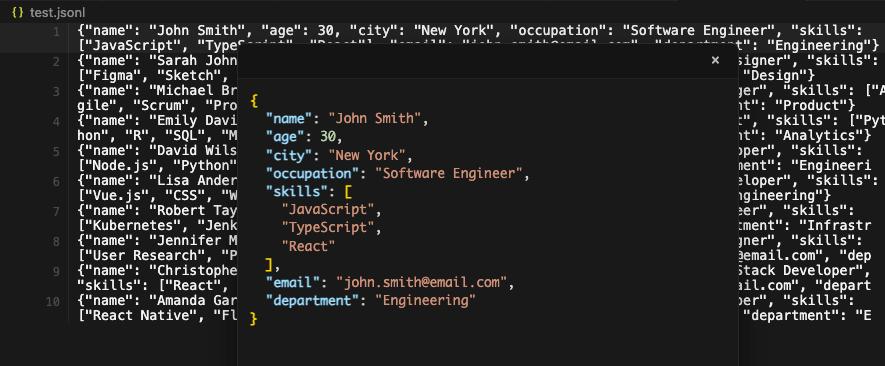
- Line-by-Line Editing: Direct inline editing of JSON lines with syntax validation
- Hover Popup: JSON popup display on line hover with formatted syntax highlighting
- Click-to-Edit Popup: Click popup content to edit JSON directly in formatted view
- Real-time Validation: Instant JSON validation with visual feedback (valid/invalid indicators)
- Data Synchronization: Seamless sync between popup edits and original lines
- Syntax Highlighting: Color-coded JSON syntax for better readability
- Error Handling: Clear error messages for invalid JSON format
- JSONL (JSON Lines) - Each line contains a valid JSON object

- Table Display: Clean, table view of Parquet data
- Search & Filter: Real-time search across all columns
- Column Sorting: Click headers to sort by any column (numeric/text aware)
- Pagination: Handle large datasets with page navigation
- Copy to Clipboard: Copy filtered data to clipboard (tab-separated format)
- Keyboard Shortcuts: Ctrl+F for search, Ctrl+C for copy
- File Information: Row count, column count, and file size display
- Responsive Design: Works on different screen sizes
- Parquet
- Signature-Based Routing: Detects common file signatures before opening and can reroute mislabeled files to the matching Omni Viewer
- Broader Format Sniffing: Recognizes common PDF, image, audio, video, Parquet, Office, CSV-style, and JSONL content beyond filename extensions
Marketplaces:
- VSCode Marketplace - Official VSCode Marketplace
- Open VSX Registry - Open Source VSX Registry
If you are using jetbrains ide, check out this repository
Omni Viewer is also available on web and mobile platforms:
- Web: Web App
- Android: Google Play
- iOS: App Store
-
Install Dependencies
npm install
-
Compile TypeScript
npm run compile
-
Package Extension
npm run vscode:prepublish
This fork sends no data off your machine. The file-sharing/upload feature from upstream has been removed entirely: there are no share, upload, or download commands, and the extension host makes no network requests. Files are read from and written to the local workspace only; all rendering happens locally inside sandboxed webviews.
MIT License
If you encounter any issues or have feature requests, please contact us through GitHub Issues.
- Large file handling optimization needed
-
Audio/Video/Image Files:
- Maximum file size limit: 50MB per file
- Recommended file size: < 50MB for optimal performance
- Audio files are loaded as Base64 for WebView compatibility
-
Text-based Files (CSV, JSONL, Parquet):
- Maximum file size limit: 500MB per file
- Recommended file size: < 200MB for optimal performance
- Large files may take time to load initially
- Memory usage scales with file size
- File Size Restrictions:
- Files ≥ 150MB: Cannot be opened. Clear error message will be displayed.
- Files 50MB - 150MB: Only the first 10,000 rows are displayed with a warning message showing total row count.
- Files < 50MB: All rows are displayed without any limitations.
- Row Limit: For files between 50MB and 150MB, only the first 10,000 rows are loaded for display to prevent memory issues
- Memory Considerations:
- Parquet files are converted to JSON format for display, which can significantly increase memory usage
- Large files may take time to load initially
- For best performance, keep files under 50MB for full data access
- Large files may take time to load initially
- Memory usage scales with file size
- For best performance, keep files under recommended sizes