A comprehensive Flutter ecosystem for AI-powered translation and text-to-speech functionality, built with a modular architecture that eliminates code duplication and follows Flutter best practices.
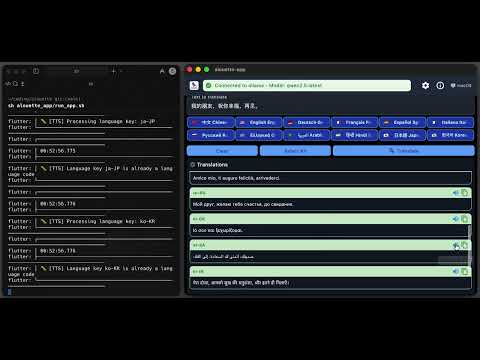
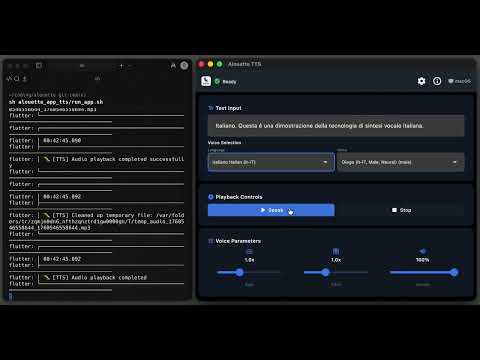
Alouette follows a layered architecture with clear separation of concerns:
Applications Layer
├── alouette_app (Combined functionality)
├── alouette_app_trans (Translation specialist)
└── alouette_app_tts (TTS specialist)

Library Layer
├── alouette_lib_trans (Translation services)
├── alouette_lib_tts (TTS services)
└── alouette_ui (UI components & services)

Platform Layer
├── Edge TTS (Desktop platforms)
├── Flutter TTS (Mobile/Web platforms)
└── LLM Providers (Ollama, LM Studio)Alouette supports 12+ languages with high-quality neural voices
- 🇨🇳 中文 Chinese (zh-CN): 这是中文语音合成技术的演示。
- 🇺🇸 English (en-US): This is a demonstration of TTS in English.
- 🇩🇪 Deutsch German (de-DE): Dies ist eine Demonstration der deutschen Sprachsynthese-Technologie.
- 🇫🇷 Français French (fr-FR): Ceci est une démonstration de la technologie de synthèse vocale française.
- 🇪🇸 Español Spanish (es-ES): Esta es una demostración de la tecnología de síntesis de voz en español.
- 🇮🇹 Italiano Italian (it-IT): Questa è una dimostrazione della tecnologia di sintesi vocale italiana.
- 🇷🇺 Русский Russian (ru-RU): Это демонстрация технологии синтеза речи на русском языке.
- 🇬🇷 Ελληνικά Greek (el-GR): Αυτή είναι μια επίδειξη της τεχνολογίας σύνθεσης ομιλίας στα ελληνικά.
- 🇸🇦 العربية Arabic (ar-SA): هذا عرض توضيحي لتقنية تحويل النص إلى كلام باللغة العربية.
- 🇮🇳 हिन्दी Hindi (hi-IN): यह हिंदी भाषा में टेक्स्ट-टू-स्पीच तकनीक का प्रदर्शन है।
- 🇯🇵 日本語 Japanese (ja-JP): これは日本語音声合成技術のデモンストレーションです。
- 🇰🇷 한국어 Korean (ko-KR): 이것은 한국어 음성 합성 기술의 시연입니다。
- Full-featured application with both translation and TTS capabilities
- Unified interface for seamless workflow between translation and speech synthesis
- Ideal for users who need both functionalities
- Focused on AI-powered translation using local LLM providers
- Supports Ollama and LM Studio for privacy-focused translation
- Batch translation to multiple languages simultaneously
- High-quality speech synthesis with platform-specific optimization
- Edge TTS for desktop platforms, Flutter TTS for mobile/web
- Advanced voice controls and audio export capabilities
Translation Services Library
- Centralized AI translation functionality
- Support for multiple LLM providers (Ollama, LM Studio)
- Comprehensive error handling and connection management
Text-to-Speech Services Library
- Multi-platform TTS with automatic engine selection
- Edge TTS integration for high-quality desktop synthesis
- Flutter TTS for native mobile and web support
Shared UI Components & Services Library
- Atomic design component system (atoms, molecules, organisms)
- Centralized service locator and dependency injection
- Design token system for consistent theming
- Configuration management and service orchestration
- Flutter SDK 3.8.1+
- Dart SDK 3.0.0+
- For AI translation: Ollama or LM Studio
- For desktop TTS: Python 3.7+ with
edge-ttspackage
-
Clone the repository
git clone https://github.com/feuyeux/alouette.git cd alouette -
Install dependencies for all modules
# Install dependencies for all applications and libraries
find . -name "pubspec.yaml" -not -path "./.*" -exec dirname {} \; | xargs -I {} sh -c 'cd "{}" && flutter pub get'
-
Set up AI translation (optional)
# Install and start Ollama
# Visit https://ollama.ai for installation instructions
ollama serve
ollama pull llama3.2

# Or install LM Studio from https://lmstudio.ai
-
Set up Edge TTS for desktop (optional)
pip install edge-tts
Each application includes platform-specific run scripts for convenience:
# Run the main combined application
cd alouette_app && ./run_app.sh

# Run the translation-focused application
cd alouette_app_trans && ./run_app.sh

# Run the TTS-focused application
cd alouette_app_tts && ./run_app.sh# Run any application
cd alouette_app
.\run_app.ps1
cd alouette_app_trans
.\run_app.ps1
cd alouette_app_tts
.\run_app.ps1- Flutter - Cross-platform UI framework
- Edge TTS - High-quality text-to-speech
- Ollama - Local LLM runtime
- LM Studio - Local LLM interface
- Material Design 3 - Design system