Neovim plugin to work GitHub PRs quickly.
Main idea of this plugin to have tools that augment GitHub PR review using web instead of replacing it like other plugins do.
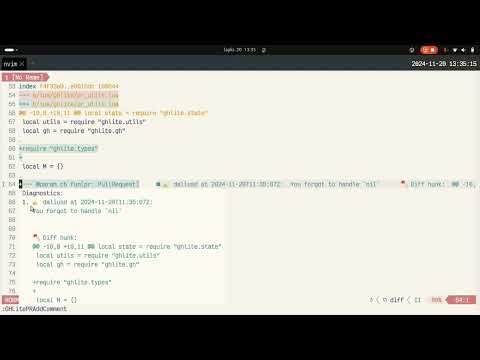
-
nvim 0.10+
-
If you are using fzf-lua or telescope you might want to checkout how to override UI select. E.g.
vim.cmd('FzfLua register_ui_select') -
Diffview.nvim (optional, for enhanced diff viewing)
-
codediff.nvim (optional, alternative for enhanced diff viewing)
Using lazyvim.
NOTE: default config here. You can skip all the settings if you are OK with defaults.
  {
    'daliusd/ghlite.nvim',
    dependencies = { 'lewis6991/async.nvim' },
    config = function()
      require('ghlite').setup({
        debug = false, -- if set to true debugging information is written to ~/.ghlite.log file
        view_split = 'vsplit', -- set to empty string '' to open in active buffer, use 'tabnew' to open in tab
        diff_split = 'vsplit', -- set to empty string '' to open in active buffer, use 'tabnew' to open in tab
        diff_tool = 'auto', -- 'diffview', 'codediff', or 'auto' - which tool to use for GHLitePRDiffview
        comment_split = 'split', -- set to empty string '' to open in active buffer, use 'tabnew' to open in tab
        comment_hunk = true, -- show GitHub diff hunks in loaded PR comment diagnostics and quickfix entries
        open_command = 'open', -- open command to use, e.g. on Linux you might want to use xdg-open
        refresh_interval = 0, -- seconds between background refreshes of the PR list, PR view and loaded comments; 0 disables
        merge = {
          approved = '--squash',
          nonapproved = '--auto --squash',
        },
        html_comments_command = { 'lynx', '-stdin', '-dump' }, -- command to render HTML comments in PR view
        -- custom shell commands runnable from the PR view, output opens in a new buffer
        pr_commands = {
          {
            name = 'AI Review', -- shown in the PR view keymap hints
            cmd = 'pi -p "review this PR"', -- run in the repository root
            key = 'cr', -- set to '' to disable the keymap
          },
        },
        -- override default keymaps with the ones you prefer
        -- set keymap to false or '' to disable it
        keymaps = {
          diff = {
            open_file = 'gf',
            open_file_tab = '',
            open_file_split = 'o',
            open_file_vsplit = 'O',
            approve = 'cA',
            request_changes = 'cR',
          },
          comment = {
            send_comment = 'c<CR>', -- this one cannot be disabled
            resolve = 'cS',
            unresolve = 'cU',
          },
          pr = {
            approve = 'cA',
            request_changes = 'cR',
            merge = 'cM',
            comment = 'ca',
            diff = 'cp',
            diffview = 'cl',
            checkout = 'co',
            refresh = 'r',
            open_commit = 'cs', -- open commit view for the commit under the cursor (<CR> works too)
          },
          commit = {
            open_file = 'gf',
            open_file_split = 'o',
            open_file_vsplit = 'O',
            diff = 'cp',
            next_commit = ']c',
            prev_commit = '[c',
            yank_sha = 'y',
            open_in_browser = 'gx',
            refresh = 'r',
            close = 'q',
          },
        },
      })
    end,
    keys = {
      { '<leader>us', ':GHLitePRList<cr>',          silent = true, desc = 'PR List' },
      -- { '<leader>us', ':GHLitePRSelect<cr>',        silent = true, desc = 'PR Select' },
      { '<leader>uo', ':GHLitePRCheckout<cr>',      silent = true, desc = 'PR Checkout' },
      { '<leader>uv', ':GHLitePRView<cr>',          silent = true, desc = 'PR View' },
      { '<leader>uu', ':GHLitePRLoadComments<cr>',  silent = true, desc = 'PR Load Comments' },
      { '<leader>up', ':GHLitePRDiff<cr>',          silent = true, desc = 'PR Diff' },
      { '<leader>ul', ':GHLitePRDiffview<cr>',      silent = true, desc = 'PR Diffview' },
      { '<leader>ua', ':GHLitePRAddComment<cr>',    silent = true, desc = 'PR Add comment' },
      { '<leader>ua', ':GHLitePRAddComment<cr>',    mode = 'x',    silent = true,             desc = 'PR Add comment' },
      { '<leader>uc', ':GHLitePRUpdateComment<cr>', silent = true, desc = 'PR Update comment' },
      { '<leader>ud', ':GHLitePRDeleteComment<cr>',    silent = true, desc = 'PR Delete comment' },
      { '<leader>ur', ':GHLitePRResolveComment<cr>',   silent = true, desc = 'PR Resolve comment thread' },
      { '<leader>uR', ':GHLitePRUnresolveComment<cr>', silent = true, desc = 'PR Unresolve comment thread' },
      { '<leader>ug', ':GHLitePROpenComment<cr>',      silent = true, desc = 'PR Open comment' },
    }
}Run the test suite with:
make testThe test target bootstraps mini.nvim into .tests/ and runs mini.test in headless Neovim.
If you want to make quick PR review without checking out PR code to your repo you can do it this way:
-
Run
:GHLitePRSelectand select PR you want to review. PR view will open. You can open:GHLitePRViewanytime later to refresh/reopen PR view. -
Run
:GHLitePRDiffto see diff of PR so you could review it in single window. Comments that can be displayed in diff view are loaded as well as diagnostics. Navigate comments usingvim.diagnostic.jumporvim.diagnostic.goto_\*functions (latter is for older neovim versions) or keys you have mapped to those functions. -
Run
:GHLitePRAddCommentto comment in existing conversations or start the new one directly in diff view. Alternatively you can use:GHLitePROpenCommentto open comments in browser. -
Run
:GHLitePRApproveto approve PR if everything is OK. you can usecain diff and pr views. -
Run
:GHLitePRRequestChangesto request changes on PR if something is wrong. you can usecrin diff and pr views.
However it might be that you want to make thorough PR review by looking not only at diff, but at surrounding code as well.
-
Run
:GHLitePRSelector:GHLitePRCheckoutand select PR you want to review. PR view will open. You can open:GHLitePRViewanytime later to refresh/reopen PR view. You can skip this step if you have locally branch checked out that is related to PR. In that case plugin will resolve PR number from git branch. -
Run
:GHLitePRDiffto see diff of PR so you could review it in single window. Usegfin this buffer to go to specific file and line if you want to see more context. If you have run:GHLitePRSelectinitially and PR branch is not checked out plugin will ask if you want to checkout branch. Comments as diagnostics will be show in opened files as well. -
Run
:GHLitePRLoadCommentsto review all comments in the code if diff view is not enough. List of comments is loaded to quickfix and shown in file as diagnostic messages. -
Run
:GHLitePRAddCommentto comment in existing conversations or start the new one. Alternatively you can use:GHLitePROpenCommentto open comments in browser. -
Run
:GHLitePRApproveto approve PR if everything is OK. you can usecain diff and pr views. -
Run
:GHLitePRRequestChangesto request changes on PR if something is wrong. you can usecrin diff and pr views.
If you are leaving several comments, run :GHLitePRStartReview first. Comments and
replies you add afterwards are held in a pending review that nobody else can see, and
:GHLitePRApprove, :GHLitePRRequestChanges or :GHLitePRSubmitReview publish all of
them at once. :GHLitePRDiscardReview throws the pending review away.
With refresh_interval set, ghlite periodically re-fetches whatever is visible in the
current tab: the PR list, PR views, and the diagnostics of comments loaded with
GHLitePRLoadComments or shown in a PR view. Buffers are only redrawn when the data
changed and the cursor stays put. Comment polling uses conditional requests, so an
unchanged response does not count against the GitHub rate limit; the PR list and PR
view go through gh pr list/gh pr view and cost one request per refresh.
Opens a reusable buffer containing the same pull requests as GHLitePRSelect. Each PR is shown across several lines with its number, title, author, creation/update dates, draft/review status, labels, and a summary of its GitHub status checks.
Supported key bindings:
csor<CR>opens the PR under the cursorcochecks out and opens the PR under the cursorrrefreshes the listqcloses the list
This command shows selection of active PRs and selects PR for other operations. You can use this command if you want to review PR without checking it out.
This command shows selection of active PRs and checkouts selected PR.
This command shows PR information (wrapper for gh pr view). Each PR has one view
buffer; running the command again reloads it in place.
Supported key bindings:
-
cAto approve PR -
cMto merge PR (seeGHLitePRMergefor details) -
cato write a top-level PR comment, or quote a PR/review comment when the cursor is on its body -
cpto open diff view -
clto open the PR in the configured diff tool (Diffview.nvim or codediff.nvim) -
coto checkout the PR (only shown when the PR isn't already checked out) -
csor<CR>to open the commit view for the commit under the cursor (seeGHLiteCommitView) -
rto refresh the PR view -
crto run the AI review command (seepr_commandsbelow)
The view lists the PR's GitHub status checks under a ## Checks heading, then
its commits under ## Commits, followed by changed files, PR comments and
review comments. When the cursor is on a review
PR or review comment body, ca preloads it as a quote in a new comment;
elsewhere it writes a top-level PR comment.
pr_commands lets you run arbitrary shell commands against the PR from the PR
view. Each entry has a name, a cmd and a key, and every configured entry
gets its own key binding and is listed in the PR view key binding hints.
By default a single AI review entry is configured, bound to cr:
pr_commands = {
  { name = 'AI Review', cmd = 'pi -p "review this PR"', key = 'cr' },
}
Use it to plug in whatever tool you prefer, for example:
pr_commands = {
  { name = 'AI Review', cmd = 'claude -p "review this PR"', key = 'cr' },
  { name = 'Tests',     cmd = 'make test',                  key = 'ct' },
}
The command is run through the shell (so pipes, quoting and redirects work)
from the repository root, and its output opens in a new read-only buffer using
view_split. AI reviews can take a while, so a spinner with the elapsed time
is notified while the command runs, and Neovim is not blocked meanwhile. The
notification asks to be updated in place, so with a notifier plugin installed
(nvim-notify, snacks.nvim, fidget.nvim) you get a single updating notification;
the built-in vim.notify shows one message per second instead. Because the
plugin passes no PR context, the command is expected
to work it out itself, e.g. via gh pr diff or git diff, which rely on the
PR branch being checked out. For that reason the PR must be checked out before
a command runs: if it isn't, you are asked to check it out first, and the
command is not run if you decline. Set an entry's key to '' to keep the
command configured without binding a key.
Note: You can use default vim shortcuts as well, like gx to open links in
this view.
HTML comments is the thing too and they look bad in text. To render HTML as
text html_comments_command settings can be used to specify command. You can
use any command here that accepts html via stdin and outputs text to stdout. By
default lynx is used, but if something works better for you feel free to use
it.
Plugin searches for html tag and only then passes comment through
html_comments_command. You can disable this functionality by setting
html_comments_command as false.
This command starts a pending review on the selected PR. While it is open,
GHLitePRAddComment adds comments and replies to that review instead of posting them
immediately, so the author is notified once instead of once per comment. GitHub allows
a single pending review per PR, so a review left over from an earlier session or started
in the web UI is picked up on its own and comments keep batching after a restart.
This command submits the pending review as COMMENT, APPROVE or REQUEST_CHANGES.
GitHub requires a summary for everything except APPROVE, so you are asked for one.
This command deletes the pending review and the comments held in it.
This command approves selected PR. When a pending review is open it is submitted as the approval, so the comments you collected are published with it.
This command request changes on PR. When a pending review is open it is submitted with the requested changes.
This command merges selected PR. Approved and non-approved PRs use different
options when running gh pr merge command. Check gh pr merge -h for
available options and use them in config's merge section if defaults are not
working for you.
This command allows to comment on PR at top level (vs commenting on the code).
This command loads PR comments. Only non-outdated review comments are loaded,
PR comments are not loaded. Comments are loaded to quickfix list and to buffer
diagnostics on buffer load. Navigate quickfix list using cnext and cprev
(assumption here that you are using quickfix list in general).
Comments held in a pending review are loaded too and marked (pending), with the same
lines and ranges they will have once the review is submitted.
NOTE: You must checkout git branch related to PR either using
:GHLitePRCheckout or using other tools.
This command loads PR diff that you can review. This command shows diff of selected PR. If no PR is selected then PR number is resolved from git branch associated with PR. Comments are loaded and shown as diagnostics in this view as well.
Supported key bindings:
-
gfgo to file from PR diff.gfcommand will not work if you use:GHLitePRSelectcommand and branch is not checked out or you have different branch checked out. -
cAto approve PR
This command shows PR diff using either
Diffview.nvim or
codediff.nvim, depending on the
diff_tool configuration option:
diff_tool = 'auto'(default): Uses diffview.nvim if installed, otherwise codediff.nvim. If both are installed, diffview.nvim is preferred.diff_tool = 'diffview': Always uses diffview.nvim (shows error if not installed)diff_tool = 'codediff': Always uses codediff.nvim (shows error if not installed)
This command will not show correct diff sometimes if you have gh older than 2.63.0 (details here cli/cli#9938).
This command opens buffer where you can write your comment.
If you want to create multi-line comment then select multiple lines using visual mode.
Supported key bindings:
-
c-enter:
-
If there is already loaded comment on cursor line (using
GHLitePRLoadCommentscommand) then comment is added as reply to thread. -
If there is no comment on line then new conversation is started.
-
This command updates selected comment.
This command deletes selected comment.
Resolve or reopen the review-comment thread under the cursor. If several threads
are attached to the line, prompts for one. In the built-in diff and PR views,
these are bound to keymaps.comment.resolve (cS) and
keymaps.comment.unresolve (cU).
Opens comment under cursor in browser using open_command command (default
open).
Shows a single commit: :GHLiteCommitView <sha>. Usually you don't type it -
press cs or <CR> on a commit in the PR view instead, which also enables
commit-to-commit navigation.
The view shows the SHA, author (and committer, when it differs), parent
commits, the commit message, signature status, CI check runs, the changed files
with their +/- counts, any review comments left on that commit, and the
commit diff.
Supported key bindings:
-
gf,o,Oto open the file under the cursor (in the current window, a split or a vertical split) at the line the diff points at -
cpto open the commit indiffview.nvim/codediff.nvim -
]cand[cto move to the next/previous commit of the PR (only when opened from the PR view) -
yto yank the full SHA -
gxto open the commit on GitHub usingopen_command -
rto refresh,qto close
The commit is fetched from the GitHub API, so it works for PRs that are not checked out. Opening a file, however, opens the file in your working tree - if the PR isn't checked out you may land in unrelated code.