Prospect your ores semi-automatically, one click at a time


 Menu |
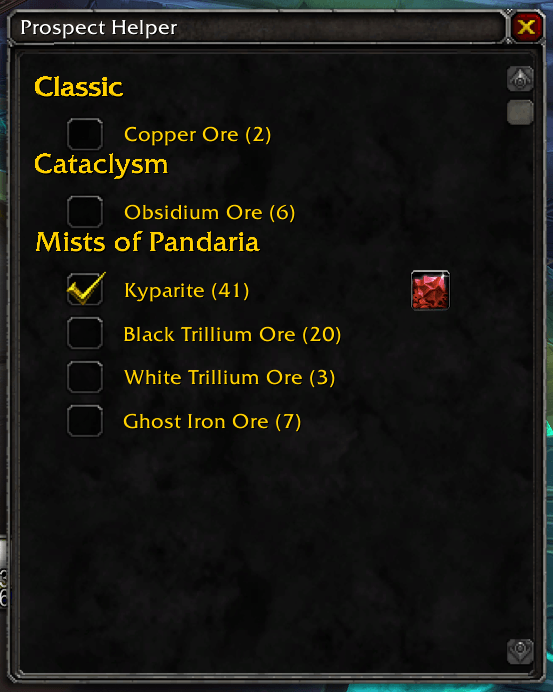
Prospect Helper scans your bags for prospectable ores and lists them in a small window. Tick an ore and a prospect button appears next to it: each click casts Prospecting on that ore, so you can work through a whole stack without opening your spellbook or writing macros yourself.
- Lists every prospectable ore in your bags with its stack count, grouped by expansion (Classic to Mists of Pandaria).
- One checkbox per ore: ticking it creates a
Prospect_<OreName>macro and shows a one-click prospect button; unticking hides the button and deletes the macro. - Ores with fewer than 5 units are greyed out, with a tooltip explaining why.
- The list refreshes automatically as your bags change.
- Movable, scrollable window.
- Minimap button (LibDBIcon / LibDataBroker).
- Translated into 20 languages.
- Download the zip from the latest release or from CurseForge.
- Extract the
ProspectHelperfolder into:- Mists / Cataclysm / Wrath Classic:
World of Warcraft/_classic_/Interface/AddOns/ - TBC Anniversary:
World of Warcraft/_anniversary_/Interface/AddOns/
- Mists / Cataclysm / Wrath Classic:
- Restart WoW and enable the addon.
- Left click the minimap button to open or close the window.
- Right click the minimap button to print a short help line in chat.
- Tick an ore, then click the button next to it once per prospect.
- Each ticked ore uses one slot of your general macros. Leave a free slot, and untick the ore when you are done so the macro is removed.
Author: Pirson · GitHub · CurseForge · MIT License