<?xml version="1.0" encoding="utf-8"?>
<feed xmlns="http://www.w3.org/2005/Atom">
    <id>https://electronjs.org/</id>
    <title>Electron</title>
    <updated>2020-02-08T18:57:16.201Z</updated>
    <generator>Electron website</generator>
    <link rel="alternate" href="https://electronjs.org/"/>
    <link rel="self" href="https://electronjs.org/releases.xml"/>
    <subtitle>Build cross platform desktop apps with JavaScript, HTML, and CSS.</subtitle>
    <entry>
        <title type="html"><![CDATA[Electron 8.0.0]]></title>
        <id>https://electronjs.org/blog/electron-8-0</id>
        <link href="https://electronjs.org/blog/electron-8-0"/>
        <updated>2020-02-04T00:00:00.000Z</updated>
        <summary type="html"><![CDATA[Electron 8.0.0 has been released! It includes upgrades to Chromium 80, V8 8.0, and Node.js 12.13.0. We've added Chrome's built-in spellchecker, and much more!

The Electron team is excited to [...]]]></summary>
        <content type="html"><![CDATA[<p>Electron 8.0.0 has been released! It includes upgrades to Chromium <code>80</code>, V8 <code>8.0</code>, and Node.js <code>12.13.0</code>. We've added Chrome's built-in spellchecker, and much more!</p>
<hr>
<p>The Electron team is excited to announce the release of Electron 8.0.0! You can install it with npm via <code>npm install electron@latest</code> or download it from our <a href="https://electronjs.org/releases/stable">releases website</a>. The release is packed with upgrades, fixes, and new features. We can't wait to see what you build with them! Continue reading for details about this release, and please share any feedback you have!</p>
<h2 id="notable-changes"><a href="#notable-changes">Notable Changes</a></h2>
<h3 id="stack-changes"><a href="#stack-changes">Stack Changes</a></h3>
<ul>
<li>Chromium <code>80.0.3987.86</code>
<ul>
<li><a href="https://developers.google.com/web/updates/2019/12/nic79">New in Chrome 79</a></li>
<li><a href="https://chromereleases.googleblog.com/2020/02/stable-channel-update-for-desktop.html">New in Chrome 80</a></li>
</ul>
</li>
<li>Node.js <code>12.13.0</code>
<ul>
<li><a href="https://nodejs.org/en/blog/release/v12.13.0/">Node 12.13.0 blog post</a></li>
</ul>
</li>
<li>V8 <code>8.0</code>
<ul>
<li><a href="https://v8.dev/blog/v8-release-79">V8 7.9 blog post</a></li>
<li><a href="https://v8.dev/blog/v8-release-80">V8 8.0 blog post</a></li>
</ul>
</li>
</ul>
<h3 id="highlight-features"><a href="#highlight-features">Highlight Features</a></h3>
<ul>
<li>Implemented usage of Chrome's built-in spellchecker feature. See more details in <a href="https://github.com/electron/electron/pull/20692">#20692</a> and <a href="https://github.com/electron/electron/pull/21266">#21266</a>.</li>
<li>IPC communication now uses v8's Structured Clone Algorithm. This is faster, more featureful, and less surprising than the existing logic, and brings about a 2x performance boost for large buffers and complex objects. Latency for small messages is not significantly affected. See more details in <a href="https://github.com/electron/electron/pull/20214">#20214</a>.</li>
</ul>
<p>See the <a href="https://github.com/electron/electron/releases/tag/v8.0.0">8.0.0 release notes</a> for a full list of new features and changes.</p>
<h2 id="breaking-changes"><a href="#breaking-changes">Breaking Changes</a></h2>
<ul>
<li>Show module name in deprecation warning for context-aware modules. <a href="https://github.com/electron/electron/pull/21952">#21952</a>
<ul>
<li>This is continued work for a future requirement that native Node modules loaded in the renderer process be either <a href="https://nodejs.org/api/n-api.html">N-API</a> or <a href="https://nodejs.org/api/addons.html#addons_context_aware_addons">Context Aware</a>. Full info and proposed timeline is detailed in <a href="https://github.com/electron/electron/issues/18397">this issue</a>.</li>
</ul>
</li>
<li>Values sent over IPC are now serialized with Structured Clone Algorithm.  <a href="https://github.com/electron/electron/pull/20214">#20214</a></li>
<li>Offscreen Rendering is currently disabled due to lack of a maintainer to work on this feature.  It broke during the Chromium upgrade and was subsequently disabled. <a href="https://github.com/electron/electron/issues/20772">#20772</a></li>
</ul>
<p>More information about these and future changes can be found on the <a href="https://github.com/electron/electron/blob/master/docs/breaking-changes.md">Planned Breaking Changes</a> page.</p>
<h2 id="api-changes"><a href="#api-changes">API Changes</a></h2>
<ul>
<li><code>app</code> API changes:
<ul>
<li>Added <code>app.getApplicationNameForProtocol(url)</code>. <a href="https://github.com/electron/electron/pull/20399">#20399</a></li>
<li>Added <code>app.showAboutPanel()</code> and <code>app.setAboutPanelOptions(options)</code> support on Windows. <a href="https://github.com/electron/electron/pull/19420">#19420</a></li>
</ul>
</li>
<li><code>BrowserWindow</code> API changes:
<ul>
<li>Updated docs to note that BrowserWindow options <code>hasShadow</code> is available on all platforms <a href="https://github.com/electron/electron/pull/20038">#20038</a></li>
<li>Added <code>trafficLightPosition</code> option to BrowserWindow options to allow custom positioning for traffic light buttons. <a href="https://github.com/electron/electron/pull/21781">#21781</a></li>
<li>Added <code>accessibleTitle</code> option to BrowserWindow for setting the accessible window title <a href="https://github.com/electron/electron/pull/19698">#19698</a></li>
<li><code>BrowserWindow.fromWebContents()</code> can now return null <a href="https://github.com/electron/electron/pull/19983">#19983</a></li>
<li>Added <code>BrowserWindow.getMediaSourceId()</code> and <code>BrowserWindow.moveAbove(mediaSourceId)</code>. <a href="https://github.com/electron/electron/pull/18926">#18926</a></li>
<li>Added support for <code>will-move</code> event on macOS. <a href="https://github.com/electron/electron/pull/19641">#19641</a></li>
</ul>
</li>
<li>Documented previously undocumented <code>crashReporter.getCrashesDirectory()</code>. <a href="https://github.com/electron/electron/pull/20417">#20417</a></li>
<li><code>dialog</code> API changes:
<ul>
<li>Added <code>dontAddToRecent</code> property to <code>dialog.showOpenDialog</code> and <code>dialog.showOpenDialogSync</code> to prevent documents from being added to recent documents on Windows in open dialogs. <a href="https://github.com/electron/electron/pull/19669">#19669</a></li>
<li>Added property customization to <code>dialog.showSaveDialog</code> and <code>dialog.showSaveDialogSync</code>. <a href="https://github.com/electron/electron/pull/19672">#19672</a></li>
</ul>
</li>
<li><code>Notification</code> API changes:
<ul>
<li>Added <code>timeoutType</code> option to allow Linux/Windows users to set the type of notification timeout. <a href="https://github.com/electron/electron/pull/20153">#20153</a></li>
<li>Added <code>urgency</code>  option to set urgency on Linux notifications. <a href="https://github.com/electron/electron/pull/20152">#20152</a></li>
</ul>
</li>
<li><code>session</code> API changes:
<ul>
<li>Updated documentation on <code>session.setProxy(config)</code> and <code>session.setCertificateVerifyProc(proc)</code> to note optional options. <a href="https://github.com/electron/electron/pull/19604">#19604</a></li>
<li>Added <code>session.downloadURL(url)</code> to allow to triggering downloads without a BrowserWindow. <a href="https://github.com/electron/electron/pull/19889">#19889</a></li>
<li>Added support for HTTP preconnect resource hints via <code>session.preconnect(options)</code> and the <code>preconnect</code> event. <a href="http://github.com/electron/electron/pull/18671">#18671</a></li>
<li>Added <code>session.addWordToSpellCheckerDictionary</code> to allow custom words in the dictionary <a href="http://github.com/electron/electron/pull/21297">#21297</a></li>
</ul>
</li>
<li>Added option to <code>shell.moveItemToTrash(fullPath[, deleteOnFail])</code> on macOS to specify what happens when moveItemToTrash fails. <a href="https://github.com/electron/electron/pull/19700">#19700</a></li>
<li><code>systemPreferences</code> API changes:
<ul>
<li>Updated <code>systemPreferences.getColor(color)</code> documentation for macOS. <a href="https://github.com/electron/electron/pull/20611">#20611</a></li>
<li>Added <code>screen</code> media type to <code>systemPreferences.getMediaAccessStatus()</code>. <a href="https://github.com/electron/electron/pull/20764">#20764</a></li>
</ul>
</li>
<li>Added <code>nativeTheme.themeSource</code> to allow apps to override Chromium and the OS's theme choice. <a href="https://github.com/electron/electron/pull/19960">#19960</a></li>
<li>TouchBar API changes:
<ul>
<li>Added <code>accessibilityLabel</code> property to <code>TouchBarButton</code> and <code>TouchBarLabel</code> to improve TouchBarButton/TouchBarLabel accessibility. <a href="https://github.com/electron/electron/pull/20454">#20454</a></li>
<li>Updated TouchBar related documentation <a href="https://github.com/electron/electron/pull/19444">#19444</a></li>
</ul>
</li>
<li><code>tray</code> API changes:
<ul>
<li>Added new options to <code>tray.displayBalloon()</code>: <code>iconType</code>, <code>largeIcon</code>, <code>noSound</code> and <code>respectQuietTime</code>. <a href="https://github.com/electron/electron/pull/19544">#19544</a></li>
<li>Added tray.removeBalloon(), which removes an already displayed balloon notification. <a href="https://github.com/electron/electron/pull/19547">#19547</a></li>
<li>Added tray.focus(), which returns focus to the taskbar notification area. feat: add tray.focus() <a href="https://github.com/electron/electron/pull/19548">#19548</a></li>
</ul>
</li>
<li><code>webContents</code> API changes:
<ul>
<li>Added <code>contents.executeJavaScriptInIsolatedWorld(worldId, scripts[, userGesture])</code> to expose executeJavaScriptInIsolatedWorld on the webContents API. <a href="https://github.com/electron/electron/pull/21190">#21190</a></li>
<li>Added methods to capture a hidden webContents. <a href="https://github.com/electron/electron/pull/21679">#21679</a></li>
<li>Added options to <code>webContents.print([options], [callback])</code> to enable customization of print page headers and footers. <a href="https://github.com/electron/electron/pull/19688">#19688</a></li>
<li>Added ability to inspect specific shared workers via <code>webContents.getAllSharedWorkers()</code> and <code>webContents.inspectSharedWorkerById(workerId)</code>. <a href="https://github.com/electron/electron/pull/20389">#20389</a></li>
<li>Added the support of <code>fitToPageEnabled</code> and <code>scaleFactor</code> options in WebContents.printToPDF(). <a href="https://github.com/electron/electron/pull/20436">#20436</a></li>
</ul>
</li>
<li>Updated <code>webview.printToPDF</code> documentation to indicate return type is now Uint8Array. <a href="https://github.com/electron/electron/pull/20505">#20505</a></li>
</ul>
<h3 id="deprecated-apis"><a href="#deprecated-apis">Deprecated APIs</a></h3>
<p>The following APIs are now deprecated:</p>
<ul>
<li>Deprecated the nonfunctional <code>visibleOnFullScreen</code> option within <code>BrowserWindow.setVisibleOnAllWorkspaces</code> prior to its removal in the next major release version. <a href="https://github.com/electron/electron/pull/21732">#21732</a></li>
<li>Deprecated <code>alternate-selected-control-text</code> on <code>systemPreferences.getColor(color)</code> for macOS. <a href="https://github.com/electron/electron/pull/20611">#20611</a></li>
<li>Deprecated <code>setLayoutZoomLevelLimits</code> on <code>webContents</code>, <code>webFrame</code>, and <code>&#x3C;webview> Tag</code> because Chromium removed this capability. <a href="https://github.com/electron/electron/pull/21296">#21296</a></li>
<li>The default value of <code>false</code> for <code>app.allowRendererProcessReuse</code> is now deprecated. <a href="https://github.com/electron/electron/pull/21287">#21287</a></li>
<li>Deprecated <code>&#x3C;webview>.getWebContents()</code> as it depends on the remote module. <a href="https://github.com/electron/electron/pull/20726">#20726</a></li>
</ul>
<h2 id="end-of-support-for-5xy"><a href="#end-of-support-for-5xy">End of Support for 5.x.y</a></h2>
<p>Electron 5.x.y has reached end-of-support as per the project's
<a href="https://electronjs.org/docs/tutorial/support#supported-versions">support policy</a>.
Developers and applications are encouraged to upgrade to a newer version of Electron.</p>
<h2 id="app-feedback-program"><a href="#app-feedback-program">App Feedback Program</a></h2>
<p>We continue to use our <a href="https://electronjs.org/blog/app-feedback-program">App Feedback Program</a> for testing. Projects who participate in this program test Electron betas on their apps; and in return, the new bugs they find are prioritized for the stable release. If you'd like to participate or learn more, <a href="https://electronjs.org/blog/app-feedback-program">check out our blog post about the program</a>.</p>
<h2 id="whats-next"><a href="#whats-next">What's Next</a></h2>
<p>In the short term, you can expect the team to continue to focus on keeping up with the development of the major components that make up Electron, including Chromium, Node, and V8. Although we are careful not to make promises about release dates, our plan is release new major versions of Electron with new versions of those components approximately quarterly. The <a href="https://electronjs.org/docs/tutorial/electron-timelines">tentative 9.0.0 schedule</a> maps out key dates in the Electron 9 development life cycle. Also, <a href="https://electronjs.org/docs/tutorial/electron-versioning">see our versioning document</a> for more detailed information about versioning in Electron.</p>
<p>For information on planned breaking changes in upcoming versions of Electron, <a href="https://github.com/electron/electron/blob/master/docs/breaking-changes.md">see our Planned Breaking Changes doc</a>.</p>
<h3 id="deprecation-of-remote-module-starting-in-electron-9"><a href="#deprecation-of-remote-module-starting-in-electron-9">Deprecation of <code>remote</code> Module (Starting in Electron 9)</a></h3>
<p>Due to serious security liabilities, we are beginning plans to deprecate the <a href="https://www.electronjs.org/docs/api/remote"><code>remote</code> module</a> starting in Electron 9. You can read and follow <a href="https://github.com/electron/electron/issues/21408">this issue</a> that details our reasons for this and includes a proposed timeline for deprecation.</p>
]]></content>
        <published>2020-02-04T00:00:00.000Z</published>
    </entry>
    <entry>
        <title type="html"><![CDATA[Electron joins the OpenJS Foundation]]></title>
        <id>https://electronjs.org/blog/electron-joins-openjsf</id>
        <link href="https://electronjs.org/blog/electron-joins-openjsf"/>
        <updated>2019-12-11T00:00:00.000Z</updated>
        <summary type="html"><![CDATA[At Node+JS Interactive in Montreal, the OpenJS Foundation announced that it accepted Electron into the Foundation's incubation program. The Foundation is committed to supporting the healthy growth of [...]]]></summary>
        <content type="html"><![CDATA[<p>At <a href="https://events19.linuxfoundation.org/events/nodejs-interactive-2019/">Node+JS Interactive</a> in Montreal, the <a href="https://openjsf.org/">OpenJS Foundation</a> announced that it accepted Electron into the Foundation's incubation program. The Foundation is committed to supporting the healthy growth of the JavaScript ecosystem and web technologies by providing a neutral organization to host and sustain projects, as well as collaboratively fund activities for the benefit of the community at large.</p>
<p>The OpenJS Foundation is host to a number of open source JavaScript projects including jQuery, Node.js, and webpack. It's supported by 30 corporate and end-user members, including GoDaddy, Google, IBM, Intel, Joyent, and Microsoft. Electron is an open–source framework for building cross-platform desktop applications with web technologies.</p>
<p>This is an exciting move for Electron, and we see it as a next step in our evolution as an open-source project.</p>
<hr>
<h2 id="what-this-means-for-developers"><a href="#what-this-means-for-developers">What this means for developers</a></h2>
<p>Electron joining the OpenJS Foundation does not change how Electron is made, released, or used — and does not directly affect developers building applications with Electron. Even though Electron was originally created at GitHub in 2013, it is currently maintained by a number of organizations and individuals. In 2019, Electron codified its governance structure and invested heavily into formalizing how decisions affecting the entire project are made. We believe that having multiple organizations and developers investing in and collaborating on Electron makes the project stronger.</p>
<p>Lifting Electron up from being owned by a single corporate entity and moving it into a neutral foundation focused on supporting the web and JavaScript ecosystem is a natural next step as we mature as an open-source project.</p>
<h2 id="learning-more"><a href="#learning-more">Learning more</a></h2>
<p>You can read up on the foundation, its mission, and its members on the <a href="https://www.notion.so/Electron-joins-the-OpenJS-Foundation-d898f12480874e56abe78f29b041fb91#0801fd7e9fa340afbcdce0510ba05f8a">OpenJSF website</a>. For more information and quotes about the acceptance of Electron into the OpenJSF incubation program, check out the official press release. To learn more about the humans behind Electron and how they work together, take a look at our <a href="https://electronjs.org/governance">Governance page</a>.</p>
<p>To get started with Electron itself, take a peek at <a href="https://electronjs.org/docs">our documentation</a>.</p>
]]></content>
        <published>2019-12-11T00:00:00.000Z</published>
    </entry>
    <entry>
        <title type="html"><![CDATA[Chromium WebAudio Vulnerability Fix (CVE-2019-13720)]]></title>
        <id>https://electronjs.org/blog/cve-2019-13720</id>
        <link href="https://electronjs.org/blog/cve-2019-13720"/>
        <updated>2019-11-04T00:00:00.000Z</updated>
        <summary type="html"><![CDATA[A High severity vulnerability has been discovered in Chrome which affects all software based on Chromium, including Electron.
This vulnerability has been assigned CVE-2019-13720.  You can read more [...]]]></summary>
        <content type="html"><![CDATA[<p>A High severity vulnerability has been discovered in Chrome which affects all software based on Chromium, including Electron.</p>
<p>This vulnerability has been assigned <code>CVE-2019-13720</code>.  You can read more about it in the <a href="https://chromereleases.googleblog.com/2019/10/stable-channel-update-for-desktop_31.html">Chrome Blog Post</a>.</p>
<p>Please note that Chrome has reports of this vulnerability being used in the wild so it is strongly recommended you upgrade Electron as soon as possible.</p>
<hr>
<h2 id="scope"><a href="#scope">Scope</a></h2>
<p>This affects any Electron application that may run third-party or untrusted JavaScript.</p>
<h2 id="mitigation"><a href="#mitigation">Mitigation</a></h2>
<p>Affected apps should upgrade to a patched version of Electron.</p>
<p>We've published new versions of Electron which include fixes for this vulnerability:</p>
<ul>
<li><a href="https://github.com/electron/electron/releases/tag/v6.1.4">6.1.4</a></li>
</ul>
<p>Electron 7.0.1 automatically included the fix from upstream, before the announcement was made. Electron 8 is similarly unaffected. The vulnerability did not exist in Electron 5, so that version is also unaffected.</p>
<h2 id="further-information"><a href="#further-information">Further Information</a></h2>
<p>This vulnerability was discovered by Anton Ivanov and Alexey Kulaev at Kaspersky Labs and reported to the Chrome team. The Chrome blog post can be found <a href="https://chromereleases.googleblog.com/2019/10/stable-channel-update-for-desktop_31.html">here</a>.</p>
<p>To learn more about best practices for keeping your Electron apps secure, see our <a href="https://electronjs.org/docs/tutorial/security">security tutorial</a>.</p>
<p>If you wish to report a vulnerability in Electron, email <a href="mailto:security@electronjs.org">security@electronjs.org</a>.</p>
]]></content>
        <published>2019-11-04T00:00:00.000Z</published>
    </entry>
    <entry>
        <title type="html"><![CDATA[Electron 7.0.0]]></title>
        <id>https://electronjs.org/blog/electron-7-0</id>
        <link href="https://electronjs.org/blog/electron-7-0"/>
        <updated>2019-10-22T00:00:00.000Z</updated>
        <summary type="html"><![CDATA[Electron 7.0.0 has been released! It includes upgrades to Chromium 78, V8 7.8, and Node.js 12.8.1. We've added a Window on Arm 64 release, faster IPC methods, a new nativeTheme API, and much [...]]]></summary>
        <content type="html"><![CDATA[<p>Electron 7.0.0 has been released! It includes upgrades to Chromium 78, V8 7.8, and Node.js 12.8.1. We've added a Window on Arm 64 release, faster IPC methods, a new <code>nativeTheme</code> API, and much more!</p>
<hr>
<p>The Electron team is excited to announce the release of Electron 7.0.0! You can install it with npm via <code>npm install electron@latest</code> or download it from our <a href="https://electronjs.org/releases/stable">releases website</a>. The release is packed with upgrades, fixes, and new features. We can't wait to see what you build with them! Continue reading for details about this release, and please share any feedback you have!</p>
<h2 id="notable-changes"><a href="#notable-changes">Notable Changes</a></h2>
<ul>
<li>
<p>Stack Upgrades:</p>
<table>
<thead>
<tr>
<th align="left">Stack</th>
<th align="left">Version in Electron 6</th>
<th align="left">Version in Electron 7</th>
<th align="left">What's New</th>
</tr>
</thead>
<tbody>
<tr>
<td align="left">Chromium</td>
<td align="left">76.0.3809.146</td>
<td align="left"><strong>78.0.3905.1</strong></td>
<td align="left"><a href="https://developers.google.com/web/updates/2019/09/nic77">77</a>, <a href="https://developers.google.com/web/updates/2019/10/nic78">78</a></td>
</tr>
<tr>
<td align="left">V8</td>
<td align="left">7.6</td>
<td align="left"><strong>7.8</strong></td>
<td align="left"><a href="https://v8.dev/blog/v8-release-77">7.7</a>, <a href="https://v8.dev/blog/v8-release-78">7.8</a></td>
</tr>
<tr>
<td align="left">Node.js</td>
<td align="left">12.4.0</td>
<td align="left"><strong>12.8.1</strong></td>
<td align="left"><a href="https://nodejs.org/en/blog/release/v12.5.0/">12.5</a>, <a href="https://nodejs.org/en/blog/release/v12.6.0/">12.6</a>, <a href="https://nodejs.org/en/blog/release/v12.7.0/">12.7</a>, <a href="https://nodejs.org/en/blog/release/v12.8.0/">12.8</a>, <a href="https://nodejs.org/en/blog/release/v12.8.1/">12.8.1</a></td>
</tr>
</tbody>
</table>
</li>
<li>
<p>Added Windows on Arm (64 bit) release. <a href="https://github.com/electron/electron/pull/18591">#18591</a>, <a href="https://github.com/electron/electron/pull/20112">#20112</a></p>
</li>
<li>
<p>Added <code>ipcRenderer.invoke()</code> and <code>ipcMain.handle()</code> for asynchronous request/response-style IPC. These are strongly recommended over the <code>remote</code> module. See this "<a href="https://medium.com/@nornagon/electrons-remote-module-considered-harmful-70d69500f31">Electron’s ‘remote’ module considered harmful</a>" blog post for more information. <a href="https://github.com/electron/electron/pull/18449">#18449</a></p>
</li>
<li>
<p>Added <code>nativeTheme</code> API to read and respond to changes in the OS's theme and color scheme. <a href="https://github.com/electron/electron/pull/19758">#19758</a>, <a href="https://github.com/electron/electron/pull/20486">#20486</a></p>
</li>
<li>
<p>Switched to a new TypeScript Definitions <a href="https://github.com/electron/docs-parser">generator</a>. The resulting definitions are more precise; so if your TypeScript build fails, this is the likely cause. <a href="https://github.com/electron/electron/pull/18103">#18103</a></p>
</li>
</ul>
<p>See the <a href="https://github.com/electron/electron/releases/tag/v7.0.0">7.0.0 release notes</a> for a longer list of changes.</p>
<h2 id="breaking-changes"><a href="#breaking-changes">Breaking Changes</a></h2>
<p>More information about these and future changes can be found on the <a href="https://github.com/electron/electron/blob/master/docs/api/breaking-changes.md">Planned Breaking Changes</a> page.</p>
<ul>
<li>Removed deprecated APIs:
<ul>
<li>Callback-based versions of functions that now use Promises. <a href="https://github.com/electron/electron/pull/17907">#17907</a></li>
<li><code>Tray.setHighlightMode()</code> (macOS). <a href="https://github.com/electron/electron/pull/18981">#18981</a></li>
<li><code>app.enableMixedSandbox()</code> <a href="https://github.com/electron/electron/pull/17894">#17894</a></li>
<li><code>app.getApplicationMenu()</code>,</li>
<li><code>app.setApplicationMenu()</code>,</li>
<li><code>powerMonitor.querySystemIdleState()</code>,</li>
<li><code>powerMonitor.querySystemIdleTime()</code>,</li>
<li><code>webFrame.setIsolatedWorldContentSecurityPolicy()</code>,</li>
<li><code>webFrame.setIsolatedWorldHumanReadableName()</code>,</li>
<li><code>webFrame.setIsolatedWorldSecurityOrigin()</code> <a href="https://github.com/electron/electron/pull/18159">#18159</a></li>
</ul>
</li>
<li><code>Session.clearAuthCache()</code> no longer allows filtering the cleared cache entries. <a href="https://github.com/electron/electron/pull/17970">#17970</a></li>
<li>Native interfaces on macOS (menus, dialogs, etc.) now automatically match the dark mode setting on the user's machine. <a href="https://github.com/electron/electron/pull/19226">#19226</a></li>
<li>Updated the <code>electron</code> module to use <code>@electron/get</code>.  The minimum supported node version is now Node 8. <a href="https://github.com/electron/electron/pull/18413">#18413</a></li>
<li>The file <code>electron.asar</code> no longer exists. Any packaging scripts that depend on its existence should be updated. <a href="https://github.com/electron/electron/pull/18577">#18577</a></li>
</ul>
<h2 id="end-of-support-for-4xy"><a href="#end-of-support-for-4xy">End of Support for 4.x.y</a></h2>
<p>Electron 4.x.y has reached end-of-support as per the project's
<a href="https://electronjs.org/docs/tutorial/support#supported-versions">support policy</a>.
Developers and applications are encouraged to upgrade to a newer version of Electron.</p>
<h2 id="app-feedback-program"><a href="#app-feedback-program">App Feedback Program</a></h2>
<p>We continue to use our <a href="https://electronjs.org/blog/app-feedback-program">App Feedback Program</a>
for testing. Projects who participate in this program test Electron betas
on their apps; and in return, the new bugs they find are prioritized for
the stable release. If you'd like to participate or learn more,
<a href="https://electronjs.org/blog/app-feedback-program">check out our blog post about the program</a>.</p>
<h2 id="whats-next"><a href="#whats-next">What's Next</a></h2>
<p>In the short term, you can expect the team to continue to focus on keeping up with the development of the major components that make up Electron, including Chromium, Node, and V8. Although we are careful not to make promises about release dates, our plan is release new major versions of Electron with new versions of those components approximately quarterly. The <a href="https://electronjs.org/docs/tutorial/electron-timelines">tentative 8.0.0 schedule</a> maps out key dates in the Electron 8 development life cycle. Also, <a href="https://electronjs.org/docs/tutorial/electron-versioning">see our versioning document</a> for more detailed information about versioning in Electron.</p>
<p>For information on planned breaking changes in upcoming versions of Electron, <a href="https://github.com/electron/electron/blob/master/docs/api/breaking-changes.md">see our Planned Breaking Changes doc</a>.</p>
]]></content>
        <published>2019-10-22T00:00:00.000Z</published>
    </entry>
    <entry>
        <title type="html"><![CDATA[Electron 6.0.0]]></title>
        <id>https://electronjs.org/blog/electron-6-0</id>
        <link href="https://electronjs.org/blog/electron-6-0"/>
        <updated>2019-07-30T00:00:00.000Z</updated>
        <summary type="html"><![CDATA[The Electron team is excited to announce the release of Electron 6.0.0! You can install it with npm via npm install electron@latest or download it from our releases website. The release is packed [...]]]></summary>
        <content type="html"><![CDATA[<p>The Electron team is excited to announce the release of Electron 6.0.0! You can install it with npm via <code>npm install electron@latest</code> or download it from our <a href="https://electronjs.org/releases/stable">releases website</a>. The release is packed with upgrades, fixes, and new features. We can't wait to see what you build with them! Continue reading for details about this release, and please share any feedback you have!</p>
<hr>
<h2 id="whats-new"><a href="#whats-new">What's New</a></h2>
<p>Today marks a first for the Electron project: this is the first time we've made a stable Electron release <strong>on the same day</strong> as the corresponding <a href="https://www.chromestatus.com/features/schedule">Chrome stable release</a>! 🎉</p>
<p>Much of Electron's functionality is provided by the core components of Chromium, Node.js, and V8. Electron keeps up-to-date with these projects to provide our users with new JavaScript features, performance improvements, and security fixes. Each of these packages has a major version bump in Electron 6:</p>
<ul>
<li>Chromium <code>76.0.3809.88</code>
<ul>
<li><a href="https://developers.google.com/web/updates/2019/04/nic74">New in 74</a></li>
<li><a href="https://developers.google.com/web/updates/2019/06/nic75">New in 75</a></li>
<li><a href="https://developers.google.com/web/updates/2019/07/nic76">New in 76</a></li>
</ul>
</li>
<li>Node.js <code>12.4.0</code>
<ul>
<li><a href="https://nodejs.org/en/blog/release/v12.4.0/">Node 12.4.0 blog post</a></li>
</ul>
</li>
<li>V8 <code>7.6.303.22</code>
<ul>
<li><a href="https://v8.dev/blog/v8-release-76">V8 7.6 blog post</a></li>
</ul>
</li>
</ul>
<p>This release also includes improvements to Electron's APIs. <a href="https://github.com/electron/electron/releases/tag/v6.0.0">The release notes</a> have a more complete list, but here are the highlights:</p>
<h3 id="promisification"><a href="#promisification">Promisification</a></h3>
<p>Electron 6.0 continues the modernization <a href="https://github.com/electron/electron/blob/master/docs/api/modernization/promisification.md">initiative</a> started in 5.0 to improve <a href="https://developer.mozilla.org/en-US/docs/Web/JavaScript/Guide/Using_promises">Promise</a> support.</p>
<p>These functions now return Promises and still support older callback-based invocation:</p>
<ul>
<li><code>contentTracing.getCategories()</code> <a href="https://github.com/electron/electron/pull/16583">#16583</a></li>
<li><code>contentTracing.getTraceBufferUsage()</code> <a href="https://github.com/electron/electron/pull/16600">#16600</a></li>
<li><code>contents.executeJavaScript()</code> <a href="https://github.com/electron/electron/pull/17312">#17312</a></li>
<li><code>cookies.flushStore()</code> <a href="https://github.com/electron/electron/pull/16464">#16464</a></li>
<li><code>cookies.get()</code> <a href="https://github.com/electron/electron/pull/16464">#16464</a></li>
<li><code>cookies.remove()</code> <a href="https://github.com/electron/electron/pull/16464">#16464</a></li>
<li><code>cookies.set()</code> <a href="https://github.com/electron/electron/pull/16464">#16464</a></li>
<li><code>dialog.showCertificateTrustDialog()</code> <a href="https://github.com/electron/electron/pull/17181">#17181</a></li>
<li><code>inAppPurchase.getProducts()</code> <a href="https://github.com/electron/electron/pull/17355">#17355</a></li>
<li><code>inAppPurchase.purchaseProduct()</code><a href="https://github.com/electron/electron/pull/17355">#17355</a></li>
<li><code>netLog.stopLogging()</code> <a href="https://github.com/electron/electron/pull/16862">#16862</a></li>
<li><code>session.clearAuthCache()</code> <a href="https://github.com/electron/electron/pull/17259">#17259</a></li>
<li><code>session.clearCache()</code>  <a href="https://github.com/electron/electron/pull/17185">#17185</a></li>
<li><code>session.clearHostResolverCache()</code> <a href="https://github.com/electron/electron/pull/17229">#17229</a></li>
<li><code>session.clearStorageData()</code> <a href="https://github.com/electron/electron/pull/17249">#17249</a></li>
<li><code>session.getBlobData()</code> <a href="https://github.com/electron/electron/pull/17303">#17303</a></li>
<li><code>session.getCacheSize()</code>  <a href="https://github.com/electron/electron/pull/17185">#17185</a></li>
<li><code>session.resolveProxy()</code> <a href="https://github.com/electron/electron/pull/17222">#17222</a></li>
<li><code>session.setProxy()</code>  <a href="https://github.com/electron/electron/pull/17222">#17222</a></li>
<li><code>webContents.hasServiceWorker()</code> <a href="https://github.com/electron/electron/pull/16535">#16535</a></li>
<li><code>webContents.printToPDF()</code> <a href="https://github.com/electron/electron/pull/16795">#16795</a></li>
<li><code>webContents.savePage()</code> <a href="https://github.com/electron/electron/pull/16742">#16742</a></li>
<li><code>webFrame.executeJavaScript()</code> <a href="https://github.com/electron/electron/pull/17312">#17312</a></li>
<li><code>webFrame.executeJavaScriptInIsolatedWorld()</code> <a href="https://github.com/electron/electron/pull/17312">#17312</a></li>
<li><code>webviewTag.executeJavaScript()</code> <a href="https://github.com/electron/electron/pull/17312">#17312</a></li>
</ul>
<p>These functions now have two forms, synchronous and Promise-based asynchronous:</p>
<ul>
<li><code>dialog.showMessageBox()</code>/<code>dialog.showMessageBoxSync()</code> <a href="https://github.com/electron/electron/pull/17298">#17298</a></li>
<li><code>dialog.showOpenDialog()</code>/<code>dialog.showOpenDialogSync()</code> <a href="https://github.com/electron/electron/pull/16973">#16973</a></li>
<li><code>dialog.showSaveDialog()</code>/<code>dialog.showSaveDialogSync()</code> <a href="https://github.com/electron/electron/pull/17054">#17054</a></li>
</ul>
<p>These functions now return Promises:</p>
<ul>
<li><code>app.dock.show()</code> <a href="https://github.com/electron/electron/pull/16904">#16904</a></li>
</ul>
<h3 id="electron-helper-rendererapp-electron-helper-gpuapp-and-electron-helper-pluginapp"><a href="#electron-helper-rendererapp-electron-helper-gpuapp-and-electron-helper-pluginapp"><code>Electron Helper (Renderer).app</code>, <code>Electron Helper (GPU).app</code> and <code>Electron Helper (Plugin).app</code></a></h3>
<p>In order to enable the <a href="https://developer.apple.com/documentation/security/hardened_runtime_entitlements?language=objc">hardened runtime</a>, which restricts things like
writable-executable memory and loading code signed by a different Team
ID, special code signing entitlements needed to be granted to the Helper.</p>
<p>To keep these entitlements scoped to the process types that require them, Chromium <a href="https://chromium-review.googlesource.com/c/chromium/src/+/1627456">added</a>
three new variants of the Helper app: one for renderers (<code>Electron Helper (Renderer).app</code>), one for the GPU process (<code>Electron Helper (GPU).app</code>) and one for plugins (<code>Electron Helper (Plugin).app</code>).</p>
<p>Folks using <code>electron-osx-sign</code> to codesign their Electron app shouldn't have to make any changes to their build logic.
If you're codesigning your app with custom scripts, you should ensure
that the three new Helper applications are correctly codesigned.</p>
<p>In order to package your application correctly with these new helpers you need to be using <code>electron-packager@14.0.4</code> or higher.  If you are using <code>electron-builder</code> you should follow <a href="https://github.com/electron-userland/electron-builder/issues/4104">this issue</a> to track support for these new helpers.</p>
<h2 id="breaking-changes"><a href="#breaking-changes">Breaking Changes</a></h2>
<ul>
<li>
<p>This release begins laying the groundwork for a future requirement that native Node modules loaded in the renderer process be either <a href="https://nodejs.org/api/n-api.html">N-API</a> or <a href="https://nodejs.org/api/addons.html#addons_context_aware_addons">Context Aware</a>. The reasons for this change are faster performance, stronger security, and reduced maintenance workload. Read the full details including the proposed timeline in <a href="https://github.com/electron/electron/issues/18397">this issue</a>. This change is expected to be completed in Electron v11.</p>
</li>
<li>
<p><code>net.IncomingMessage</code> headers have <a href="https://github.com/electron/electron/pull/17517#issue-263752903">changed slightly</a> to more closely match <a href="https://nodejs.org/api/http.html#http_message_headers">Node.js behavior</a>, particularly with the value of <code>set-cookie</code> and how duplicate headers are handled. <a href="https://github.com/electron/electron/pull/17517">#17517</a>.</p>
</li>
<li>
<p><code>shell.showItemInFolder()</code> now returns void and is an asynchronous call. <a href="https://github.com/electron/electron/pull/17121">#17121</a></p>
</li>
<li>
<p>Apps must now explicitly set a log path by calling the new function <code>app.setAppLogPath()</code> before using <code>app.getPath('log')</code>. <a href="https://github.com/electron/electron/pull/17841">#17841</a></p>
</li>
</ul>
<h2 id="end-of-support-for-3xy"><a href="#end-of-support-for-3xy">End of Support for 3.x.y</a></h2>
<p>Per our <a href="https://electronjs.org/docs/tutorial/support#supported-versions">support policy</a>, 3.x.y has reached end of life. Developers and applications are encouraged to upgrade to a newer version of Electron.</p>
<h2 id="app-feedback-program"><a href="#app-feedback-program">App Feedback Program</a></h2>
<p>We continue to use our <a href="https://electronjs.org/blog/app-feedback-program">App Feedback Program</a> for testing. Projects who participate in this program test Electron betas on their apps; and in return, the new bugs they find are prioritized for the stable release. If you'd like to participate or learn more, <a href="https://electronjs.org/blog/app-feedback-program">check out our blog post about the program</a>.</p>
<h2 id="whats-next"><a href="#whats-next">What's Next</a></h2>
<p>In the short term, you can expect the team to continue to focus on keeping up with the development of the major components that make up Electron, including Chromium, Node, and V8. Although we are careful not to make promises about release dates, our plan is release new major versions of Electron with new versions of those components approximately quarterly. The <a href="https://electronjs.org/docs/tutorial/electron-timelines">tentative 7.0.0 schedule</a> maps out key dates in the Electron 7 development life cycle. Also, <a href="https://electronjs.org/docs/tutorial/electron-versioning">see our versioning document</a> for more detailed information about versioning in Electron.</p>
<p>For information on planned breaking changes in upcoming versions of Electron, <a href="https://github.com/electron/electron/blob/master/docs/api/breaking-changes.md">see our Planned Breaking Changes doc</a>.</p>
]]></content>
        <published>2019-07-30T00:00:00.000Z</published>
    </entry>
    <entry>
        <title type="html"><![CDATA[New Electron Release Cadence]]></title>
        <id>https://electronjs.org/blog/12-week-cadence</id>
        <link href="https://electronjs.org/blog/12-week-cadence"/>
        <updated>2019-05-13T00:00:00.000Z</updated>
        <summary type="html"><![CDATA[🎉 Electron is moving to release a new major stable version every 12 weeks! 🎉

⚡️ Wow that's quick! But why?
Simply put, Chromium doesn't stop shipping so Electron is not going to slow down [...]]]></summary>
        <content type="html"><![CDATA[<p>🎉 Electron is moving to release a new major stable version every 12 weeks! 🎉</p>
<hr>
<h2 id="️-wow-thats-quick-but-why"><a href="#️-wow-thats-quick-but-why">⚡️ Wow that's quick! But why?</a></h2>
<p>Simply put, Chromium doesn't stop shipping so Electron is not going to slow down either.</p>
<p>Chromium releases on a consistent 6-week <a href="https://www.chromium.org/developers/calendar">schedule</a>. To deliver the most up-to-date versions of Chromium in Electron, our schedule needs to track theirs. More information around Chromium's release cycle can be found <a href="https://chromium.googlesource.com/chromium/src/+/master/docs/process/release_cycle.md">here</a>.</p>
<h2 id="-why-every-12-weeks"><a href="#-why-every-12-weeks">🚀 Why every 12 weeks?</a></h2>
<p>Every 6 weeks, a new Chromium release comes out with new features, bug fixes / security fixes, and V8 improvements. Electron's users have been loud and clear about wanting these changes in a timely manner, so we've adjusted our stable release dates to match every other Chromium stable release. Up first, Electron v6.0.0 will include M76 and is scheduled for stable release on <a href="https://electronjs.org/docs/tutorial/electron-timelines#600-release-schedule">July 30, 2019</a>, the same release day as <a href="https://www.chromestatus.com/features/schedule">Chromium M76</a>.</p>
<h2 id="-what-does-this-mean-for-me-and-my-electron-app"><a href="#-what-does-this-mean-for-me-and-my-electron-app">🚧 What does this mean for me and my Electron app?</a></h2>
<p>You'll have access to new Chromium and V8 features and fixes sooner than before. Importantly, you'll also know <em>when</em> those new changes are coming, so you'll be able to plan with better information than before.</p>
<p>The Electron team will <a href="https://electronjs.org/docs/tutorial/support#supported-versions">continue to support</a> the latest three major versions. For example, when <a href="https://electronjs.org/docs/tutorial/electron-timelines#600-release-schedule">v6.0.0 goes stable on July 30, 2019</a>, we will support v6.x, v5.x, and v4.x, while v3.x will reach End-Of-Life.</p>
<h2 id="-app-feedback-program"><a href="#-app-feedback-program">💬 App Feedback Program</a></h2>
<p>Please consider joining our <a href="https://electronjs.org/blog/app-feedback-program">App Feedback Program</a> to help us with testing our beta releases and stabilization. Projects who participate in this program test Electron betas on their apps; and in return, the new bugs they find are prioritized for the stable release.</p>
<h2 id="-a-brief-history-of-electron-releases"><a href="#-a-brief-history-of-electron-releases">📝 A brief history of Electron releases</a></h2>
<p>The decisions around stable releases before v3.0.0 did not follow a schedule. We added internal schedules to the project with v3.0.0 and v4.0.0. Earlier this year, we decided to publicize our stable release date for the first time for <a href="https://electronjs.org/blog/electron-5-0-timeline">Electron v5.0.0</a>. Announcing our stable release dates was positively received overall and we're excited to continue doing that for future releases.</p>
<p>In order to better streamline these upgrade-related efforts, our <a href="https://github.com/electron/governance/tree/master/wg-upgrades">Upgrades</a> and <a href="https://github.com/electron/governance/tree/master/wg-releases">Releases</a> Working Groups were created within our <a href="https://electronjs.org/blog/governance">Governance</a> system. They have allowed us to better prioritize and delegate this work, which we hope will become more apparent with each subsequent release.</p>
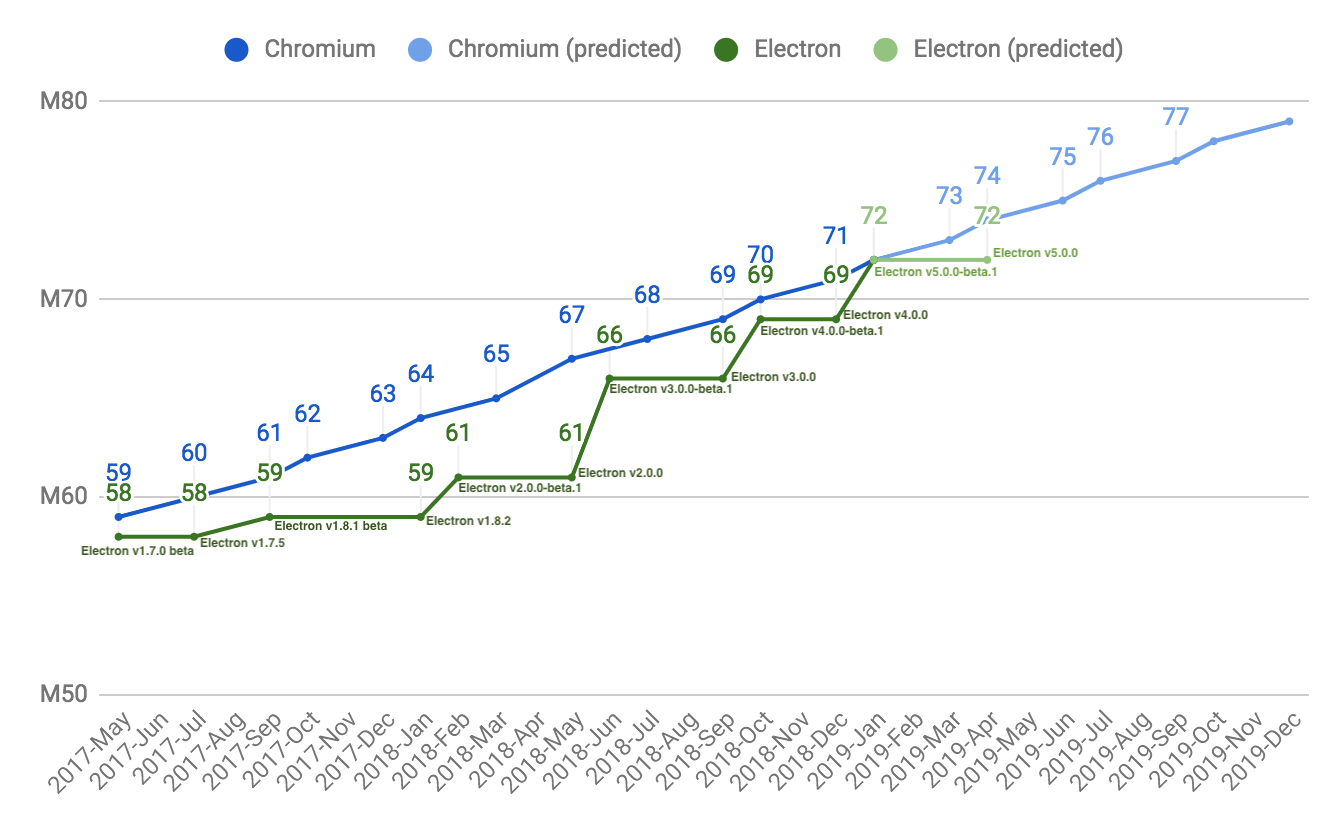
<p>Here is where our new cadence will put us in comparison to Chromium's cadence:
<img alt="line graph comparing Electron versus Chromium versions" src="https://user-images.githubusercontent.com/2138661/57543187-86340700-7308-11e9-9745-a9371bb29275.png"></p>
<p>📨 If you have questions, please mail us at <a href="mailto:info@electronjs.org">info@electronjs.org</a>.</p>
]]></content>
        <published>2019-05-13T00:00:00.000Z</published>
    </entry>
    <entry>
        <title type="html"><![CDATA[Electron 5.0.0]]></title>
        <id>https://electronjs.org/blog/electron-5-0</id>
        <link href="https://electronjs.org/blog/electron-5-0"/>
        <updated>2019-04-23T00:00:00.000Z</updated>
        <summary type="html"><![CDATA[The Electron team is excited to announce the release of Electron 5.0.0! You can install it with npm via npm install electron@latest or download the tarballs from our releases page. The release is [...]]]></summary>
        <content type="html"><![CDATA[<p>The Electron team is excited to announce the release of Electron 5.0.0! You can install it with npm via <code>npm install electron@latest</code> or download the tarballs from <a href="https://github.com/electron/electron/releases/tag/v5.0.0">our releases page</a>. The release is packed with upgrades, fixes, and new features. We can't wait to see what you build with them! Continue reading for details about this release, and please share any feedback you have!</p>
<hr>
<h2 id="whats-new"><a href="#whats-new">What's New?</a></h2>
<p>Much of Electron's functionality is provided by the core components of Chromium, Node.js, and V8. Electron keeps up-to-date with these projects to provide our users with new JavaScript features, performance improvements, and security fixes. Each of these packages has a major version bump in Electron 5:</p>
<ul>
<li>Chromium <code>73.0.3683.119</code>
<ul>
<li><a href="https://developers.google.com/web/updates/2018/10/nic70">New in 70</a></li>
<li><a href="https://developers.google.com/web/updates/2018/12/nic71">New in 71</a></li>
<li><a href="https://developers.google.com/web/updates/2019/01/nic72">New in 72</a></li>
<li><a href="https://developers.google.com/web/updates/2019/03/nic73">New in 73</a></li>
</ul>
</li>
<li>Node.js <code>12.0.0</code>
<ul>
<li><a href="https://nodejs.org/en/blog/release/v12.0.0/">Node 12 Blog Post</a></li>
</ul>
</li>
<li>V8 <code>7.3.492.27</code>.
<ul>
<li><a href="https://twitter.com/mathias/status/1120700101637353473">New JS Features</a></li>
</ul>
</li>
</ul>
<p>Electron 5 also includes improvements to Electron-specific APIs. A summary of the major changes is below; for the full list of changes, check out the <a href="https://github.com/electron/electron/releases/tag/v5.0.0">Electron v5.0.0 release notes</a>.</p>
<h3 id="promisification"><a href="#promisification">Promisification</a></h3>
<p>Electron 5 continues <a href="https://github.com/electron/electron/blob/5-0-x/docs/api/promisification.md">Promisification initiative</a> initiative to convert Electron's callback-based API to use Promises. These APIs were converted for Electron 5:</p>
<ul>
<li><code>app.getFileIcon</code></li>
<li><code>contentTracing.getCategories</code></li>
<li><code>contentTracing.startRecording</code></li>
<li><code>contentTracing.stopRecording</code></li>
<li><code>debugger.sendCommand</code></li>
<li>Cookies API</li>
<li><code>shell.openExternal</code></li>
<li><code>webContents.loadFile</code></li>
<li><code>webContents.loadURL</code></li>
<li><code>webContents.zoomLevel</code></li>
<li><code>webContents.zoomFactor</code></li>
<li><code>win.capturePage</code></li>
</ul>
<h3 id="system-colors-access-for-macos"><a href="#system-colors-access-for-macos">System colors access for macOS</a></h3>
<p>These functions were changed or added to <code>systemPreferences</code> to access macOS systems' colors:</p>
<ul>
<li><code>systemPreferences.getAccentColor</code></li>
<li><code>systemPreferences.getColor</code></li>
<li><code>systemPreferences.getSystemColor</code></li>
</ul>
<h3 id="process-memory-information"><a href="#process-memory-information">Process memory information</a></h3>
<p>The function <code>process.getProcessMemoryInfo</code> has been added to get memory usage statistics about the current process.</p>
<h3 id="additional-filtering-for-remote-apis"><a href="#additional-filtering-for-remote-apis">Additional filtering for remote APIs</a></h3>
<p>To improve security in the <code>remote</code> API, new remote events have been added so that <code>remote.getBuiltin</code>, <code>remote.getCurrentWindow</code>, <code>remote.getCurrentWebContents</code> and <code>&#x3C;webview>.getWebContents</code> can be <a href="https://github.com/electron/electron/blob/master/docs/tutorial/security.md#13-disable-or-limit-creation-of-new-windows">filtered</a>.</p>
<h3 id="multiple-browserviews-on-browserwindow"><a href="#multiple-browserviews-on-browserwindow">Multiple BrowserViews on BrowserWindow</a></h3>
<p>BrowserWindow now supports managing multiple BrowserViews within the same BrowserWindow.</p>
<h2 id="breaking-changes"><a href="#breaking-changes">Breaking Changes</a></h2>
<h3 id="defaults-for-packaged-apps"><a href="#defaults-for-packaged-apps">Defaults for packaged apps</a></h3>
<p>Packaged apps will now behave the same as the default app: a default application menu will be created unless the app has one and the <code>window-all-closed</code> event will be automatically handled unless the app handles the event.</p>
<h3 id="mixed-sandbox"><a href="#mixed-sandbox">Mixed sandbox</a></h3>
<p>Mixed sandbox mode is now enabled by default. Renderers launched with <code>sandbox: true</code> will now be actually sandboxed, where previously they would only be sandboxed if mixed-sandbox mode was also enabled.</p>
<h3 id="security-improvements"><a href="#security-improvements">Security improvements</a></h3>
<p>The default values of <code>nodeIntegration</code> and <code>webviewTag</code> are now <code>false</code> to improve security.</p>
<h3 id="spellchecker-now-asynchronous"><a href="#spellchecker-now-asynchronous">Spellchecker now asynchronous</a></h3>
<p>The SpellCheck API has been changed to provide <a href="https://github.com/electron/electron/blob/5-0-x/docs/api/web-frame.md#webframesetspellcheckproviderlanguage-provider">asynchronous results</a>.</p>
<h2 id="deprecations"><a href="#deprecations">Deprecations</a></h2>
<p>The following APIs are newly deprecated in Electron 5.0.0 and planned for removal in 6.0.0:</p>
<h3 id="mksnapshot-binaries-for-arm-and-arm64"><a href="#mksnapshot-binaries-for-arm-and-arm64">Mksnapshot binaries for arm and arm64</a></h3>
<p>Native binaries of mksnapshot for arm and arm64 are deprecated and will be removed in 6.0.0. Snapshots can be created for arm and arm64 using the x64 binaries.</p>
<h3 id="serviceworker-apis-on-webcontents"><a href="#serviceworker-apis-on-webcontents">ServiceWorker APIs on WebContents</a></h3>
<p>Deprecated ServiceWorker APIs on WebContents in preparation for their removal.</p>
<ul>
<li><code>webContents.hasServiceWorker</code></li>
<li><code>webContents.unregisterServiceWorker</code></li>
</ul>
<h3 id="automatic-modules-with-sandboxed-webcontents"><a href="#automatic-modules-with-sandboxed-webcontents">Automatic modules with sandboxed webContents</a></h3>
<p>In order to improve security, the following modules are being deprecated for use directly via <code>require</code> and will instead need to be included via <code>remote.require</code> in a sandboxed webcontents:</p>
<ul>
<li><code>electron.screen</code></li>
<li><code>child_process</code></li>
<li><code>fs</code></li>
<li><code>os</code></li>
<li><code>path</code></li>
</ul>
<h2 id="webframe-isolated-world-apis"><a href="#webframe-isolated-world-apis">webFrame Isolated World APIs</a></h2>
<p><code>webFrame.setIsolatedWorldContentSecurityPolicy</code>,<code>webFrame.setIsolatedWorldHumanReadableName</code>, <code>webFrame.setIsolatedWorldSecurityOrigin</code> have been deprecated in favor of <code>webFrame.setIsolatedWorldInfo</code>.</p>
<h3 id="mixed-sandbox-1"><a href="#mixed-sandbox-1">Mixed sandbox</a></h3>
<p><code>enableMixedSandbox</code> and the <code>--enable-mixed-sandbox</code> command-line switch still exist for compatibility, but are deprecated and have no effect.</p>
<h2 id="end-of-support-for-20x"><a href="#end-of-support-for-20x">End of support for 2.0.x</a></h2>
<p>Per our <a href="https://electronjs.org/docs/tutorial/support#supported-versions">supported versions policy</a>, 2.0.x has reached end of life.</p>
<h2 id="app-feedback-program"><a href="#app-feedback-program">App Feedback Program</a></h2>
<p>We continue to use our <a href="https://electronjs.org/blog/app-feedback-program">App Feedback Program</a> for testing. Projects who participate in this program test Electron betas on their apps; and in return, the new bugs they find are prioritized for the stable release. If you'd like to participate or learn more, <a href="https://electronjs.org/blog/app-feedback-program">check out our blog post about the program</a>.</p>
<h2 id="whats-next"><a href="#whats-next">What's Next</a></h2>
<p>In the short term, you can expect the team to continue to focus on keeping up with the development of the major components that make up Electron, including Chromium, Node, and V8. Although we are careful not to make promises about release dates, our plan is release new major versions of Electron with new versions of those components approximately quarterly. The <a href="https://electronjs.org/docs/tutorial/electron-timelines#600-release-schedule">tentative 6.0.0 schedule</a> maps out key dates in the Electron 6 development life cycle. Also, <a href="https://electronjs.org/docs/tutorial/electron-versioning">see our versioning document</a> for more detailed information about versioning in Electron.</p>
<p>For information on planned breaking changes in upcoming versions of Electron, <a href="https://github.com/electron/electron/blob/master/docs/api/breaking-changes.md">see our Planned Breaking Changes doc</a>.</p>
]]></content>
        <published>2019-04-23T00:00:00.000Z</published>
    </entry>
    <entry>
        <title type="html"><![CDATA[From native to JavaScript in Electron]]></title>
        <id>https://electronjs.org/blog/from-native-to-js</id>
        <link href="https://electronjs.org/blog/from-native-to-js"/>
        <updated>2019-03-19T00:00:00.000Z</updated>
        <summary type="html"><![CDATA[How do Electron's features written in C++ or Objective-C get to JavaScript so they're available to an end-user?

Background
Electron is a JavaScript platform whose primary purpose is to lower the [...]]]></summary>
        <content type="html"><![CDATA[<p>How do Electron's features written in C++ or Objective-C get to JavaScript so they're available to an end-user?</p>
<hr>
<h2 id="background"><a href="#background">Background</a></h2>
<p><a href="https://electronjs.org">Electron</a> is a JavaScript platform whose primary purpose is to lower the barrier to entry for developers to build robust desktop apps without worrying about platform-specific implementations. However, at its core, Electron itself still needs platform-specific functionality to be written in a given system language.</p>
<p>In reality, Electron handles the native code for you so that you can focus on a single JavaScript API.</p>
<p>How does that work, though? How do Electron's features written in C++ or Objective-C get to JavaScript so they're available to an end-user?</p>
<p>To trace this pathway, let's start with the <a href="https://electronjs.org/docs/api/app"><code>app</code> module</a>.</p>
<p>By opening the <a href="https://github.com/electron/electron/blob/0431997c8d64c9ed437b293e8fa15a96fc73a2a7/lib/browser/api/app.ts"><code>app.ts</code></a> file inside our <code>lib/</code> directory, you'll find the following line of code towards the top:</p>
<pre><code class="hljs language-js"><span class="hljs-keyword">const</span> binding = process.electronBinding(<span class="hljs-string">'app'</span>)
</code></pre>
<p>This line points directly to Electron's mechanism for binding its C++/Objective-C modules to JavaScript for use by developers. This function is created by the header and <a href="https://github.com/electron/electron/blob/0431997c8d64c9ed437b293e8fa15a96fc73a2a7/atom/common/api/electron_bindings.cc">implementation file</a> for the <code>ElectronBindings</code> class.</p>
<h2 id="processelectronbinding"><a href="#processelectronbinding"><code>process.electronBinding</code></a></h2>
<p>These files add the <code>process.electronBinding</code> function, which behaves like Node.js’ <code>process.binding</code>. <code>process.binding</code> is a lower-level implementation of Node.js' <a href="https://nodejs.org/api/modules.html#modules_require_id"><code>require()</code></a> method, except it allows users to <code>require</code> native code instead of other code written in JS. This custom <code>process.electronBinding</code> function confers the ability to load native code from Electron.</p>
<p>When a top-level JavaScript module (like <code>app</code>) requires this native code, how is the state of that native code determined and set? Where are the methods exposed up to JavaScript? What about the properties?</p>
<h2 id="native_mate"><a href="#native_mate"><code>native_mate</code></a></h2>
<p>At present, answers to this question can be found in <code>native_mate</code>:  a fork of Chromium's <a href="https://chromium.googlesource.com/chromium/src.git/+/lkgr/gin/"><code>gin</code> library</a> that makes it easier to marshal types between C++ and JavaScript.</p>
<p>Inside <code>native_mate/native_mate</code> there's a header and implementation file for <code>object_template_builder</code>. This is what allow us to form modules in native code whose shape conforms to what JavaScript developers would expect.</p>
<h3 id="mateobjecttemplatebuilder"><a href="#mateobjecttemplatebuilder"><code>mate::ObjectTemplateBuilder</code></a></h3>
<p>If we look at every Electron module as an <code>object</code>, it becomes easier to see why we would want to use <code>object_template_builder</code> to construct them. This class is built on top of a class exposed by V8, which is Google’s open source high-performance JavaScript and WebAssembly engine, written in C++. V8 implements the JavaScript (ECMAScript) specification, so its native functionality implementations can be directly correlated to implementations in JavaScript. For example, <a href="https://v8docs.nodesource.com/node-0.8/db/d5f/classv8_1_1_object_template.html"><code>v8::ObjectTemplate</code></a> gives us JavaScript objects without a dedicated constructor function and prototype. It uses <code>Object[.prototype]</code>, and in JavaScript would be equivalent to <a href="https://developer.mozilla.org/en-US/docs/Web/JavaScript/Reference/Global_Objects/Object/create"><code>Object.create()</code></a>.</p>
<p>To see this in action, look to the implementation file for the app module, <a href="https://github.com/electron/electron/blob/0431997c8d64c9ed437b293e8fa15a96fc73a2a7/atom/browser/api/atom_api_app.cc"><code>atom_api_app.cc</code></a>. At the bottom is the following:</p>
<pre><code class="hljs language-cpp">mate::ObjectTemplateBuilder(isolate, prototype->PrototypeTemplate())
    .SetMethod(<span class="hljs-string">"getGPUInfo"</span>, &#x26;App::GetGPUInfo)
</code></pre>
<p>In the above line, <code>.SetMethod</code> is called on <code>mate::ObjectTemplateBuilder</code>. <code>.SetMethod</code> can be called on any instance of the <code>ObjectTemplateBuilder</code> class to set methods on the <a href="https://developer.mozilla.org/en-US/docs/Web/JavaScript/Reference/Global_Objects/Object/prototype">Object prototype</a> in JavaScript, with the following syntax:</p>
<pre><code class="hljs language-cpp">.SetMethod(<span class="hljs-string">"method_name"</span>, &#x26;function_to_bind)
</code></pre>
<p>This is the JavaScript equivalent of:</p>
<pre><code class="hljs language-js"><span class="hljs-function"><span class="hljs-keyword">function</span> <span class="hljs-title">App</span></span>{}
App.prototype.getGPUInfo = <span class="hljs-function"><span class="hljs-keyword">function</span> (<span class="hljs-params"></span>) </span>{
  <span class="hljs-comment">// implementation here</span>
}
</code></pre>
<p>This class also contains functions to set properties on a module:</p>
<pre><code class="hljs language-cpp">.SetProperty(<span class="hljs-string">"property_name"</span>, &#x26;getter_function_to_bind)
</code></pre>
<p>or</p>
<pre><code class="hljs language-cpp">.SetProperty(<span class="hljs-string">"property_name"</span>, &#x26;getter_function_to_bind, &#x26;setter_function_to_bind)
</code></pre>
<p>These would in turn be the JavaScript implementations of <a href="https://developer.mozilla.org/en/docs/Web/JavaScript/Reference/Global_Objects/Object/defineProperty">Object.defineProperty</a>:</p>
<pre><code class="hljs language-js"><span class="hljs-function"><span class="hljs-keyword">function</span> <span class="hljs-title">App</span> </span>{}
<span class="hljs-built_in">Object</span>.defineProperty(App.prototype, <span class="hljs-string">'myProperty'</span>, {
  <span class="hljs-keyword">get</span>() {
    <span class="hljs-keyword">return</span> _myProperty
  }
})
</code></pre>
<p>and</p>
<pre><code class="hljs language-js"><span class="hljs-function"><span class="hljs-keyword">function</span> <span class="hljs-title">App</span> </span>{}
<span class="hljs-built_in">Object</span>.defineProperty(App.prototype, <span class="hljs-string">'myProperty'</span>, {
  <span class="hljs-keyword">get</span>() {
    <span class="hljs-keyword">return</span> _myProperty
  }
  <span class="hljs-keyword">set</span>(newPropertyValue) {
    _myProperty = newPropertyValue
  }
})
</code></pre>
<p>It’s possible to create JavaScript objects formed with prototypes and properties as developers expect them, and more clearly reason about functions and properties implemented at this lower system level!</p>
<p>The decision around where to implement any given module method is itself a complex and oft-nondeterministic one, which we'll cover in a future post.</p>
]]></content>
        <published>2019-03-19T00:00:00.000Z</published>
    </entry>
    <entry>
        <title type="html"><![CDATA[Electron Governance]]></title>
        <id>https://electronjs.org/blog/governance</id>
        <link href="https://electronjs.org/blog/governance"/>
        <updated>2019-03-18T00:00:00.000Z</updated>
        <summary type="html"><![CDATA[As Electron grows in popularity for desktop applications, the team working on it has also grown: we have more fulltime maintainers who work for different companies, live in different timezones, and [...]]]></summary>
        <content type="html"><![CDATA[<p>As Electron grows in popularity for desktop applications, the team working on it has also grown: we have more fulltime maintainers who work for different companies, live in different timezones, and have different interests. We're introducing a governance structure so we can keep growing smoothly.</p>
<hr>
<h2 id="why-are-things-changing"><a href="#why-are-things-changing">Why are things changing?</a></h2>
<p>People in the Electron project coordinate in timezones around the world with volunteers, with full-time maintainers, and with several companies who all rely on Electron. Until now, we've been successful with informal coordination; but as the team has grown, we've found that the approach doesn't scale. We also want to make it easier for new contributors to find a place to call home in the project.</p>
<h2 id="working-groups"><a href="#working-groups">Working Groups</a></h2>
<p>Electron governance includes working groups that are responsible for different parts of the project. We're starting out with seven groups:</p>
<ul>
<li>Community &#x26; Safety: Handles <a href="https://github.com/electron/governance/blob/master/CODE_OF_CONDUCT.md">Code of Conduct</a> issues.</li>
<li>Docs &#x26; Tooling: Oversees externally-focused tooling (e.g. <a href="https://electronjs.org/fiddle">Fiddle</a>, <a href="https://electronforge.io/">Forge</a>) and the Electron <a href="https://electronjs.org/docs">documentation</a>.</li>
<li>Outreach: Helps grow the Electron community.</li>
<li>Releases: Ensures releases are stable and on schedule.</li>
<li>Security: Performs security testing and responds to security issues.</li>
<li>Upgrades: Integrates upstream upgrades, such as new versions of V8, Chromium, and Node.</li>
<li>Website: Maintains and improves <a href="https://electronjs.org/">the Electron website</a>.</li>
</ul>
<p>These groups will coordinate with each other, but each has their own meeting schedules and agendas to be productive on their own. More details on these groups are available at the <a href="https://github.com/electron/governance/blob/master/README.md">governance repository</a>.</p>
<h2 id="does-this-change-the-electron-projects-direction"><a href="#does-this-change-the-electron-projects-direction">Does this change the Electron project's direction?</a></h2>
<p>This shouldn't have any direct effect on Electron's direction. If our strategy is successful, working groups will make it easier for new contributors to find topics that interest them, and make maintainers' lives simpler by moving discussion unrelated to their day-to-day work to other groups. If that happens, it may indirectly affect things by having more unblocked people working together.</p>
<h2 id="where-can-i-learn-more"><a href="#where-can-i-learn-more">Where can I learn more?</a></h2>
<ul>
<li>The governance <a href="https://github.com/electron/governance/">repo</a> and <a href="https://github.com/electron/governance/tree/master/charter">charter</a> have information about the new governance structure.</li>
<li>Each working group has its own page: <a href="https://github.com/electron/governance/tree/master/wg-community-safety">Community</a>, <a href="https://github.com/electron/governance/tree/master/wg-docs-tools">Docs &#x26; Tools</a>, <a href="https://github.com/electron/governance/tree/master/wg-outreach">Outreach</a>, <a href="https://github.com/electron/governance/tree/master/wg-releases">Releases</a>, <a href="https://github.com/electron/governance/tree/master/wg-security">Security</a>, <a href="https://github.com/electron/governance/tree/master/wg-upgrades">Upgrades</a>, and <a href="https://github.com/electron/governance/tree/master/wg-website">Website</a>.</li>
<li>You can contact the maintainers by <a href="https://github.com/electron/governance/issues">opening an issue</a> or mailing us at <a href="mailto:info@electronjs.org">info@electronjs.org</a>.</li>
</ul>
]]></content>
        <published>2019-03-18T00:00:00.000Z</published>
    </entry>
    <entry>
        <title type="html"><![CDATA[Chromium FileReader Vulnerability Fix]]></title>
        <id>https://electronjs.org/blog/filereader-fix</id>
        <link href="https://electronjs.org/blog/filereader-fix"/>
        <updated>2019-03-07T00:00:00.000Z</updated>
        <summary type="html"><![CDATA[A High severity vulnerability has been discovered in Chrome which affects all software based on Chromium, including Electron.
This vulnerability has been assigned CVE-2019-5786.  You can read more [...]]]></summary>
        <content type="html"><![CDATA[<p>A High severity vulnerability has been discovered in Chrome which affects all software based on Chromium, including Electron.</p>
<p>This vulnerability has been assigned <code>CVE-2019-5786</code>.  You can read more about it in the <a href="https://chromereleases.googleblog.com/2019/03/stable-channel-update-for-desktop.html">Chrome Blog Post</a>.</p>
<p>Please note that Chrome has reports of this vulnerability being used in the wild so it is strongly recommended you upgrade Electron ASAP.</p>
<hr>
<h2 id="scope"><a href="#scope">Scope</a></h2>
<p>This affects any Electron application that may run third-party or untrusted JavaScript.</p>
<h2 id="mitigation"><a href="#mitigation">Mitigation</a></h2>
<p>Affected apps should upgrade to a patched version of Electron.</p>
<p>We've published new versions of Electron which include fixes for this vulnerability:</p>
<ul>
<li><a href="https://github.com/electron/electron/releases/tag/v4.0.8">4.0.8</a></li>
<li><a href="https://github.com/electron/electron/releases/tag/v3.1.6">3.1.6</a></li>
<li><a href="https://github.com/electron/electron/releases/tag/v3.0.16">3.0.16</a></li>
<li><a href="https://github.com/electron/electron/releases/tag/v2.0.18">2.0.18</a></li>
</ul>
<p>The latest beta of Electron 5 was tracking Chromium 73 and therefore is already patched:</p>
<ul>
<li><a href="https://github.com/electron/electron/releases/tag/v5.0.0-beta.5">5.0.0-beta.5</a></li>
</ul>
<h2 id="further-information"><a href="#further-information">Further Information</a></h2>
<p>This vulnerability was discovered by Clement Lecigne of Google's Threat Analysis Group and reported to the Chrome team.  The Chrome blog post can be found <a href="https://chromereleases.googleblog.com/2019/03/stable-channel-update-for-desktop.html">here</a>.</p>
<p>To learn more about best practices for keeping your Electron apps secure, see our <a href="https://electronjs.org/docs/tutorial/security">security tutorial</a>.</p>
<p>If you wish to report a vulnerability in Electron, email <a href="mailto:security@electronjs.org">security@electronjs.org</a>.</p>
]]></content>
        <published>2019-03-07T00:00:00.000Z</published>
    </entry>
    <entry>
        <title type="html"><![CDATA[Discontinuing support for 32-bit Linux]]></title>
        <id>https://electronjs.org/blog/linux-32bit-support</id>
        <link href="https://electronjs.org/blog/linux-32bit-support"/>
        <updated>2019-03-04T00:00:00.000Z</updated>
        <summary type="html"><![CDATA[The Electron team will discontinue support for 32-bit Linux (ia32 / i386) starting with Electron v4.0. The last version of Electron that supports 32-bit based installations of Linux is Electron v3.1, [...]]]></summary>
        <content type="html"><![CDATA[<p>The Electron team will discontinue support for 32-bit Linux (ia32 / i386) starting with Electron v4.0. The last version of Electron that supports 32-bit based installations of Linux is Electron v3.1, which will receive support releases until Electron v6 is released. Support for 64-bit based Linux and <code>armv7l</code> will continue unchanged.</p>
<hr>
<h2 id="what-exactly-is-electron-no-longer-supporting"><a href="#what-exactly-is-electron-no-longer-supporting">What exactly is Electron no longer supporting?</a></h2>
<p>You may have seen the description "64-bit" and "32-bit" as stickers on your computer or as options for downloading software. The term is used to describe a specific computer architecture. Most computers made in the 1990s and early 2000s were made with CPUs that were based on the 32-bit architecture, while most computers made later were based on the newer and more powerful 64-bit architecture. The Nintendo 64 (get it?) and the PlayStation 2 were the first widely available consumer devices with the new architecture, computers sold after 2010 contained almost exclusively 64-bit processors. As a result, support has been shrinking: Google stopped releasing Chrome for 32-bit Linux in March 2016, Canonical stopped providing 32-bit desktop images in 2017 and dropped support for 32-bit altogether with Ubuntu 18.10. Arch Linux, elementary OS, and other prominent Linux distributions have already dropped support for the aging processor architecture.</p>
<p>Until now, Electron has provided and supported builds that run on the older 32-bit architecture. From release v4.0 onwards, the Electron team will no longer be able to provide binaries or support for 32-bit Linux.</p>
<p>Electron has always been a vibrant open source project and we continue to support and encourage developers interested in building Electron for exotic architectures.</p>
<h2 id="what-does-that-mean-for-developers"><a href="#what-does-that-mean-for-developers">What does that mean for developers?</a></h2>
<p>If you are not currently providing 32-bit distributions of your app for Linux, no action is required.</p>
<p>Projects which ship 32-bit Linux Electron applications will need to decide how to proceed. 32-bit Linux will be supported on Electron 3 <a href="https://electronjs.org/docs/tutorial/support#supported-versions">until</a> the release of Electron 6, which gives some time to make decisions and plans.</p>
<h2 id="what-does-that-mean-for-users"><a href="#what-does-that-mean-for-users">What does that mean for users?</a></h2>
<p>If you are a Linux user and not sure whether or not you're running a 64-bit based system, you are likely running on a 64-bit based architecture. To make sure, you can run the <code>lscpu</code> or <code>uname -m</code> commands in your terminal. Either one will print your current architecture.</p>
<p>If you are using Linux on a 32-bit processor, you have likely already encountered difficulties finding recently released software for your operating system. The Electron team joins other prominent members in the Linux community by recommending that you upgrade to a 64-bit based architecture.</p>
]]></content>
        <published>2019-03-04T00:00:00.000Z</published>
    </entry>
    <entry>
        <title type="html"><![CDATA[BrowserView window.open() Vulnerability Fix]]></title>
        <id>https://electronjs.org/blog/window-open-fix</id>
        <link href="https://electronjs.org/blog/window-open-fix"/>
        <updated>2019-02-03T00:00:00.000Z</updated>
        <summary type="html"><![CDATA[A code vulnerability has been discovered that allows Node to be re-enabled in child windows.

Opening a BrowserView with sandbox: true or nativeWindowOpen: true and nodeIntegration: false results in [...]]]></summary>
        <content type="html"><![CDATA[<p>A code vulnerability has been discovered that allows Node to be re-enabled in child windows.</p>
<hr>
<p>Opening a BrowserView with <code>sandbox: true</code> or <code>nativeWindowOpen: true</code> and <code>nodeIntegration: false</code> results in a webContents where <code>window.open</code> can be called and the newly opened child window will have <code>nodeIntegration</code> enabled. This vulnerability affects all supported versions of Electron.</p>
<h2 id="mitigation"><a href="#mitigation">Mitigation</a></h2>
<p>We've published new versions of Electron which include fixes for  this vulnerability:
<a href="https://github.com/electron/electron/releases/tag/v2.0.17"><code>2.0.17</code></a>,
<a href="https://github.com/electron/electron/releases/tag/v3.0.15"><code>3.0.15</code></a>,
<a href="https://github.com/electron/electron/releases/tag/v3.1.3"><code>3.1.3</code></a>,
<a href="https://github.com/electron/electron/releases/tag/v4.0.4"><code>4.0.4</code></a>, and
<a href="https://github.com/electron/electron/releases/tag/v5.0.0-beta.2"><code>5.0.0-beta.2</code></a>.
We encourage all Electron developers to update their apps to the latest stable version immediately.</p>
<p>If for some reason you are unable to upgrade your Electron version, you can mitigate this issue by disabling all child web contents:</p>
<pre><code class="hljs language-javascript">view.webContents.on(<span class="hljs-string">'-add-new-contents'</span>, e => e.preventDefault());
</code></pre>
<h2 id="further-information"><a href="#further-information">Further Information</a></h2>
<p>This vulnerability was found and reported responsibly to the Electron project by <a href="https://github.com/PalmerAL">PalmerAL</a>.</p>
<p>To learn more about best practices for keeping your Electron apps secure, see our <a href="https://electronjs.org/docs/tutorial/security">security tutorial</a>.</p>
<p>If you wish to report a vulnerability in Electron, email <a href="mailto:security@electronjs.org">security@electronjs.org</a>.</p>
]]></content>
        <published>2019-02-03T00:00:00.000Z</published>
    </entry>
    <entry>
        <title type="html"><![CDATA[Node.js Native Addons and Electron 5.0]]></title>
        <id>https://electronjs.org/blog/nodejs-native-addons-and-electron-5</id>
        <link href="https://electronjs.org/blog/nodejs-native-addons-and-electron-5"/>
        <updated>2019-02-01T00:00:00.000Z</updated>
        <summary type="html"><![CDATA[If you're having trouble using a native Node.js addon with Electron 5.0, there's a chance it needs to be updated to work with the most recent version of V8.

Goodbye v8::Handle, Hello v8::Local
In [...]]]></summary>
        <content type="html"><![CDATA[<p>If you're having trouble using a native Node.js addon with Electron 5.0, there's a chance it needs to be updated to work with the most recent version of V8.</p>
<hr>
<h2 id="goodbye-v8handle-hello-v8local"><a href="#goodbye-v8handle-hello-v8local">Goodbye <code>v8::Handle</code>, Hello <code>v8::Local</code></a></h2>
<p>In 2014, the V8 team deprecated <code>v8::Handle</code> in favor of <code>v8::Local</code> for local handles. Electron 5.0 includes a version of V8 that has finally removed <code>v8::Handle</code> for good, and native Node.js addons that still use it will need to be updated before they can be used with Electron 5.0.</p>
<p>The required code change is minimal, but <em>every</em> native Node module that still uses <code>v8::Handle</code> will fail to build with Electron 5.0 and will need to be modified. The good news is that Node.js v12 will also include this V8 change, so any modules that use <code>v8::Handle</code> will need to be updated <em>anyway</em> to work with the upcoming version of Node.</p>
<h2 id="i-maintain-a-native-addon-how-can-i-help"><a href="#i-maintain-a-native-addon-how-can-i-help">I maintain a native addon, how can I help?</a></h2>
<p>If you maintain a native addon for Node.js, ensure you replace all occurrences of <code>v8::Handle</code> with <code>v8::Local</code>. The former was just an alias of the latter, so no other changes need to be made to address this specific issue.</p>
<p>You may also be interested in looking into <a href="https://nodejs.org/api/n-api.html">N-API</a>, which is maintained separately from V8 as a part of Node.js itself, and aims to insulate native addons from changes in the underlying JavaScript engine. You can find more information <a href="https://nodejs.org/api/n-api.html#n_api_n_api">in the N-API documentation on the Node.js website</a>.</p>
<h2 id="help-i-use-a-native-addon-in-my-app-and-it-wont-work"><a href="#help-i-use-a-native-addon-in-my-app-and-it-wont-work">Help! I use a native addon in my app and it won't work!</a></h2>
<p>If you're consuming a native addon for Node.js in your app and the native addon will not build because of this issue, check with the author of the addon to see if they've released a new version that fixes the problem. If not, reaching out to the author (or <a href="https://help.github.com/articles/about-pull-requests/">opening a Pull Request!</a>) is probably your best bet.</p>
]]></content>
        <published>2019-02-01T00:00:00.000Z</published>
    </entry>
    <entry>
        <title type="html"><![CDATA[Electron v5.0.0 Timeline]]></title>
        <id>https://electronjs.org/blog/electron-5-0-timeline</id>
        <link href="https://electronjs.org/blog/electron-5-0-timeline"/>
        <updated>2019-01-25T00:00:00.000Z</updated>
        <summary type="html"><![CDATA[For the first time ever, Electron is excited to publicize our release schedule starting with v5.0.0. This is our first step in having a public, long-term timeline.

As mentioned in our v4.0.0 stable [...]]]></summary>
        <content type="html"><![CDATA[<p>For the first time ever, Electron is excited to publicize our release schedule starting with v5.0.0. This is our first step in having a public, long-term timeline.</p>
<hr>
<p>As mentioned in our v4.0.0 stable release <a href="https://electronjs.org/blog/electron-4-0#whats-next">blog post</a>, we are planning to release approximately quarterly to maintain closer cadence with Chromium releases. Chromium releases a new version very quickly -- every 6 weeks.</p>
<p>Take a look at progression in Electron versus Chromium side-by-side:
<img src="https://user-images.githubusercontent.com/2138661/51714676-db167080-1fea-11e9-8f10-fab1aa51993e.png" alt="line graph comparing Electron versus Chromium versions"></p>
<p>In the last half of 2018, our top priority was releasing faster and catching up closer to Chromium. We succeeded by sticking to a predetermined timeline. Electron 3.0.0 and 4.0.0 were released in a 2-3 month timeline for each release. We are optimistic about continuing that pace in releasing 5.0.0 and beyond. With a major Electron release approximately every quarter, we're now keeping pace with Chromium's release cadence. Getting ahead of Chromium stable release is always a goal for us and we are taking steps towards that.</p>
<p>We would love to promise future dates like <a href="https://github.com/nodejs/Release">Node.js</a> and <a href="https://chromiumdash.appspot.com/schedule">Chromium</a> do, but we are not at that place <em>yet</em>. We are optimistic that we will reach a long-term timeline in the future.</p>
<p>With that in mind, we are taking first steps by publicly posting our release schedule for v5.0.0. You can find that <a href="https://electronjs.org/docs/tutorial/electron-timelines">here</a>.</p>
<p>To help us with testing our beta releases and stabilization, please consider joining our <a href="https://electronjs.org/blog/app-feedback-program">App Feedback Program</a>.</p>
]]></content>
        <published>2019-01-25T00:00:00.000Z</published>
    </entry>
    <entry>
        <title type="html"><![CDATA[Electron 4.0.0]]></title>
        <id>https://electronjs.org/blog/electron-4-0</id>
        <link href="https://electronjs.org/blog/electron-4-0"/>
        <updated>2018-12-20T00:00:00.000Z</updated>
        <summary type="html"><![CDATA[The Electron team is excited to announce that the stable release of Electron 4 is now available! You can install it from electronjs.org or from npm via npm install electron@latest. The release is [...]]]></summary>
        <content type="html"><![CDATA[<p>The Electron team is excited to announce that the stable release of Electron 4 is now available! You can install it from <a href="https://electronjs.org/">electronjs.org</a> or from npm via <code>npm install electron@latest</code>. The release is packed with upgrades, fixes, and new features, and we can't wait to see what you build with them. Read more for details about this release, and please share any feedback you have as you explore!</p>
<hr>
<h2 id="whats-new"><a href="#whats-new">What's New?</a></h2>
<p>A large part of Electron's functionality is provided by Chromium, Node.js, and V8, the core components that make up Electron. As such, a key goal for the Electron team is to keep up with changes to these projects as much as possible, providing developers who build Electron apps access to new web and JavaScript features. To this end, Electron 4 features major version bumps to each of these components; Electron v4.0.0 includes Chromium <code>69.0.3497.106</code>, Node <code>10.11.0</code>, and V8 <code>6.9.427.24</code>.</p>
<p>In addition, Electron 4 includes changes to Electron-specific APIs. You can find a summary of the major changes in Electron 4 below; for the full list of changes, check out the <a href="https://github.com/electron/electron/releases/tag/v4.0.0">Electron v4.0.0 release notes</a>.</p>
<h3 id="disabling-the-remote-module"><a href="#disabling-the-remote-module">Disabling the <code>remote</code> Module</a></h3>
<p>You now have the ability to disable the <code>remote</code> module for security reasons. The module can be disabled for <code>BrowserWindow</code>s and for <code>webview</code> tags:</p>
<pre><code class="hljs language-javascript"><span class="hljs-comment">// BrowserWindow</span>
<span class="hljs-keyword">new</span> BrowserWindow({
  <span class="hljs-attr">webPreferences</span>: {
    <span class="hljs-attr">enableRemoteModule</span>: <span class="hljs-literal">false</span>
  }
})

<span class="hljs-comment">// webview tag</span>
&#x3C;webview src=<span class="hljs-string">"http://www.google.com/"</span> enableremotemodule=<span class="hljs-string">"false"</span>><span class="xml"><span class="hljs-tag">&#x3C;/<span class="hljs-name">webview</span>></span></span>
</code></pre>
<p>See the <a href="https://electronjs.org/docs/api/browser-window">BrowserWindow</a> and <a href="https://electronjs.org/docs/api/webview-tag"><code>&#x3C;webview></code> Tag</a> documentation for more information.</p>
<h3 id="filtering-remoterequire--remotegetglobal-requests"><a href="#filtering-remoterequire--remotegetglobal-requests">Filtering <code>remote.require()</code> / <code>remote.getGlobal()</code> Requests</a></h3>
<p>This feature is useful if you don't want to completely disable the <code>remote</code> module in your renderer process or <code>webview</code> but would like additional control over which modules can be required via <code>remote.require</code>.</p>
<p>When a module is required via <code>remote.require</code> in a renderer process, a <code>remote-require</code> event is raised on the <a href="https://electronjs.org/docs/api/app"><code>app</code> module</a>. You can call <code>event.preventDefault()</code> on the the event (the first argument) to prevent the module from being loaded. The <a href="https://electronjs.org/docs/api/web-contents"><code>WebContents</code> instance</a> where the require occurred is passed as the second argument, and the name of the module is passed as the third argument. The same event is also emitted on the <code>WebContents</code> instance, but in this case the only arguments are the event and the module name. In both cases, you can return a custom value by setting the value of <code>event.returnValue</code>.</p>
<pre><code class="hljs language-javascript"><span class="hljs-comment">// Control `remote.require` from all WebContents:</span>
app.on(<span class="hljs-string">'remote-require'</span>, <span class="hljs-function"><span class="hljs-keyword">function</span> (<span class="hljs-params">event, webContents, requestedModuleName</span>) </span>{
  <span class="hljs-comment">// ...</span>
})

<span class="hljs-comment">// Control `remote.require` from a specific WebContents instance:</span>
browserWin.webContents.on(<span class="hljs-string">'remote-require'</span>, <span class="hljs-function"><span class="hljs-keyword">function</span> (<span class="hljs-params">event, requestedModuleName</span>) </span>{
  <span class="hljs-comment">// ...</span>
})
</code></pre>
<p>In a similar fashion, when <code>remote.getGlobal(name)</code> is called, a <code>remote-get-global</code> event is raised. This works the same way as the <code>remote-require</code> event: call <code>preventDefault()</code> to prevent the global from being returned, and set <code>event.returnValue</code> to return a custom value.</p>
<pre><code class="hljs language-javascript"><span class="hljs-comment">// Control `remote.getGlobal` from all WebContents:</span>
app.on(<span class="hljs-string">'remote-get-global'</span>, <span class="hljs-function"><span class="hljs-keyword">function</span> (<span class="hljs-params">event, webContents, requrestedGlobalName</span>) </span>{
  <span class="hljs-comment">// ...</span>
})

<span class="hljs-comment">// Control `remote.getGlobal` from a specific WebContents instance:</span>
browserWin.webContents.on(<span class="hljs-string">'remote-get-global'</span>, <span class="hljs-function"><span class="hljs-keyword">function</span> (<span class="hljs-params">event, requestedGlobalName</span>) </span>{
  <span class="hljs-comment">// ...</span>
})
</code></pre>
<p>For more information, see the following documentation:</p>
<ul>
<li><a href="https://electronjs.org/docs/api/remote#remoterequiremodule"><code>remote.require</code></a></li>
<li><a href="https://electronjs.org/docs/api/remote#remotegetglobalname"><code>remote.getGlobal</code></a></li>
<li><a href="https://electronjs.org/docs/api/app"><code>app</code></a></li>
<li><a href="https://electronjs.org/docs/api/web-contents"><code>WebContents</code></a></li>
</ul>
<h3 id="javascript-access-to-the-about-panel"><a href="#javascript-access-to-the-about-panel">JavaScript Access to the About Panel</a></h3>
<p>On macOS, you can now call <code>app.showAboutPanel()</code> to programmatically show the About panel, just like clicking the menu item created via <code>{role: 'about'}</code>. See the <a href="https://electronjs.org/docs/api/app?query=show#appshowaboutpanel-macos"><code>showAboutPanel</code> documentation</a> for more information</p>
<h3 id="controlling-webcontents-background-throttling"><a href="#controlling-webcontents-background-throttling">Controlling <code>WebContents</code> Background Throttling</a></h3>
<p><code>WebContents</code> instances now have a method <code>setBackgroundThrottling(allowed)</code> to enable or disable throttling of timers and animations when the page is backgrounded.</p>
<pre><code class="hljs language-javascript"><span class="hljs-keyword">let</span> win = <span class="hljs-keyword">new</span> BrowserWindow(...)
win.webContents.setBackgroundThrottling(enableBackgroundThrottling)
</code></pre>
<p>See <a href="https://electronjs.org/docs/api/web-contents#contentssetbackgroundthrottlingallowed">the <code>setBackgroundThrottling</code> documentation</a> for more information.</p>
<h2 id="breaking-changes"><a href="#breaking-changes">Breaking Changes</a></h2>
<h3 id="no-more-macos-109-support"><a href="#no-more-macos-109-support">No More macOS 10.9 Support</a></h3>
<p>Chromium no longer supports macOS 10.9 (OS X Mavericks), and as a result <a href="https://github.com/electron/electron/pull/15357">Electron 4.0 and beyond does not support it either</a>.</p>
<h3 id="single-instance-locking"><a href="#single-instance-locking">Single Instance Locking</a></h3>
<p>Previously, to make your app a Single Instance Application (ensuring that only one instance of your app is running at any given time), you could use the <code>app.makeSingleInstance()</code> method. Starting in Electron 4.0, you must use <code>app.requestSingleInstanceLock()</code> instead. The return value of this method indicates whether or not this instance of your application successfully obtained the lock. If it failed to obtain the lock, you can assume that another instance of your application is already running with the lock and exit immediately.</p>
<p>For an example of using <code>requestSingleInstanceLock()</code> and information on nuanced behavior on various platforms, <a href="https://electronjs.org/docs/api/app#apprequestsingleinstancelock">see the documentation for <code>app.requestSingleInstanceLock()</code> and related methods</a> and <a href="https://electronjs.org/docs/api/app#event-second-instance">the <code>second-instance</code> event</a>.</p>
<h3 id="win_delay_load_hook"><a href="#win_delay_load_hook"><code>win_delay_load_hook</code></a></h3>
<p>When building native modules for windows, the <code>win_delay_load_hook</code> variable in the module's <code>binding.gyp</code> must be true (which is the default). If this hook is not present, then the native module will fail to load on Windows, with an error message like <code>Cannot find module</code>. <a href="https://electronjs.org/docs/tutorial/using-native-node-modules#a-note-about-win_delay_load_hook">See the native module guide</a> for more information.</p>
<h2 id="deprecations"><a href="#deprecations">Deprecations</a></h2>
<p>The following breaking changes are planned for Electron 5.0, and thus are deprecated in Electron 4.0.</p>
<h3 id="nodejs-integration-disabled-for-nativewindowopen-ed-windows"><a href="#nodejs-integration-disabled-for-nativewindowopen-ed-windows">Node.js Integration Disabled for <code>nativeWindowOpen</code>-ed Windows</a></h3>
<p>Starting in Electron 5.0, child windows opened with the <code>nativeWindowOpen</code> option will always have Node.js integration disabled.</p>
<h3 id="webpreferences-default-values"><a href="#webpreferences-default-values"><code>webPreferences</code> Default Values</a></h3>
<p>When creating a new <code>BrowserWindow</code> with the <code>webPreferences</code> option set, the following <code>webPreferences</code> option defaults are deprecated in favor of new defaults listed below:</p>
<div class="table table-ruled table-full-width">
<table>
<thead>
<tr>
<th>Property</th>
<th>Deprecated Default</th>
<th>New Default</th>
</tr>
</thead>
<tbody>
<tr>
<td><code>contextIsolation</code></td>
<td><code>false</code></td>
<td><code>true</code></td>
</tr>
<tr>
<td><code>nodeIntegration</code></td>
<td><code>true</code></td>
<td><code>false</code></td>
</tr>
<tr>
<td><code>webviewTag</code></td>
<td>value of <code>nodeIntegration</code> if set, otherwise <code>true</code></td>
<td><code>false</code></td>
</tr>
</tbody>
</table>
</div>
<p>Please note: there is currently <a href="https://github.com/electron/electron/issues/9736">a known bug (#9736)</a> that prevents the <code>webview</code> tag from working if <code>contextIsolation</code> is on. Keep an eye on the GitHub issue for up-to-date information!</p>
<p>Learn more about context isolation, Node integration, and the <code>webview</code> tag in <a href="https://electronjs.org/docs/tutorial/security">the Electron security document</a>.</p>
<p>Electron 4.0 will still use the current defaults, but if you don't pass an explicit value for them, you'll see a deprecation warning. To prepare your app for Electron 5.0, use explicit values for these options. <a href="https://electronjs.org/docs/api/browser-window#new-browserwindowoptions">See the <code>BrowserWindow</code> docs</a> for details on each of these options.</p>
<h3 id="webcontentsfindinpagetext-options"><a href="#webcontentsfindinpagetext-options"><code>webContents.findInPage(text[, options])</code></a></h3>
<p>The <code>medialCapitalAsWordStart</code> and <code>wordStart</code> options have been deprecated as they have been removed upstream.</p>
<h2 id="app-feedback-program"><a href="#app-feedback-program">App Feedback Program</a></h2>
<p>The <a href="https://electronjs.org/blog/app-feedback-program">App Feedback Program</a> we instituted during the development of Electron 3.0 was successful, so we've continued it during the development of 4.0 as well. We'd like to extend a massive thank you to Atlassian, Discord, MS Teams, OpenFin, Slack, Symphony, WhatsApp, and the other program members for their involvement during the 4.0 beta cycle. To learn more about the App Feedback Program and to participate in future betas, <a href="https://electronjs.org/blog/app-feedback-program">check out our blog post about the program</a>.</p>
<h2 id="whats-next"><a href="#whats-next">What's Next</a></h2>
<p>In the short term, you can expect the team to continue to focus on keeping up with the development of the major components that make up Electron, including Chromium, Node, and V8. Although we are careful not to make promises about release dates, our plan is release new major versions of Electron with new versions of those components approximately quarterly. <a href="https://electronjs.org/docs/tutorial/electron-versioning">See our versioning document</a> for more detailed information about versioning in Electron.</p>
<p>For information on planned breaking changes in upcoming versions of Electron, <a href="https://github.com/electron/electron/blob/master/docs/api/breaking-changes.md">see our Planned Breaking Changes doc</a>.</p>
]]></content>
        <published>2018-12-20T00:00:00.000Z</published>
    </entry>
    <entry>
        <title type="html"><![CDATA[SQLite Vulnerability Fix]]></title>
        <id>https://electronjs.org/blog/magellan-fix</id>
        <link href="https://electronjs.org/blog/magellan-fix"/>
        <updated>2018-12-18T00:00:00.000Z</updated>
        <summary type="html"><![CDATA[A remote code execution vulnerability, "Magellan," has been discovered affecting software based on SQLite or Chromium, including all versions of Electron.

Scope
Electron applications using Web SQL [...]]]></summary>
        <content type="html"><![CDATA[<p>A remote code execution vulnerability, "<a href="https://blade.tencent.com/magellan/index_en.html">Magellan</a>," has been discovered affecting software based on SQLite or Chromium, including all versions of Electron.</p>
<hr>
<h2 id="scope"><a href="#scope">Scope</a></h2>
<p>Electron applications using Web SQL are impacted.</p>
<h2 id="mitigation"><a href="#mitigation">Mitigation</a></h2>
<p>Affected apps should stop using Web SQL or upgrade to a patched version of Electron.</p>
<p>We've published new versions of Electron which include fixes for this vulnerability:</p>
<ul>
<li><a href="https://github.com/electron/electron/releases/tag/v4.0.0-beta.11">4.0.0-beta.11</a></li>
<li><a href="https://github.com/electron/electron/releases/tag/v3.1.0-beta.4">3.1.0-beta.4</a></li>
<li><a href="https://github.com/electron/electron/releases/tag/v3.0.13">3.0.13</a></li>
<li><a href="https://github.com/electron/electron/releases/tag/v2.0.16">2.0.16</a></li>
</ul>
<p>There are no reports of this in the wild; however, affected applications are urged to mitigate.</p>
<h2 id="further-information"><a href="#further-information">Further Information</a></h2>
<p>This vulnerability was discovered by the Tencent Blade team, who have published <a href="https://blade.tencent.com/magellan/index_en.html">a blog post that discusses the vulnerability</a>.</p>
<p>To learn more about best practices for keeping your Electron apps secure, see our <a href="https://electronjs.org/docs/tutorial/security">security tutorial</a>.</p>
<p>If you wish to report a vulnerability in Electron, email <a href="mailto:security@electronjs.org">security@electronjs.org</a>.</p>
]]></content>
        <published>2018-12-18T00:00:00.000Z</published>
    </entry>
    <entry>
        <title type="html"><![CDATA[Electron App Feedback Program]]></title>
        <id>https://electronjs.org/blog/app-feedback-program</id>
        <link href="https://electronjs.org/blog/app-feedback-program"/>
        <updated>2018-10-02T00:00:00.000Z</updated>
        <summary type="html"><![CDATA[Electron is working on making its release cycles faster and more stable. To make that possible, we've started the App Feedback Program for large-scale Electron apps to test our beta releases and [...]]]></summary>
        <content type="html"><![CDATA[<p>Electron is working on making its release cycles faster and more stable. To make that possible, we've started the App Feedback Program for large-scale Electron apps to test our beta releases and report app-specific issues to us. This helps us to prioritize work that will get applications upgraded to our next stable release sooner.</p>
<hr>
<h2 id="who-can-join"><a href="#who-can-join">Who can join?</a></h2>
<p>Our criteria and expectations for apps joining this program include the following items:</p>
<ul>
<li>Test your app during the beta period for 10,000+ user-hours</li>
<li>Have a single point-person who will check in weekly to discuss your app's Electron bugs and app blockers</li>
<li>You agree to abide by Electron's <a href="https://github.com/electron/electron/blob/master/CODE_OF_CONDUCT.md">Code of Conduct</a></li>
<li>You are willing to share the following information listed in the next question</li>
</ul>
<h2 id="what-info-does-my-electron-app-have-to-share"><a href="#what-info-does-my-electron-app-have-to-share">What info does my Electron app have to share?</a></h2>
<ul>
<li>Total user-hours your app has been running with any beta release</li>
<li>Version of Electron that your app is testing with (e.g., 4.0.0-beta.3)</li>
<li>Any bugs preventing your application from upgrading to the release line being beta tested</li>
</ul>
<h2 id="user-hours"><a href="#user-hours">User-hours</a></h2>
<p>We understand not everyone can share exact user numbers, however better data helps us decide how stable a particular release is. We ask that apps commit to testing a minimum number of user-hours, currently 10,000 across the beta cycle.</p>
<ul>
<li>10 user-hours could be 10 people testing for one hour, or one person testing for 10 hours</li>
<li>You can split the testing between beta releases, for example test for 5,000 user-hours on 3.0.0-beta.2 and then test for 5,000 user-hours on 3.0.0-beta.5. More is better, but we understand that some applications cannot test every beta release</li>
<li>CI or QA hours do not count towards the total; however, internal releases do count</li>
</ul>
<h2 id="why-should-my-electron-app-join"><a href="#why-should-my-electron-app-join">Why should my Electron app join?</a></h2>
<p>Your app's bugs will be tracked and be on the core Electron team's radar. Your feedback helps the Electron team to see how the new betas are doing and what work needs to be done.</p>
<h2 id="will-my-applications-info-be-shared-publicly-who-gets-to-see-this-info"><a href="#will-my-applications-info-be-shared-publicly-who-gets-to-see-this-info">Will my application's info be shared publicly? Who gets to see this info?</a></h2>
<p>No, your application's information will not be shared with the general public. Information is kept in a private GitHub repo that is only viewable to members of the App Feedback Program and <a href="https://github.com/electron/governance">Electron Governance</a>. All members have agreed to follow Electron's <a href="https://github.com/electron/electron/blob/master/CODE_OF_CONDUCT.md">Code of Conduct</a>.</p>
<h2 id="sign-up"><a href="#sign-up">Sign up</a></h2>
<p>We are currently accepting a <em>limited number</em> of signups. If you are interested and are able to fulfill the above requirements, please fill out this <a href="https://goo.gl/forms/OpMEKV75ScN6we7g1">form</a>.</p>
]]></content>
        <published>2018-10-02T00:00:00.000Z</published>
    </entry>
    <entry>
        <title type="html"><![CDATA[Electron 3.0.0]]></title>
        <id>https://electronjs.org/blog/electron-3-0</id>
        <link href="https://electronjs.org/blog/electron-3-0"/>
        <updated>2018-09-18T00:00:00.000Z</updated>
        <summary type="html"><![CDATA[The Electron team is excited to announce that the first stable release of Electron 3 is now
available from electronjs.org and via npm install electron@latest! It's jam-packed with upgrades, fixes, [...]]]></summary>
        <content type="html"><![CDATA[<p>The Electron team is excited to announce that the first stable release of Electron 3 is now
available from <a href="https://electronjs.org/">electronjs.org</a> and via <code>npm install electron@latest</code>! It's jam-packed with upgrades, fixes, and new features, and we can't wait to see what you build with them. Below are details about this release, and we welcome your feedback as you explore.</p>
<hr>
<h2 id="release-process"><a href="#release-process">Release Process</a></h2>
<p>As we undertook development of <code>v3.0.0</code>, we sought to more empirically define criteria for a stable release by formalizing the feedback progress for progressive beta releases. <code>v3.0.0</code> would not have been possible without our <a href="https://github.com/electron/electron/blob/3-0-x/docs/tutorial/app-feedback-program.md">App Feedback Program</a> partners, who provided early testing and feedback during the beta cycle. Thanks to Atlassian, Atom, Microsoft Teams, Oculus, OpenFin, Slack, Symphony, VS Code, and other program members for their work. If you'd like to participate in future betas, please mail us at <a href="mailto:info@electronjs.org">info@electronjs.org</a>.</p>
<h2 id="changes--new-features"><a href="#changes--new-features">Changes / New Features</a></h2>
<p>Major bumps to several important parts of Electron's toolchain, including Chrome <code>v66.0.3359.181</code>, Node <code>v10.2.0</code>, and V8 <code>v6.6.346.23.</code></p>
<ul>
<li>[<a href="https://github.com/electron/electron/pull/12656">#12656</a>] feat: <code>app.isPackaged</code></li>
<li>[<a href="https://github.com/electron/electron/pull/12652">#12652</a>] feat: <code>app.whenReady()</code></li>
<li>[<a href="https://github.com/electron/electron/pull/13183">#13183</a>] feat: <code>process.getHeapStatistics()</code></li>
<li>[<a href="https://github.com/electron/electron/pull/12485">#12485</a>] feat: <code>win.moveTop()</code> to move window z-order to top</li>
<li>[<a href="https://github.com/electron/electron/pull/13110">#13110</a>] feat: TextField and Button APIs</li>
<li>[<a href="https://github.com/electron/electron/pull/13068">#13068</a>] feat: netLog API for dynamic logging control</li>
<li>[<a href="https://github.com/electron/electron/pull/13539">#13539</a>] feat: enable <code>webview</code> in sandbox renderer</li>
<li>[<a href="https://github.com/electron/electron/pull/14118">#14118</a>] feat: <code>fs.readSync</code> now works with massive files</li>
<li>[<a href="https://github.com/electron/electron/pull/14031">#14031</a>] feat: node <code>fs</code> wrappers to make <code>fs.realpathSync.native</code> and <code>fs.realpath.native</code> available</li>
</ul>
<h2 id="breaking-api-changes"><a href="#breaking-api-changes">Breaking API changes</a></h2>
<ul>
<li>[<a href="https://github.com/electron/electron/pull/12362">#12362</a>] feat: updates to menu item order control</li>
<li>[<a href="https://github.com/electron/electron/pull/13050">#13050</a>] refactor: removed documented deprecated APIs
<ul>
<li>See <a href="https://github.com/electron/electron/blob/master/docs/api/breaking-changes.md#breaking-api-changes-30">docs</a> for more details</li>
</ul>
</li>
<li>[<a href="https://github.com/electron/electron/pull/12477">#12477</a>] refactor: removed <code>did-get-response-details</code> and <code>did-get-redirect-request</code> events</li>
<li>[<a href="https://github.com/electron/electron/pull/12655">#12655</a>] feat: default to disabling navigating on drag/drop</li>
<li>[<a href="https://github.com/electron/electron/pull/12993">#12993</a>] feat: Node <code>v4.x</code> or greater is required use the <code>electron</code> npm module</li>
<li>[<a href="https://github.com/electron/electron/pull/12008">#12008</a> <a href="https://github.com/electron/electron/pull/12140">#12140</a> <a href="https://github.com/electron/electron/pull/12503">#12503</a> <a href="https://github.com/electron/electron/pull/12514">#12514</a> <a href="https://github.com/electron/electron/pull/12584">#12584</a> <a href="https://github.com/electron/electron/pull/12596">#12596</a> <a href="https://github.com/electron/electron/pull/12637">#12637</a> <a href="https://github.com/electron/electron/pull/12660">#12660</a> <a href="https://github.com/electron/electron/pull/12696">#12696</a> <a href="https://github.com/electron/electron/pull/12716">#12716</a> <a href="https://github.com/electron/electron/pull/12750">#12750</a> <a href="https://github.com/electron/electron/pull/12787">#12787</a> <a href="https://github.com/electron/electron/pull/12858">#12858</a>] refactor: <code>NativeWindow</code></li>
<li>[<a href="https://github.com/electron/electron/pull/11968">#11968</a>] refactor: <code>menu.popup()</code></li>
<li>[<a href="https://github.com/electron/electron/pull/8953">#8953</a>] feat: no longer use JSON to send the result of <code>ipcRenderer.sendSync</code></li>
<li>[<a href="https://github.com/electron/electron/pull/13039">#13039</a>] feat: default to ignore command line arguments following a URL</li>
<li>[<a href="https://github.com/electron/electron/pull/12004">#12004</a>] refactor: rename <code>api::Window</code> to <code>api::BrowserWindow</code></li>
<li>[<a href="https://github.com/electron/electron/pull/12679">#12679</a>] feat: visual zoom now turned off by default</li>
<li>[<a href="https://github.com/electron/electron/pull/12408">#12408</a>] refactor: rename app-command <code>media-play_pause</code> to <code>media-play-pause</code></li>
</ul>
<h3 id="macos"><a href="#macos">macOS</a></h3>
<ul>
<li>[<a href="https://github.com/electron/electron/pull/12093">#12093</a>] feat: workspace notifications support</li>
<li>[<a href="https://github.com/electron/electron/pull/12496">#12496</a>] feat: <code>tray.setIgnoreDoubleClickEvents(ignore)</code> to ignore tray double click events.</li>
<li>[<a href="https://github.com/electron/electron/pull/12281">#12281</a>] feat: mouse forward functionality on macOS</li>
<li>[<a href="https://github.com/electron/electron/pull/12714">#12714</a>] feat: screen lock / unlock events</li>
</ul>
<h3 id="windows"><a href="#windows">Windows</a></h3>
<ul>
<li>[<a href="https://github.com/electron/electron/pull/12879">#12879</a>] feat: added DIP to/from screen coordinate conversions</li>
</ul>
<p><strong>Nota Bene:</strong> Switching to an older version of Electron after running this version will require you to clear out your user data directory to avoid older versions crashing. You can get the user data directory by running <code>console.log(app.getPath("userData"))</code> or see <a href="https://electronjs.org/docs/api/app#appgetpathname">docs</a> for more details.</p>
<h2 id="bug-fixes"><a href="#bug-fixes">Bug Fixes</a></h2>
<ul>
<li>[<a href="https://github.com/electron/electron/pull/13397">#13397</a>] fix: issue with <code>fs.statSyncNoException</code> throwing exceptions</li>
<li>[<a href="https://github.com/electron/electron/pull/13476">#13476</a>, <a href="https://github.com/electron/electron/pull/13452">#13452</a>] fix: crash when loading site with jquery</li>
<li>[<a href="https://github.com/electron/electron/pull/14092">#14092</a>] fix: crash in <code>net::ClientSocketHandle</code> destructor</li>
<li>[<a href="https://github.com/electron/electron/pull/14453">#14453</a>] fix: notify focus change right away rather not on next tick</li>
</ul>
<h3 id="macos-1"><a href="#macos-1">MacOS</a></h3>
<ul>
<li>[<a href="https://github.com/electron/electron/pull/13220">#13220</a>] fix: issue allowing bundles to be selected in <code>&#x3C;input file="type"></code> open file dialog</li>
<li>[<a href="https://github.com/electron/electron/pull/12404">#12404</a>] fix: issue blocking main process when using async dialog</li>
<li>[<a href="https://github.com/electron/electron/pull/12043">#12043</a>] fix: context menu click callback</li>
<li>[<a href="https://github.com/electron/electron/pull/12527">#12527</a>] fix: event leak on reuse of touchbar item</li>
<li>[<a href="https://github.com/electron/electron/pull/12352">#12352</a>] fix: tray title crash</li>
<li>[<a href="https://github.com/electron/electron/pull/12327">#12327</a>] fix: non-draggable regions</li>
<li>[<a href="https://github.com/electron/electron/pull/12809">#12809</a>] fix: to prevent menu update while it's open</li>
<li>[<a href="https://github.com/electron/electron/pull/13162">#13162</a>] fix: tray icon bounds not allowing negative values</li>
<li>[<a href="https://github.com/electron/electron/pull/13085">#13085</a>] fix: tray title not inverting when highlighted</li>
<li>[<a href="https://github.com/electron/electron/pull/12196">#12196</a>] fix: Mac build when <code>enable_run_as_node==false</code></li>
<li>[<a href="https://github.com/electron/electron/pull/12157">#12157</a>] fix: additional issues on frameless windows with vibrancy</li>
<li>[<a href="https://github.com/electron/electron/pull/13326">#13326</a>] fix: to set mac protocol to none after calling <code>app.removeAsDefaultProtocolClient</code></li>
<li>[<a href="https://github.com/electron/electron/pull/13530">#13530</a>] fix: incorrect usage of private APIs in MAS build</li>
<li>[<a href="https://github.com/electron/electron/pull/13517">#13517</a>] fix: <code>tray.setContextMenu</code> crash</li>
<li>[<a href="https://github.com/electron/electron/pull/14205">#14205</a>] fix: pressing escape on a dialog now closes it even if <code>defaultId</code> is set</li>
</ul>
<h3 id="linux"><a href="#linux">Linux</a></h3>
<ul>
<li>[<a href="https://github.com/electron/electron/pull/12507">#12507</a>] fix: <code>BrowserWindow.focus()</code> for offscreen windows</li>
</ul>
<h2 id="other-notes"><a href="#other-notes">Other Notes</a></h2>
<ul>
<li>PDF Viewer is currently not working but is being worked on and will be functional once again soon</li>
<li><code>TextField</code> and <code>Button</code> APIs are experimental and are therefore off by default
<ul>
<li>They can be enabled with the <code>enable_view_api</code> build flag</li>
</ul>
</li>
</ul>
<h1 id="whats-next"><a href="#whats-next">What's Next</a></h1>
<p>The Electron team continues to work on defining our processes for more rapid and smooth upgrades as we seek to ultimately maintain parity with the development cadences of Chromium, Node, and V8.</p>
]]></content>
        <published>2018-09-18T00:00:00.000Z</published>
    </entry>
    <entry>
        <title type="html"><![CDATA[Using GN to Build Electron]]></title>
        <id>https://electronjs.org/blog/gn</id>
        <link href="https://electronjs.org/blog/gn"/>
        <updated>2018-09-05T00:00:00.000Z</updated>
        <summary type="html"><![CDATA[Electron now uses GN to build itself. Here's a discussion of why.

GYP and GN
When Electron was first released in 2013, Chromium's build configuration was written with GYP, short for "Generate Your [...]]]></summary>
        <content type="html"><![CDATA[<p>Electron now uses GN to build itself. Here's a discussion of why.</p>
<hr>
<h1 id="gyp-and-gn"><a href="#gyp-and-gn">GYP and GN</a></h1>
<p>When Electron was first released in 2013, Chromium's build configuration was written with <a href="https://gyp.gsrc.io/">GYP</a>, short for "Generate Your Projects".</p>
<p>In 2014, the Chromium project introduced a new build configuration tool called <a href="https://gn.googlesource.com/gn/">GN</a> (short for "Generate <a href="https://ninja-build.org/">Ninja</a>") Chromium's build files were migrated to GN and GYP was removed from the source code.</p>
<p>Electron has historically kept a separation between the main <a href="https://github.com/electron/electron">Electron code</a> and <a href="https://github.com/electron/libchromiumcontent">libchromiumcontent</a>, the part of Electron that wraps Chromium's 'content' submodule. Electron has carried on using GYP, while libchromiumcontent -- as a subset of Chromium -- switched to GN when Chromium did.</p>
<p>Like gears that don't quite mesh, there was friction between using the two build systems. Maintaining compatibility was error-prone, from compiler flags and <code>#defines</code> that needed to be meticulously kept in sync between Chromium, Node, V8, and Electron.</p>
<p>To address this, the Electron team has been working on moving everything to GN. Today, the <a href="https://github.com/electron/electron/pull/14097">commit</a> to remove the last of the GYP code from Electron was landed in master.</p>
<h1 id="what-this-means-for-you"><a href="#what-this-means-for-you">What this means for you</a></h1>
<p>If you're contributing to Electron itself, the process of checking out and building Electron from <code>master</code> or 4.0.0 is very different than it was in 3.0.0 and earlier. See the <a href="https://github.com/electron/electron/blob/master/docs/development/build-instructions-gn.md">GN build instructions</a> for details.</p>
<p>If you're developing an app with Electron, there are a few minor changes you might notice in the new Electron 4.0.0-nightly; but more than likely, Electron's change in build system will be totally transparent to you.</p>
<h1 id="what-this-means-for-electron"><a href="#what-this-means-for-electron">What this means for Electron</a></h1>
<p>GN is <a href="https://chromium.googlesource.com/chromium/src/tools/gn/+/48062805e19b4697c5fbd926dc649c78b6aaa138/README.md">faster</a> than GYP and its files are more readable and maintainable. Moreover, we hope that using a single build configuration system will reduce the work required to upgrade Electron to new versions of Chromium.</p>
<ul>
<li>
<p>It's already helped development on Electron 4.0.0 substantially because Chromium 67 removed support for MSVC and switched to building with Clang on Windows. With the GN build, we inherit all the compiler commands from Chromium directly, so we got the Clang build on Windows for free!</p>
</li>
<li>
<p>It's also made it easier for Electron to use <a href="https://boringssl.googlesource.com/boringssl/">BoringSSL</a> in a unified build across Electron, Chromium, and Node -- something that was <a href="https://electronjs.org/blog/electron-internals-using-node-as-a-library#shared-library-or-static-library">problematic before</a>.</p>
</li>
</ul>
]]></content>
        <published>2018-09-05T00:00:00.000Z</published>
    </entry>
    <entry>
        <title type="html"><![CDATA[WebPreferences Vulnerability Fix]]></title>
        <id>https://electronjs.org/blog/web-preferences-fix</id>
        <link href="https://electronjs.org/blog/web-preferences-fix"/>
        <updated>2018-08-22T00:00:00.000Z</updated>
        <summary type="html"><![CDATA[A remote code execution vulnerability has been discovered affecting apps with the ability to open nested child windows on Electron versions (3.0.0-beta.6, 2.0.7, 1.8.7, and 1.7.15). This [...]]]></summary>
        <content type="html"><![CDATA[<p>A remote code execution vulnerability has been discovered affecting apps with the ability to open nested child windows on Electron versions (3.0.0-beta.6, 2.0.7, 1.8.7, and 1.7.15). This vulnerability has been assigned the CVE identifier <a href="https://cve.mitre.org/cgi-bin/cvename.cgi?name=CVE-2018-15685">CVE-2018-15685</a>.</p>
<hr>
<h2 id="affected-platforms"><a href="#affected-platforms">Affected Platforms</a></h2>
<p>You are impacted if:</p>
<ol>
<li>You embed <em>any</em> remote user content, even in a sandbox</li>
<li>You accept user input with any XSS vulnerabilities</li>
</ol>
<p><em>Details</em></p>
<p>You are impacted if any user code runs inside an <code>iframe</code> / can create an <code>iframe</code>. Given the possibility of an XSS vulnerability it can be assumed that most apps are vulnerable to this case.</p>
<p>You are also impacted if you open any of your windows with the <code>nativeWindowOpen: true</code> or <code>sandbox: true</code> option.  Although this vulnerability also requires an XSS vulnerability to exist in your app, you should still apply one of the mitigations below if you use either of these options.</p>
<h2 id="mitigation"><a href="#mitigation">Mitigation</a></h2>
<p>We've published new versions of Electron which include fixes for  this vulnerability: <a href="https://github.com/electron/electron/releases/tag/v3.0.0-beta.7"><code>3.0.0-beta.7</code></a>, <a href="https://github.com/electron/electron/releases/tag/v2.0.8"><code>2.0.8</code></a>, <a href="https://github.com/electron/electron/releases/tag/v1.8.8"><code>1.8.8</code></a>, and <a href="https://github.com/electron/electron/releases/tag/v1.7.16"><code>1.7.16</code></a>. We urge all Electron developers to update their apps to the latest stable version immediately.</p>
<p>If for some reason you are unable to upgrade your Electron version, you can protect your app by blanket-calling <code>event.preventDefault()</code> on the <code>new-window</code> event for all  <code>webContents</code>'. If you don't use <code>window.open</code> or any child windows at all then this is also a valid mitigation for your app.</p>
<pre><code class="hljs language-javascript">mainWindow.webContents.on(<span class="hljs-string">'new-window'</span>, e => e.preventDefault())
</code></pre>
<p>If you rely on the ability of your child windows to make grandchild windows, then a third mitigation strategy is to use the following code on your top level window:</p>
<pre><code class="hljs language-javascript"><span class="hljs-keyword">const</span> enforceInheritance = <span class="hljs-function">(<span class="hljs-params">topWebContents</span>) =></span> {
  <span class="hljs-keyword">const</span> handle = <span class="hljs-function">(<span class="hljs-params">webContents</span>) =></span> {
    webContents.on(<span class="hljs-string">'new-window'</span>, (event, url, frameName, disposition, options) => {
      <span class="hljs-keyword">if</span> (!options.webPreferences) {
        options.webPreferences = {}
      }
      <span class="hljs-built_in">Object</span>.assign(options.webPreferences, topWebContents.getLastWebPreferences())
      <span class="hljs-keyword">if</span> (options.webContents) {
        handle(options.webContents)
      }
    })
  }
  handle(topWebContents)
}

enforceInheritance(mainWindow.webContents)
</code></pre>
<p>This code will manually enforce that the top level windows <code>webPreferences</code> is manually applied to all child windows infinitely deep.</p>
<h2 id="further-information"><a href="#further-information">Further Information</a></h2>
<p>This vulnerability was found and reported responsibly to the Electron project by <a href="https://twitter.com/mattaustin">Matt Austin</a> of <a href="https://www.contrastsecurity.com/security-influencers/cve-2018-15685">Contrast Security</a>.</p>
<p>To learn more about best practices for keeping your Electron apps secure, see our <a href="https://electronjs.org/docs/tutorial/security">security tutorial</a>.</p>
<p>If you wish to report a vulnerability in Electron, email <a href="mailto:security@electronjs.org">security@electronjs.org</a>.</p>
]]></content>
        <published>2018-08-22T00:00:00.000Z</published>
    </entry>
    <entry>
        <title type="html"><![CDATA[Search]]></title>
        <id>https://electronjs.org/blog/search</id>
        <link href="https://electronjs.org/blog/search"/>
        <updated>2018-06-21T00:00:00.000Z</updated>
        <summary type="html"><![CDATA[The Electron website has a new search engine that delivers instant results for
API docs, tutorials, Electron-related npm packages, and more.

Learning a new technology or framework like Electron can [...]]]></summary>
        <content type="html"><![CDATA[<p>The Electron website has a new search engine that delivers instant results for
API docs, tutorials, Electron-related npm packages, and more.</p>
<figure>
  <a href="https://electronjs.org/?query=resize" style="display: block; text-align: center;">
    <img class="screenshot" src="https://user-images.githubusercontent.com/2289/41683719-417ca80a-7490-11e8-9a52-fb145f4251ba.png" alt="Electron Search Screenshot">
  </a>
</figure>
<hr>
<p>Learning a new technology or framework like Electron can be intimidating.
Once you get past the <a href="https://github.com/electron/electron-quick-start">quick-start</a> phase, it can
be difficult to learn best practices, find the right APIs, or discover the tools
that will help you build the app of your dreams. We want the Electron website to
be a better tool for finding the resources you need to build apps faster and
more easily.</p>
<p>Visit any page on <a href="https://electronjs.org">electronjs.org</a> and you'll find the
new search input at the top of the page.</p>
<h2 id="the-search-engine"><a href="#the-search-engine">The Search Engine</a></h2>
<p>When we first set about adding search to the website, we rolled our own
search engine using GraphQL as a backend. GraphQL was fun to work with and
the search engine was performant, but we quickly realized that building a search
engine is not a trivial task. Things like multi-word search and typo detection
require a lot of work to get right. Rather than reinventing the wheel,
we decided to use an existing search solution: <a href="https://algolia.com">Algolia</a>.</p>
<p>Algolia is a hosted search service that has quickly become the
search engine of choice among popular open source projects like
React, Vue, Bootstrap, Yarn, and <a href="https://community.algolia.com/docsearch/">many others</a>.</p>
<p>Here are some of the features that made Algolia a good fit for the Electron project:</p>
<ul>
<li><a href="https://community.algolia.com/instantsearch.js">InstantSearch.js</a> provides results as you type, usually in about 1ms.</li>
<li><a href="https://www.algolia.com/doc/guides/textual-relevance/typo-tolerance/">Typo tolerance</a> means you'll still get results even when you type <a href="https://electronjs.org/?query=widnow"><code>widnow</code></a>.</li>
<li><a href="https://www.algolia.com/doc/api-reference/api-parameters/advancedSyntax/">Advanced query syntax</a> enables <code>"exact quoted matches"</code> and <code>-exclusion</code>.</li>
<li><a href="https://www.algolia.com/doc/api-client/javascript/getting-started/">API clients</a> are open source and with well-documented.</li>
<li><a href="https://www.algolia.com/doc/guides/analytics/analytics-overview/">Analytics</a> tell us what people are searching for most, as well as what they're searching for but not finding. This will give us valuable insight into how Electron's documentation can be improved.</li>
<li>Algolia is <a href="https://www.algolia.com/for-open-source">free for open source projects</a>.</li>
</ul>
<h2 id="api-docs"><a href="#api-docs">API Docs</a></h2>
<p>Sometimes you know <em>what</em> you want to accomplish, but you don't know exactly
<em>how</em> to do it. Electron has over 750 API methods, events, and properties.
No human can easily remember all of them, but computers are good at this stuff.
Using Electron's <a href="https://electronjs.org/blog/api-docs-json-schema">JSON API docs</a>,
we indexed all of this data in Algolia, and now you can easily find
the exact API you're looking for.</p>
<p>Trying to resize a window? Search for <a href="https://electronjs.org/?query=resize"><code>resize</code></a> and jump straight to the method you need.</p>
<h2 id="tutorials"><a href="#tutorials">Tutorials</a></h2>
<p>Electron has an ever-growing collection of tutorials to complement its API
documentation. Now you can more easily find tutorials on a given topic,
right alongside related API documentation.</p>
<p>Looking for security best practices? Search for <a href="https://electronjs.org/?query=security"><code>security</code></a>.</p>
<h2 id="npm-packages"><a href="#npm-packages">npm Packages</a></h2>
<p>There are now over 700,000 packages in the npm registry and it's not
always easy to find the one you need. To make it easier to discover these modules,
we've created <a href="https://ghub.io/electron-npm-packages"><code>electron-npm-packages</code></a>, a collection of the 3400+ modules in
the registry that are built specifically for use with Electron.</p>
<p>The folks at <a href="https://libraries.io">Libraries.io</a> have created <a href="https://docs.libraries.io/overview.html#sourcerank">SourceRank</a>,
a system for scoring software projects based on a combination of metrics like
code, community, documentation, and usage. We created a <a href="https://github.com/nice-registry/sourceranks"><code>sourceranks</code></a>
module that includes the score of every module in the npm registry, and we
use these scores to sort the package results.</p>
<p>Want alternatives to Electron's built-in IPC modules? Search for <a href="https://electronjs.org/?query=is%3Apackage%20ipc"><code>is:package ipc</code></a>.</p>
<h2 id="electron-apps"><a href="#electron-apps">Electron Apps</a></h2>
<p>It's <a href="https://github.com/electron/algolia-indices">easy to index data with Algolia</a>,
so we added the existing apps list from <a href="https://github.com/electron/apps">electron/apps</a>.</p>
<p>Try a search for <a href="https://electronjs.org/?query=music"><code>music</code></a> or <a href="https://electronjs.org/?query=homebrew"><code>homebrew</code></a>.</p>
<h2 id="filtering-results"><a href="#filtering-results">Filtering Results</a></h2>
<p>If you've used GitHub's <a href="https://github.com/search">code search</a> before,
you're probably aware of its colon-separated key-value filters like
<code>extension:js</code> or <code>user:defunkt</code>. We think this filtering technique is pretty
powerful, so we've added an <code>is:</code> keyword to Electron's search that lets you
filter results to only show a single type:</p>
<ul>
<li><a href="https://electronjs.org/?query=is%3Aapi%20thumbnail"><code>is:api thumbnail</code></a></li>
<li><a href="https://electronjs.org/?query=is%3Atutorial%20security"><code>is:tutorial security</code></a></li>
<li><a href="https://electronjs.org/?query=is%3Apackage%20ipc"><code>is:package ipc</code></a></li>
<li><a href="https://electronjs.org/?query=is%3Aapp%20graphql"><code>is:app graphql</code></a></li>
</ul>
<h2 id="keyboard-navigation"><a href="#keyboard-navigation">Keyboard Navigation</a></h2>
<p>People love keyboard shortcuts! The new search can be used without taking
your fingers off the keyboard:</p>
<ul>
<li><kbd>/</kbd> focuses the search input</li>
<li><kbd>esc</kbd> focuses the search input and clears it</li>
<li><kbd>down</kbd> moves to the next result</li>
<li><kbd>up</kbd> moves to the previous result, or the search input</li>
<li><kbd>enter</kbd> opens a result</li>
</ul>
<p>We also open-sourced the <a href="https://github.com/electron/search-with-your-keyboard/">module</a>
that enables this keyboard interaction. It's designed for use with Algolia InstantSearch,
but is generalized to enable compatibility with different search implementations.</p>
<h2 id="we-want-your-feedback"><a href="#we-want-your-feedback">We want your feedback</a></h2>
<p>If you encounter any issues with the new search tool, we want to hear about it!</p>
<p>The best way to submit your feedback is by filing an issue on GitHub in the
appropriate repository:</p>
<ul>
<li><a href="https://github.com/electron/electronjs.org">electron/electronjs.org</a> is the Electron website. If you don't know where to file an issue, this your best bet.</li>
<li><a href="https://github.com/electron/algolia-indices">electron/algolia-indices</a> is where all the searchable Electron data is compiled.</li>
<li><a href="https://github.com/electron/search-with-your-keyboard">electron/search-with-your-keyboard</a> makes the search interface navigable by keyboard.</li>
<li><a href="https://github.com/algolia/instantsearch.js">algolia/instantsearch.js</a> is the browser-side client that enables find-as-you-type search.</li>
<li><a href="https://github.com/algolia/algoliasearch-client-javascript">algolia/algoliasearch-client-javascript</a> is the Node.js client for uploading data to Algolia's servers.</li>
</ul>
<h2 id="thanks"><a href="#thanks">Thanks</a></h2>
<p>Special thanks to <a href="https://github.com/echjordan">Emily Jordan</a>
and <a href="https://github.com/vanessayuenn">Vanessa Yuen</a>
for building these new search capabilities, to <a href="https://libraries.io">Libraries.io</a> for providing
<a href="https://docs.libraries.io/overview.html#sourcerank">SourceRank</a> scores, and to the team at Algolia for helping us get started. 🍹</p>
]]></content>
        <published>2018-06-21T00:00:00.000Z</published>
    </entry>
    <entry>
        <title type="html"><![CDATA[Internationalization Updates]]></title>
        <id>https://electronjs.org/blog/i18n-updates</id>
        <link href="https://electronjs.org/blog/i18n-updates"/>
        <updated>2018-06-20T00:00:00.000Z</updated>
        <summary type="html"><![CDATA[Ever since the launch of the new internationalized Electron website, we have been working hard to make the Electron development experience even more accessible to developers outside of the English [...]]]></summary>
        <content type="html"><![CDATA[<p>Ever since the <a href="https://electronjs.org/blog/new-website">launch</a> of the new internationalized Electron website, we have been working hard to make the Electron development experience even more accessible to developers outside of the English speaking world.</p>
<p>So here we are with some exciting i18n updates!</p>
<hr>
<h2 id="-language-toggle"><a href="#-language-toggle">🌐 Language Toggle</a></h2>
<p>Did you know that many people who read translated documentation often cross reference that with the original English documentation? They do this to familiarize themselves with English docs, and to avoid outdated or inaccurate translations, which is one caveat of internationalized documentations.</p>
<figure>
  <img class="screenshot" src="https://user-images.githubusercontent.com/6842965/35578586-cae629e2-05e4-11e8-9431-0278f8c2b39f.gif" alt="Language toggle on Electron documentation">
</figure>
<p>To make cross-referencing to English docs easier, we recently shipped a feature that allows you to seamlessly toggle a section of the Electron documentation between English and whatever language you're viewing the website in. The language toggle will show up as long as you have a non-English locale selected on the website.</p>
<h2 id="️-quick-access-to-translation-page"><a href="#️-quick-access-to-translation-page">⚡️ Quick Access to Translation Page</a></h2>
<figure>
  <img class="screenshot" src="https://user-images.githubusercontent.com/6842965/36511386-c32e31fc-1766-11e8-8484-7466be6a5eb0.png" alt="New Electron documentation footer in Japanese">
  <figcaption>Electron documentation footer in Japanese</figcaption>
</figure>
<p>Notice a typo or an incorrect translation while you're reading the documentation? You no longer have to log in to Crowdin, pick your locale, find the file you'd like the fix, etc etc. Instead, you can just scroll down to the bottom of the said doc, and click "Translate this doc" (or the equivalent in your language). Voila! You are brought straight to the Crowdin translation page. Now apply your translation magic!</p>
<h2 id="-some-statistics"><a href="#-some-statistics">📈 Some Statistics</a></h2>
<p>Ever since we have publicized the Electron documentation i18n effort, we have seen <em>huge</em> growth in translation contributions from Electron community members from all around the world. To date, we have <strong>1,719,029 strings translated, from 1,066 community translators, and in 25 languages</strong>.</p>
<figure>
  <a href="https://crowdin.com/project/electron/">
    <img class="screenshot" src="https://user-images.githubusercontent.com/6842965/41649826-ca26037c-747c-11e8-9594-5ce12d2978e2.png" alt="Translation Forecast provided by Crowdin">
    <figcaption>Translation Forecast provided by Crowdin</figcaption>
  </a>
</figure>
<p>Here is a fun graph showing the approximate amount of time needed to translate the project into each language if the existing tempo (based on the project activity during the last 14 days at the time of writing) is preserved.</p>
<h2 id="-translator-survey"><a href="#-translator-survey">📃 Translator Survey</a></h2>
<p>We would like to give a huge ❤️ thank you ❤️ to everyone who has contributed their time to help improving Electron! In order to properly acknowledge the hard work of our translator community, we have created a survey to collect some information (namely the mapping between their Crowdin and Github usernames) about our translators.</p>
<p>If you are one of our incredible translators, please take a few minutes to fill this out: <a href="https://goo.gl/forms/b46sjdcHmlpV0GKT2">https://goo.gl/forms/b46sjdcHmlpV0GKT2</a>.</p>
<h2 id="-nodes-internationalization-effort"><a href="#-nodes-internationalization-effort">🙌 Node's Internationalization Effort</a></h2>
<p>Because of the success of Electron's i18n initiative, Node.js decided to model <a href="https://github.com/nodejs/i18n">their revamped i18n effort</a> after the pattern we use as well! 🎉 The <a href="https://github.com/nodejs/i18n">Node.js i18n initiative</a> has now been launched and gained great momentum, but you can stil read about the early proposal and reasoning behind it <a href="https://medium.com/the-node-js-collection/internationalizing-node-js-fe7761798b0a">here</a>.</p>
<h2 id="-contributing-guide"><a href="#-contributing-guide">🔦 Contributing Guide</a></h2>
<p>If you're interested in joining our effort to make Electron more international friendly, we have a handy-dandy <a href="https://github.com/electron/i18n/blob/master/contributing.md">contributing guide</a> to help you get started. Happy internationalizing! 📚</p>
]]></content>
        <published>2018-06-20T00:00:00.000Z</published>
    </entry>
    <entry>
        <title type="html"><![CDATA[Electron 2.0.0]]></title>
        <id>https://electronjs.org/blog/electron-2-0</id>
        <link href="https://electronjs.org/blog/electron-2-0"/>
        <updated>2018-05-02T00:00:00.000Z</updated>
        <summary type="html"><![CDATA[After more than four months of development, eight beta releases, and worldwide
testing from many apps' staged rollouts, the release of Electron 2.0.0 is now
available from electronjs.org.

Release [...]]]></summary>
        <content type="html"><![CDATA[<p>After more than four months of development, eight beta releases, and worldwide
testing from many apps' staged rollouts, the release of Electron 2.0.0 is now
available from <a href="https://electronjs.org/">electronjs.org</a>.</p>
<hr>
<h2 id="release-process"><a href="#release-process">Release Process</a></h2>
<p>Starting with 2.0.0, Electron's releases will follow <a href="https://electronjs.org/blog/electron-2-semantic-boogaloo">semantic versioning</a>. This means the major version will bump more often and will usually be a major update to Chromium. Patch releases should be more stable because they will contain only high-priority bug fixes.</p>
<p>Electron 2.0.0 also represents an improvement to how Electron is stabilized before a major release. Several large scale Electron apps have included 2.0.0 betas in staged rollouts, providing the best feedback loop Electron's ever had for a beta series.</p>
<h2 id="changes--new-features"><a href="#changes--new-features">Changes / New Features</a></h2>
<ul>
<li>Major bumps to several important parts of Electron's toolchain, including Chrome 61, Node 8.9.3, V8 6.1.534.41, GTK+ 3 on Linux, updated spellchecker, and Squirrel.</li>
<li><a href="https://electronjs.org/blog/in-app-purchases">In-app purchases</a>
are now supported on MacOS. <a href="https://github.com/electron/electron/pull/11292">#11292</a></li>
<li>New API for loading files. <a href="https://github.com/electron/electron/pull/11565">#11565</a></li>
<li>New API to enable/disable a window. <a href="https://github.com/electron/electron/pull/11832">#11832</a></li>
<li>New API app.setLocale(). <a href="https://github.com/electron/electron/pull/11469">#11469</a></li>
<li>New support for logging IPC messages. <a href="https://github.com/electron/electron/pull/11880">#11880</a></li>
<li>New menu events. <a href="https://github.com/electron/electron/pull/11754">#11754</a></li>
<li>Add a <code>shutdown</code> event to powerMonitor. <a href="https://github.com/electron/electron/pull/11417">#11417</a></li>
<li>Add <code>affinity</code> option for gathering several BrowserWindows into a single process. <a href="https://github.com/electron/electron/pull/11501">#11501</a></li>
<li>Add the ability for saveDialog to list available extensions. <a href="https://github.com/electron/electron/pull/11873">#11873</a></li>
<li>Support for additional notification actions <a href="https://github.com/electron/electron/pull/11647">#11647</a></li>
<li>The ability to set macOS notification close button title. <a href="https://github.com/electron/electron/pull/11654">#11654</a></li>
<li>Add conditional for menu.popup(window, callback)</li>
<li>Memory improvements in touchbar items. <a href="https://github.com/electron/electron/pull/12527">#12527</a></li>
<li>Improved security recommendation checklist.</li>
<li>Add App-Scoped Security scoped bookmarks. <a href="https://github.com/electron/electron/pull/11711">#11711</a></li>
<li>Add ability to set arbitrary arguments in a renderer process. <a href="https://github.com/electron/electron/pull/11850">#11850</a></li>
<li>Add accessory view for format picker. <a href="https://github.com/electron/electron/pull/11873">#11873</a></li>
<li>Fixed network delegate race condition. <a href="https://github.com/electron/electron/pull/12053">#12053</a></li>
<li>Drop support for the <code>mips64el</code> arch on Linux. Electron requires the C++14 toolchain, which was
not available for that arch at the time of the release. We hope to re-add support in the future.</li>
</ul>
<h2 id="breaking-api-changes"><a href="#breaking-api-changes">Breaking API changes</a></h2>
<ul>
<li>Removed <a href="https://github.com/electron/electron/blob/v2.0.0-beta.8/docs/tutorial/planned-breaking-changes.md">deprecated APIs</a>, including:
<ul>
<li>Changed <code>menu.popup</code> signature. <a href="https://github.com/electron/electron/pull/11968">#11968</a></li>
<li>Removed deprecated <code>crashReporter.setExtraParameter</code> <a href="https://github.com/electron/electron/pull/11972">#11972</a></li>
<li>Removed deprecated <code>webContents.setZoomLevelLimits</code> and <code>webFrame.setZoomLevelLimits</code>. <a href="https://github.com/electron/electron/pull/11974">#11974</a></li>
<li>Removed deprecated <code>clipboard</code> methods. <a href="https://github.com/electron/electron/pull/11973">#11973</a></li>
<li>Removed support for boolean parameters for <code>tray.setHighlightMode</code>. <a href="https://github.com/electron/electron/pull/11981">#11981</a></li>
</ul>
</li>
</ul>
<h2 id="bug-fixes"><a href="#bug-fixes">Bug Fixes</a></h2>
<ul>
<li>Changed to make sure <code>webContents.isOffscreen()</code> is always available. <a href="https://github.com/electron/electron/pull/12531">#12531</a></li>
<li>Fixed <code>BrowserWindow.getFocusedWindow()</code> when DevTools is undocked and focused. <a href="https://github.com/electron/electron/pull/12554">#12554</a></li>
<li>Fixed preload not loading in sandboxed render if preload path contains special chars. <a href="https://github.com/electron/electron/pull/12643">#12643</a></li>
<li>Correct the default of allowRunningInsecureContent as per docs. <a href="https://github.com/electron/electron/pull/12629">#12629</a></li>
<li>Fixed transparency on nativeImage. <a href="https://github.com/electron/electron/pull/12683">#12683</a></li>
<li>Fixed issue with <code>Menu.buildFromTemplate</code>. <a href="https://github.com/electron/electron/pull/12703">#12703</a></li>
<li>Confirmed menu.popup options are objects. <a href="https://github.com/electron/electron/pull/12330">#12330</a></li>
<li>Removed a race condition between new process creation and context release. <a href="https://github.com/electron/electron/pull/12361">#12361</a></li>
<li>Update draggable regions when changing BrowserView. <a href="https://github.com/electron/electron/pull/12370">#12370</a></li>
<li>Fixed menubar toggle alt key detection on focus. <a href="https://github.com/electron/electron/pull/12235">#12235</a></li>
<li>Fixed incorrect warnings in webviews. <a href="https://github.com/electron/electron/pull/12236">#12236</a></li>
<li>Fixed inheritance of 'show' option from parent windows. <a href="https://github.com/electron/electron/pull/122444">#122444</a></li>
<li>Ensure that <code>getLastCrashReport()</code> is actually the last crash report. <a href="https://github.com/electron/electron/pull/12255">#12255</a></li>
<li>Fixed require on network share path. <a href="https://github.com/electron/electron/pull/12287">#12287</a></li>
<li>Fixed context menu click callback. <a href="https://github.com/electron/electron/pull/12170">#12170</a></li>
<li>Fixed popup menu position. <a href="https://github.com/electron/electron/pull/12181">#12181</a></li>
<li>Improved libuv loop cleanup. <a href="https://github.com/electron/electron/pull/11465">#11465</a></li>
<li>Fixed <code>hexColorDWORDToRGBA</code> for transparent colors. <a href="https://github.com/electron/electron/pull/11557">#11557</a></li>
<li>Fixed null pointer dereference with getWebPreferences api. <a href="https://github.com/electron/electron/pull/12245">#12245</a></li>
<li>Fixed a cyclic reference in menu delegate. <a href="https://github.com/electron/electron/pull/11967">#11967</a></li>
<li>Fixed protocol filtering of net.request. <a href="https://github.com/electron/electron/pull/11657">#11657</a></li>
<li>WebFrame.setVisualZoomLevelLimits now sets user-agent scale constraints <a href="https://github.com/electron/electron/pull/12510">#12510</a></li>
<li>Set appropriate defaults for webview options. <a href="https://github.com/electron/electron/pull/12292">#12292</a></li>
<li>Improved vibrancy support. <a href="https://github.com/electron/electron/pull/12157">#12157</a> <a href="https://github.com/electron/electron/pull/12171">#12171</a> <a href="https://github.com/electron/electron/pull/11886">#11886</a></li>
<li>Fixed timing issue in singleton fixture.</li>
<li>Fixed broken production cache in NotifierSupportsActions()</li>
<li>Made MenuItem roles camelCase-compatible. <a href="https://github.com/electron/electron/pull/11532">#11532</a></li>
<li>Improved touch bar updates. <a href="https://github.com/electron/electron/pull/11812">#11812</a>, <a href="https://github.com/electron/electron/pull/11761">#11761</a>.</li>
<li>Removed extra menu separators. <a href="https://github.com/electron/electron/pull/11827">#11827</a></li>
<li>Fixed Bluetooth chooser bug. Closes <a href="https://github.com/electron/electron/pull/11399">#11399</a>.</li>
<li>Fixed macos Full Screen Toggle menu item label. <a href="https://github.com/electron/electron/pull/11633">#11633</a></li>
<li>Improved tooltip hiding when a window is deactivated. <a href="https://github.com/electron/electron/pull/11644">#11644</a></li>
<li>Migrated deprecated web-view method. <a href="https://github.com/electron/electron/pull/11798">#11798</a></li>
<li>Fixed closing a window opened from a browserview. <a href="https://github.com/electron/electron/pull/11799">#11799</a></li>
<li>Fixed Bluetooth chooser bug. <a href="https://github.com/electron/electron/pull/11492">#11492</a></li>
<li>Updated to use task scheduler for app.getFileIcon API. <a href="https://github.com/electron/electron/pull/11595">#11595</a></li>
<li>Changed to fire <code>console-message</code> event even when rendering offscreen. <a href="https://github.com/electron/electron/pull/11921">#11921</a></li>
<li>Fixed downloading from custom protocols using <code>WebContents.downloadURL</code>. <a href="https://github.com/electron/electron/pull/11804">#11804</a></li>
<li>Fixed transparent windows losing transparency when devtools detaches. <a href="https://github.com/electron/electron/pull/11956">#11956</a></li>
<li>Fixed Electron apps canceling restart or shutdown. <a href="https://github.com/electron/electron/pull/11625">#11625</a></li>
</ul>
<h3 id="macos"><a href="#macos">macOS</a></h3>
<ul>
<li>Fixed event leak on reuse of touchbar item. <a href="https://github.com/electron/electron/pull/12624">#12624</a></li>
<li>Fixed tray highlight in darkmode. <a href="https://github.com/electron/electron/pull/12398">#12398</a></li>
<li>Fixed blocking main process for async dialog. <a href="https://github.com/electron/electron/pull/12407">#12407</a></li>
<li>Fixed <code>setTitle</code> tray crash. <a href="https://github.com/electron/electron/pull/12356">#12356</a></li>
<li>Fixed crash when setting dock menu. <a href="https://github.com/electron/electron/pull/12087">#12087</a></li>
</ul>
<h3 id="linux"><a href="#linux">Linux</a></h3>
<ul>
<li>Better Linux desktop notifications. <a href="https://github.com/electron/electron/pull/12229">#12229</a> <a href="https://github.com/electron/electron/pull/12216">#12216</a> <a href="https://github.com/electron/electron/pull/11965">#11965</a> <a href="https://github.com/electron/electron/pull/11980">#11980</a></li>
<li>Better GTK+ theme support for menus. <a href="https://github.com/electron/electron/pull/12331">#12331</a></li>
<li>Exit gracefully on linux. <a href="https://github.com/electron/electron/pull/12139">#12139</a></li>
<li>Use the app’s name as the tray icon's default tooltip. <a href="https://github.com/electron/electron/pull/12393">#12393</a></li>
</ul>
<h3 id="windows"><a href="#windows">Windows</a></h3>
<ul>
<li>Added Visual Studio 2017 support. <a href="https://github.com/electron/electron/pull/11656">#11656</a></li>
<li>Fixed passing of exception to the system crash handler. <a href="https://github.com/electron/electron/pull/12259">#12259</a></li>
<li>Fixed hiding tooltip from minimized window. <a href="https://github.com/electron/electron/pull/11644">#11644</a></li>
<li>Fixed <code>desktopCapturer</code> to capture the correct screen. <a href="https://github.com/electron/electron/pull/11664">#11664</a></li>
<li>Fixed <code>disableHardwareAcceleration</code> with transparency. <a href="https://github.com/electron/electron/pull/11704">#11704</a></li>
</ul>
<h1 id="whats-next"><a href="#whats-next">What's Next</a></h1>
<p>The Electron team is hard at work to support newer versions of Chromium, Node, and v8. Expect 3.0.0-beta.1 soon!</p>
]]></content>
        <published>2018-05-02T00:00:00.000Z</published>
    </entry>
    <entry>
        <title type="html"><![CDATA[Easier AutoUpdating for Open-Source Apps]]></title>
        <id>https://electronjs.org/blog/autoupdating-electron-apps</id>
        <link href="https://electronjs.org/blog/autoupdating-electron-apps"/>
        <updated>2018-05-01T00:00:00.000Z</updated>
        <summary type="html"><![CDATA[Today we're releasing a free, open-source, hosted
updates webservice and companion
npm package
to enable easy automatic updates for open-source Electron apps. This is a step
toward empowering app [...]]]></summary>
        <content type="html"><![CDATA[<p>Today we're releasing a free, open-source, hosted
<a href="https://github.com/electron/update.electronjs.org">updates webservice</a> and companion
<a href="https://github.com/electron/update-electron-app">npm package</a>
to enable easy automatic updates for open-source Electron apps. This is a step
toward empowering app developers to think less about
deployment and more about developing high-quality experiences for their users.</p>
<hr>
<figure>
  <a href="https://github.com/electron/update-electron-app" style="display: block; text-align: center;">
    <img class="screenshot" src="https://user-images.githubusercontent.com/2289/39480716-e9990910-4d1d-11e8-8901-9549c6ff6050.png" alt="Updater Screenshot">
    <figcaption>The new updater module in action</figcaption>
  </a>
</figure>
<h2 id="making-life-easier"><a href="#making-life-easier">Making life easier</a></h2>
<p>Electron has an <a href="https://electronjs.org/docs/tutorial/updates">autoUpdater</a> API that gives apps the ability to
consume metadata from a remote endpoint to check for updates, download them
in the background, and install them automatically.</p>
<p>Enabling these updates has been a cumbersome step in the deployment process
for many Electron app developers because it requires a web server to be deployed
and maintained just to serve app version history metadata.</p>
<p>Today we are announcing a new drop-in solution for automatic app updates.
If your Electron app is in a public GitHub repository and you're using
GitHub Releases to publish builds, you can use this service to deliver
continuous app updates to your users.</p>
<h2 id="using-the-new-module"><a href="#using-the-new-module">Using the new module</a></h2>
<p>To minimize configuration on your part, we've created <a href="https://github.com/electron/update-electron-app">update-electron-app</a>,
an npm module which integrates with the new <a href="https://github.com/electron/update.electronjs.org">update.electronjs.org</a> webservice.</p>
<p>Install the module:</p>
<pre><code class="hljs language-sh">npm install update-electron-app
</code></pre>
<p>Call it from anywhere in your app's <a href="https://electronjs.org/docs/glossary#main-process">main process</a>:</p>
<pre><code class="hljs language-js"><span class="hljs-built_in">require</span>(<span class="hljs-string">'update-electron-app'</span>)()
</code></pre>
<p>That's it! The module will check for updates at app startup, then
every ten minutes. When an update is found it will download automically
in the background, and a dialog will be displayed when the update is ready.</p>
<h2 id="migrating-existing-apps"><a href="#migrating-existing-apps">Migrating existing apps</a></h2>
<p>Apps already using Electron's autoUpdater API can use this service too.
To do so, you can
<a href="https://github.com/electron/update-electron-app">customize the <code>update-electron-app</code></a> module
or
<a href="https://github.com/electron/update.electronjs.org">integrate directly with update.electronjs.org</a>.</p>
<h2 id="alternatives"><a href="#alternatives">Alternatives</a></h2>
<p>If you're using <a href="https://github.com/electron-userland/electron-builder">electron-builder</a> to package your app, you can use its
built-in updater. For details, see
<a href="https://www.electron.build/auto-update">electron.build/auto-update</a>.</p>
<p>If your app is private, you may need to run your own update server. There are
a number of open-source tools for this, including Zeit's <a href="https://github.com/zeit/hazel">Hazel</a> and
Atlassian's <a href="https://github.com/atlassian/nucleus">Nucleus</a>. See the <a href="https://electronjs.org/docs/tutorial/updates#deploying-an-update-server">Deploying an Update Server</a> tutorial for more
info.</p>
<h2 id="thanks"><a href="#thanks">Thanks</a></h2>
<p>Thanks to <a href="http://juliangruber.com/">Julian Gruber</a> for helping design and build this simple and scalable
web service. Thanks to the folks at <a href="https://zeit.co">Zeit</a> for their open-source <a href="https://github.com/zeit/hazel">Hazel</a>
service, from which we drew design inspiration. Thanks to <a href="https://www.samuelattard.com/">Samuel Attard</a> for
the code reviews. Thanks to the Electron community for helping test this
service.</p>
<p>🌲 Here's to an evergreen future for Electron apps!</p>
]]></content>
        <published>2018-05-01T00:00:00.000Z</published>
    </entry>
    <entry>
        <title type="html"><![CDATA[New in Electron 2: In-App Purchases]]></title>
        <id>https://electronjs.org/blog/in-app-purchases</id>
        <link href="https://electronjs.org/blog/in-app-purchases"/>
        <updated>2018-04-04T00:00:00.000Z</updated>
        <summary type="html"><![CDATA[The new Electron 2.0 release line is packed with new features and fixes. One of the highlights from this new major version is a new
inAppPurchase API
for Apple's Mac App Store.

In-app purchases [...]]]></summary>
        <content type="html"><![CDATA[<p>The new Electron 2.0 release line is <a href="https://github.com/electron/electron/releases/tag/v2.0.0-beta.1">packed</a> with new features and fixes. One of the highlights from this new major version is a new
<a href="https://github.com/electron/electron/blob/master/docs/api/in-app-purchase.md"><code>inAppPurchase</code> API</a>
for Apple's <a href="https://support.apple.com/en-us/HT202023">Mac App Store</a>.</p>
<hr>
<p>In-app purchases enable content or subscriptions to be purchased directly
from within apps. This gives developers an easy way to embrace the
<a href="https://developer.apple.com/app-store/freemium-business-model/">freemium business model</a>,
wherein users pay nothing to download an app and are offered optional
in-app purchases for premium features, additional content, or subscriptions.</p>
<p>The new API was added to Electron by community contributor
<a href="https://github.com/AdrienFery">Adrien Fery</a> to enable in-app purchases in
<a href="https://amanote.com/">Amanote</a>, a note-taking Electron app for lectures and
conferences. Amanote is free to download and allows clear and structured notes
to be added to PDFs, with features like mathematical formulae, drawings, audio
recording, and more.</p>
<p>Since adding in-app purchase support to the Mac version of Amanote, Adrien
has noted a <strong>40% increase in sales</strong>!</p>
<h2 id="getting-started"><a href="#getting-started">Getting Started</a></h2>
<p>The new <a href="https://github.com/electron/electron/blob/master/docs/api/in-app-purchase.md"><code>inAppPurchase</code></a> API has already landed in the latest Electron beta:</p>
<pre><code class="hljs language-sh">npm i -D electron@beta
</code></pre>
<p>The docs for the API can be <a href="https://github.com/electron/electron/blob/master/docs/api/in-app-purchase.md">found on GitHub</a>,
and Adrien has been kind enough to write a tutorial on how to use the API. To
get started adding in-app purchases to your app, <a href="https://github.com/AdrienFery/electron/blob/a69bbe882aed1a5aee2b7910afe09900275b2bf6/docs/tutorial/in-app-purchases.md">see the tutorial</a>.</p>
<p>More <a href="https://github.com/electron/electron/pull/12464">improvements to the API</a>
are in the works, and will soon be landing in an upcoming Electron beta release.</p>
<h2 id="windows-could-be-next"><a href="#windows-could-be-next">Windows Could Be Next</a></h2>
<p>Up next, Adrien is hoping to open a new revenue channel for Amanote by adding
support for Microsoft Store in-app purchases in Electron. Stay tuned for
developments on that!</p>
]]></content>
        <published>2018-04-04T00:00:00.000Z</published>
    </entry>
    <entry>
        <title type="html"><![CDATA[Webview Vulnerability Fix]]></title>
        <id>https://electronjs.org/blog/webview-fix</id>
        <link href="https://electronjs.org/blog/webview-fix"/>
        <updated>2018-03-21T00:00:00.000Z</updated>
        <summary type="html"><![CDATA[A vulnerability has been discovered which allows Node.js integration to be re-enabled in some Electron applications that disable it. This vulnerability has been assigned the CVE identifier [...]]]></summary>
        <content type="html"><![CDATA[<p>A vulnerability has been discovered which allows Node.js integration to be re-enabled in some Electron applications that disable it. This vulnerability has been assigned the CVE identifier <a href="https://cve.mitre.org/cgi-bin/cvename.cgi?name=CVE-2018-1000136">CVE-2018-1000136</a>.</p>
<hr>
<h2 id="affected-applications"><a href="#affected-applications">Affected Applications</a></h2>
<p>An application is affected if <em>all</em> of the following are true:</p>
<ol>
<li>Runs on Electron 1.7, 1.8, or a 2.0.0-beta</li>
<li>Allows execution of arbitrary remote code</li>
<li>Disables Node.js integration</li>
<li>Does not explicitly declare <code>webviewTag: false</code> in its webPreferences</li>
<li>Does not enable the <code>nativeWindowOption</code> option</li>
<li>Does not intercept <code>new-window</code> events and manually override <code>event.newGuest</code> without using the supplied options tag</li>
</ol>
<p>Although this appears to be a minority of Electron applicatons, we encourage all applications to be upgraded as a precaution.</p>
<h2 id="mitigation"><a href="#mitigation">Mitigation</a></h2>
<p>This vulnerability is fixed in today's <a href="https://github.com/electron/electron/releases/tag/v1.7.13">1.7.13</a>, <a href="https://github.com/electron/electron/releases/tag/v1.8.4">1.8.4</a>, and <a href="https://github.com/electron/electron/releases/tag/v2.0.0-beta.5">2.0.0-beta.5</a> releases.</p>
<p>Developers who are unable to upgrade their application's Electron version can mitigate the vulnerability with the following code:</p>
<pre><code class="hljs language-js">app.on(<span class="hljs-string">'web-contents-created'</span>, (event, win) => {
  win.on(<span class="hljs-string">'new-window'</span>, (event, newURL, frameName, disposition,
                        options, additionalFeatures) => {
    <span class="hljs-keyword">if</span> (!options.webPreferences) options.webPreferences = {};
    options.webPreferences.nodeIntegration = <span class="hljs-literal">false</span>;
    options.webPreferences.nodeIntegrationInWorker = <span class="hljs-literal">false</span>;
    options.webPreferences.webviewTag = <span class="hljs-literal">false</span>;
    <span class="hljs-keyword">delete</span> options.webPreferences.preload;
  })
})

<span class="hljs-comment">// and *IF* you don't use WebViews at all,</span>
<span class="hljs-comment">// you might also want</span>
app.on(<span class="hljs-string">'web-contents-created'</span>, (event, win) => {
  win.on(<span class="hljs-string">'will-attach-webview'</span>, (event, webPreferences, params) => {
    event.preventDefault();
  })
})
</code></pre>
<h2 id="further-information"><a href="#further-information">Further Information</a></h2>
<p>This vulnerability was found and reported responsibly to the Electron project by Brendan Scarvell of <a href="https://www.trustwave.com/Company/SpiderLabs/">Trustwave SpiderLabs</a>.</p>
<p>To learn more about best practices for keeping your Electron apps secure, see our <a href="https://electronjs.org/docs/tutorial/security">security tutorial</a>.</p>
<p>To report a vulnerability in Electron, please email <a href="mailto:security@electronjs.org">security@electronjs.org</a>.</p>
<p>Please join our <a href="https://groups.google.com/forum/#!forum/electronjs">email list</a> to receive updates about releases and security updates.</p>
]]></content>
        <published>2018-03-21T00:00:00.000Z</published>
    </entry>
    <entry>
        <title type="html"><![CDATA[Website Hiccups]]></title>
        <id>https://electronjs.org/blog/website-hiccups</id>
        <link href="https://electronjs.org/blog/website-hiccups"/>
        <updated>2018-02-12T00:00:00.000Z</updated>
        <summary type="html"><![CDATA[Last week the electronjs.org site had a few minutes
of downtime. If you were affected by these brief outages, we're sorry
for the inconvenience. After a bit of investigation today, we've [...]]]></summary>
        <content type="html"><![CDATA[<p>Last week the <a href="https://electronjs.org">electronjs.org</a> site had a few minutes
of downtime. If you were affected by these brief outages, we're sorry
for the inconvenience. After a bit of investigation today, we've diagnosed
the root cause and have deployed a <a href="https://github.com/electron/electronjs.org/pull/1076">fix</a>.</p>
<hr>
<p>To prevent this kind of downtime in the future, we've enabled
<a href="https://devcenter.heroku.com/articles/metrics#threshold-alerting">Heroku threshold alerts</a>
on our app. Any time our web server accumulates failed requests or slow responses beyond a certain threshold, our team will be notified so we can
address the problem quickly.</p>
<h2 id="offline-docs-in-every-language"><a href="#offline-docs-in-every-language">Offline Docs in Every Language</a></h2>
<p>The next time you're developing an Electron app on a plane or in a subterranean
coffee shop, you might want to have a copy of the docs for offline reference.
Fortunately, Electron's docs are available as Markdown files in over 20
languages.</p>
<pre><code class="hljs language-sh">git <span class="hljs-built_in">clone</span> https://github.com/electron/electron-i18n
ls electron-i18n/content
</code></pre>
<h2 id="offline-docs-with-a-gui"><a href="#offline-docs-with-a-gui">Offline Docs with a GUI</a></h2>
<p><a href="https://devdocs.io/electron/">devdocs.io/electron</a> is a handy website that
stores docs for offline use, not just for Electron but many other projects like
JavaScript, TypeScript, Node.js, React, Angular, and many others. And of course
there's an Electron app for that, too.
Check out <a href="https://electronjs.org/apps/devdocs-app">devdocs-app</a>
on the Electron site.</p>
<p><a href="https://electronjs.org/apps/devdocs-app"><img src="https://user-images.githubusercontent.com/8784712/27121730-11676ba8-511b-11e7-8c01-00444ee8501a.png" alt=""></a></p>
<p>If you like to install apps without using your mouse or trackpad, give
<a href="https://electronforge.io/">Electron Forge</a>'s <code>install</code> command a try:</p>
<pre><code class="hljs language-sh">npx electron-forge install egoist/devdocs-app
</code></pre>
]]></content>
        <published>2018-02-12T00:00:00.000Z</published>
    </entry>
    <entry>
        <title type="html"><![CDATA[Protocol Handler Vulnerability Fix]]></title>
        <id>https://electronjs.org/blog/protocol-handler-fix</id>
        <link href="https://electronjs.org/blog/protocol-handler-fix"/>
        <updated>2018-01-22T00:00:00.000Z</updated>
        <summary type="html"><![CDATA[A remote code execution vulnerability has been discovered affecting
Electron apps that use custom protocol handlers. This vulnerability has been
assigned the CVE identifier [...]]]></summary>
        <content type="html"><![CDATA[<p>A remote code execution vulnerability has been discovered affecting
Electron apps that use custom protocol handlers. This vulnerability has been
assigned the CVE identifier <a href="https://cve.mitre.org/cgi-bin/cvename.cgi?name=CVE-2018-1000006">CVE-2018-1000006</a>.</p>
<hr>
<h2 id="affected-platforms"><a href="#affected-platforms">Affected Platforms</a></h2>
<p>Electron apps designed to run on Windows that register themselves as the default
handler for a protocol, like <code>myapp://</code>, are vulnerable.</p>
<p>Such apps can be affected regardless of how the protocol is registered, e.g.
using native code, the Windows registry, or Electron's
<a href="https://electronjs.org/docs/api/app#appsetasdefaultprotocolclientprotocol-path-args-macos-windows">app.setAsDefaultProtocolClient</a> API.</p>
<p>macOS and Linux are <strong>not vulnerable</strong> to this issue.</p>
<h2 id="mitigation"><a href="#mitigation">Mitigation</a></h2>
<p>We've published new versions of Electron which include fixes for
this vulnerability:
<a href="https://github.com/electron/electron/releases/tag/v1.8.2-beta.5"><code>1.8.2-beta.5</code></a>,
<a href="https://github.com/electron/electron/releases/tag/v1.7.12"><code>1.7.12</code></a>,
and <a href="https://github.com/electron/electron/releases/tag/v2.6.17"><code>1.6.17</code></a>.
We urge all Electron developers to update their apps to the latest stable
version immediately.</p>
<p>If for some reason you are unable to upgrade your Electron version,
you can append <code>--</code> as the last argument when calling <a href="https://electronjs.org/docs/api/app#appsetasdefaultprotocolclientprotocol-path-args-macos-windows">app.setAsDefaultProtocolClient</a>,
which prevents Chromium from parsing further options.
The double dash <code>--</code> signifies the end of command options,
after which only positional parameters are accepted.</p>
<pre><code class="hljs language-js">app.setAsDefaultProtocolClient(protocol, process.execPath, [
  <span class="hljs-string">'--your-switches-here'</span>,
  <span class="hljs-string">'--'</span>
])
</code></pre>
<p>See the <a href="https://electronjs.org/docs/api/app#appsetasdefaultprotocolclientprotocol-path-args-macos-windows">app.setAsDefaultProtocolClient</a> API for more details.</p>
<p>To learn more about best practices for keeping your Electron apps secure,
see our <a href="https://electronjs.org/docs/tutorial/security">security tutorial</a>.</p>
<p>If you wish to report a vulnerability in Electron, email
<a href="mailto:security@electronjs.org">security@electronjs.org</a>.</p>
]]></content>
        <published>2018-01-22T00:00:00.000Z</published>
    </entry>
    <entry>
        <title type="html"><![CDATA[Electron 2.0 and Beyond - Semantic Versioning]]></title>
        <id>https://electronjs.org/blog/electron-2-semantic-boogaloo</id>
        <link href="https://electronjs.org/blog/electron-2-semantic-boogaloo"/>
        <updated>2017-12-06T00:00:00.000Z</updated>
        <summary type="html"><![CDATA[A new major version of Electron is in the works, and with it some changes to our versioning strategy. As of version 2.0.0, Electron will strictly adhere to Semantic Versioning.

This change means [...]]]></summary>
        <content type="html"><![CDATA[<p>A new major version of Electron is in the works, and with it some changes to our versioning strategy. As of version 2.0.0, Electron will strictly adhere to Semantic Versioning.</p>
<hr>
<p>This change means you'll see the major version bump more often, and it will usually be a major update to Chromium. Patch releases will also be more stable, as they will now only contain bug fixes with no new features.</p>
<p><strong>Major Version Increments</strong></p>
<ul>
<li>Chromium version updates</li>
<li>Node.js major version updates</li>
<li>Electron breaking API changes</li>
</ul>
<p><strong>Minor Version Increments</strong></p>
<ul>
<li>Node.js minor version updates</li>
<li>Electron non-breaking API changes</li>
</ul>
<p><strong>Patch Version Increments</strong></p>
<ul>
<li>Node.js patch version updates</li>
<li>fix-related chromium patches</li>
<li>Electron bug fixes</li>
</ul>
<p>Because Electron's semver ranges will now be more meaningful, we recommend
installing Electron using npm's default <code>--save-dev</code> flag, which will prefix
your version with <code>^</code>, keeping you safely up to date with minor and patch
updates:</p>
<pre><code class="hljs language-sh">npm install --save-dev electron
</code></pre>
<p>For developers interested only in bug fixes, you should use the tilde semver prefix e.g. <code>~2.0.0</code>, which which will never introduce new features, only fixes to improve stability.</p>
<p>For more details, see <a href="https://electronjs.org/docs/tutorial/electron-versioning">electronjs.org/docs/tutorial/electron-versioning</a>.</p>
]]></content>
        <published>2017-12-06T00:00:00.000Z</published>
    </entry>
    <entry>
        <title type="html"><![CDATA[Electron's New Internationalized Website]]></title>
        <id>https://electronjs.org/blog/new-website</id>
        <link href="https://electronjs.org/blog/new-website"/>
        <updated>2017-11-13T00:00:00.000Z</updated>
        <summary type="html"><![CDATA[Electron has a new website at electronjs.org! We've replaced
our static Jekyll site with a Node.js webserver, giving us flexibility to
internationalize the site and paving the way for more exciting [...]]]></summary>
        <content type="html"><![CDATA[<p>Electron has a new website at <a href="https://electronjs.org">electronjs.org</a>! We've replaced
our static Jekyll site with a Node.js webserver, giving us flexibility to
internationalize the site and paving the way for more exciting new features.</p>
<hr>
<h2 id="-translations"><a href="#-translations">🌍 Translations</a></h2>
<p>We've begun the process of internationalizing the website with the
goal of making Electron app development accessible to a global audience of
developers. We're using a localization platform called <a href="https://crowdin.com/project/electron">Crowdin</a> that integrates
with GitHub, opening and updating pull requests automatically as content is translated into different languages.</p>
<figure>
  <a href="https://electronjs.org/languages">
    <img src="https://user-images.githubusercontent.com/2289/32803530-a35ff774-c938-11e7-9b98-5c0cfb679d84.png" alt="Electron Nav in Simplified Chinese">
    <figcaption>Electron's Nav in Simplified Chinese</figcaption>
  </a>
</figure>
<p>Though we've been working quietly on this effort so far,
over 75 Electron community members have already discovered the project
organically and joined in the effort to internationalize the website and
translate Electron's docs into over 20 languages. We are seeing <a href="https://github.com/electron/electron-i18n/pulls?utf8=%E2%9C%93&#x26;q=is%3Apr%20author%3Aglotbot%20">daily
contributions</a> from people all over the world, with translations for
languages like French, Vietnamese, Indonesian, and Chinese leading the way.</p>
<p>To choose your language and view translation progress, visit <a href="https://electronjs.org/languages">electronjs.org/languages</a></p>
<figure>
  <a href="https://electronjs.org/languages">
    <img class="screenshot" src="https://user-images.githubusercontent.com/2289/32754734-e8e43c04-c886-11e7-9f34-f2da2bb4357b.png" alt="Current target languages on Crowdin">
    <figcaption>Translations in progress on Crowdin</figcaption>
  </a>
</figure>
<p>If you're multilingual and interested in helping translate Electron's docs
and website, visit the <a href="https://github.com/electron/electron-i18n#readme">electron/electron-i18n</a> repo, or jump right into
translating on <a href="https://crowdin.com/project/electron">Crowdin</a>, where you can sign in using your GitHub account.</p>
<p>There are currently 21 languages enabled for the Electron project on Crowdin.
Adding support for more languages is easy, so if you're interested in
helping translate but you don't see your language listed,
<a href="https://github.com/electron/electronjs.org/issues/new">let us know</a> and
we'll enable it.</p>
<h2 id="raw-translated-docs"><a href="#raw-translated-docs">Raw Translated Docs</a></h2>
<p>If you prefer to read documentation in raw markdown files, you
can now do that in any language:</p>
<pre><code class="hljs language-sh">git <span class="hljs-built_in">clone</span> https://github.com/electron/electron-i18n
ls electron-i18n/content
</code></pre>
<h2 id="app-pages"><a href="#app-pages">App Pages</a></h2>
<p>As of today, any Electron app can easily have its own page on the Electron
site. For a few examples, check out
<a href="https://electronjs.org/apps/etcher">Etcher</a>,
<a href="https://electronjs.org/apps/1clipboard">1Clipboard</a>, or
<a href="https://electronjs.org/apps/graphql-playground">GraphQL Playground</a>, pictured
here on the Japanese version of the site:</p>
<figure>
  <a href="https://electronjs.org/apps/graphql-playground">
    <img class="screenshot" src="https://user-images.githubusercontent.com/2289/32871096-f5043292-ca33-11e7-8d03-a6a157aa183d.png" alt="GraphQL Playground">
  </a>
</figure>
<p>There are some incredible Electron apps out there, but they're not always easy
to find, and not every developer has the time or resources to build a proper
website to market and distribute their app.</p>
<p>Using just a
<a href="https://github.com/electron/electron-apps/blob/master/contributing.md">PNG icon file and a small amount of app metadata</a>,
we're able to collect a lot of information about a given app.
Using data collected from GitHub, app pages can now display screenshots,
download links, versions, release notes, and READMEs for every app that
has a public repository. Using a color palette extracted from each app's icon,
we can produce <a href="https://github.com/zeke/pick-a-good-color">bold and accessible colors</a>
to give each app page some visual distinction.</p>
<p>The <a href="https://electronjs.org/apps">apps index page</a> now also has categories
and a keyword filter to find interesting apps like <a href="https://electronjs.org/apps?q=graphql">GraphQL GUIs</a>
and <a href="https://electronjs.org/apps?q=graphql">p2p tools</a>.</p>
<p>If you've got an Electron app that you'd like featured on the site, open a
pull request on the <a href="https://github.com/electron/electron-apps">electron/electron-apps</a> repository.</p>
<h2 id="one-line-installation-with-homebrew"><a href="#one-line-installation-with-homebrew">One-line Installation with Homebrew</a></h2>
<p>The <a href="https://brew.sh">Homebrew</a> package manager for macOS has a subcommand called <a href="https://caskroom.github.io">cask</a>
that makes it easy to install desktop apps using a single command in your
terminal, like <code>brew cask install atom</code>.</p>
<p>We've begun collecting Homebrew cask names for popular Electron apps and are now
displaying the installation command (for macOS visitors) on every app page
that has a cask:</p>
<figure>
  <a href="https://electronjs.org/apps/dat">
   <img class="screenshot" src="https://user-images.githubusercontent.com/2289/32871246-c5ef6f2a-ca34-11e7-8eb4-3a5b93b91007.png">
   <figcaption>Installation options tailored for your platform: macOS, Windows, Linux</figcaption>
  </a>
</figure>
<p>To view all the apps that have homebrew cask names, visit
<a href="https://electronjs.org/apps?q=homebrew">electronjs.org/apps?q=homebrew</a>. If
you know of other apps with casks that we haven't indexed yet,
<a href="https://github.com/electron/electron-apps/blob/master/contributing.md">please add them!</a></p>
<h2 id="-a-new-domain"><a href="#-a-new-domain">🌐 A New Domain</a></h2>
<p>We've moved the site from electron.atom.io to a new domain: <a href="https://electronjs.org">electronjs.org</a>.</p>
<p>The Electron project was born inside <a href="https://atom.io">Atom</a>, GitHub's open-source text editor
built on web technologies. Electron was originally called <code>atom-shell</code>. Atom
was the first app to use it, but it didn't take long for folks to realize that
this magical Chromium + Node runtime could be used for all kinds of different
applications. When companies like Microsoft and Slack started to make use of
<code>atom-shell</code>, it became clear that the project needed a new name.</p>
<p>And so "Electron" was born. In early 2016, GitHub assembled a new team to focus
specifically on Electron development and maintenance, apart from Atom. In the
time since, Electron has been adopted by thousands of app developers, and is now
depended on by many large companies, many of which have Electron teams of
their own.</p>
<p>Supporting GitHub's Electron projects like Atom and <a href="https://desktop.github.com">GitHub Desktop</a> is still a
priority for our team, but by moving to a new domain we hope to help clarify
the technical distinction between Atom and Electron.</p>
<h2 id="-nodejs-everywhere"><a href="#-nodejs-everywhere">🐢🚀 Node.js Everywhere</a></h2>
<p>The previous Electron website was built with <a href="https://jekyllrb.com">Jekyll</a>, the popular Ruby-based
static site generator. Jekyll is a great tool for building static websites, but
the website had started to outgrow it. We wanted more dynamic capabilities like proper redirects and dynamic content rendering, so a <a href="https://nodejs.org">Node.js</a> server was the obvious choice.</p>
<p>The Electron ecosystem includes projects with components written in many
different programming languages, from Python to C++ to Bash. But JavaScript is foundational to Electron, and it's the language used most in our community.</p>
<p>By migrating the website from Ruby to Node.js, we aim to lower the barrier to
entry for people wishing to contribute to the website.</p>
<h2 id="️-easier-open-source-participation"><a href="#️-easier-open-source-participation">⚡️ Easier Open-Source Participation</a></h2>
<p>If you've got <a href="https://nodejs.org">Node.js</a> (8 or higher) and
<a href="https://git-scm.org">git</a> installed on your system, you can easily get the
site running locally:</p>
<pre><code class="hljs language-sh">git <span class="hljs-built_in">clone</span> https://github.com/electron/electronjs.org
<span class="hljs-built_in">cd</span> electronjs.org
npm install
npm run dev
</code></pre>
<p>The new website is hosted on Heroku. We use deployment pipelines and the
<a href="https://devcenter.heroku.com/articles/github-integration-review-apps">Review Apps</a>
feature, which automatically creates a running copy of the app for every pull
request. This makes it easy for reviewers to view the actual effects of a
pull request on a live copy of the site.</p>
<h2 id="-thanks-to-contributors"><a href="#-thanks-to-contributors">🙏 Thanks to Contributors</a></h2>
<p>We'd like to give special thanks to all the folks around the world who have
contributed their own time and energy to help improve Electron. The passion of
the open-source community has helped immeasurably in making Electron a success.
Thank you!</p>
<figure>
  <img src="https://user-images.githubusercontent.com/2289/32871386-92eaa4ea-ca35-11e7-9511-a746c7fbf2c4.png">
</figure>
]]></content>
        <published>2017-11-13T00:00:00.000Z</published>
    </entry>
    <entry>
        <title type="html"><![CDATA[Chromium RCE Vulnerability Fix]]></title>
        <id>https://electronjs.org/blog/chromium-rce-vulnerability</id>
        <link href="https://electronjs.org/blog/chromium-rce-vulnerability"/>
        <updated>2017-09-27T00:00:00.000Z</updated>
        <summary type="html"><![CDATA[A remote code execution vulnerability has been discovered in Google Chromium
that affects all recent versions of Electron. Any Electron app that accesses
remote content is vulnerable to this exploit, [...]]]></summary>
        <content type="html"><![CDATA[<p>A remote code execution vulnerability has been discovered in Google Chromium
that affects all recent versions of Electron. Any Electron app that accesses
remote content is vulnerable to this exploit, regardless of whether the
<a href="https://electronjs.org/docs/api/sandbox-option">sandbox option</a> is enabled.</p>
<p>We've published two new versions of electron <code>1.7.8</code> and <code>1.6.14</code>,
both of which include a fix for this vulnerability. We urge all Electron
developers to update their apps to the latest stable version immediately:</p>
<pre><code class="hljs language-sh">npm i electron@latest --save-dev
</code></pre>
<p>To learn more about best practices for keeping your Electron apps secure,
see our <a href="https://electronjs.org/docs/tutorial/security">security tutorial</a>.</p>
<p>Please contact <a href="mailto:security@electronjs.org">security@electronjs.org</a> if you wish to report a vulnerability in
Electron.</p>
]]></content>
        <published>2017-09-27T00:00:00.000Z</published>
    </entry>
    <entry>
        <title type="html"><![CDATA[Announcing TypeScript support in Electron]]></title>
        <id>https://electronjs.org/blog/typescript</id>
        <link href="https://electronjs.org/blog/typescript"/>
        <updated>2017-06-01T00:00:00.000Z</updated>
        <summary type="html"><![CDATA[The electron npm package now includes a TypeScript definition file that provides detailed annotations of the entire Electron API. These annotations can improve your Electron development
experience [...]]]></summary>
        <content type="html"><![CDATA[<p>The <code>electron</code> npm package now includes a TypeScript definition file that provides detailed annotations of the entire Electron API. These annotations can improve your Electron development
experience <strong>even if you're writing vanilla JavaScript</strong>. Just
<code>npm install electron</code> to get up-to-date Electron typings in your project.</p>
<hr>
<p>TypeScript is an open-source programming language created by Microsoft. It's
a superset of JavaScript that extends the language by adding support for
static types. The TypeScript community has grown quickly in recent years,
and TypeScript was ranked among the
<a href="https://stackoverflow.com/insights/survey/2017#technology-most-loved-dreaded-and-wanted-languages">most loved programming languages</a>
in a recent Stack Overflow developer survey.  TypeScript is described
as "JavaScript that scales", and teams at
<a href="https://githubengineering.com/how-four-native-developers-wrote-an-electron-app/">GitHub</a>,
<a href="https://slack.engineering/typescript-at-slack-a81307fa288d">Slack</a>,
and
<a href="https://github.com/Microsoft/vscode">Microsoft</a>
are all using it to write scalable Electron apps that are used
by millions of people.</p>
<p>TypeScript supports many of the newer language features in JavaScript like
classes, object destructuring, and async/await, but its real differentiating
feature is <strong>type annotations</strong>.
Declaring the input and output datatypes expected by your program can
<a href="https://slack.engineering/typescript-at-slack-a81307fa288d">reduce bugs</a> by
helping you find errors at compile time, and the annotations can also serve
as a formal declaration of <a href="https://staltz.com/all-js-libraries-should-be-authored-in-typescript.html">how your program works</a>.</p>
<p>When libraries are written in vanilla Javascript, the types are often vaguely
defined as an afterthought when writing documentation. Functions can often
accept more types than what was documented, or a function can have invisible
constraints that are not documented, which can lead to runtime errors.</p>
<p>TypeScript solves this problem with <strong>definition files</strong>.
A TypeScript definition file describes all the functions of a library and its
expected input and output types. When library authors bundle a TypeScript
definition file with their published library, consumers of that library can
<a href="https://code.visualstudio.com/docs/editor/intellisense">explore its API right inside their editor</a>
and start using it right away, often without needing to consult the library's
documentation.</p>
<p>Many popular projects like
<a href="https://angularjs.org/">Angular</a>,
<a href="http://vuejs.org/">Vue.js</a>,
<a href="https://github.com/mikedeboer/node-github">node-github</a>
(and now Electron!) compile their own definition file and bundle it with their
published npm package. For projects that don't bundle their own definition file,
there is
<a href="https://github.com/DefinitelyTyped/DefinitelyTyped">DefinitelyTyped</a>,
a third-party ecosystem of community-maintained definition files.</p>
<h2 id="installation"><a href="#installation">Installation</a></h2>
<p>Starting at version 1.6.10, every release of Electron includes its own
TypeScript definition file. When you install the <code>electron</code> package from npm,
the <code>electron.d.ts</code> file is bundled automatically with the
installed package.</p>
<p>The <a href="https://electronjs.org/docs/tutorial/electron-versioning/">safest way</a> to install Electron is using an exact version number:</p>
<pre><code class="hljs language-sh">npm install electron --save-dev --save-exact
</code></pre>
<p>Or if you're using <a href="https://yarnpkg.com/lang/en/docs/migrating-from-npm/#toc-cli-commands-comparison">yarn</a>:</p>
<pre><code class="hljs language-sh">yarn add electron --dev --exact
</code></pre>
<p>If you were already using third-party definitions like <code>@types/electron</code>
and <code>@types/node</code>, you should remove them from your Electron project to prevent
any collisions.</p>
<p>The definition file is derived from our
<a href="https://electronjs.org/blog/2016/09/27/api-docs-json-schema">structured API documentation</a>,
so it will always be consistent with <a href="https://electronjs.org/docs/api/">Electron's API documentation</a>.
Just install <code>electron</code> and you'll always get TypeScript definitions that are
up to date with the version of Electron you're using.</p>
<h2 id="usage"><a href="#usage">Usage</a></h2>
<p>For a summary of how to install and use Electron's new TypeScript annotations,
watch this short demo screencast:</p>
<iframe width="100%" height="420" src="https://www.youtube.com/embed/PJRag0rYQt8" frameborder="0" allowfullscreen></iframe>
<p>If you're using <a href="https://code.visualstudio.com/">Visual Studio Code</a>, you've
already got TypeScript support built in. There are also community-maintained
plugins for
<a href="https://atom.io/packages/atom-typescript">Atom</a>,
<a href="https://github.com/Microsoft/TypeScript-Sublime-Plugin">Sublime</a>,
<a href="https://github.com/Microsoft/TypeScript/wiki/TypeScript-Editor-Support#vim">vim</a>,
and
<a href="https://www.typescriptlang.org/index.html#download-links">other editors</a>.</p>
<p>Once your editor is configured for TypeScript, you'll start to see more
context-aware behavior like autocomplete suggestions, inline method reference,
argument checking, and more.</p>
<figure>
  <img src="https://cloud.githubusercontent.com/assets/2289/26128017/f6318c20-3a3f-11e7-9c2c-401a32d1f9fb.png" alt="Method autocompletion">
  <figcaption>Method autcompletion</figcaption>
</figure>
<figure>
  <img src="https://cloud.githubusercontent.com/assets/2289/26128018/f6352600-3a3f-11e7-8d92-f0fb88ecc53e.png" alt="Method reference">
  <figcaption>Inline method reference</figcaption>
</figure>
<figure>
  <img src="https://cloud.githubusercontent.com/assets/2289/26128021/f6b1ca0c-3a3f-11e7-8161-ce913268a9f0.png" alt="Argument checking">
  <figcaption>Argument checking</figcaption>
</figure>
<h2 id="getting-started-with-typescript"><a href="#getting-started-with-typescript">Getting started with TypeScript</a></h2>
<p>If you're new to TypeScript and want to learn more, this
<a href="http://video.ch9.ms/ch9/4ae3/062c336d-9cf0-498f-ae9a-582b87954ae3/B881_mid.mp4">introductory video from Microsoft</a>
provides a nice overview of why the language was created, how it works,
how to use it, and where it's headed.</p>
<p>There's also a
<a href="https://www.typescriptlang.org/docs/handbook/basic-types.html">handbook</a>
and a
<a href="https://www.typescriptlang.org/play/index.html">playground</a>
on the official TypeScript website.</p>
<p>Because TypeScript is a superset of JavaScript, your existing JavaScript code is
already valid TypeScript. This means you can gradually transition an existing
JavaScript project to TypeScript, sprinkling in new language features as needed.</p>
<h2 id="thanks"><a href="#thanks">Thanks</a></h2>
<p>This project would not have been possible without the help of Electron's
community of open-source maintainers. Thanks to
<a href="https://github.com/MarshallOfSound">Samuel Attard</a>,
<a href="https://github.com/felixrieseberg">Felix Rieseberg</a>,
<a href="https://github.com/poiru">Birunthan Mohanathas</a>,
<a href="https://github.com/miniak">Milan Burda</a>,
<a href="https://github.com/shiftkey">Brendan Forster</a>,
and many others for their bug fixes, documentation improvements,
and technical guidance.</p>
<h2 id="support"><a href="#support">Support</a></h2>
<p>If you encounter any issues using Electron's new TypeScript definition files,
please file an issue on the
<a href="https://github.com/electron/electron-typescript-definitions/issues">electron-typescript-definitions</a> repository.</p>
<p>Happy TypeScripting!</p>
]]></content>
        <published>2017-06-01T00:00:00.000Z</published>
    </entry>
    <entry>
        <title type="html"><![CDATA[Project of the Week: Jasper]]></title>
        <id>https://electronjs.org/blog/jasper</id>
        <link href="https://electronjs.org/blog/jasper"/>
        <updated>2017-03-21T00:00:00.000Z</updated>
        <summary type="html"><![CDATA[This week we interviewed the creator of Jasper, an Electron-based tool for
managing GitHub notifications.

Hello! Who are you?
I'm Ryo Maruyama, a software developer in Japan. I am developing Jasper [...]]]></summary>
        <content type="html"><![CDATA[<p>This week we interviewed the creator of <a href="https://jasperapp.io">Jasper</a>, an Electron-based tool for
managing GitHub notifications.</p>
<hr>
<h2 id="hello-who-are-you"><a href="#hello-who-are-you">Hello! Who are you?</a></h2>
<p>I'm <a href="https://github.com/h13i32maru">Ryo Maruyama</a>, a software developer in Japan. I am developing <a href="https://jasperapp.io">Jasper</a> and <a href="https://esdoc.org">ESDoc</a>.</p>
<h2 id="what-is-jasper"><a href="#what-is-jasper">What is Jasper?</a></h2>
<p><a href="https://jasperapp.io">Jasper</a> is a flexible and powerful issue reader for GitHub. It supports issues and pull requests on github.com and GitHub Enterprise.</p>
<p><a href="https://jasperapp.io/"><img src="https://cloud.githubusercontent.com/assets/2289/24108647/75ef131e-0d4b-11e7-945b-27dd50cb03ab.png" alt="Jasper App Screenshot"></a></p>
<h2 id="why-did-you-make-it"><a href="#why-did-you-make-it">Why did you make it?</a></h2>
<p>When people use GitHub in their job or OSS activities, they tend to receive many notifications on a daily basis. As a way to subscribe to the notifications, GitHub provides email and <a href="https://github.com/notifications">web notifications</a>. I used these for a couple of years, but I faced the following problems:</p>
<ul>
<li>It's easy to overlook issues where I was mentioned, I commented, or I am watching.</li>
<li>I put some issues in a corner of my head to check later, but I sometimes forget about them.</li>
<li>To not forget issues, I keep many tabs open in my browser.</li>
<li>It's hard to check all issues that are related to me.</li>
<li>It's hard to grasp all of my team's activity.</li>
</ul>
<p>I was spending a lot of time and energy trying to prevent those problems, so I decided to make an issue reader for GitHub to solve these problems efficiently, and started developing Jasper.</p>
<h2 id="whos-using-jasper"><a href="#whos-using-jasper">Who's using Jasper?</a></h2>
<p>Jasper is used by developers, designers, and managers in several companies that are using GitHub.
Of course, some OSS developers also are using it.
And it is also used by some people at GitHub!</p>
<p><a href="https://twitter.com/mistydemeo/status/778841101109080064"><img src="https://cloud.githubusercontent.com/assets/2289/24108650/75f87706-0d4b-11e7-8fcb-9fbedf2f66ea.png" width="500"></a></p>
<p><a href="https://twitter.com/jna_sh/status/798283937344651264"><img src="https://cloud.githubusercontent.com/assets/2289/24108649/75f4b9e0-0d4b-11e7-9701-24a0ef251ad2.png" width="500"></a></p>
<h2 id="how-does-jasper-work"><a href="#how-does-jasper-work">How does Jasper work?</a></h2>
<p>Once Jasper is configured, the following screen appears. From left to right, you can see "streams list", "issues list" and "issue body".</p>
<p><a href="https://jasperapp.io/"><img src="https://cloud.githubusercontent.com/assets/2289/24108645/75ae3786-0d4b-11e7-9a1a-3c270ae33cba.png" alt="Jasper Start Screen"></a></p>
<p>This "stream" is the core feature of Jasper. For example, if you want to see "issues that are assigned to @zeke in the electron/electron repository", you create the following stream:</p>
<pre><code class="hljs language-groovy"><span class="hljs-string">repo:</span>electron/electron <span class="hljs-string">assignee:</span>zeke <span class="hljs-string">is:</span>issue
</code></pre>
<p><a href="https://jasperapp.io/"><img src="https://cloud.githubusercontent.com/assets/2289/24108648/75f403ec-0d4b-11e7-9ed4-4599ecd26b78.png" alt="Jasper Start Screen 2"></a></p>
<p>After creating the stream and waiting for a few seconds, you can see the issues that meet the conditions.</p>
<p><a href="https://jasperapp.io/"><img src="https://cloud.githubusercontent.com/assets/2289/24108646/75b7fea6-0d4b-11e7-9d05-7dd4e595403c.png" alt="Jasper Start Screen 3"></a></p>
<h2 id="what-can-we-do-with-streams"><a href="#what-can-we-do-with-streams">What can we do with streams?</a></h2>
<p>I will introduce what kind of conditions can be used for stream.</p>
<h3 id="users-and-teams"><a href="#users-and-teams">Users and Teams</a></h3>
<table>
<thead>
<tr>
<th>Stream</th>
<th>Issues</th>
</tr>
</thead>
<tbody>
<tr>
<td><code>mentions:cat mentions:dog</code></td>
<td>Issues that mention user <code>cat</code> or <code>dog</code></td>
</tr>
<tr>
<td><code>author:cat author:dog</code></td>
<td>Issues created by user <code>cat</code> or <code>dog</code></td>
</tr>
<tr>
<td><code>assignee:cat assignee:dog</code></td>
<td>Issues assigned to <code>cat</code> or <code>dog</code></td>
</tr>
<tr>
<td><code>commenter:cat commenter:dog</code></td>
<td>Issues that <code>cat</code> or <code>dog</code> commented on</td>
</tr>
<tr>
<td><code>involves:cat involves:dog</code></td>
<td>Issues that "involve" <code>cat</code> or <code>bob</code></td>
</tr>
<tr>
<td><code>team:animal/white-cat team:animal/black-dog</code></td>
<td>Issues that <code>animal/white-cat</code> or <code>animal/black-dog</code> are mentioned in</td>
</tr>
</tbody>
</table>
<p><code>involves</code> means <code>mention</code>, <code>author</code>, <code>assignee</code> or <code>commenter</code></p>
<h3 id="repositories-and-organizations"><a href="#repositories-and-organizations">Repositories and Organizations</a></h3>
<table>
<thead>
<tr>
<th>Stream</th>
<th>Issues</th>
</tr>
</thead>
<tbody>
<tr>
<td><code>repo:cat/jump repo:dog/run</code></td>
<td>Issues in <code>cat/jump</code> or <code>dog/run</code></td>
</tr>
<tr>
<td><code>org:electron user:cat user:dog</code></td>
<td>Issues in <code>electron</code>, <code>cat</code> or <code>dog</code></td>
</tr>
</tbody>
</table>
<p><code>org</code> is same as <code>user</code></p>
<h3 id="attributes"><a href="#attributes">Attributes</a></h3>
<table>
<thead>
<tr>
<th>Stream</th>
<th>Issues</th>
</tr>
</thead>
<tbody>
<tr>
<td><code>repo:cat/jump milestone:v1.0.0 milestone:v1.0.1</code></td>
<td>Issues that are attached to <code>v1.0.0</code> or <code>v1.0.1</code> in <code>cat/jump</code></td>
</tr>
<tr>
<td><code>repo:cat/jump label:bug label:blocker</code></td>
<td>Issues that are attached <code>bug</code> <strong>and</strong> <code>blocker</code> in <code>cat/jump</code></td>
</tr>
<tr>
<td><code>electron OR atomshell</code></td>
<td>Issues that include <code>electron</code> or <code>atomshell</code></td>
</tr>
</tbody>
</table>
<h3 id="review-status"><a href="#review-status">Review Status</a></h3>
<table>
<thead>
<tr>
<th>Stream</th>
<th>Issues</th>
</tr>
</thead>
<tbody>
<tr>
<td><code>is:pr review:required</code></td>
<td>Issues that are required review in <code>cat/jump</code></td>
</tr>
<tr>
<td><code>is:pr review-requested:cat</code></td>
<td>Issues that are requested review by <code>cat</code>. <br> But these are not reviewed yet.</td>
</tr>
<tr>
<td><code>is:pr reviewed-by:cat</code></td>
<td>Issues that are reviewed by <code>cat</code></td>
</tr>
</tbody>
</table>
<br>
<p>As you may have noticed by looking at these, streams can use GitHub's search queries.
For details on how to use streams and search queries, see the following URLs.</p>
<ul>
<li><a href="https://jasperapp.io/doc.html#stream">jasperapp.io/doc.html#stream</a></li>
<li><a href="https://help.github.com/articles/searching-issues/">help.github.com/articles/searching-issues</a></li>
<li><a href="https://help.github.com/articles/search-syntax/">help.github.com/articles/search-syntax</a></li>
</ul>
<p>Jasper also has features for unread issue management, unread comment management, marking stars, notification updating, filtering issues, keyboard shortcuts, etc.</p>
<h2 id="is-jasper-a-paid-product-how-much-does-it-cost"><a href="#is-jasper-a-paid-product-how-much-does-it-cost">Is Jasper a paid product? How much does it cost?</a></h2>
<p>Jasper is $12. However you can use the <a href="https://jasperapp.io/">free trial edition</a> for 30 days.</p>
<h2 id="why-did-you-choose-to-build-jasper-on-electron"><a href="#why-did-you-choose-to-build-jasper-on-electron">Why did you choose to build Jasper on Electron?</a></h2>
<p>I like the following aspects of Electron:</p>
<ul>
<li>Apps can be developed with JavaScript/CSS/HTML.</li>
<li>Apps can be built for Windows, Mac, and Linux platforms.</li>
<li>Electron is actively developed and has a large community.</li>
</ul>
<p>These features enable rapid and simple desktop application development. It is awesome! If you have any product idea, you should consider using Electron by all means.</p>
<h2 id="what-are-some-challenges-youve-faced-while-developing-jasper"><a href="#what-are-some-challenges-youve-faced-while-developing-jasper">What are some challenges you've faced while developing Jasper?</a></h2>
<p>I had a hard time figuring out the "stream" concept. At first I considered using GitHub's <a href="https://developer.github.com/v3/activity/notifications/">Notifications API</a>. However I noticed that it does not support certain use cases. After that I considered using the <a href="https://developer.github.com/v3/issues/">Issues API</a> and <a href="https://developer.github.com/v3/pulls/">Pull Requests API</a>, in addition to the Notification API. But it never became what I wanted. Then while thinking about various methods, I realized that polling GitHub's <a href="https://developer.github.com/v3/search/">Search API</a> would offer the most flexibility. It took about a month of experimentation to get to this point, then I implemented a prototype of Jasper with the stream concept in two days.</p>
<p>Note: The polling is limited to once every 10 seconds at most. This is acceptable enough for the restriction of GitHub API.</p>
<h2 id="whats-coming-next"><a href="#whats-coming-next">What's coming next?</a></h2>
<p>I have a plan to develop the following features:</p>
<ul>
<li><strong>A filtered stream</strong>: A stream has some filtered stream that filter issues in the stream. It is like as view of SQL.</li>
<li><strong>Multiple accounts</strong>: you will be able to use both github.com and GHE</li>
<li><strong>Improve performance</strong>: For now the loading a issue in WebView is low speed than normal browser.</li>
</ul>
<p>Follow <a href="https://twitter.com/jasperappio">@jasperappio</a> on Twitter for updates.</p>
]]></content>
        <published>2017-03-21T00:00:00.000Z</published>
    </entry>
    <entry>
        <title type="html"><![CDATA[Project of the Week: WebTorrent]]></title>
        <id>https://electronjs.org/blog/webtorrent</id>
        <link href="https://electronjs.org/blog/webtorrent"/>
        <updated>2017-03-14T00:00:00.000Z</updated>
        <summary type="html"><![CDATA[This week we caught up with @feross and @dcposch to talk about WebTorrent, the web-powered torrent client that connects users together to form a distributed, decentralized browser-to-browser [...]]]></summary>
        <content type="html"><![CDATA[<p>This week we caught up with <a href="https://github.com/feross">@feross</a> and <a href="https://github.com/dcposch">@dcposch</a> to talk about WebTorrent, the web-powered torrent client that connects users together to form a distributed, decentralized browser-to-browser network.</p>
<hr>
<h2 id="what-is-webtorrent"><a href="#what-is-webtorrent">What is WebTorrent?</a></h2>
<p><a href="https://webtorrent.io">WebTorrent</a> is the first torrent client that works in the browser. It's written completely in JavaScript and it can use WebRTC for peer-to-peer transport. No browser plugin, extension, or installation is required.</p>
<p>Using open web standards, WebTorrent connects website users together to form a distributed, decentralized browser-to-browser network for efficient file transfer.</p>
<p>You can see a demo of WebTorrent in action here: <a href="https://webtorrent.io/">webtorrent.io</a>.</p>
<a href="https://webtorrent.io/">
  <img alt="webtorrent homepage" src="https://cloud.githubusercontent.com/assets/2289/23912149/1543d2ce-089c-11e7-8519-613740c82b47.jpg">
</a>
<h2 id="why-is-this-cool"><a href="#why-is-this-cool">Why is this cool?</a></h2>
<p>Imagine a video site like YouTube, but where visitors help to host the site's content. The more people that use a WebTorrent-powered website, the faster and more resilient it becomes.</p>
<p>Browser-to-browser communication cuts out the middle-man and lets people communicate on their own terms. No more client/server – just a network of peers, all equal. WebTorrent is the first step in the journey to re-decentralize the Web.</p>
<h2 id="where-does-electron-come-into-the-picture"><a href="#where-does-electron-come-into-the-picture">Where does Electron come into the picture?</a></h2>
<p>About one year ago, we decided to build <a href="https://webtorrent.io/desktop/">WebTorrent Desktop</a>, a version of WebTorrent that runs as a desktop app.</p>
<p><a href="https://webtorrent.io/desktop/"><img src="https://cloud.githubusercontent.com/assets/2289/23912152/154aef0a-089c-11e7-8544-869b0cd642b1.jpg" alt="WebTorrent Desktop player window"></a></p>
<p>We created WebTorrent Desktop for three reasons:</p>
<ol>
<li>We wanted a clean, lightweight, ad-free, open source torrent app</li>
<li>We wanted a torrent app with good streaming support</li>
<li>We need a "hybrid client" that connects the BitTorrent and WebTorrent networks</li>
</ol>
<h2 id="if-we-can-already-download-torrents-in-my-web-browser-why-a-desktop-app"><a href="#if-we-can-already-download-torrents-in-my-web-browser-why-a-desktop-app">If we can already download torrents in my web browser, why a desktop app?</a></h2>
<p>First, a bit of background on the design of WebTorrent.</p>
<a href="https://webtorrent.io/desktop/">
  <img alt="webtorrent desktop logo" src="https://cloud.githubusercontent.com/assets/2289/23912151/154657e2-089c-11e7-9889-6914ce71ebc9.png" width="200" align="right">
</a>
<p>In the early days, BitTorrent used TCP as its transport protocol. Later, uTP came along promising better performance and additional advantages over TCP. Every mainstream torrent client eventually adopted uTP, and today you can use BitTorrent over either protocol. The WebRTC protocol is the next logical step. It brings the promise of interoperability with web browsers – one giant P2P network made up of all desktop BitTorrent clients and millions of web browsers.</p>
<p>“Web peers” (torrent peers that run in a web browser) make the BitTorrent network stronger by adding millions of new peers, and spreading BitTorrent to dozens of new use cases. WebTorrent follows the BitTorrent spec as closely as possible, to make it easy for existing BitTorrent clients to add support for WebTorrent.</p>
<p>Some torrent apps like <a href="https://www.vuze.com/">Vuze</a> already support web peers, but we didn't want to wait around for the rest to add support. <strong>So basically, WebTorrent Desktop was our way to speed up the adoption of the WebTorrent protocol.</strong> By making an awesome torrent app that people really want to use, we increase the number of peers in the network that can share torrents with web peers (i.e. users on websites).</p>
<h2 id="what-are-some-interesting-use-cases-for-torrents-beyond-what-people-already-know-they-can-do"><a href="#what-are-some-interesting-use-cases-for-torrents-beyond-what-people-already-know-they-can-do">What are some interesting use cases for torrents beyond what people already know they can do?</a></h2>
<p>One of the most exciting uses for WebTorrent is peer-assisted delivery. Non-profit projects like <a href="https://www.wikipedia.org/">Wikipedia</a> and the <a href="https://archive.org/">Internet Archive</a> could reduce bandwidth and hosting costs by letting visitors chip in. Popular content can be served browser-to-browser, quickly and cheaply. Rarely-accessed content can be served reliably over HTTP from the origin server.</p>
<p>The Internet Archive actually already updated their torrent files so they work great with WebTorrent. So if you want to embed Internet Archive content on your site, you can do it in a way that reduces hosting costs for the Archive, allowing them to devote more money to actually archiving the web!</p>
<p>There are also exciting business use cases, from CDNs to app delivery over P2P.</p>
<h2 id="what-are-some-of-your-favorite-projects-that-use-webtorrent"><a href="#what-are-some-of-your-favorite-projects-that-use-webtorrent">What are some of your favorite projects that use WebTorrent?</a></h2>
<p><img src="https://cloud.githubusercontent.com/assets/2289/23912148/154392c8-089c-11e7-88a8-3d4bcb1d2a94.jpg" alt="gaia app screenshot"></p>
<p>The coolest thing built with WebTorrent, hands down, is probably <a href="http://charliehoey.com/threejs-demos/gaia_dr1.html">Gaia 3D Star Map</a>. It's a slick 3D interactive simulation of the Milky Way. The data loads from a torrent, right in your browser. It's awe-inspiring to fly through our star system and realize just how little we humans are compared to the vastness of our universe.</p>
<p>You can read about how this was made in <a href="https://medium.com/@flimshaw/torrenting-the-galaxy-extracting-2-million-3d-stars-from-180gb-of-csvs-457ff70c0f93">Torrenting The Galaxy</a>, a blog post where the author, Charlie Hoey, explains how he built the star map with WebGL and WebTorrent.</p>
<a href="https://brave.com/">
  <img alt="brave logo" src="https://cloud.githubusercontent.com/assets/2289/23912147/1542ad4a-089c-11e7-8106-15c8e34298a9.png" width="150" align="left">
</a>
<p>We're also huge fans of <a href="https://brave.com/">Brave</a>. Brave is a browser that automatically blocks ads and trackers to make the web faster and safer. Brave recently added torrent support, so you can <a href="https://torrentfreak.com/brave-a-privacy-focused-browser-with-built-in-torrent-streaming-170219/">view traditional torrents without using a separate app</a>. That feature is powered by WebTorrent.</p>
<p>So, just like how most browsers can render PDF files, Brave can render magnet links and torrent files. They're just another type of content that the browser natively supports.</p>
<p>One of the co-founders of Brave is actually Brendan Eich, the creator of JavaScript, the language we wrote WebTorrent in, so we think it's pretty cool that Brave chose to integrate WebTorrent.</p>
<h2 id="why-did-you-choose-to-build-webtorrent-desktop-on-electron"><a href="#why-did-you-choose-to-build-webtorrent-desktop-on-electron">Why did you choose to build WebTorrent Desktop on Electron?</a></h2>
<a href="https://webtorrent.io/desktop/">
  <img alt="WebTorrent Desktop main window" src="https://cloud.githubusercontent.com/assets/2289/23912150/15444542-089c-11e7-91ab-7fe3f1e5ee43.jpg" align="right" width="450">
</a>
<p>There is a meme that Electron apps are "bloated" because they include the entire Chrome content module in every app. In some cases, this is partially true (an Electron app installer is usually ~40MB, where an OS-specific app installer is usually ~20MB).</p>
<p>However, in the case of WebTorrent Desktop, we use nearly every Electron feature, and many dozens of Chrome features in the course of normal operation. If we wanted to implement these features from scratch for each platform, it would have taken months or years longer to build our app, or we would have only been able to release for a single platform.</p>
<p>Just to get an idea, we use Electron's <a href="https://electronjs.org/docs/api/app/#appdockbouncetype-macos">dock integration</a> (to show download progress), <a href="https://electronjs.org/docs/api/menu">menu bar integration</a> (to run in the background), <a href="https://electronjs.org/docs/api/app/#appsetasdefaultprotocolclientprotocol-path-args-macos-windows">protocol handler registration</a> (to open magnet links), <a href="https://electronjs.org/docs/api/power-save-blocker/">power save blocker</a> (to prevent sleep during video playback), and <a href="https://electronjs.org/docs/api/auto-updater">automatic updater</a>. As for Chrome features, we use plenty: the <code>&#x3C;video></code> tag (to play many different video formats), the <code>&#x3C;track></code> tag (for closed captions support), drag-and-drop support, and WebRTC (which is non-trivial to use in a native app).</p>
<p>Not to mention: our torrent engine is written in JavaScript and assumes the existence of lots of Node APIs, but especially <code>require('net')</code> and <code>require('dgram')</code> for TCP and UDP socket support.</p>
<p>Basically, Electron is just what we needed and had the exact set of features we needed to ship a solid, polished app in record time.</p>
<h2 id="what-are-your-favorite-things-about-electron"><a href="#what-are-your-favorite-things-about-electron">What are your favorite things about Electron?</a></h2>
<p>The WebTorrent library has been in development as an open source side project for two years. <strong>We made WebTorrent Desktop in four weeks.</strong> Electron is the primary reason that we were able to build and ship our app so quickly.</p>
<p>Just as Node.js made server programming accessible to a generation of jQuery-using front-end programmers, Electron makes native app development accessible to anyone familiar with Web or Node.js development. Electron is extremely empowering.</p>
<h2 id="do-the-website-and-the-desktop-client-share-code"><a href="#do-the-website-and-the-desktop-client-share-code">Do the website and the Desktop client share code?</a></h2>
<p>Yes, the <a href="https://npmjs.com/package/webtorrent"><code>webtorrent</code> npm package</a> works in Node.js, in the browser, and in Electron. The exact same code can run in all environments – this is the beauty of JavaScript. It's today's universal runtime. Java Applets promised "Write Once, Run Anywhere" apps, but that vision never really materialized for a number of reasons. Electron, more than any other platform, actually gets pretty darn close to that ideal.</p>
<h2 id="what-are-some-challenges-youve-faced-while-building-webtorrent"><a href="#what-are-some-challenges-youve-faced-while-building-webtorrent">What are some challenges you've faced while building WebTorrent?</a></h2>
<p>In early versions of the app, we struggled to make the UI performant. We put the torrent engine in the same renderer process that draws the main app window which, predictably, led to slowness anytime there was intense CPU activity from the torrent engine (like verifying the torrent pieces received from peers).</p>
<p>We fixed this by moving the torrent engine to a second, invisible renderer process that we communicate with over <a href="https://electronjs.org/docs/api/ipc-main/">IPC</a>. This way, if that process briefly uses a lot of CPU, the UI thread will be unaffected. Buttery-smooth scrolling and animations are so satisfying.</p>
<p>Note: we had to put the torrent engine in a renderer process, instead of a "main" process, because we need access to WebRTC (which is only available in the renderer.)</p>
<h2 id="in-what-areas-should-electron-be-improved"><a href="#in-what-areas-should-electron-be-improved">In what areas should Electron be improved?</a></h2>
<p>One thing we'd love to see is better documentation about how to build and ship production-ready apps, especially around tricky subjects like code signing and auto-updating. We had to learn about best practices by digging into source code and asking around on Twitter!</p>
<h2 id="is-webtorrent-desktop-done-if-not-whats-coming-next"><a href="#is-webtorrent-desktop-done-if-not-whats-coming-next">Is WebTorrent Desktop done? If not, what's coming next?</a></h2>
<p>We think the current version of WebTorrent Desktop is excellent, but there's always room for improvement. We're currently working on improving polish, performance, subtitle support, and video codec support.</p>
<p>If you're interested in getting involved in the project, check out <a href="https://github.com/feross/webtorrent-desktop">our GitHub page</a>!</p>
<h2 id="any-electron-development-tips-that-might-be-useful-to-other-developers"><a href="#any-electron-development-tips-that-might-be-useful-to-other-developers">Any Electron development tips that might be useful to other developers?</a></h2>
<p><a href="http://feross.org/">Feross</a>, one of the WebTorrent Desktop contributors, recently gave a talk <em>"Real world Electron: Building Cross-platform desktop apps with JavaScript"</em> at NodeConf Argentina that contains useful tips for releasing a polished Electron app. The talk is especially useful if you're at the stage where you have a basic working app and you're trying to take it to the next level of polish and professionalism.</p>
<p><a href="https://www.youtube.com/watch?v=YLExGgEnbFY">Watch here</a>:</p>
<iframe width="100%" height="360" src="https://www.youtube.com/embed/YLExGgEnbFY?rel=0" frameborder="0" allowfullscreen></iframe>
<p><a href="https://speakerdeck.com/feross/real-world-electron">Slides here</a>:</p>
<script async class="speakerdeck-embed" data-id="5aae08bb7c5b4dbd89060cff11bb1300" data-ratio="1.77777777777778" src="//speakerdeck.com/assets/embed.js"></script>
<p><a href="https://dcpos.ch/">DC</a>, another WebTorrent contributor, wrote <a href="https://blog.dcpos.ch/how-to-make-your-electron-app-sexy">a checklist of things you can do</a> to make your app feel polished and native. It comes with code examples and covers things like macOS dock integration, drag-and-drop, desktop notifications, and making sure your app loads quickly.</p>
]]></content>
        <published>2017-03-14T00:00:00.000Z</published>
    </entry>
    <entry>
        <title type="html"><![CDATA[Touch Bar Support]]></title>
        <id>https://electronjs.org/blog/touch-bar-support</id>
        <link href="https://electronjs.org/blog/touch-bar-support"/>
        <updated>2017-03-08T00:00:00.000Z</updated>
        <summary type="html"><![CDATA[The Electron 1.6.3 beta release contains initial support for the macOS Touch Bar.

The new Touch Bar API allows you to add buttons, labels, popovers, color
pickers, sliders, and spacers. These [...]]]></summary>
        <content type="html"><![CDATA[<p>The Electron <a href="https://github.com/electron/electron/releases/tag/v1.6.3">1.6.3</a> beta release contains initial support for the macOS <a href="https://developer.apple.com/macos/touch-bar">Touch Bar</a>.</p>
<hr>
<p>The new Touch Bar API allows you to add buttons, labels, popovers, color
pickers, sliders, and spacers. These elements can be dynamically updated and
also emit events when they are interacted with.</p>
<p>This is the first release of this API so it will be evolving over the next
few Electron releases. Please check out the release notes for further updates
and open <a href="https://github.com/electron/electron/issues">issues</a> for any problems
or missing functionality.</p>
<p>You can install this version via <code>npm install electron@beta</code> and learn
more about it in the <a href="https://github.com/electron/electron/blob/master/docs/api/touch-bar.md">TouchBar</a>
and <a href="https://github.com/electron/electron/blob/master/docs/api/browser-window.md#winsettouchbartouchbar-macos">BrowserWindow</a>
Electron docs.</p>
<p>Big thanks to <a href="https://github.com/MarshallOfSound">@MarshallOfSound</a> for contributing this to Electron. 🎉</p>
<h2 id="touch-bar-example"><a href="#touch-bar-example">Touch Bar Example</a></h2>
<p><img src="https://cloud.githubusercontent.com/assets/671378/23723516/5ff1774c-03fe-11e7-97b8-c693a0004dc8.gif" alt="Touch Bar Gif"></p>
<p>Below is an example of creating a simple slot machine game in the touch bar.
It demonstrates how to create a touch bar, style the items, associate it with a
window, handle button click events, and update the labels dynamically.</p>
<pre><code class="hljs language-js"><span class="hljs-keyword">const</span> {app, BrowserWindow, TouchBar} = <span class="hljs-built_in">require</span>(<span class="hljs-string">'electron'</span>)

<span class="hljs-keyword">const</span> {TouchBarButton, TouchBarLabel, TouchBarSpacer} = TouchBar

<span class="hljs-keyword">let</span> spinning = <span class="hljs-literal">false</span>

<span class="hljs-comment">// Reel labels</span>
<span class="hljs-keyword">const</span> reel1 = <span class="hljs-keyword">new</span> TouchBarLabel()
<span class="hljs-keyword">const</span> reel2 = <span class="hljs-keyword">new</span> TouchBarLabel()
<span class="hljs-keyword">const</span> reel3 = <span class="hljs-keyword">new</span> TouchBarLabel()

<span class="hljs-comment">// Spin result label</span>
<span class="hljs-keyword">const</span> result = <span class="hljs-keyword">new</span> TouchBarLabel()

<span class="hljs-comment">// Spin button</span>
<span class="hljs-keyword">const</span> spin = <span class="hljs-keyword">new</span> TouchBarButton({
  <span class="hljs-attr">label</span>: <span class="hljs-string">'🎰 Spin'</span>,
  <span class="hljs-attr">backgroundColor</span>: <span class="hljs-string">'#7851A9'</span>,
  <span class="hljs-attr">click</span>: <span class="hljs-function"><span class="hljs-params">()</span> =></span> {
    <span class="hljs-comment">// Ignore clicks if already spinning</span>
    <span class="hljs-keyword">if</span> (spinning) {
      <span class="hljs-keyword">return</span>
    }

    spinning = <span class="hljs-literal">true</span>
    result.label = <span class="hljs-string">''</span>

    <span class="hljs-keyword">let</span> timeout = <span class="hljs-number">10</span>
    <span class="hljs-keyword">const</span> spinLength = <span class="hljs-number">4</span> * <span class="hljs-number">1000</span> <span class="hljs-comment">// 4 seconds</span>
    <span class="hljs-keyword">const</span> startTime = <span class="hljs-built_in">Date</span>.now()

    <span class="hljs-keyword">const</span> spinReels = <span class="hljs-function"><span class="hljs-params">()</span> =></span> {
      updateReels()

      <span class="hljs-keyword">if</span> ((<span class="hljs-built_in">Date</span>.now() - startTime) >= spinLength) {
        finishSpin()
      } <span class="hljs-keyword">else</span> {
        <span class="hljs-comment">// Slow down a bit on each spin</span>
        timeout *= <span class="hljs-number">1.1</span>
        setTimeout(spinReels, timeout)
      }
    }

    spinReels()
  }
})

<span class="hljs-keyword">const</span> getRandomValue = <span class="hljs-function"><span class="hljs-params">()</span> =></span> {
  <span class="hljs-keyword">const</span> values = [<span class="hljs-string">'🍒'</span>, <span class="hljs-string">'💎'</span>, <span class="hljs-string">'7️⃣'</span>, <span class="hljs-string">'🍊'</span>, <span class="hljs-string">'🔔'</span>, <span class="hljs-string">'⭐'</span>, <span class="hljs-string">'🍇'</span>, <span class="hljs-string">'🍀'</span>]
  <span class="hljs-keyword">return</span> values[<span class="hljs-built_in">Math</span>.floor(<span class="hljs-built_in">Math</span>.random() * values.length)]
}

<span class="hljs-keyword">const</span> updateReels = <span class="hljs-function"><span class="hljs-params">()</span> =></span> {
  reel1.label = getRandomValue()
  reel2.label = getRandomValue()
  reel3.label = getRandomValue()
}

<span class="hljs-keyword">const</span> finishSpin = <span class="hljs-function"><span class="hljs-params">()</span> =></span> {
  <span class="hljs-keyword">const</span> uniqueValues = <span class="hljs-keyword">new</span> <span class="hljs-built_in">Set</span>([reel1.label, reel2.label, reel3.label]).size
  <span class="hljs-keyword">if</span> (uniqueValues === <span class="hljs-number">1</span>) {
    <span class="hljs-comment">// All 3 values are the same</span>
    result.label = <span class="hljs-string">'💰 Jackpot!'</span>
    result.textColor = <span class="hljs-string">'#FDFF00'</span>
  } <span class="hljs-keyword">else</span> <span class="hljs-keyword">if</span> (uniqueValues === <span class="hljs-number">2</span>) {
    <span class="hljs-comment">// 2 values are the same</span>
    result.label = <span class="hljs-string">'😍 Winner!'</span>
    result.textColor = <span class="hljs-string">'#FDFF00'</span>
  } <span class="hljs-keyword">else</span> {
    <span class="hljs-comment">// No values are the same</span>
    result.label = <span class="hljs-string">'🙁 Spin Again'</span>
    result.textColor = <span class="hljs-literal">null</span>
  }
  spinning = <span class="hljs-literal">false</span>
}

<span class="hljs-keyword">const</span> touchBar = <span class="hljs-keyword">new</span> TouchBar([
  spin,
  <span class="hljs-keyword">new</span> TouchBarSpacer({<span class="hljs-attr">size</span>: <span class="hljs-string">'large'</span>}),
  reel1,
  <span class="hljs-keyword">new</span> TouchBarSpacer({<span class="hljs-attr">size</span>: <span class="hljs-string">'small'</span>}),
  reel2,
  <span class="hljs-keyword">new</span> TouchBarSpacer({<span class="hljs-attr">size</span>: <span class="hljs-string">'small'</span>}),
  reel3,
  <span class="hljs-keyword">new</span> TouchBarSpacer({<span class="hljs-attr">size</span>: <span class="hljs-string">'large'</span>}),
  result
])

<span class="hljs-keyword">let</span> <span class="hljs-built_in">window</span>

app.once(<span class="hljs-string">'ready'</span>, () => {
  <span class="hljs-built_in">window</span> = <span class="hljs-keyword">new</span> BrowserWindow({
    <span class="hljs-attr">frame</span>: <span class="hljs-literal">false</span>,
    <span class="hljs-attr">titleBarStyle</span>: <span class="hljs-string">'hidden-inset'</span>,
    <span class="hljs-attr">width</span>: <span class="hljs-number">200</span>,
    <span class="hljs-attr">height</span>: <span class="hljs-number">200</span>,
    <span class="hljs-attr">backgroundColor</span>: <span class="hljs-string">'#000'</span>
  })
  <span class="hljs-built_in">window</span>.loadURL(<span class="hljs-string">'about:blank'</span>)
  <span class="hljs-built_in">window</span>.setTouchBar(touchBar)
})
</code></pre>
]]></content>
        <published>2017-03-08T00:00:00.000Z</published>
    </entry>
    <entry>
        <title type="html"><![CDATA[Project of the Week: Voltra]]></title>
        <id>https://electronjs.org/blog/voltra</id>
        <link href="https://electronjs.org/blog/voltra"/>
        <updated>2017-03-07T00:00:00.000Z</updated>
        <summary type="html"><![CDATA[This week we met with Aprile Elcich and
Paolo Fragomeni to talk about Voltra, an
Electron-powered music player.

What is Voltra?
Voltra is a music player for people who want to own their music. It’s [...]]]></summary>
        <content type="html"><![CDATA[<p>This week we met with <a href="https://twitter.com/aprileelcich">Aprile Elcich</a> and
<a href="https://twitter.com/0x00A">Paolo Fragomeni</a> to talk about Voltra, an
Electron-powered music player.</p>
<hr>
<h2 id="what-is-voltra"><a href="#what-is-voltra">What is Voltra?</a></h2>
<p><a href="https://voltra.co/">Voltra</a> is a music player for people who want to own their music. It’s also a store where you can discover and buy new music based on what you already own. It’s ad-free, cross-platform for desktop and mobile. It also doesn’t spy on you.</p>
<p><a href="https://voltra.co/"><img src="https://cloud.githubusercontent.com/assets/2289/23670061/4db0323c-031b-11e7-81fd-128e714e911c.jpg" alt="voltra-artistview"></a></p>
<h2 id="who-is-voltra-for"><a href="#who-is-voltra-for">Who is Voltra for?</a></h2>
<p>Anyone who listens to music.</p>
<h2 id="what-motivated-you-to-create-voltra"><a href="#what-motivated-you-to-create-voltra">What motivated you to create Voltra?</a></h2>
<p>Radio has has always had a big share of listeners. It’s moving off the airwaves and onto the Internet. Now you can rent music on demand — it’s a radio revival! A lot of new products and services have emerged because of this, but streaming radio still leaves someone else in control of your music and how you experience it.</p>
<p>We wanted a product that was entirely focused on music you own. Something that made it easy to discover and buy new music directly from artists or labels.</p>
<h2 id="is-there-a-free-version"><a href="#is-there-a-free-version">Is there a free version?</a></h2>
<p>The desktop player is completely free. <a href="https://voltra.co/artists">Selling your music is also free!</a> We are not ad-supported.</p>
<p>Since the app is free, we may open source it later on. Right now we don’t have the bandwidth to manage that. We also have very specific ideas for features and the direction we want to take things. We have an active beta community and we take our feedback to heart.</p>
<h2 id="how-do-you-make-money"><a href="#how-do-you-make-money">How do you make money?</a></h2>
<p>We have premium features!</p>
<p>Our <a href="https://voltra.co/premium/">Voltra Audio Archive</a> is a cloud-backup service designed specifically for music. We don’t compress or share data blocks. Your music collection is physically backed up for you.</p>
<p>For artists and labels, our <a href="https://voltra.co/artists/pro">Pro Membership</a> offers tools to help them reach more relevant audiences, such as analytics and professional artist webpages.</p>
<h2 id="what-makes-voltra-different"><a href="#what-makes-voltra-different">What makes Voltra different?</a></h2>
<p>Design and usability are incredibly important to us. We want to give listeners a distraction-free listening experience! There are a some interesting music players and stores out there. But many of them are more advanced and harder to use than their creators realize. We want to make Voltra accessible to as many people as possible.</p>
<p>We also don't take a cut from the artist or the label. That’s a key differentiator for us. It’s really important because it lowers the barrier for artists to get their music to market.</p>
<h2 id="what-are-some-design--technical-decisions-you-made"><a href="#what-are-some-design--technical-decisions-you-made">What are some design &#x26; technical decisions you made?</a></h2>
<p>While designing Voltra, we considered UI conventions from native apps and the web, we also thought a lot about what we could remove. We have an active private beta group who have given us critical feedback over the last few months.</p>
<p>We found that album art and photography are really important to people. Many players are just lists of files. One of the cool things about owning physical albums is the album art, and we wanted to put emphasis on this in the Voltra desktop app.</p>
<p><a href="https://voltra.co/"><img src="https://cloud.githubusercontent.com/assets/2289/23670056/4b0c18d4-031b-11e7-89e1-539e927a380d.jpg" alt="voltra-albumview"></a></p>
<p>We also made sure not to mess with people's files. We use file watching so you can put your files wherever you want, and we don't rename them or move them for you. We have an embedded database to track the state of the watched directories so that we can track what's new, even when the process isn't running.</p>
<h2 id="what-are-some-challenges-youve-faced-while-building-voltra"><a href="#what-are-some-challenges-youve-faced-while-building-voltra">What are some challenges you've faced while building Voltra?</a></h2>
<p>We spend a lot of time focused on performance. We started with frameworks but moved to vanilla Javascript. In our experience, the generalized abstractions they provide outweigh the performance penalties and ceremony that they introduce.</p>
<p>We handle very large collections pretty well at this point. Large collections means possibly tens of thousands of images! Having Node.js’ file system module directly available from the render process made it really easy to lazy load and unload lots of images super quickly based on DOM events.</p>
<p>In general <em><a href="https://developer.mozilla.org/en-US/docs/Web/API/Window/setImmediate">setImmediate</a></em> and <em><a href="https://developer.mozilla.org/en-US/docs/Web/API/Window/requestIdleCallback">requestIdleCallback</a></em> have been super important tools for performing lots of processing while keeping the UI responsive. More specifically, distributing CPU-bound tasks into separate processes really helps to keep the user interface responsive. For example, we moved the actual audio context into a separate process, communicating with it over <a href="https://electronjs.org/docs/glossary/#ipc">IPC</a> to avoid potential interruptions from a busy UI.</p>
<h2 id="why-did-you-choose-to-build-voltra-on-electron"><a href="#why-did-you-choose-to-build-voltra-on-electron">Why did you choose to build Voltra on Electron?</a></h2>
<p>The browser’s sandbox is too restricted for our app. But we are also developing a web player. So it’s a huge win that we can share almost 100% of the code between the two implementations.</p>
<p>We actually started by building a native app with Swift. The main problem we found was that we were reinventing a lot of things. The web has the world’s largest open source eco-system. So we pretty quickly switched to Electron.</p>
<p>Also, and most importantly, with Electron you develop once and it should Just Work™ on all the major platforms. It’s not guaranteed, but the cost of coding natively for each platform definitely outweighs any other costs that electron introduces.</p>
<h2 id="what-are-your-favorite-things-about-electron"><a href="#what-are-your-favorite-things-about-electron">What are your favorite things about Electron?</a></h2>
<p><strong>GTD!</strong>: Having Node.js’ networking stack and Chromium’s presentation layer packaged together is a recipe for getting things done.</p>
<p><strong>Competency</strong>: It’s just the web stack, so literally our whole team is involved in actually building the product.</p>
<p><strong>Community</strong>:  There is a highly organized community that knows how to communicate really well! We feel pretty great about developing with support like that.</p>
<h2 id="in-what-areas-could-electron-be-improved"><a href="#in-what-areas-could-electron-be-improved">In what areas could Electron be improved?</a></h2>
<p>We would like to see Electron endorse a single packager. The packager is as important to Electron what the package manager is to Node. There are multiple packagers in user-land, each with interesting features but each with bugs. Consensus by the community would help to direct the energy being spent by contributors.</p>
<h2 id="whats-coming-next"><a href="#whats-coming-next">What's coming next?</a></h2>
<p>We‘re currently developing a mobile app, and working with artists and labels to add their music to the Voltra shop. Hey! If you’re an artist or label, <a href="https://admin.voltra.co/signup">sign up now</a>! We plan on opening up the shop when we reach our goal of 10 million tracks.</p>
]]></content>
        <published>2017-03-07T00:00:00.000Z</published>
    </entry>
    <entry>
        <title type="html"><![CDATA[Electron Internals: Building Chromium as a Library]]></title>
        <id>https://electronjs.org/blog/electron-internals-building-chromium-as-a-library</id>
        <link href="https://electronjs.org/blog/electron-internals-building-chromium-as-a-library"/>
        <updated>2017-03-03T00:00:00.000Z</updated>
        <summary type="html"><![CDATA[Electron is based on Google's open-source Chromium, a project that is not
necessarily designed to be used by other projects. This post introduces
how Chromium is built as a library for Electron's [...]]]></summary>
        <content type="html"><![CDATA[<p>Electron is based on Google's open-source Chromium, a project that is not
necessarily designed to be used by other projects. This post introduces
how Chromium is built as a library for Electron's use, and how the build
system has evolved over the years.</p>
<hr>
<h2 id="using-cef"><a href="#using-cef">Using CEF</a></h2>
<p>The Chromium Embedded Framework (CEF) is a project that turns Chromium into
a library, and provides stable APIs based on Chromium's codebase. Very
early versions of Atom editor and NW.js used CEF.</p>
<p>To maintain a stable API, CEF hides all the details of Chromium
and wraps Chromium's APIs with its own interface. So when we needed to
access underlying Chromium APIs, like integrating Node.js into web pages, the
advantages of CEF became blockers.</p>
<p>So in the end both Electron and NW.js switched to using Chromium's APIs
directly.</p>
<h2 id="building-as-part-of-chromium"><a href="#building-as-part-of-chromium">Building as part of Chromium</a></h2>
<p>Even though Chromium does not officially support outside projects, the codebase
is modular and it is easy to build a minimal browser based on Chromium. The core
module providing the browser interface is called Content Module.</p>
<p>To develop a project with Content Module, the easiest way is to build the
project as part of Chromium. This can be done by first checking out Chromium's
source code, and then adding the project to Chromium's <code>DEPS</code> file.</p>
<p>NW.js and very early versions of Electron are using this way for building.</p>
<p>The downside is, Chromium is a very large codebase and requires very powerful
machines to build. For normal laptops, that can take more than 5 hours.
So this greatly impacts the number of developers that can contribute to the
project, and it also makes development slower.</p>
<h2 id="building-chromium-as-a-single-shared-library"><a href="#building-chromium-as-a-single-shared-library">Building Chromium as a single shared library</a></h2>
<p>As a user of Content Module, Electron does not need to modify Chromium's code
under most cases, so an obvious way to improve the building of Electron is to
build Chromium as a shared library, and then link with it in Electron. In this
way developers no longer need to build all off Chromium when contributing to
Electron.</p>
<p>The <a href="https://github.com/electron/libchromiumcontent">libchromiumcontent</a> project was created by
<a href="https://github.com/aroben">@aroben</a> for this purpose. It builds the Content
Module of Chromium as a shared library, and then provides Chromium's headers
and prebuilt binaries for download. The code of the initial version of
libchromiumcontent can be found <a href="https://github.com/electron/libchromiumcontent/tree/873daa8c57efa053d48aa378ac296b0a1206822c">in this link</a>.</p>
<p>The <a href="https://github.com/electron/brightray">brightray</a> project was also born as part of libchromiumcontent,
which provides a thin layer around Content Module.</p>
<p>By using libchromiumcontent and brightray together, developers can
quickly build a browser without getting into the details of building Chromium.
And it removes the requirement of a fast network and powerful machine for building
the project.</p>
<p>Apart from Electron, there were also other Chromium-based projects built in this
way, like the <a href="https://www.quora.com/Is-Breach-Browser-still-in-development">Breach browser</a>.</p>
<h2 id="filtering-exported-symbols"><a href="#filtering-exported-symbols">Filtering exported symbols</a></h2>
<p>On Windows there is a limitation of how many symbols one shared library can
export. As the codebase of Chromium grew, the number of symbols exported in
libchromiumcontent soon exceeded the limitation.</p>
<p>The solution was to filter out unneeded symbols when generating the DLL file.
It worked by <a href="https://github.com/electron/libchromiumcontent/pull/11/commits/85ca0f60208eef2c5013a29bb4cf3d21feb5030b">providing a <code>.def</code> file to the linker</a>, and then using
a script to <a href="https://github.com/electron/libchromiumcontent/pull/47/commits/d2fed090e47392254f2981a56fe4208938e538cd">judge whether symbols under a namespace should be
exported</a>.</p>
<p>By taking this approach, though Chromium kept adding new exported symbols,
libchromiumcontent could still generate shared library files by stripping more
symbols.</p>
<h2 id="component-build"><a href="#component-build">Component build</a></h2>
<p>Before talking about the next steps taken in libchromiumcontent, it is important
to introduce the concept of component build in Chromium first.</p>
<p>As a huge project, the linking step takes very long in Chromium when building.
Normally when a developer makes a small change, it can take 10 minutes to see the
final output. To solve this, Chromium introduced component build, which builds
each module in Chromium as separated shared libraries, so the time spent in the
final linking step becomes unnoticeable.</p>
<h2 id="shipping-raw-binaries"><a href="#shipping-raw-binaries">Shipping raw binaries</a></h2>
<p>With Chromium continuing to grow, there were so many exported symbols in
Chromium that even the symbols of Content Module and Webkit were more than the
limitation. It was impossible to generate a usable shared library by simply
stripping symbols.</p>
<p>In the end, we had to <a href="https://github.com/electron/libchromiumcontent/pull/98">ship the raw binaries of Chromium</a> instead of
generating a single shared library.</p>
<p>As introduced earlier there are two build modes in Chromium. As a result of
shipping raw binaries, we have to ship two different distributions of binaries
in libchromiumcontent. One is called <code>static_library</code> build, which includes
all static libraries of each module generated by the normal build of Chromium.
The other is <code>shared_library</code>, which includes all shared libraries of each
module generated by the component build.</p>
<p>In Electron, the Debug version is linked with the <code>shared_library</code> version of
libchromiumcontent, because it is small to download and takes little time
when linking the final executable. And the Release version of Electron is
linked with the <code>static_library</code> version of libchromiumcontent, so the compiler
can generate full symbols which are important for debugging, and the linker
can do much better optimization since it knows which object files are needed
and which are not.</p>
<p>So for normal development, developers only need to build the Debug version,
which does not require a good network or powerful machine. Though the Release
version then requires much better hardware to build, it can generate better
optimized binaries.</p>
<h2 id="the-gn-update"><a href="#the-gn-update">The <code>gn</code> update</a></h2>
<p>Being one of the largest projects in the world, most normal systems are not
suitable for building Chromium, and the Chromium team develops their own build
tools.</p>
<p>Earlier versions of Chromium were using <code>gyp</code> as a build system, but it suffers
from being slow, and its configuration file becomes hard to understand for complex
projects. After years of development, Chromium switched to <code>gn</code> as a
build system, which is much faster and has a clear architecture.</p>
<p>One of the improvements of <code>gn</code> is to introduce <code>source_set</code>, which represents
a group of object files. In <code>gyp</code>, each module was represented by either
<code>static_library</code> or <code>shared_library</code>, and for the normal build of Chromium,
each module generated a static library and they were linked together in the
final executable. By using <code>gn</code>, each module now only generates a bunch of
object files, and the final executable just links all the object files together,
so the intermediate static library files are no longer generated.</p>
<p>This improvement however made great trouble to libchromiumcontent, because
the intermediate static library files were actually needed by libchromiumcontent.</p>
<p>The first try to solve this was to <a href="https://github.com/electron/libchromiumcontent/pull/239">patch <code>gn</code> to generate static library
files</a>, which solved the problem, but was far from a decent
solution.</p>
<p>The second try was made by <a href="https://github.com/alespergl">@alespergl</a> to
<a href="https://github.com/electron/libchromiumcontent/pull/249">produce custom static libraries from the list of object files</a>.
It used a trick to first run a dummy build to collect a list of generated
object files, and then actually build the static libraries by feeding
<code>gn</code> with the list. It only made minimal changes to Chromium's source
code, and kept Electron's building architecture still.</p>
<h2 id="summary"><a href="#summary">Summary</a></h2>
<p>As you can see, compared to building Electron as part of Chromium, building
Chromium as a library takes greater efforts and requires continuous
maintenance. However the latter removes the requirement of powerful hardware
to build Electron, thus enabling a much larger range of developers to build and
contribute to Electron. The effort is totally worth it.</p>
]]></content>
        <published>2017-03-03T00:00:00.000Z</published>
    </entry>
    <entry>
        <title type="html"><![CDATA[Project of the Week: WordPress Desktop]]></title>
        <id>https://electronjs.org/blog/wordpress</id>
        <link href="https://electronjs.org/blog/wordpress"/>
        <updated>2017-02-28T00:00:00.000Z</updated>
        <summary type="html"><![CDATA[This week we caught up with folks at Automattic to
talk about WordPress Desktop, an
open-source desktop client for managing WordPress content.

Everyone knows about WordPress, but what is WordPress [...]]]></summary>
        <content type="html"><![CDATA[<p>This week we caught up with folks at <a href="https://automattic.com/">Automattic</a> to
talk about <a href="https://apps.wordpress.com/desktop/">WordPress Desktop</a>, an
open-source desktop client for managing WordPress content.</p>
<hr>
<p><a href="https://apps.wordpress.com/desktop/"><img src="https://cloud.githubusercontent.com/assets/2289/23391881/ea54d52e-fd2c-11e6-86ec-98fe466d5c5c.gif" alt="WordPress Apps"></a></p>
<h2 id="everyone-knows-about-wordpress-but-what-is-wordpress-desktop"><a href="#everyone-knows-about-wordpress-but-what-is-wordpress-desktop">Everyone knows about WordPress, but what is WordPress Desktop?</a></h2>
<p>The <a href="https://apps.wordpress.com/desktop/">WordPress.com Desktop app</a> provides a seamless cross-platform experience that allows you to focus on your content and design with no browser tabs to distract you — or to keep your sites sidelined but accessible. In combination with our browser support and mobile app you can build your site anywhere, in whatever way helps you get your work done.</p>
<h2 id="why-build-a-desktop-app-for-managing-wordpress-sites-couldnt-it-all-be-web-based"><a href="#why-build-a-desktop-app-for-managing-wordpress-sites-couldnt-it-all-be-web-based">Why build a Desktop app for managing WordPress sites? Couldn't it all be web-based?</a></h2>
<p>It's actually using exactly the same technology you get when visiting <a href="https://wordpress.com">WordPress.com</a> in your browser. However, it's all locally hosted, so it has minimal load times. With the benefit of native features such as being in your dock, notifications, etc., you really can focus on your WordPress sites and blogging.</p>
<h2 id="why-did-you-choose-to-build-wordpress-desktop-on-electron"><a href="#why-did-you-choose-to-build-wordpress-desktop-on-electron">Why did you choose to build WordPress Desktop on Electron?</a></h2>
<p>At the end of 2015 we rebuilt much of WordPress.com in the form of <a href="https://github.com/automattic/wp-calypso">Calypso</a>, an open-source modern JavaScript app using React. We started looking at Electron and with some changes to Calypso were able to get it running locally. It was a compelling  experience and we thought there was a lot of value in developing it further.</p>
<p>We had several teams working on Calypso. To make a full multi-platform GUI client that matched this using traditional desktop technologies would have taken more work. By using Electron, a small team of 2-4 of us were able to leverage the other team’s efforts and build the Desktop app in a couple of months.</p>
<h2 id="what-are-some-challenges-youve-faced-while-building-wordpress-desktop"><a href="#what-are-some-challenges-youve-faced-while-building-wordpress-desktop">What are some challenges you've faced while building WordPress Desktop?</a></h2>
<p>We got an initial version of the app running very quickly, but tuning it to behave optimally as a desktop app took a lot more time. One big challenge with the app is that you're actually running a copy of Calypso on your own machine - it’s purely an API driven UI. There was a lot of bridging work involved in this, and changes were fed back to Calypso itself.</p>
<p>Additionally a lot of effort was spent packaging the app for different platforms - we provide Windows, macOS, and Linux versions - and there are sufficient differences to make this tricky.</p>
<p>At the time Electron was relatively new and we kept running into issues that were shortly fixed (sometimes the same day!)</p>
<h2 id="in-what-areas-should-electron-be-improved"><a href="#in-what-areas-should-electron-be-improved">In what areas should Electron be improved?</a></h2>
<p>Electron already provides most of what we need for the Desktop app, and it's progressed rapidly since we started using it. That said, there are some areas that are taken for granted in a desktop app, such as spell checking and find/replace, that are harder to replicate with Electron as-is.</p>
<p>We’d also love to see some of the newer Chrome technologies filtering down into Electron too. We’re particularly keen on experimenting with WebVR.</p>
<h2 id="what-are-your-favorite-things-about-electron"><a href="#what-are-your-favorite-things-about-electron">What are your favorite things about Electron?</a></h2>
<p>The main reason we chose Electron, and it's biggest strength, is the very active and open community. Automattic has always believed in open source. It is one of our core tenets, and the Electron project and community follows a lot of the core beliefs of being very open and positive.</p>
<h2 id="whats-coming-next-in-wordpress-desktop"><a href="#whats-coming-next-in-wordpress-desktop">What's coming next in WordPress Desktop?</a></h2>
<p>The great thing about our model is that the Desktop app benefits from any new Calypso feature - there are constant improvements. We’re hoping we can add additional features to the app such as offline support, which would really take the app into native territory, and better system notifications.</p>
<h2 id="are-there-any-teams-at-automattic-working-on-other-electron-apps"><a href="#are-there-any-teams-at-automattic-working-on-other-electron-apps">Are there any teams at Automattic working on other Electron apps?</a></h2>
<p>Yes, after our efforts on the Desktop app, the Simplenote team decided to use Electron to build desktop apps for Windows and Linux (a native Mac client already exists). The <a href="https://github.com/Automattic/simplenote-electron">Simplenote Electron app</a> is also open source and available on Github.</p>
<p>We've also got an upcoming Raspberry Pi integration that uses Electron.</p>
<p>If any of that sounds interesting then we'd <a href="https://automattic.com/work-with-us/">love to hear from you</a>!</p>
<h2 id="any-electron-tips-that-might-be-useful-to-other-developers"><a href="#any-electron-tips-that-might-be-useful-to-other-developers">Any Electron tips that might be useful to other developers?</a></h2>
<p>The process of shipping signed desktop software is relatively new to us, especially for Windows. we wrote up an article for <a href="https://mkaz.blog/code/code-signing-a-windows-application/">Code Signing a Windows App</a> which includes the process and a few of the hurdles we went through to do it right.</p>
]]></content>
        <published>2017-02-28T00:00:00.000Z</published>
    </entry>
    <entry>
        <title type="html"><![CDATA[Project of the Week: Dat]]></title>
        <id>https://electronjs.org/blog/dat</id>
        <link href="https://electronjs.org/blog/dat"/>
        <updated>2017-02-21T00:00:00.000Z</updated>
        <summary type="html"><![CDATA[This week's featured project is Dat, a
grant-funded, open source, decentralized tool
for distributing data sets. Dat is built and maintained by a
geodistributed team, many of whom helped
write this [...]]]></summary>
        <content type="html"><![CDATA[<p>This week's featured project is <a href="https://datproject.org/">Dat</a>, a
<a href="https://changelog.com/rfc/6">grant-funded</a>, open source, decentralized tool
for distributing data sets. Dat is built and maintained by a
<a href="https://datproject.org/team">geodistributed team</a>, many of whom helped
write this post.</p>
<hr>
<p><a href="https://github.com/datproject/dat-desktop"><img src="https://cloud.githubusercontent.com/assets/2289/23175925/dbaee7ec-f815-11e6-80cc-3041203c7842.png" alt="A screenshot of the main view of dat-desktop, showing a few rows of shared dats"></a></p>
<h2 id="first-off-what-is-dat"><a href="#first-off-what-is-dat">First off what is Dat?</a></h2>
<p>We wanted to bring the best parts of peer to peer and distributed systems to data sharing. We started with scientific data sharing and then began branching out into research institutions, government, public service, and open source teams as well.</p>
<p>Another way to think about it is a sync and upload app like Dropbox or BitTorrent Sync, except Dat is <a href="https://github.com/datproject">open source</a>. Our goal is to be a a powerful, open source, non-profit data sharing software for big, small, medium, small-batch and big-batch data.</p>
<p>To use the <code>dat</code> CLI tool, all you have to type is:</p>
<pre><code class="hljs language-sh">dat share path/to/my/folder
</code></pre>
<p>And dat will create a link that you can use to send that folder to someone else -- no central servers or third parties get access to your data. Unlike BitTorrent, it's also impossible to sniff who is sharing what (<a href="https://github.com/datproject/docs/blob/master/papers/dat-paper.md">see the Dat Paper draft for more details</a>).</p>
<h2 id="now-we-know-what-dat-is-how-does-dat-desktop-fit-in"><a href="#now-we-know-what-dat-is-how-does-dat-desktop-fit-in">Now we know what Dat is. How does Dat Desktop fit in?</a></h2>
<p><a href="https://github.com/datproject/dat-desktop">Dat Desktop</a> is a way to make Dat accessible to people who can't or don't want to use the command line. You can host multiple dats on your machine and serve the data over your network.</p>
<h2 id="can-you-share-some-cool-use-cases"><a href="#can-you-share-some-cool-use-cases">Can you share some cool use cases?</a></h2>
<h3 id="datarefuge--project-svalbard"><a href="#datarefuge--project-svalbard">DataRefuge + Project Svalbard</a></h3>
<p>We're working on a thing codenamed <a href="https://github.com/datproject/svalbard">Project Svalbard</a> that is related to <a href="http://www.ppehlab.org/datarefuge">DataRefuge</a>, a group working to back up government climate data at risk of disappearing. Svalbard is named after the Svalbard Global Seed Vault in the Arctic which has a big underground backup library of plant DNA. Our version of it is a big version controlled collection of public scientific datasets. Once we know and can trust the metadata, we can build other cool projects like a <a href="https://github.com/datproject/datasilo/">distributed volunteer data storage network</a>.</p>
<h3 id="california-civic-data-coalition"><a href="#california-civic-data-coalition">California Civic Data Coalition</a></h3>
<p><a href="http://www.californiacivicdata.org/">CACivicData</a> is an open-source archive serving up daily downloads from CAL-ACCESS, California's database tracking money in politics. They do <a href="http://calaccess.californiacivicdata.org/downloads/0">daily releases</a>, which means hosting a lot of duplicate data across their zip files. We're working on hosting their data as a Dat repository which will reduce the amount of hassle and bandwidth needed to refer to specific version or update to a newer version.</p>
<h2 id="electron-updates"><a href="#electron-updates">Electron Updates</a></h2>
<p>This one isn't concrete yet, but we think a fun use case would be putting a compiled Electron app in a Dat repository, then using a Dat client in Electron to pull the latest deltas of the built app binary, to save on download time but also to reduce bandwidth costs for the server.</p>
<h2 id="who-should-be-using-dat-desktop"><a href="#who-should-be-using-dat-desktop">Who should be using Dat Desktop?</a></h2>
<p>Anyone who wants to share and update data over a p2p network. Data scientists, open data hackers, researchers, developers. We're super receptive to feedback if anyone has a cool use case we haven't thought of yet. You can drop by our <a href="https://gitter.im/datproject/discussions">Gitter Chat</a> and ask us anything!</p>
<h2 id="whats-coming-next-in-dat-and-dat-desktop"><a href="#whats-coming-next-in-dat-and-dat-desktop">What's coming next in Dat and Dat Desktop?</a></h2>
<p>User accounts and metadata publishing. We are working on a Dat registry web app to be deployed at <a href="https://datproject.org/">datproject.org</a> which will basically be an 'NPM for datasets', except the caveat being we are just going to be a metadata directory and the data can live anywhere online (as opposed to NPM or GitHub where all the data is centrally hosted, because source code is small enough you can fit it all in one system). Since many datasets are huge, we need a federated registry (similar to how BitTorrent trackers work). We want to make it easy for people to find or publish datasets with the registry from Dat Desktop, to make the data sharing process frictionless.</p>
<p>Another feature is multi-writer/collaborative folders. We have big plans to do collaborative workflows, maybe with branches, similar to git, except designed around dataset collaboration. But we're still working on overall stability and standardizing our protocols right now!</p>
<h2 id="why-did-you-choose-to-build-dat-desktop-on-electron"><a href="#why-did-you-choose-to-build-dat-desktop-on-electron">Why did you choose to build Dat Desktop on Electron?</a></h2>
<p>Dat is built using Node.js, so it was a natural fit for our integration. Beyond this, our users use a variety of machines
since scientists, researchers and government officials may be forced to use certain setups for their institutions -- this means we need to be able to target Windows and Linux as well as Mac. Dat Desktop gives us that quite easily.</p>
<h2 id="what-are-some-challenges-youve-faced-while-building-dat-and-dat-desktop"><a href="#what-are-some-challenges-youve-faced-while-building-dat-and-dat-desktop">What are some challenges you've faced while building Dat and Dat Desktop?</a></h2>
<p>Figuring out what people want. We started with tabular datasets, but we realized that it was a bit of a complicated problem to solve and that most people don't use databases. So half way through the project, we redesigned everything from scratch to use a filesystem and haven't looked back.</p>
<p>We also ran into some general Electron infrastructure problems, including:</p>
<ul>
<li>Telemetry - how to capture anonymous usage statistics</li>
<li>Updates - It's kind of piecemeal and magic to set up automatic updates</li>
<li>Releases - XCode signing, building releases on Travis, doing beta builds, all were challenges.</li>
</ul>
<p>We also use Browserify and some cool Browserify Transforms on the 'front end' code in Dat Desktop (which is kind of weird because we still bundle even though we have native <code>require</code> -- but it's because we want the Transforms). To better help manage our CSS we switched from Sass to using <a href="https://github.com/stackcss/sheetify">sheetify</a>. It's greatly helped us modularize our CSS and made it easier to move our UI to a component oriented architecture with shared dependencies. For example <a href="https://github.com/Kriesse/dat-colors">dat-colors</a> contains all of our colors and is shared between all our projects.</p>
<p>We've always been a big fan of standards and minimal abstractions. Our whole interface is built using regular DOM nodes with just a few helper libraries. We've started to move some of these components into <a href="https://base.choo.io">base-elements</a>, a library of low-level reusable components. As with most of our technology we keep iterating on it until we get it right, but as a team we have a feeling we're heading in the right direction here.</p>
<h2 id="in-what-areas-should-electron-be-improved"><a href="#in-what-areas-should-electron-be-improved">In what areas should Electron be improved?</a></h2>
<p>We think the biggest pain point is native modules. Having to rebuild your modules for Electron with npm adds complexity to the workflow. Our team developed a module called <a href="http://npmjs.org/prebuild"><code>prebuild</code></a> which handles pre-built binaries, which worked well for Node, but Electron workflows still required a custom step after installing, usually <code>npm run rebuild</code>. It was annoying. To address this we recently switched to a strategy where we bundle all compiled binary versions of all platforms inside the npm tarball. This means tarballs get larger (though this can be optimized with <code>.so</code> files - shared libraries), this approach avoids having to run post-install scripts and also avoids the <code>npm run rebuild</code> pattern completely. It means <code>npm install</code> does the right thing for Electron the first time.</p>
<h2 id="what-are-your-favorite-things-about-electron"><a href="#what-are-your-favorite-things-about-electron">What are your favorite things about Electron?</a></h2>
<p>The APIs seem fairly well thought out, it's relatively stable, and it does a pretty good job at keeping up to date with upstream Node releases, not much else we can ask for!</p>
<h2 id="any-electron-tips-that-might-be-useful-to-other-developers"><a href="#any-electron-tips-that-might-be-useful-to-other-developers">Any Electron tips that might be useful to other developers?</a></h2>
<p>If you use native modules, give <a href="https://www.npmjs.com/package/prebuild">prebuild</a> a shot!</p>
<h2 id="whats-the-best-way-to-follow-dat-developments"><a href="#whats-the-best-way-to-follow-dat-developments">What's the best way to follow Dat developments?</a></h2>
<p>Follow <a href="https://twitter.com/dat_project">@dat_project</a> on Twitter, or
subscribe to our <a href="https://tinyletter.com/datdata">email newsletter</a>.</p>
]]></content>
        <published>2017-02-21T00:00:00.000Z</published>
    </entry>
    <entry>
        <title type="html"><![CDATA[Project of the Week: Ghost]]></title>
        <id>https://electronjs.org/blog/ghost</id>
        <link href="https://electronjs.org/blog/ghost"/>
        <updated>2017-02-14T00:00:00.000Z</updated>
        <summary type="html"><![CDATA[This week we chatted with Felix Rieseberg, desktop engineer at Slack and maintainer of Ghost Desktop, an Electron client for the Ghost publishing platform.

What is Ghost?
Ghost is a fully open [...]]]></summary>
        <content type="html"><![CDATA[<p>This week we chatted with <a href="https://felixrieseberg.com/">Felix Rieseberg</a>, desktop engineer at <a href="https://slack.com/">Slack</a> and maintainer of <a href="https://ghost.org/downloads/">Ghost Desktop</a>, an Electron client for the <a href="https://ghost.org/">Ghost</a> publishing platform.</p>
<hr>
<div class="pt-5">
  <img src="https://cloud.githubusercontent.com/assets/2289/22913898/7396b0de-f222-11e6-8e5d-147a7ced37a9.png" alt="Ghost Desktop Screenshot"> 
</div>
<h2 id="what-is-ghost"><a href="#what-is-ghost">What is Ghost?</a></h2>
<p>Ghost is a fully open source, hackable platform for building and running a modern online publication. We power blogs, magazines and journalists from Zappos to Sky News.</p>
<h2 id="what-makes-it-different-from-other-publishing-platforms"><a href="#what-makes-it-different-from-other-publishing-platforms">What makes it different from other publishing platforms?</a></h2>
<p>Ghost was founded in April 2013, after a very successful Kickstarter campaign to create a new platform focused solely on professional publishing. Our mission is to create the best open source tools for independent journalists and writers across the world, and have a real impact on the future of online media. It offers a simpler, more focussed experience: Our editor is designed solely around providing the best possible writing experience.</p>
<p>Compared to the all-time classic WordPress, it offers a simpler, more streamlined experience - it is easier to setup and maintain, comes with all important features out-of-the-box, and is dramatically faster. Compared to other online platforms, Ghost gives writers full ownership and control over their content, allows full customization, and enables authors to build a business around their publication.</p>
<h2 id="is-ghost-a-for-profit-company"><a href="#is-ghost-a-for-profit-company">Is Ghost a for-profit company?</a></h2>
<p>This one is important to us: Ghost is an independent non-profit organisation. We build publishing tools for modern journalism &#x26; blogging because we believe freedom of speech is important. Our software is released under a <a href="https://github.com/TryGhost/Ghost">free open source license</a>, our business model is <a href="https://blog.ghost.org/year-3/">completely transparent</a>, and our legal structure means that 100% of the money we make is reinvested into making Ghost better.</p>
<h2 id="what-is-ghost-desktop"><a href="#what-is-ghost-desktop">What is Ghost Desktop?</a></h2>
<p>Ghost Desktop allows writers to manage multiple blogs at once - and to focus on their writing. Simple things like common writing shortcuts can't be realized in a browser, but are available in our desktop app. It allows other applications to communicate directly <a href="https://github.com/tryghost/ghost-desktop/blob/master/docs/deeplinks.md">with the blog via deeplinks</a>.</p>
<h2 id="what-is-ghost-for-journalism"><a href="#what-is-ghost-for-journalism">What is Ghost for Journalism?</a></h2>
<p>This year we're very excited to be dedicating our entire 10 person full-time Ghost team to helping grow three independent publications, along with $45,000 in resources toward their efforts. We're calling it <a href="https://ghost.org/journalism/">Ghost for Journalism</a>.</p>
<p>We've been building Ghost as the web's next great platform for independent publishers for about three and half years now, and we've now reached a really interesting inflection point. We started this journey to create a simple, well designed blogging platform which could be used by just about anyone. That was always going to be step one.</p>
<p>Long term, we want Ghost to be an incredible platform for the world's best journalism, and that means we need to build features to attract exactly those people. This year we're making a very conscious decision to focus on just that.</p>
<h2 id="why-did-you-choose-to-build-ghost-desktop-on-electron"><a href="#why-did-you-choose-to-build-ghost-desktop-on-electron">Why did you choose to build Ghost Desktop on Electron?</a></h2>
<p>Ghost uses JavaScript and Node.js on both the backend and frontend, so being able to utilize the same technology and skillset enables our team to move faster, build more, and ultimately deliver a better experience. In addition, being able to share more than 95% of code between the macOS, Windows, and Linux version of the app allows us to focus on building a great core user experience, without having to maintain one code base for each platform.</p>
<h2 id="what-are-some-challenges-youve-faced-while-building-ghost-desktop"><a href="#what-are-some-challenges-youve-faced-while-building-ghost-desktop">What are some challenges you've faced while building Ghost Desktop?</a></h2>
<p>Spellchecking is likely still one of the most difficult services offered - we could easily utilize one of the many online services, but correctly spellchecking text in multiple languages while guarding the privacy and autonomy of our users is not an easy task.</p>
<h2 id="in-what-areas-should-electron-be-improved"><a href="#in-what-areas-should-electron-be-improved">In what areas should Electron be improved?</a></h2>
<p>We would love to see Electron bring the operating system's native spellchecking capabilities to their apps. We're dreaming about a world in which an <code>&#x3C;input></code> field receives the same services as a <code>NSTextView</code>, but we are also intimately aware how difficult that is.</p>
<h2 id="what-are-your-favorite-things-about-electron"><a href="#what-are-your-favorite-things-about-electron">What are your favorite things about Electron?</a></h2>
<p>JavaScript is famous for being a vast ecosystem, involving countless tools and frameworks - but the convenience it affords us is hard to overstate. Building an app with Electron is only <em>slightly</em> harder than building a web app, which is an amazing  feat.</p>
<h2 id="is-ghost-done-if-not-whats-coming-next"><a href="#is-ghost-done-if-not-whats-coming-next">Is Ghost done? If not, what's coming next?</a></h2>
<p>Ghost Desktop is also an ongoing project - we're pretty far from being done. We have been talking for a while about bringing a full offline mode to our users, and we're getting fairly close. Other notable work areas are the extension and integration with other text editing apps (like Word or Atom), ultimately allowing people to write posts using their favorite tools. In general, once we've shipped the offline mode feature, we're looking for deeper integration with the operating system. If that sounds interesting to you, <a href="https://github.com/tryghost/ghost-desktop">join us</a>!</p>
<h2 id="what-are-some-of-your-favorite-electron-apps"><a href="#what-are-some-of-your-favorite-electron-apps">What are some of your favorite Electron apps?</a></h2>
<p>I'm a big fan of <a href="https://getkap.co/">Kap</a>, <a href="https://github.com/henryboldi/felony">Felony</a>, and <a href="https://code.visualstudio.com">Visual Studio Code</a>.</p>
<p>👻</p>
]]></content>
        <published>2017-02-14T00:00:00.000Z</published>
    </entry>
    <entry>
        <title type="html"><![CDATA[Project of the Week: Beaker Browser]]></title>
        <id>https://electronjs.org/blog/beaker-browser</id>
        <link href="https://electronjs.org/blog/beaker-browser"/>
        <updated>2017-02-07T00:00:00.000Z</updated>
        <summary type="html"><![CDATA[This week we caught up with Paul Frazee, creator
of Beaker Browser. Beaker is an experimental
peer-to-peer web browser that uses the Dat protocol to host sites from users’
devices.

What is Beaker [...]]]></summary>
        <content type="html"><![CDATA[<p>This week we caught up with <a href="http://pfrazee.github.io/">Paul Frazee</a>, creator
of <a href="https://beakerbrowser.com/">Beaker Browser</a>. Beaker is an experimental
peer-to-peer web browser that uses the Dat protocol to host sites from users’
devices.</p>
<hr>
<iframe width="100%" height="420" src="https://www.youtube.com/embed/Bem9nRpyPEs" frameborder="0" allowfullscreen></iframe>
<h2 id="what-is-beaker-and-why-did-you-create-it"><a href="#what-is-beaker-and-why-did-you-create-it">What is Beaker and why did you create it?</a></h2>
<p>Beaker is a participatory browser. It's a browser for indie hackers.</p>
<p>The Web is closed source. If you want to influence how social media works, you have to work at Facebook or Twitter. For search, Google. Control is in the hands of companies, rather than the users themselves.</p>
<p>With Beaker, we have a new Web protocol: the <a href="https://datprotocol.com">Decentralized Archive Transport</a>. "Dat." It creates sites on demand, for free, and then shares them from the device. No servers required. That's our innovation.</p>
<p><img src="https://cloud.githubusercontent.com/assets/2289/22560648/3defed5c-e92a-11e6-93f8-956cafafe3be.jpg" alt="Beakers Protocols"></p>
<p>When you visit a Dat site in Beaker, you download the files. The site is yours, forever. You can save it, fork it, modify it, and share your new version for free. It's all open-source.</p>
<p>So that's what it's about: We're making a browser for open-source Websites. We want it to be a toolkit for social hacking.</p>
<h2 id="who-should-be-using-beaker"><a href="#who-should-be-using-beaker">Who should be using Beaker?</a></h2>
<p>Hackers. Modders. Creative types. People who like to tinker.</p>
<h2 id="how-do-i-create-a-new-project-that-uses-dat"><a href="#how-do-i-create-a-new-project-that-uses-dat">How do I create a new project that uses Dat?</a></h2>
<p>We've got <a href="https://github.com/beakerbrowser/bkr">a command-line tool called bkr</a> that's kind of like git + npm. Here's creating a site:</p>
<pre><code class="hljs language-bash">$ <span class="hljs-built_in">cd</span> ~/my-site
$ bkr init
$ <span class="hljs-built_in">echo</span> <span class="hljs-string">"Hello, world!"</span> > index.html
$ bkr publish
</code></pre>
<p>And here's forking a site:</p>
<pre><code class="hljs language-bash">$ bkr fork dat://0ff7d4c7644d0aa19914247dc5dbf502d6a02ea89a5145e7b178d57db00504cd/ ~/my-fork
$ <span class="hljs-built_in">cd</span> ~/my-fork
$ <span class="hljs-built_in">echo</span> <span class="hljs-string">"My fork has no regard for the previous index.html!"</span> > index.html
$ bkr publish
</code></pre>
<p>Those sites then get hosted out of your browser. It's a little like BitTorrent; you share the sites in a P2P mesh.</p>
<p>If you want a GUI, we have some basic tools built into the browser, but we're pushing those tools into userland. It's all going to be moddable user apps.</p>
<h2 id="why-did-you-choose-to-build-beaker-on-electron"><a href="#why-did-you-choose-to-build-beaker-on-electron">Why did you choose to build Beaker on Electron?</a></h2>
<p>It was obvious for this project. If I forked Chrome myself, I'd be writing C++ right now! Nobody wants to do that. I know the Web stack, and I can work quickly with it. It's a no-brainer.</p>
<p>The truth is, I'm not sure I could do any of this without Electron. It's a great piece of software.</p>
<h2 id="what-are-some-challenges-youve-faced-while-building-beaker"><a href="#what-are-some-challenges-youve-faced-while-building-beaker">What are some challenges you've faced while building Beaker?</a></h2>
<p>Half of it is poking at the tools and figuring out how much I can get away with.</p>
<p>Making the browser itself was pretty easy. Electron is practically a toolkit for making browsers. ...Except for the browser tabs; that took me forever to get right. I finally broke down and learned how to do SVGs. It's much better looking, but it took 3 or 4 iterations before I got that right.</p>
<h2 id="in-what-areas-should-electron-be-improved"><a href="#in-what-areas-should-electron-be-improved">In what areas should Electron be improved?</a></h2>
<p>It'd be really great if I could dock the devtools inside a webview.</p>
<h2 id="whats-coming-next-in-beaker"><a href="#whats-coming-next-in-beaker">What's coming next in Beaker?</a></h2>
<p>Secure DNS names for Dat sites. A socially configurable URL scheme, called the <a href="https://github.com/beakerbrowser/beaker/wiki/App-Scheme">"app scheme."</a> More Dat APIs.</p>
<h2 id="for-folks-who-may-be-interested-in-contributing-to-the-project-in-what-areas-does-beaker-need-help"><a href="#for-folks-who-may-be-interested-in-contributing-to-the-project-in-what-areas-does-beaker-need-help">For folks who may be interested in contributing to the project, in what areas does Beaker need help?</a></h2>
<p>We have lots of open issues. Don't be afraid to ping me. #beakerbrowser on freenode. We keep a <a href="https://beakerbrowser.com/docs/team.html">page for contributors</a> and we'll add you to it. And if you visit Austin, I'll buy you a beer.</p>
<h2 id="any-electron-tips-that-might-be-useful-to-other-developers"><a href="#any-electron-tips-that-might-be-useful-to-other-developers">Any Electron tips that might be useful to other developers?</a></h2>
<ol>
<li>Use the build tooling that's out there. You don't want to wrestle with your own solutions, trust me. Use electron-builder. Use a boilerplate repo.</li>
<li>If you need to open an issue in the Electron repo, go the extra mile to make it easy to reproduce. You'll get a response much more quickly, and the team will appreciate it. Even better, try fixing it yourself. It's actually pretty interesting to see the innards.</li>
<li>Read through all the guides and advanced docs at least once.</li>
<li>Don't build a browser, it's a saturated market.</li>
</ol>
]]></content>
        <published>2017-02-07T00:00:00.000Z</published>
    </entry>
    <entry>
        <title type="html"><![CDATA[Project of the Week: Kap]]></title>
        <id>https://electronjs.org/blog/kap</id>
        <link href="https://electronjs.org/blog/kap"/>
        <updated>2017-01-31T00:00:00.000Z</updated>
        <summary type="html"><![CDATA[The Electron community is growing quickly, and people are creating powerful
new apps and tools at an astounding rate. To celebrate this creative momentum
and keep the community informed of some of [...]]]></summary>
        <content type="html"><![CDATA[<p>The Electron community is growing quickly, and people are creating powerful
new apps and tools at an astounding rate. To celebrate this creative momentum
and keep the community informed of some of these new projects, we've decided to
start a weekly blog series featuring noteworthy Electron-related projects.</p>
<hr>
<p>This post is the first in the series, and features <a href="https://getkap.co/">Kap</a>,
an open-source screen recording app built by <a href="https://wulkano.com/">Wulkano</a>,
a geodistributed team of freelance designers and developers.</p>
<p><a href="https://getkap.co/"><img src="https://cloud.githubusercontent.com/assets/2289/22439463/8f1e509e-e6e4-11e6-9c32-3a9db63fc9a1.gif" alt="Kap Screencast"></a></p>
<h2 id="what-is-kap"><a href="#what-is-kap">What is Kap?</a></h2>
<p><a href="https://getkap.co">Kap is an open-source screen recorder</a> built primarily for designers and developers to easily capture their work. People use it to share animated prototypes, document bugs, create silly GIFs and everything in-between.</p>
<p>We've seen people of all ages and backgrounds use it in educational settings, screencasts, tutorials... the list goes on. Even to create production assets! We're completely blown away by how well received our little side project has been.</p>
<h2 id="why-did-you-build-it"><a href="#why-did-you-build-it">Why did you build it?</a></h2>
<p>That's a very good question, it's not like there's a lack of screen recorders out there! We felt the alternatives were either too complex, too expensive or too limited. Nothing felt <em>just right</em> for our everyday needs. We also think it's great when the tools we use to do our work are open-source, that way everyone can help shape them. <a href="https://medium.com/wulkano-friends/from-idea-to-product-and-beyond-a12850403c38">Building Kap ended up being just as much about what we didn't do</a>. It's all in the details, an accumulation of small improvements that became the outline of a tool we wanted to use.</p>
<p>However, and maybe most importantly, Kap has become a place for us to leave our worries at the door and just have fun building something for ourselves and people like us. It's so important to create an environment where you get to just vent, try new thins and enjoy your craft. No requirements, no pressure, no expectations. Should designers and developers side project? Why, yes. Yes, they should.</p>
<h2 id="why-did-you-choose-to-build-kap-on-electron"><a href="#why-did-you-choose-to-build-kap-on-electron">Why did you choose to build Kap on Electron?</a></h2>
<p>There were a number of reasons:</p>
<ul>
<li>Web tech</li>
<li>Most of the team are web developers</li>
<li>We're invested in JavaScript</li>
<li>It opens the door for more people to contribute</li>
<li>Electron itself is open-source</li>
<li>The power and easily maintainable modularity of <code>node_modules</code></li>
<li>Cross-platform possibilities</li>
</ul>
<p>We think the future of apps are in the browser, but we're not quite there yet. Electron is an important step in the journey towards that future. It not only makes the apps themselves more accessible, but also the code they're built with. An interesting thought is imagining a future where the OS is a browser, and the tabs are essentially Electron apps.</p>
<p>Additionally, being primarily web developers, we're big fans of the isomorphic nature of JavaScript, in that you can run JS on the client, server, and now the desktop. With web tech (HTML, CSS and JS), many things are much simpler than native: Faster prototyping, less code, flexbox > auto-layout (macOS/iOS).</p>
<h2 id="what-are-some-challenges-youve-faced-while-building-kap"><a href="#what-are-some-challenges-youve-faced-while-building-kap">What are some challenges you've faced while building Kap?</a></h2>
<p>Using the resources Electron has available to record the screen was the biggest challenge. They simply weren't performant enough to meet our requirements and would render the project a failure in our eyes. Though at no fault of Electron itself, there's still a gap between native development and building desktop apps with web tech.</p>
<p>We spent a lot of time trying to work around the poor performance of the <code>getUserMedia</code> API, an issue originating in Chromium. One of our main goals when we set out to make Kap was to build the entire app with web tech. After trying everything we could to get it working (the minimum requirement being 30 FPS on a Retina screen), we eventually had to find another solution.</p>
<h2 id="i-see-some-swift-code-in-the-repo-whats-that-about"><a href="#i-see-some-swift-code-in-the-repo-whats-that-about">I see some Swift code in the repo. What's that about?</a></h2>
<p>Being forced to look for alternatives to <code>getUserMedia</code>, we started experimenting with <code>ffmpeg</code>. Besides being one of the best tools for audio and video conversion it has the functionality of recording the screen in almost any OS, and we were able to record crispy video meeting our minimum requirement of 30 FPS on a Retina screen. Problem? The performance was "😩", the CPU usage was going haywire. So we went back to the drawing board, discussed our options and realised that we had to make a compromise. That resulted in <a href="https://github.com/wulkano/aperture">Aperture</a>, our own screen recording library for macOS written in Swift.</p>
<h2 id="in-what-areas-should-electron-be-improved"><a href="#in-what-areas-should-electron-be-improved">In what areas should Electron be improved?</a></h2>
<p>We all know that Electron apps can have a thing for using RAM, but again, that's really a Chromium thing. It's part of how it works and it really depends on what you're running, for example Kap and Hyper typically use less than 100MB of memory.</p>
<p>One of the biggest areas of improvement that we see is payload, particularly how Electron distributes Chromium. One idea would be to have a shared Electron core and make app installers check if it's already present on the system.</p>
<p>Creating cross-platform Electron apps could be a better experience. Right now there are too many inconsistencies, platform-specific APIs, and missing features between platforms, making your codebase littered with if-else statements. For example, vibrancy is only supported on macOS, the auto-updater works differently on macOS and Windows, and is not even supported on Linux. Transparency is a hit or miss on Linux, usually miss.</p>
<p>It should also be easier to call native system APIs. Electron comes with a very good set of APIs, but sometimes you need functionality it doesn't provide. Creating a native Node.js addon is an option, but it's painful to work with. Ideally Electron would ship with a good <a href="https://en.wikipedia.org/wiki/Foreign_function_interface">FFI</a> API, like <a href="https://github.com/cmake-js/fastcall"><code>fastcall</code></a>. This would have enabled us to write the Swift part in JavaScript instead.</p>
<h2 id="what-are-your-favorite-things-about-electron"><a href="#what-are-your-favorite-things-about-electron">What are your favorite things about Electron?</a></h2>
<p>Our favorite thing is easily the fact that anyone with knowledge of creating for the web can build and contribute to multi-platform native experiences. Not to mention the ease and joy of developing on it, the excellent documentation and the thriving ecosystem.</p>
<p>From a front-end perspective, building Kap felt no different than building a simple website using browser APIs. Electron does a really great job of making app development similar (basically identical) to web development. So simple in fact that there was no need for frameworks or similar to help us, just clean and modular JS and CSS.</p>
<p>We are also huge fans of the team building it, their dedication and support, and the active and friendly community they maintain. Hugs to all of you!</p>
<h2 id="whats-coming-next-in-kap"><a href="#whats-coming-next-in-kap">What's coming next in Kap?</a></h2>
<p>The next step for us is to review the app in preparation for our 2.0.0 milestone, which includes a React re-write in addition to support for plugins, allowing developers to extend the functionality of Kap! We invite everyone to follow to project and contribute on our <a href="https://github.com/wulkano/kap">GitHub repository</a>. We're listening and want to hear from as many of you as possible, <a href="https://wulkano.typeform.com/to/BIvJKz">let us know how we can make Kap the best possible tool it can be for you</a>!</p>
<h2 id="what-is-wulkano"><a href="#what-is-wulkano">What is Wulkano?</a></h2>
<p><a href="https://wulkano.com">Wulkano</a> is a design studio and digital collective, a team of remote technologists who love working together on both client gigs and our own projects. We're a distributed but tight knit group of people from different places and backgrounds, sharing knowledge, ideas, experiences, but most importantly silly GIFs and memes, in our virtual office (which happens to be the Electron based Slack!).</p>
<h2 id="any-electron-tips-that-might-be-useful-to-other-developers"><a href="#any-electron-tips-that-might-be-useful-to-other-developers">Any Electron tips that might be useful to other developers?</a></h2>
<p>Take advantage of and get involved in the fantastic <a href="https://discuss.atom.io/c/electron">community</a>, check out <a href="https://github.com/sindresorhus/awesome-electron">Awesome Electron</a>, look at <a href="https://github.com/electron/electron-api-demos">examples</a> and make use of the great <a href="https://electronjs.org/docs/">docs</a>!</p>
]]></content>
        <published>2017-01-31T00:00:00.000Z</published>
    </entry>
    <entry>
        <title type="html"><![CDATA[Electron Simple Samples]]></title>
        <id>https://electronjs.org/blog/simple-samples</id>
        <link href="https://electronjs.org/blog/simple-samples"/>
        <updated>2017-01-19T00:00:00.000Z</updated>
        <summary type="html"><![CDATA[We recently hosted an Electron hackathon at GitHub HQ for members of Hackbright Academy, a coding school for women founded in San Francisco. To help attendees get a head start on their projects, our [...]]]></summary>
        <content type="html"><![CDATA[<p>We recently hosted an Electron hackathon at GitHub HQ for members of <a href="https://hackbrightacademy.com">Hackbright Academy</a>, a coding school for women founded in San Francisco. To help attendees get a head start on their projects, our own <a href="https://github.com/kevinsawicki">Kevin Sawicki</a> created a few sample Electron applications.</p>
<hr>
<p>If you're new to Electron development or haven't yet tried it out, these
sample applications are a great place to start. They are small, easy to read,
and the code is heavily commented to explain how everything works.</p>
<p>To get started, clone this repository:</p>
<pre><code class="hljs language-sh">git <span class="hljs-built_in">clone</span> https://github.com/electron/simple-samples
</code></pre>
<p>To run any of the apps below, change into the app's directory,
install dependencies, then start:</p>
<pre><code class="hljs language-sh"><span class="hljs-built_in">cd</span> activity-monitor
npm install
npm start
</code></pre>
<h2 id="activity-monitor"><a href="#activity-monitor">Activity Monitor</a></h2>
<p>Shows a doughnut chart of the CPU system, user, and idle activity time.</p>
<p><a href="https://github.com/kevinsawicki/electron-samples/tree/master/activity-monitor"><img src="https://cloud.githubusercontent.com/assets/671378/20894933/3882a328-bacc-11e6-865b-4bc1c5ac7ec7.png" alt="Screenshot"></a></p>
<h2 id="hash"><a href="#hash">Hash</a></h2>
<p>Shows the hash values of entered text using different algorithms.</p>
<p><a href="https://github.com/kevinsawicki/electron-samples/tree/master/hash"><img src="https://cloud.githubusercontent.com/assets/671378/21204178/de96fa12-c20a-11e6-8e94-f5b16e676eee.png" alt="screenshot"></a></p>
<h2 id="mirror"><a href="#mirror">Mirror</a></h2>
<p>Plays a video of the computer's camera at a maximized size like looking into a mirror.
Includes an optional rainbow filter effect that uses CSS animations.</p>
<h2 id="prices"><a href="#prices">Prices</a></h2>
<p>Shows the current price of oil, gold, and silver using the Yahoo Finance API.</p>
<p><a href="https://github.com/kevinsawicki/electron-samples/tree/master/prices"><img src="https://cloud.githubusercontent.com/assets/671378/21198004/6e7a3798-c1f2-11e6-8228-495de90b7797.png" alt="screenshot"></a></p>
<h2 id="url"><a href="#url">URL</a></h2>
<p>Loads a URL passed on the command line in a window.</p>
<h2 id="other-resources"><a href="#other-resources">Other Resources</a></h2>
<p>We hope these apps help you get started using Electron. Here are a handful other resources for learning more:</p>
<ul>
<li><a href="https://github.com/electron/electron-quick-start">electron-quick-start</a>: A minimal Electron application boilerplate.</li>
<li><a href="https://github.com/electron/electron-api-demos">Electron API Demos</a>: An interactive app that demonstrates the core features of the Electron API</li>
<li><a href="https://electronjs.org/docs/all/">electronjs.org/docs/all</a>: All of the Electron documentation together on a single searchable page.</li>
<li><a href="https://github.com/hokein/electron-sample-apps">hokein/electron-sample-apps</a>: Another collection of sample applications for Electron, compiled by Electron maintainer <a href="https://github.com/hokein">Haojian Wu</a>.</li>
<li><a href="https://github.com/sindresorhus/awesome-electron">awesome-electron</a> - A GitHub repository that collects the latest and greatest Electron-related tutorials, books, videos, etc.</li>
</ul>
]]></content>
        <published>2017-01-19T00:00:00.000Z</published>
    </entry>
    <entry>
        <title type="html"><![CDATA[Electron Userland]]></title>
        <id>https://electronjs.org/blog/userland</id>
        <link href="https://electronjs.org/blog/userland"/>
        <updated>2016-12-20T00:00:00.000Z</updated>
        <summary type="html"><![CDATA[We've added a new userland section to
the Electron website to help users discover the people, packages, and apps that make
up our flourishing open-source ecosystem.

Origins of Userland
Userland is [...]]]></summary>
        <content type="html"><![CDATA[<p>We've added a new <a href="https://electronjs.org/userland">userland</a> section to
the Electron website to help users discover the people, packages, and apps that make
up our flourishing open-source ecosystem.</p>
<hr>
<p><a href="https://electronjs.org/userland"><img src="https://cloud.githubusercontent.com/assets/2289/21205352/a873f86c-c210-11e6-9a92-1ef37dfc986b.png" alt="github-contributors"></a></p>
<h2 id="origins-of-userland"><a href="#origins-of-userland">Origins of Userland</a></h2>
<p>Userland is where people in software communities come together to share tools and ideas.
The term originated in the Unix community, where it referred to
any program that ran outside of the kernel, but today it means something more.
When people in today's Javascript community refer to userland, they're usually
talking about the <a href="http://npm.im">npm package registry</a>. This is where the majority of experimentation and
innovation happens, while Node and the JavaScript language (like the Unix kernel) retain
a relatively small and stable set of core features.</p>
<h2 id="node-and-electron"><a href="#node-and-electron">Node and Electron</a></h2>
<p>Like Node, Electron has a small set of core APIs. These provide
the basic features needed for developing multi-platform desktop applications.
This design philosophy allows Electron to remain a flexible tool without being
overly prescriptive about how it should be used.</p>
<p>Userland is the counterpart to "core", enabling users to
create and share tools that extend Electron's functionality.</p>
<h2 id="collecting-data"><a href="#collecting-data">Collecting data</a></h2>
<p>To better understand the trends in our ecosystem, we
analyzed metadata from 15,000 public GitHub repositories
that depend on <code>electron</code> or <code>electron-prebuilt</code></p>
<p>We used the
<a href="https://developer.github.com/v3/">GitHub API</a>,
the
<a href="https://libraries.io/api">libraries.io API</a>,
and the npm registry to gather info about dependencies,
development dependencies, dependents, package authors,
repo contributors, download counts, fork counts, stargazer
counts, etc.</p>
<p>We then used this data to generate the following reports:</p>
<ul>
<li><a href="https://electronjs.org/userland/dev_dependencies">App Development Dependencies</a>: Packages most often listed as <code>devDependencies</code> in Electron apps.</li>
<li><a href="https://electronjs.org/userland/github_contributors">GitHub Contributors</a>: GitHub users who have contributed to numerous Electron-related GitHub repositories.</li>
<li><a href="https://electronjs.org/userland/package_dependencies">Package Dependencies</a>: Electron-related npm packages that are frequently depended on by other npm packages.</li>
<li><a href="https://electronjs.org/userland/starred_apps">Starred Apps</a>: Electron apps (that are not npm packages) with numerous stargazers.</li>
<li><a href="https://electronjs.org/userland/most_downloaded_packages">Most Downloaded Packages</a>: Electron-related npm packages that are downloaded a lot.</li>
<li><a href="https://electronjs.org/userland/dependencies">App Dependencies</a>: Packages most often listed as <code>dependencies</code> in Electron apps.</li>
<li><a href="https://electronjs.org/userland/package_authors">Package Authors</a>: The most prolific authors of Electron-related npm packages.</li>
</ul>
<h2 id="filtering-results"><a href="#filtering-results">Filtering Results</a></h2>
<p>Reports like
<a href="https://electronjs.org/userland/dependencies">app dependencies</a> and
<a href="https://electronjs.org/userland/starred_apps">starred apps</a>
which list packages, apps, and repos have a text input that can be used to
filter the results.</p>
<p>As you type into this input, the URL of the page is updated dynamically. This
allows you to copy a URL representing a particular slice of userland data,
then share it with others.</p>
<p><a href="https://electronjs.org/userland/dev_dependencies?q=babel%20preset"><img src="https://cloud.githubusercontent.com/assets/2289/21328807/7bfa75e4-c5ea-11e6-8212-0e7988b367fd.png" alt="babel">
</a></p>
<h2 id="more-to-come"><a href="#more-to-come">More to come</a></h2>
<p>This first set of reports is just the beginning. We will continue to collect
data about how the community is building Electron, and will be adding
new reports to the website.</p>
<p>All of the tools used to collect and display this data are open-source:</p>
<ul>
<li><a href="https://github.com/electron/electron.atom">electron/electronjs.org</a>: The Electron website.</li>
<li><a href="https://github.com/electron/electron-userland-reports">electron/electron-userland-reports</a>: Slices of data about packages, repos, and users in Electron userland.</li>
<li><a href="https://github.com/electron/repos-using-electron">electron/repos-using-electron</a>: All public repositories on GitHub that depend on <code>electron</code> or <code>electron-prebuilt</code></li>
<li><a href="https://github.com/zeke/electron-npm-packages">electron/electron-npm-packages</a>: All npm packages that mention <code>electron</code> in their <code>package.json</code> file.</li>
</ul>
<p>If you have ideas about how to improve these reports, please let us know
<a href="https://github.com/electron/electronjs.org/issues/new">opening an issue on the website repository</a>
or any of the above-mentioned repos.</p>
<p>Thanks to you, the Electron community, for making userland what it is today!</p>
]]></content>
        <published>2016-12-20T00:00:00.000Z</published>
    </entry>
    <entry>
        <title type="html"><![CDATA[Certificate Transparency Fix]]></title>
        <id>https://electronjs.org/blog/certificate-transparency-fix</id>
        <link href="https://electronjs.org/blog/certificate-transparency-fix"/>
        <updated>2016-12-09T00:00:00.000Z</updated>
        <summary type="html"><![CDATA[Electron 1.4.12 contains an important patch that fixes an upstream Chrome
issue where some Symantec, GeoTrust, and Thawte SSL/TLS certificates
are incorrectly rejected 10 weeks from the build time of [...]]]></summary>
        <content type="html"><![CDATA[<p>Electron <a href="https://github.com/electron/electron/releases/tag/v1.4.12">1.4.12</a> contains an important patch that fixes an upstream Chrome
issue where some Symantec, GeoTrust, and Thawte SSL/TLS certificates
are incorrectly rejected 10 weeks from the build time of <a href="https://github.com/electron/libchromiumcontent">libchromiumcontent</a>,
Electron's underlying Chrome library. There are no issues with the certificates
used on the affected sites and replacing these certificates will not help.</p>
<hr>
<p>In Electron 1.4.0 — 1.4.11 HTTPS requests to sites using these affected
certificates will fail with network errors after a certain date.
This affects HTTPS requests made using Chrome's underlying networking APIs
such as <code>window.fetch</code>, Ajax requests, Electron's <code>net</code> API,
<code>BrowserWindow.loadURL</code>, <code>webContents.loadURL</code>, the <code>src</code> attribute on a
<code>&#x3C;webview></code> tag, and others.</p>
<p>Upgrading your applications to 1.4.12 will prevent these request failures from
occurring.</p>
<p><strong>Note:</strong> This issue was introduced in Chrome 53 so Electron versions earlier
than 1.4.0 are not affected.</p>
<h3 id="impact-dates"><a href="#impact-dates">Impact Dates</a></h3>
<p>Below is a table of each Electron 1.4 version and the date when
requests to sites using these affected certificates will start to fail.</p>
<table class="table table-ruled table-full-width">
    <thead>
        <tr class="text-left">
            <th>Electron Version</th>
            <th>Impact Date</th>
        </tr>
    </thead>
    <tbody>
        <tr>
            <td>1.3.x</td>
            <td>Unaffected</td>
        </tr>
        <tr>
            <td>1.4.0</td>
            <td>Already failing</td>
        </tr>
        <tr>
            <td>1.4.1</td>
            <td>Already failing</td>
        </tr>
        <tr>
            <td>1.4.2</td>
            <td>Already failing</td>
        </tr>
        <tr>
            <td>1.4.3</td>
            <td>December 10th, 2016 9:00 PM PST</td>
        </tr>
        <tr>
            <td>1.4.4</td>
            <td>December 10th, 2016 9:00 PM PST</td>
        </tr>
        <tr>
            <td>1.4.5</td>
            <td>December 10th, 2016 9:00 PM PST</td>
        </tr>
        <tr>
            <td>1.4.6</td>
            <td>January 14th, 2017 9:00 PM PST</td>
        </tr>
        <tr>
            <td>1.4.7</td>
            <td>January 14th, 2017 9:00 PM PST</td>
        </tr>
        <tr>
            <td>1.4.8</td>
            <td>January 14th, 2017 9:00 PM PST</td>
        </tr>
        <tr>
            <td>1.4.9</td>
            <td>January 14th, 2017 9:00 PM PST</td>
        </tr>
        <tr>
            <td>1.4.10</td>
            <td>January 14th, 2017 9:00 PM PST</td>
        </tr>
        <tr>
            <td>1.4.11</td>
            <td>February 11th, 2017 9:00 PM PST</td>
        </tr>
        <tr>
            <td>1.4.12</td>
            <td>Unaffected</td>
        </tr>
    </tbody>
</table>
<p>You can verify your app's impact date by setting your computer's clock ahead
and then check to see if <a href="https://symbeta.symantec.com/welcome/">https://symbeta.symantec.com/welcome/</a>
successfully loads from it.</p>
<h2 id="more-information"><a href="#more-information">More Information</a></h2>
<p>You can read more about this topic, the original issue, and the fix at the
following places:</p>
<ul>
<li><a href="https://www.certificate-transparency.org/what-is-ct">What is Certificate Transparency?</a></li>
<li><a href="https://knowledge.symantec.com/support/ssl-certificates-support/index?page=content&#x26;id=ALERT2160">Symtantec knowledge base article</a></li>
<li><a href="https://bugs.chromium.org/p/chromium/issues/detail?id=664177">Chrome issue 664177</a></li>
<li><a href="https://codereview.chromium.org/2495583002">Chrome fix for issue 664177</a></li>
<li><a href="https://github.com/electron/libchromiumcontent/pull/248">libchromiumcontent patch for issue 664177</a></li>
</ul>
]]></content>
        <published>2016-12-09T00:00:00.000Z</published>
    </entry>
    <entry>
        <title type="html"><![CDATA[September 2016&#58; New Apps]]></title>
        <id>https://electronjs.org/blog/september-2016-roundup</id>
        <link href="https://electronjs.org/blog/september-2016-roundup"/>
        <updated>2016-10-06T00:00:00.000Z</updated>
        <summary type="html"><![CDATA[Here are the new Electron apps and talks that were added to the site in September.

This site is updated with new apps and meetups through pull requests from the community. You can watch the [...]]]></summary>
        <content type="html"><![CDATA[<p>Here are the new Electron apps and talks that were added to the site in September.</p>
<hr>
<p>This site is updated with new <a href="https://electronjs.org/apps">apps</a> and <a href="https://electronjs.org/community">meetups</a> through <a href="https://github.com/electron/electronjs.org/pulls">pull requests</a> from the community. You can <a href="https://github.com/electron/electronjs.org">watch the repository</a> to get notifications of new additions or if you're not interested in <em>all</em> of the site's changes, subscribe to the <a href="https://electronjs.org/feed.xml">blog RSS feed</a>.</p>
<p>If you've made an Electron app or host a meetup, make a <a href="https://github.com/electron/electronjs.org">pull request</a> to add it to the site and it will make the next roundup.</p>
<h3 id="new-talks"><a href="#new-talks">New Talks</a></h3>
<p>In September, GitHub held its GitHub Universe conference billed as the event for people building the future of software. There were a couple of interesting Electron talks at the event.</p>
<ul>
<li><a href="https://www.youtube.com/watch?v=Eqg_IqVeI5s">Making Electron Development Simpler, More Pleasant, and More Productive</a> by Machisté Quintana, a Software Engineer at Slack.</li>
<li><a href="https://www.youtube.com/watch?v=FNHBfN8c32U">Electron: Desktop Apps with Web Languages</a> by Zeke Sikelianos, an Electron Developer at GitHub.</li>
</ul>
<p>Also, if you happen to be in Paris on December 5, Zeke will be <a href="https://twitter.com/dotJS/status/783615732307333120">giving an Electron talk at dotJS 2016</a>.</p>
<h3 id="new-apps"><a href="#new-apps">New Apps</a></h3>
<table>
<thead>
<tr>
<th></th>
<th></th>
<th></th>
</tr>
</thead>
<tbody>
<tr>
<td><img src="/images/apps/pexels-icon.png" width="50"></td>
<td><a href="https://www.pexels.com/pro/mac-and-windows-app/">Pexels</a></td>
<td>Search for completely free photos and copy them into your clipboard</td>
</tr>
<tr>
<td><img src="/images/apps/timestamp-icon.png" width="50"></td>
<td><a href="https://mzdr.github.io/timestamp/">Timestamp</a></td>
<td>A better macOS menu bar clock with a customizable date/time display and a calendar</td>
</tr>
<tr>
<td><img src="/images/apps/harmony-icon.png" width="50"></td>
<td><a href="http://getharmony.xyz/">Harmony</a></td>
<td>Music player compatible with Spotify, Soundcloud, Play Music and your local files</td>
</tr>
<tr>
<td><img src="/images/apps/uphone-icon.png" width="50"></td>
<td><a href="http://www.integraccs.com">uPhone</a></td>
<td>WebRTC Desktop Phone</td>
</tr>
<tr>
<td><img src="/images/apps/sealtalk-icon.png" width="50"></td>
<td><a href="http://sealtalk.im">SealTalk</a></td>
<td>Instant-messaging App powered by RongCloud IM Cloud Service and IM SDK</td>
</tr>
<tr>
<td><img src="/images/apps/infinity-icon.png" width="50"></td>
<td><a href="https://ycosxapp.github.io">Infinity</a></td>
<td>An easy way to make presentation</td>
</tr>
<tr>
<td><img src="/images/apps/cycligent-git-tool-icon.png" width="50"></td>
<td><a href="https://www.cycligent.com/git-tool">Cycligent Git Tool</a></td>
<td>Straightforward, graphic GUI for your Git projects</td>
</tr>
<tr>
<td><img src="/images/apps/foco-icon.png" width="50"></td>
<td><a href="https://github.com/akashnimare/foco">Foco</a></td>
<td>Stay focused and boost productivity with Foco</td>
</tr>
<tr>
<td><img src="/images/apps/strawberry-icon.png" width="50"></td>
<td><a href="https://strawberrypos.com">Strawberry</a></td>
<td>Win Diners for Life Know and serve them better with the all-in-one restaurant software suite.</td>
</tr>
<tr>
<td><img src="/images/apps/mixmax-icon.png" width="50"></td>
<td><a href="https://mixmax.com/download">Mixmax</a></td>
<td>See every action on your emails in real-time Compose anywhere.</td>
</tr>
<tr>
<td><img src="/images/apps/firebase-admin-icon.png" width="50"></td>
<td><a href="https://firebaseadmin.com">Firebase Admin</a></td>
<td>A Firebase data management tool</td>
</tr>
<tr>
<td><img src="/images/apps/anote-icon.png" width="50"></td>
<td><a href="https://github.com/AnotherNote/anote">ANote</a></td>
<td>A Simple Friendly Markdown Note</td>
</tr>
<tr>
<td><img src="/images/apps/temps-icon.png" width="50"></td>
<td><a href="https://jackd248.github.io/temps/">Temps</a></td>
<td>A simple but smart menubar weather app</td>
</tr>
<tr>
<td><img src="/images/apps/amium-icon.png" width="50"></td>
<td><a href="https://www.amium.com">Amium</a></td>
<td>A work collaboration product that brings conversation to your files</td>
</tr>
<tr>
<td><img src="/images/apps/soube-icon.png" width="50"></td>
<td><a href="http://soube.diegomolina.cl">Soube</a></td>
<td>Simple music player</td>
</tr>
<tr>
<td><img src="/images/apps/un-colored-icon.png" width="50"></td>
<td><a href="https://n457.github.io/Uncolored/">(Un)colored</a></td>
<td>Next generation desktop rich content editor that saves documents with themes HTML &#x26; Markdown compatible. For Windows, OS X &#x26; Linux.</td>
</tr>
<tr>
<td><img src="/images/apps/quickcalc-icon.png" width="50"></td>
<td><a href="https://github.com/Cwoodall6/quickcalc">quickcalc</a></td>
<td>Menubar Calculator</td>
</tr>
<tr>
<td><img src="/images/apps/forestpin-analytics-icon.png" width="50"></td>
<td><a href="http://forestpin.com/analytics">Forestpin Analytics</a></td>
<td>Financial data analytics tool for businesses</td>
</tr>
<tr>
<td><img src="/images/apps/ling-icon.png" width="50"></td>
<td><a href="https://github.com/talhasch/ling">Ling</a></td>
<td>REST Client</td>
</tr>
<tr>
<td><img src="/images/apps/shortexts-icon.png" width="50"></td>
<td><a href="http://shortexts.com/">Shortexts</a></td>
<td>Shortcuts for texts you copy frequently, folders and emojis</td>
</tr>
<tr>
<td><img src="/images/apps/front-end-box-icon.png" width="50"></td>
<td><a href="http://frontendbox.io">Front-End Box</a></td>
<td>Set of front-end-code generators</td>
</tr>
</tbody>
</table>
]]></content>
        <published>2016-10-06T00:00:00.000Z</published>
    </entry>
    <entry>
        <title type="html"><![CDATA[Electron's API Docs as Structured Data]]></title>
        <id>https://electronjs.org/blog/api-docs-json-schema</id>
        <link href="https://electronjs.org/blog/api-docs-json-schema"/>
        <updated>2016-09-27T00:00:00.000Z</updated>
        <summary type="html"><![CDATA[Today we're announcing some improvements to Electron's documentation. Every new
release now includes a
JSON file
that describes all of Electron's public APIs in detail. We created this file to
enable [...]]]></summary>
        <content type="html"><![CDATA[<p>Today we're announcing some improvements to Electron's documentation. Every new
release now includes a
<a href="https://github.com/electron/electron/releases/download/v1.4.1/electron-api.json">JSON file</a>
that describes all of Electron's public APIs in detail. We created this file to
enable developers to use Electron's API documentation in interesting new ways.</p>
<hr>
<h2 id="schema-overview"><a href="#schema-overview">Schema overview</a></h2>
<p>Each API is an object with properties like name, description, type, etc.
Classes such as <code>BrowserWindow</code> and <code>Menu</code> have additional properties describing
their instance methods, instance properties, instance events, etc.</p>
<p>Here's an excerpt from the schema that describes the <code>BrowserWindow</code> class:</p>
<pre><code class="hljs language-js">{
  <span class="hljs-attr">name</span>: <span class="hljs-string">'BrowserWindow'</span>,
  <span class="hljs-attr">description</span>: <span class="hljs-string">'Create and control browser windows.'</span>,
  <span class="hljs-attr">process</span>: {
    <span class="hljs-attr">main</span>: <span class="hljs-literal">true</span>,
    <span class="hljs-attr">renderer</span>: <span class="hljs-literal">false</span>
  },
  <span class="hljs-attr">type</span>: <span class="hljs-string">'Class'</span>,
  <span class="hljs-attr">instanceName</span>: <span class="hljs-string">'win'</span>,
  <span class="hljs-attr">slug</span>: <span class="hljs-string">'browser-window'</span>,
  <span class="hljs-attr">websiteUrl</span>: <span class="hljs-string">'https://electronjs.org/docs/api/browser-window'</span>,
  <span class="hljs-attr">repoUrl</span>: <span class="hljs-string">'https://github.com/electron/electron/blob/v1.4.0/docs/api/browser-window.md'</span>,
  <span class="hljs-attr">staticMethods</span>: [...],
  <span class="hljs-attr">instanceMethods</span>: [...],
  <span class="hljs-attr">instanceProperties</span>: [...],
  <span class="hljs-attr">instanceEvents</span>: [...]
}
</code></pre>
<p>And here's an example of a method description, in this case the
<code>apis.BrowserWindow.instanceMethods.setMaximumSize</code> instance method:</p>
<pre><code class="hljs language-js">{
  <span class="hljs-attr">name</span>: <span class="hljs-string">'setMaximumSize'</span>,
  <span class="hljs-attr">signature</span>: <span class="hljs-string">'(width, height)'</span>,
  <span class="hljs-attr">description</span>: <span class="hljs-string">'Sets the maximum size of window to width and height.'</span>,
  <span class="hljs-attr">parameters</span>: [{
    <span class="hljs-attr">name</span>: <span class="hljs-string">'width'</span>,
    <span class="hljs-attr">type</span>: <span class="hljs-string">'Integer'</span>
  }, {
    <span class="hljs-attr">name</span>: <span class="hljs-string">'height'</span>,
    <span class="hljs-attr">type</span>: <span class="hljs-string">'Integer'</span>
  }]
}
</code></pre>
<h2 id="using-the-new-data"><a href="#using-the-new-data">Using the new data</a></h2>
<p>To make it easy for developers to use this structured data in their projects,
we've created <a href="https://www.npmjs.com/package/electron-api-docs">electron-docs-api</a>, a small
npm package that is published automatically whenever there's a new Electron
release.</p>
<pre><code class="hljs language-sh">npm install electron-api-docs --save
</code></pre>
<p>For instant gratification, try out the module in your Node.js REPL:</p>
<pre><code class="hljs language-sh">npm i -g trymodule &#x26;&#x26; trymodule electron-api-docs=apis
</code></pre>
<h2 id="how-the-data-is-collected"><a href="#how-the-data-is-collected">How the data is collected</a></h2>
<p>Electron's API documentation adheres to
<a href="https://github.com/electron/electron/blob/master/docs/development/coding-style.md">Electron Coding Style</a>
and the
<a href="https://github.com/electron/electron/blob/master/docs/styleguide.md#readme">Electron Styleguide</a>,
so its content can be programmatically parsed.</p>
<p>The <a href="https://github.com/electron/electron-docs-linter">electron-docs-linter</a>
is a new development dependency of the <code>electron/electron</code> repository.
It is a command-line tool that lints all the markdown files and enforces the
rules of the styleguide. If errors are found, they are listed and the release
process is halted. If the API docs are valid, the <code>electron-json.api</code> file
is created and
<a href="https://github.com/electron/electron/releases/tag/v1.4.1">uploaded to GitHub</a>
as part of the Electron release.</p>
<h2 id="standard-javascript-and-standard-markdown"><a href="#standard-javascript-and-standard-markdown">Standard Javascript and Standard Markdown</a></h2>
<p>Earlier this year, Electron's codebase was updated to use the
<a href="http://standardjs.com/"><code>standard</code></a> linter for all JavaScript. Standard's
README sums up the reasoning behind this choice:</p>
<blockquote>
<p>Adopting standard style means ranking the importance of code clarity and community conventions higher than personal style. This might not make sense for 100% of projects and development cultures, however open source can be a hostile place for newbies. Setting up clear, automated contributor expectations makes a project healthier.</p>
</blockquote>
<p>We also recently created
<a href="https://github.com/zeke/standard-markdown">standard-markdown</a> to verify that
all the JavaScript code snippets in our documentation are valid and consistent
with the style in the codebase itself.</p>
<p>Together these tools help us use continuous integration (CI) to automatically
find errors in pull requests. This reduces the burden placed on humans doing code
review, and gives us more confidence about the accuracy of our documentation.</p>
<h3 id="a-community-effort"><a href="#a-community-effort">A community effort</a></h3>
<p>Electron's documentation is constantly improving, and we have our awesome
open-source community to thank for it. As of this writing, nearly 300 people
have contributed to the docs.</p>
<p>We're excited to see what people do with this new structured data. Possible uses
include:</p>
<ul>
<li>Improvements to <a href="https://electronjs.org/docs/">https://electronjs.org/docs/</a></li>
<li>A <a href="https://github.com/electron/electron-docs-linter/blob/master/README.md#typescript-definitions">TypeScript definition file</a> for more streamlined Electron development in projects using TypeScript.</li>
<li>Searchable offline documentation for tools like <a href="https://kapeli.com/dash">Dash.app</a> and <a href="http://devdocs.io/">devdocs.io</a></li>
</ul>
]]></content>
        <published>2016-09-27T00:00:00.000Z</published>
    </entry>
    <entry>
        <title type="html"><![CDATA[Electron Internals&#58; Weak References]]></title>
        <id>https://electronjs.org/blog/electron-internals-weak-references</id>
        <link href="https://electronjs.org/blog/electron-internals-weak-references"/>
        <updated>2016-09-20T00:00:00.000Z</updated>
        <summary type="html"><![CDATA[As a language with garbage collection, JavaScript frees users from managing
resources manually. But because Electron hosts this environment, it has to be
very careful avoiding both memory and [...]]]></summary>
        <content type="html"><![CDATA[<p>As a language with garbage collection, JavaScript frees users from managing
resources manually. But because Electron hosts this environment, it has to be
very careful avoiding both memory and resources leaks.</p>
<p>This post introduces the concept of weak references and how they are used to
manage resources in Electron.</p>
<hr>
<h2 id="weak-references"><a href="#weak-references">Weak references</a></h2>
<p>In JavaScript, whenever you assign an object to a variable, you are adding a
reference to the object. As long as there is a reference to the object, it will
always be kept in memory. Once all references to the object are gone, i.e. there
are no longer variables storing the object, the JavaScript engine will recoup
the memory on next garbage collection.</p>
<p>A weak reference is a reference to an object that allows you to get the object
without effecting whether it will be garbage collected or not. You will also get
notified when the object is garbage collected. It then becomes possible to
manage resources with JavaScript.</p>
<p>Using the <code>NativeImage</code> class in Electron as an example, every time you call the
<code>nativeImage.create()</code> API, a <code>NativeImage</code> instance is returned and it is
storing the image data in C++. Once you are done with the instance and the
JavaScript engine (V8) has garbage collected the object, code in C++ will be
called to free the image data in memory, so there is no need for users manage
this manually.</p>
<p>Another example is <a href="https://electronjs.org/docs/faq/#my-apps-windowtray-disappeared-after-a-few-minutes">the window disappearing problem</a>, which
visually shows how the window is garbage collected when all the references to it
are gone.</p>
<h2 id="testing-weak-references-in-electron"><a href="#testing-weak-references-in-electron">Testing weak references in Electron</a></h2>
<p>There is no way to directly test weak references in raw JavaScript since the
language doesn't have a way to assign weak references. The only API in
JavaScript related to weak references is <a href="https://developer.mozilla.org/en-US/docs/Web/JavaScript/Reference/Global_Objects/WeakMap">WeakMap</a>, but since it only
creates weak-reference keys, it is impossible to know when an object has been
garbage collected.</p>
<p>In versions of Electron prior to v0.37.8, you can use the internal
<code>v8Util.setDestructor</code> API to test weak references, which adds a weak reference
to the passed object and calls the callback when the object is garbage collected:</p>
<pre><code class="hljs language-javascript"><span class="hljs-comment">// Code below can only run on Electron &#x3C; v0.37.8.</span>
<span class="hljs-keyword">var</span> v8Util = process.atomBinding(<span class="hljs-string">'v8_util'</span>)

<span class="hljs-keyword">var</span> object = {}
v8Util.setDestructor(object, <span class="hljs-function"><span class="hljs-keyword">function</span> (<span class="hljs-params"></span>) </span>{
  <span class="hljs-built_in">console</span>.log(<span class="hljs-string">'The object is garbage collected'</span>)
})

<span class="hljs-comment">// Remove all references to the object.</span>
object = <span class="hljs-literal">undefined</span>
<span class="hljs-comment">// Manually starts a GC.</span>
gc()
<span class="hljs-comment">// Console prints "The object is garbage collected".</span>
</code></pre>
<p>Note that you have to start Electron with the <code>--js-flags="--expose_gc"</code> command
switch to expose the internal <code>gc</code> function.</p>
<p>The API was removed in later versions because V8 actually does not allow running
JavaScript code in the destructor and in later versions doing so would cause
random crashes.</p>
<h2 id="weak-references-in-the-remote-module"><a href="#weak-references-in-the-remote-module">Weak references in the <code>remote</code> module</a></h2>
<p>Apart from managing native resources with C++, Electron also needs weak
references to manage JavaScript resources. An example is Electron's <code>remote</code>
module, which is a <a href="https://en.wikipedia.org/wiki/Remote_procedure_call">Remote Procedure Call</a> (RPC) module
that allows using objects in the main process from renderer processes.</p>
<p>One key challenge with the <code>remote</code> module is to avoid memory leaks. When users
acquire a remote object in the renderer process, the <code>remote</code> module must
guarantee the object continues to live in the main process until the references
in the renderer process are gone. Additionally, it also has to make sure the
object can be garbage collected when there are no longer any reference to it in
renderer processes.</p>
<p>For example, without proper implementation, following code would cause memory
leaks quickly:</p>
<pre><code class="hljs language-javascript"><span class="hljs-keyword">const</span> {remote} = <span class="hljs-built_in">require</span>(<span class="hljs-string">'electron'</span>)

<span class="hljs-keyword">for</span> (<span class="hljs-keyword">let</span> i = <span class="hljs-number">0</span>; i &#x3C; <span class="hljs-number">10000</span>; ++i) {
  remote.nativeImage.createEmpty()
}
</code></pre>
<p>The resource management in the <code>remote</code> module is simple. Whenever an object is
requested, a message is sent to the main process and Electron will store
the object in a map and assign an ID for it, then send the ID back to the
renderer process. In the renderer process, the <code>remote</code> module will receive
the ID and wrap it with a proxy object and when the proxy object is garbage
collected, a message will be sent to the main process to free the object.</p>
<p>Using <code>remote.require</code> API as an example, a simplified implementation looks
like this:</p>
<pre><code class="hljs language-javascript">remote.require = <span class="hljs-function"><span class="hljs-keyword">function</span> (<span class="hljs-params">name</span>) </span>{
  <span class="hljs-comment">// Tell the main process to return the metadata of the module.</span>
  <span class="hljs-keyword">const</span> meta = ipcRenderer.sendSync(<span class="hljs-string">'REQUIRE'</span>, name)
  <span class="hljs-comment">// Create a proxy object.</span>
  <span class="hljs-keyword">const</span> object = metaToValue(meta)
  <span class="hljs-comment">// Tell the main process to free the object when the proxy object is garbage</span>
  <span class="hljs-comment">// collected.</span>
  v8Util.setDestructor(object, <span class="hljs-function"><span class="hljs-keyword">function</span> (<span class="hljs-params"></span>) </span>{
    ipcRenderer.send(<span class="hljs-string">'FREE'</span>, meta.id)
  })
  <span class="hljs-keyword">return</span> object
}
</code></pre>
<p>In the main process:</p>
<pre><code class="hljs language-javascript"><span class="hljs-keyword">const</span> map = {}
<span class="hljs-keyword">const</span> id = <span class="hljs-number">0</span>

ipcMain.on(<span class="hljs-string">'REQUIRE'</span>, <span class="hljs-function"><span class="hljs-keyword">function</span> (<span class="hljs-params">event, name</span>) </span>{
  <span class="hljs-keyword">const</span> object = <span class="hljs-built_in">require</span>(name)
  <span class="hljs-comment">// Add a reference to the object.</span>
  map[++id] = object
  <span class="hljs-comment">// Convert the object to metadata.</span>
  event.returnValue = valueToMeta(id, object)
})

ipcMain.on(<span class="hljs-string">'FREE'</span>, <span class="hljs-function"><span class="hljs-keyword">function</span> (<span class="hljs-params">event, id</span>) </span>{
  <span class="hljs-keyword">delete</span> map[id]
})
</code></pre>
<h2 id="maps-with-weak-values"><a href="#maps-with-weak-values">Maps with weak values</a></h2>
<p>With the previous simple implementation, every call in the <code>remote</code> module will
return a new remote object from the main process, and each remote object
represents a reference to the object in the main process.</p>
<p>The design itself is fine, but the problem is when there are multiple calls to
receive the same object, multiple proxy objects will be created and for
complicated objects this can add huge pressure on memory usage and garbage
collection.</p>
<p>For example, the following code:</p>
<pre><code class="hljs language-javascript"><span class="hljs-keyword">const</span> {remote} = <span class="hljs-built_in">require</span>(<span class="hljs-string">'electron'</span>)

<span class="hljs-keyword">for</span> (<span class="hljs-keyword">let</span> i = <span class="hljs-number">0</span>; i &#x3C; <span class="hljs-number">10000</span>; ++i) {
  remote.getCurrentWindow()
}
</code></pre>
<p>It first uses a lot of memory creating proxy objects and then occupies
the CPU (Central Processing Unit) for garbage collecting them and sending IPC
messages.</p>
<p>An obvious optimization is to cache the remote objects: when there is already
a remote object with the same ID, the previous remote object will be returned
instead of creating a new one.</p>
<p>This is not possible with the API in JavaScript core. Using the normal map
to cache objects will prevent V8 from garbage collecting the objects, while the
<a href="https://developer.mozilla.org/en-US/docs/Web/JavaScript/Reference/Global_Objects/WeakMap">WeakMap</a> class can only use objects as weak keys.</p>
<p>To solve this, a map type with values as weak references is added, which is
perfect for caching objects with IDs. Now the <code>remote.require</code> looks like
this:</p>
<pre><code class="hljs language-javascript"><span class="hljs-keyword">const</span> remoteObjectCache = v8Util.createIDWeakMap()

remote.require = <span class="hljs-function"><span class="hljs-keyword">function</span> (<span class="hljs-params">name</span>) </span>{
  <span class="hljs-comment">// Tell the main process to return the meta data of the module.</span>
  ...
  if (remoteObjectCache.has(meta.id))
    <span class="hljs-keyword">return</span> remoteObjectCache.get(meta.id)
  <span class="hljs-comment">// Create a proxy object.</span>
  ...
  remoteObjectCache.set(meta.id, object)
  <span class="hljs-keyword">return</span> object
}
</code></pre>
<p>Note that the <code>remoteObjectCache</code> stores objects as weak references, so there
is no need to delete the key when the object is garbage collected.</p>
<h2 id="native-code"><a href="#native-code">Native code</a></h2>
<p>For people interested in the C++ code of weak references in Electron, it can be
found in following files:</p>
<p>The <code>setDestructor</code> API:</p>
<ul>
<li><a href="https://github.com/electron/electron/blob/v1.3.4/atom/common/api/object_life_monitor.cc"><code>object_life_monitor.cc</code></a></li>
<li><a href="https://github.com/electron/electron/blob/v1.3.4/atom/common/api/object_life_monitor.h"><code>object_life_monitor.h</code></a></li>
</ul>
<p>The <code>createIDWeakMap</code> API:</p>
<ul>
<li><a href="https://github.com/electron/electron/blob/v1.3.4/atom/common/key_weak_map.h"><code>key_weak_map.h</code></a></li>
<li><a href="https://github.com/electron/electron/blob/v1.3.4/atom/common/api/atom_api_key_weak_map.h"><code>atom_api_key_weak_map.h</code></a></li>
</ul>
]]></content>
        <published>2016-09-20T00:00:00.000Z</published>
    </entry>
    <entry>
        <title type="html"><![CDATA[August 2016&#58; New Apps]]></title>
        <id>https://electronjs.org/blog/august-2016-roundup</id>
        <link href="https://electronjs.org/blog/august-2016-roundup"/>
        <updated>2016-09-06T00:00:00.000Z</updated>
        <summary type="html"><![CDATA[Here are the new Electron apps that were added to the site in August.

The site is updated with new apps and meetups through pull requests from the community. You can watch the repository to get [...]]]></summary>
        <content type="html"><![CDATA[<p>Here are the new Electron apps that were added to the site in August.</p>
<hr>
<p>The site is updated with new <a href="https://electronjs.org/apps">apps</a> and <a href="https://electronjs.org/community">meetups</a> through <a href="https://github.com/electron/electronjs.org/pulls">pull requests</a> from the community. You can <a href="https://github.com/electron/electronjs.org">watch the repository</a> to get notifications of new additions or if you're not interested in <em>all</em> of the site's changes, subscribe to the <a href="https://electronjs.org/feed.xml">blog RSS feed</a>.</p>
<p>If you've made an Electron app or host a meetup, make a <a href="https://github.com/electron/electronjs.org">pull request</a> to add it to the site and it will make the next roundup.</p>
<h3 id="new-apps"><a href="#new-apps">New Apps</a></h3>
<p>{: .table .table-ruled .table-full-width .table-with-spacious-first-column .mb-7}</p>
<table>
<thead>
<tr>
<th></th>
<th></th>
<th></th>
</tr>
</thead>
<tbody>
<tr>
<td><img src="/images/apps/coderpgify.png" width="50"></td>
<td><a href="http://code.rpgify.com">Code RPGify</a></td>
<td>RPG style coding application</td>
</tr>
<tr>
<td><img src="/images/apps/pamfax.png" width="50"></td>
<td><a href="https://www.pamfax.biz">PamFax</a></td>
<td>A cross-platform app for sending and receiving faxes</td>
</tr>
<tr>
<td><img src="/images/apps/blankup.png" width="50"></td>
<td><a href="https://hoverbaum.github.io/BlankUp-Electron/">BlankUp</a></td>
<td>Markdown editor witch clarity +1</td>
</tr>
<tr>
<td><img src="/images/apps/rambox.png" width="50"></td>
<td><a href="http://rambox.pro">Rambox</a></td>
<td>Free and Open Source messaging and emailing app that combines common web applications into one</td>
</tr>
<tr>
<td><img src="/images/apps/gordie.png" width="50"></td>
<td><a href="http://gordie-app.bitbucket.org/">Gordie</a></td>
<td>The best app for your card collections</td>
</tr>
<tr>
<td><img src="/images/apps/ionic-creator.png" width="50"></td>
<td><a href="https://github.com/Meadowcottage/Ionic-Creator">Ionic Creator</a></td>
<td>Build amazing mobile apps, faster</td>
</tr>
<tr>
<td><img src="/images/apps/twitchalerts.png" width="50"></td>
<td><a href="https://github.com/Meadowcottage/TwitchAlerts">TwitchAlerts</a></td>
<td>Keep your viewers happy with beautiful alerts and notifications</td>
</tr>
<tr>
<td><img src="/images/apps/museeks.png" width="50"></td>
<td><a href="http://museeks.io/">Museeks</a></td>
<td>A simple, clean and cross-platform music player</td>
</tr>
<tr>
<td><img src="/images/apps/seapig.png" width="50"></td>
<td><a href="https://github.com/yasumichi/seapig/blob/master/README.md">SeaPig</a></td>
<td>A converter from markdown to html</td>
</tr>
<tr>
<td><img src="/images/apps/groupme.png" width="50"></td>
<td><a href="https://github.com/dcrousso/GroupMe#readme">GroupMe</a></td>
<td>Unofficial GroupMe App</td>
</tr>
<tr>
<td><img src="/images/apps/moeditor.png" width="50"></td>
<td><a href="https://moeditor.github.io/">Moeditor</a></td>
<td>Your all-purpose markdown editor</td>
</tr>
<tr>
<td><img src="/images/apps/soundnode.png" width="50"></td>
<td><a href="http://www.soundnodeapp.com">Soundnode</a></td>
<td>Soundnode App is the Soundcloud for desktop</td>
</tr>
<tr>
<td><img src="/images/apps/qmui.png" width="50"></td>
<td><a href="http://qmuiteam.com/web">QMUI Web</a></td>
<td>QMUI Web Desktop is an application for managing projects based on QMUI Web Framework</td>
</tr>
<tr>
<td><img src="/images/apps/svgsus.png" width="50"></td>
<td><a href="http://www.svgs.us">Svgsus</a></td>
<td>Organize, clean and transform your SVGs</td>
</tr>
<tr>
<td><img src="/images/apps/ramme.png" width="50"></td>
<td><a href="https://github.com/terkelg/ramme">Ramme</a></td>
<td>Unofficial Instagram Desktop App</td>
</tr>
<tr>
<td><img src="/images/apps/insomnia.png" width="50"></td>
<td><a href="https://insomnia.rest/">Insomnia</a></td>
<td>REST API Client</td>
</tr>
<tr>
<td><img src="/images/apps/correo.png" width="50"></td>
<td><a href="https://github.com/amitmerchant1990/correo">Correo</a></td>
<td>A menubar/taskbar Gmail App for Windows, macOS and Linux</td>
</tr>
<tr>
<td><img src="/images/apps/kongdash.png" width="50"></td>
<td><a href="https://ajaysreedhar.github.io/kongdash">KongDash</a></td>
<td>Desktop client for Kong Admin API</td>
</tr>
<tr>
<td><img src="/images/apps/react-intl-translation-editor.png" width="50"></td>
<td><a href="https://bitbucket.org/bflower/react-intl-editor/wiki/Home">Translation Editor</a></td>
<td>Translation files editor for INTL ICU messages (see formatjsio)</td>
</tr>
<tr>
<td><img src="/images/apps/5eplay.png" width="50"></td>
<td><a href="https://www.5eplay.com/">5EClient</a></td>
<td>5EPlay CSGO Client</td>
</tr>
<tr>
<td><img src="/images/apps/theme-juice.png" width="50"></td>
<td><a href="https://www.themejuice.it">Theme Juice</a></td>
<td>Local WordPress development made easy</td>
</tr>
</tbody>
</table>
]]></content>
        <published>2016-09-06T00:00:00.000Z</published>
    </entry>
    <entry>
        <title type="html"><![CDATA[Accessibility Tools]]></title>
        <id>https://electronjs.org/blog/accessibility-tools</id>
        <link href="https://electronjs.org/blog/accessibility-tools"/>
        <updated>2016-08-23T00:00:00.000Z</updated>
        <summary type="html"><![CDATA[Making accessible applications is important and we're happy to introduce new functionality to Devtron and Spectron that gives developers the opportunity to make their apps better for [...]]]></summary>
        <content type="html"><![CDATA[<p>Making accessible applications is important and we're happy to introduce new functionality to <a href="https://electronjs.org/devtron">Devtron</a> and <a href="https://electronjs.org/spectron">Spectron</a> that gives developers the opportunity to make their apps better for everyone.</p>
<hr>
<p>Accessibility concerns in Electron applications are similar to those of websites because they're both ultimately HTML. With Electron apps, however, you can't use the online resources for accessibility audits because your app doesn't have a URL to point the auditor to.</p>
<p>These new features bring those auditing tools to your Electron app. You can choose to add audits to your tests with Spectron or use them within DevTools with Devtron. Read on for a summary of the tools or checkout our <a href="https://electronjs.org/docs/tutorial/accessibility/">accessibility documentation</a> for more information.</p>
<h3 id="spectron"><a href="#spectron">Spectron</a></h3>
<p>In the testing framework Spectron, you can now audit each window and <code>&#x3C;webview></code> tag in your application. For example:</p>
<pre><code class="hljs language-javascript">app.client.auditAccessibility().then(<span class="hljs-function"><span class="hljs-keyword">function</span> (<span class="hljs-params">audit</span>) </span>{
  <span class="hljs-keyword">if</span> (audit.failed) {
    <span class="hljs-built_in">console</span>.error(audit.message)
  }
})
</code></pre>
<p>You can read more about this feature in <a href="https://github.com/electron/spectron#accessibility-testing">Spectron's documentation</a>.</p>
<h3 id="devtron"><a href="#devtron">Devtron</a></h3>
<p>In Devtron there is a new accessibility tab which will allow you to audit a page in your app, sort and filter the results.</p>
<p><img src="https://cloud.githubusercontent.com/assets/1305617/17156618/9f9bcd72-533f-11e6-880d-389115f40a2a.png" alt="devtron screenshot"></p>
<p>Both of these tools are using the <a href="https://github.com/GoogleChrome/accessibility-developer-tools">Accessibility Developer Tools</a> library built by Google for Chrome. You can learn more about the accessibility audit rules this library uses on that <a href="https://github.com/GoogleChrome/accessibility-developer-tools/wiki/Audit-Rules">repository's wiki</a>.</p>
<p>If you know of other great accessibility tools for Electron, add them to the <a href="https://electronjs.org/docs/tutorial/accessibility/">accessibility documentation</a> with a pull request.</p>
]]></content>
        <published>2016-08-23T00:00:00.000Z</published>
    </entry>
    <entry>
        <title type="html"><![CDATA[npm install electron]]></title>
        <id>https://electronjs.org/blog/npm-install-electron</id>
        <link href="https://electronjs.org/blog/npm-install-electron"/>
        <updated>2016-08-16T00:00:00.000Z</updated>
        <summary type="html"><![CDATA[As of Electron version 1.3.1, you can npm install electron --save-dev to
install the latest precompiled version of Electron in your app.

The prebuilt Electron binary
If you've ever worked on an [...]]]></summary>
        <content type="html"><![CDATA[<p>As of Electron version 1.3.1, you can <code>npm install electron --save-dev</code> to
install the latest precompiled version of Electron in your app.</p>
<hr>
<p><img src="https://cloud.githubusercontent.com/assets/378023/17259327/3e3196be-55cb-11e6-8156-525e9c45e66e.png" alt="npm install electron"></p>
<h2 id="the-prebuilt-electron-binary"><a href="#the-prebuilt-electron-binary">The prebuilt Electron binary</a></h2>
<p>If you've ever worked on an Electron app before, you've likely come across the
<code>electron-prebuilt</code> npm package. This package is an indispensable part of nearly
every Electron project. When installed, it detects your operating system
and downloads a prebuilt binary that is compiled to work on your system's
architecture.</p>
<h2 id="the-new-name"><a href="#the-new-name">The new name</a></h2>
<p>The Electron installation process was often a stumbling block for new developers.
Many brave people tried to get started developing an Electron by app by running
<code>npm install electron</code> instead of <code>npm install electron-prebuilt</code>,
only to discover (often after much confusion) that it was not the <code>electron</code>
they were looking for.</p>
<p>This was because there was an existing <code>electron</code> project on npm,
created before GitHub's Electron project existed. To help make Electron
development easier and more intuitive for new developers, we reached out to the
owner of the existing <code>electron</code> npm package to ask if he'd be willing to let us use
the name. Luckily he was a fan of our project, and agreed to help us repurpose
the name.</p>
<h2 id="prebuilt-lives-on"><a href="#prebuilt-lives-on">Prebuilt lives on</a></h2>
<p>As of version 1.3.1, we have begun publishing
<a href="https://www.npmjs.com/package/electron"><code>electron</code></a> and <code>electron-prebuilt</code>
packages to npm in tandem. The two packages are identical. We chose to continue publishing
the package under both names for a while so as not to inconvenience the
thousands of developers who are currently using <code>electron-prebuilt</code> in their projects.
We recommend updating your <code>package.json</code> files to use the  new <code>electron</code> dependency,
but we will continue releasing new versions of <code>electron-prebuilt</code> until the
end of 2016.</p>
<p>The <a href="https://github.com/electron-userland/electron-prebuilt">electron-userland/electron-prebuilt</a>
repository will remain the canonical home of the <code>electron</code> npm package.</p>
<h2 id="many-thanks"><a href="#many-thanks">Many thanks</a></h2>
<p>We owe a special thanks to <a href="https://github.com/mafintosh">@mafintosh</a>,
<a href="https://github.com/maxogden">@maxogden</a>, and many other <a href="https://github.com/electron-userland/electron-prebuilt/graphs/contributors">contributors</a>
for creating and maintaining <code>electron-prebuilt</code>, and for their tireless service
to the JavaScript, Node.js, and Electron communities.</p>
<p>And thanks to <a href="https://github.com/logicalparadox">@logicalparadox</a> for allowing
us to take over the <code>electron</code> package on npm.</p>
<h2 id="updating-your-projects"><a href="#updating-your-projects">Updating your projects</a></h2>
<p>We've worked with the community to update popular packages that are affected
by this change. Packages like
<a href="https://github.com/electron-userland/electron-packager">electron-packager</a>,
<a href="https://github.com/electron/electron-rebuild">electron-rebuild</a>, and
<a href="https://github.com/electron-userland/electron-builder">electron-builder</a>
have already been updated to work with the new name while continuing to support
the old name.</p>
<p>If you encounter any problems installing this new package, please let us know by
opening an issue on the
<a href="https://github.com/electron-userland/electron-prebuilt/issues">electron-userland/electron-prebuilt</a>
repository.</p>
<p>For any other issues with Electron,
please use the <a href="https://github.com/electron/electron/issues">electron/electron</a>
repository.</p>
]]></content>
        <published>2016-08-16T00:00:00.000Z</published>
    </entry>
    <entry>
        <title type="html"><![CDATA[Electron Internals&#58; Using Node as a Library]]></title>
        <id>https://electronjs.org/blog/electron-internals-using-node-as-a-library</id>
        <link href="https://electronjs.org/blog/electron-internals-using-node-as-a-library"/>
        <updated>2016-08-08T00:00:00.000Z</updated>
        <summary type="html"><![CDATA[This is the second post in an ongoing series explaining the internals of
Electron. Check out the first post about event loop integration
if you haven't already.
Most people use Node for server-side [...]]]></summary>
        <content type="html"><![CDATA[<p>This is the second post in an ongoing series explaining the internals of
Electron. Check out the <a href="https://electronjs.org/blog/2016/07/28/electron-internals-node-integration">first post</a> about event loop integration
if you haven't already.</p>
<p>Most people use <a href="https://nodejs.org">Node</a> for server-side applications, but because of Node's rich
API set and thriving community, it is also a great fit for an embedded library.
This post explains how Node is used as a library in Electron.</p>
<hr>
<h2 id="build-system"><a href="#build-system">Build system</a></h2>
<p>Both Node and Electron use <a href="https://gyp.gsrc.io"><code>GYP</code></a> as their build systems. If you want to embed
Node inside your app, you have to use it as your build system too.</p>
<p>New to <code>GYP</code>? Read <a href="https://gyp.gsrc.io/docs/UserDocumentation.md">this guide</a> before you continue further in this post.</p>
<h2 id="nodes-flags"><a href="#nodes-flags">Node's flags</a></h2>
<p>The <a href="https://github.com/nodejs/node/blob/v6.3.1/node.gyp"><code>node.gyp</code></a> file in Node's source code directory describes how Node
is built, along with lots of <a href="https://gyp.gsrc.io"><code>GYP</code></a> variables controlling which parts of
Node are enabled and whether to open certain configurations.</p>
<p>To change the build flags, you need to set the variables in the <code>.gypi</code> file of
your project. The <code>configure</code> script in Node can generate some common
configurations for you, for example running <code>./configure --shared</code> will generate
a <code>config.gypi</code> with variables instructing Node to be built as a shared library.</p>
<p>Electron does not use the <code>configure</code> script since it has its own build scripts.
The configurations for Node are defined in the <a href="https://github.com/electron/electron/blob/master/common.gypi"><code>common.gypi</code></a> file
in Electron's root source code directory.</p>
<h2 id="link-node-with-electron"><a href="#link-node-with-electron">Link Node with Electron</a></h2>
<p>In Electron, Node is being linked as a shared library by setting the <code>GYP</code>
variable <code>node_shared</code> to <code>true</code>, so Node's build type will be changed from
<code>executable</code> to <code>shared_library</code>, and the source code containing the Node's <code>main</code>
entry point will not be compiled.</p>
<p>Since Electron uses the V8 library shipped with Chromium, the V8 library
included in Node's source code is not used. This is done by setting both
<code>node_use_v8_platform</code> and <code>node_use_bundled_v8</code> to <code>false</code>.</p>
<h2 id="shared-library-or-static-library"><a href="#shared-library-or-static-library">Shared library or static library</a></h2>
<p>When linking with Node, there are two options: you can either build Node as a
static library and include it in the final executable, or you can build it as a
shared library and ship it alongside the final executable.</p>
<p>In Electron, Node was built as a static library for a long time. This made the
build simple, enabled the best compiler optimizations, and allowed Electron to
be distributed without an extra <code>node.dll</code> file.</p>
<p>However, this changed after Chrome switched to use <a href="https://boringssl.googlesource.com/boringssl">BoringSSL</a>. BoringSSL is a
fork of <a href="https://www.openssl.org">OpenSSL</a> that removes several unused APIs and changes many existing
interfaces. Because Node still uses OpenSSL, the compiler would generate numerous
linking errors due to conflicting symbols if they were linked together.</p>
<p>Electron couldn't use BoringSSL in Node, or use OpenSSL in Chromium, so the only
option was to switch to building Node as a shared library, and
<a href="https://github.com/electron/electron/blob/v1.3.2/common.gypi#L209-L218">hide the BoringSSL and OpenSSL symbols</a> in the components of each.</p>
<p>This change brought Electron some positive side effects. Before this
change, you could not rename the executable file of Electron on Windows if you
used native modules because the name of the executable was hard coded in the
import library. After Node was built as a shared library, this limitation was gone
because all native modules were linked to <code>node.dll</code>, whose name didn't need to
be changed.</p>
<h2 id="supporting-native-modules"><a href="#supporting-native-modules">Supporting native modules</a></h2>
<p><a href="https://nodejs.org/api/addons.html">Native modules</a> in Node work by defining an entry function for Node to load,
and then searching the symbols of V8 and libuv from Node. This is a bit
troublesome for embedders because by default the symbols of V8 and libuv are
hidden when building Node as a library and native modules will fail to load
because they cannot find the symbols.</p>
<p>So in order to make native modules work, the V8 and libuv symbols
were exposed in Electron. For V8 this is done by <a href="https://github.com/electron/libchromiumcontent/blob/v51.0.2704.61/chromiumcontent/chromiumcontent.gypi#L104-L122">forcing all
symbols in Chromium's configuration file to be exposed</a>. For libuv,
it is achieved by <a href="https://github.com/electron/electron/blob/v1.3.2/common.gypi#L219-L228">setting the <code>BUILDING_UV_SHARED=1</code> definition</a>.</p>
<h2 id="starting-node-in-your-app"><a href="#starting-node-in-your-app">Starting Node in your app</a></h2>
<p>After all the work of building and linking with Node, the final step is to run
Node in your app.</p>
<p>Node doesn't provide many public APIs for embedding itself into other apps.
Usually, you can just call <a href="https://github.com/nodejs/node/blob/v6.3.1/src/node.h#L187-L191"><code>node::Start</code> and <code>node::Init</code></a> to start
a new instance of Node. However, if you are building a complex app based on Node,
you have to use APIs like <code>node::CreateEnvironment</code> to precisely control every
step.</p>
<p>In Electron, Node is started in two modes: the standalone mode that runs in the
main process, which is similar to official Node binaries, and the embedded mode
which inserts Node APIs into web pages. The details of this will be explained
in a future post.</p>
]]></content>
        <published>2016-08-08T00:00:00.000Z</published>
    </entry>
    <entry>
        <title type="html"><![CDATA[July 2016&#58; New Apps and Meetups]]></title>
        <id>https://electronjs.org/blog/jully-2016-roundup</id>
        <link href="https://electronjs.org/blog/jully-2016-roundup"/>
        <updated>2016-08-04T00:00:00.000Z</updated>
        <summary type="html"><![CDATA[We're starting a monthly roundup to highlight activity in the Electron community. Each roundup will feature things like new apps, upcoming meetups, tools, videos, etc.

This site is updated with new [...]]]></summary>
        <content type="html"><![CDATA[<p>We're starting a monthly roundup to highlight activity in the Electron community. Each roundup will feature things like new apps, upcoming meetups, tools, videos, etc.</p>
<hr>
<p>This site is updated with new <a href="https://electronjs.org/apps">apps</a> and <a href="https://electronjs.org/community">meetups</a> through <a href="https://github.com/electron/electronjs.org/pulls">pull requests</a> from the community. You can <a href="https://github.com/electron/electronjs.org">watch the repository</a> to get notifications of new additions or if you're not interested in <em>all</em> of the site's changes, subscribe to the <a href="https://electronjs.org/feed.xml">blog RSS feed</a>.</p>
<p>If you've made an Electron app or host a meetup, make a <a href="https://github.com/electron/electronjs.org">pull request</a> to add it to the site and it will make the next roundup.</p>
<h3 id="new-apps"><a href="#new-apps">New Apps</a></h3>
<p>{: .table .table-ruled .table-full-width .table-with-spacious-first-column .mb-7}
| |  |  |
| --- | --- | -- |
| <img src="/images/apps/demio.png" width="50"> | <a href="https://demio.com">Demio</a> | A Webinar platform built for inbound sales and marketing |
| <img src="/images/apps/electorrent.png" width="50"> | <a href="https://github.com/Tympanix/Electorrent">Electorrent</a> | A remote client app for uTorrent server |
| <img src="/images/apps/phonegap.png" width="50"> | <a href="http://phonegap.com/products/#desktop-app-section">PhoneGap</a> | The open source framework that gets you building amazing mobile apps using web technology |
| <img src="/images/apps/wordmark.png" width="50"> | <a href="http://wordmarkapp.com">WordMark</a> |  A lightweight blog publishing editor for Markdown writers |
| <img src="/images/apps/ubauth.png" width="50"> | <a href="http://ubauth.enytc.com">UbAuth</a> | App to help developers create access tokens for Uber applications with OAuth 2.0 |
| <img src="/images/apps/hyperterm.png" width="50"> | <a href="https://hyperterm.org">HyperTerm</a> | HTML/JS/CSS terminal |
| <img src="/images/apps/marp.png" width="50"> | <a href="https://yhatt.github.io/marp">Marp</a> | Markdown presentation writer |
| <img src="/images/apps/glyphrstudio.png" width="50"> | <a href="https://github.com/glyphr-studio/Glyphr-Studio-Desktop">Glyphr Studio</a> | A free, web based font designer, focusing on font design for hobbyists |
| <img src="/images/apps/bitcrypt.png" width="50"> | <a href="https://github.com/Nazgul07/BitCrypt">BitCrypt</a> | A simple file encryption application for Windows Encrypt your bits |
| <img src="/images/apps/trym.png" width="50"> | <a href="http://kontentapps.com/trym">Trym</a> | Beautiful small app for macOS to help you view, optimize and convert SVG icons |
| <img src="/images/apps/booker.png" width="50"> | <a href="http://apps.meamka.me/booker">Booker</a> | Text editor with the power of Markdown |
| <img src="/images/apps/phonepresenter.png" width="50"> | <a href="https://phonepresenter.com">PhonePresenter</a> | The smartest presentation clicker |
| <img src="/images/apps/yout-player.png" width="50"> | <a href="https://youtplayer.github.io">Yout</a> | The new way to watch your playlists from YouTube on desktop |</p>
<h3 id="new-meetups"><a href="#new-meetups">New Meetups</a></h3>
<p>{: .table .table-ruled .table-full-width .table-with-spacious-first-column .mb-7}
|  |  |
| --- | -- |
| <a href="http://www.meetup.com/Electron-Open-Source-Desktop-Framework/">Electron Open Source Desktop Framework</a> | London, UK |</p>
]]></content>
        <published>2016-08-04T00:00:00.000Z</published>
    </entry>
    <entry>
        <title type="html"><![CDATA[July 2016&#58; New Apps and Meetups]]></title>
        <id>https://electronjs.org/blog/july-2016-roundup</id>
        <link href="https://electronjs.org/blog/july-2016-roundup"/>
        <updated>2016-08-04T00:00:00.000Z</updated>
        <summary type="html"><![CDATA[We're starting a monthly roundup to highlight activity in the Electron community. Each roundup will feature things like new apps, upcoming meetups, tools, videos, etc.

This site is updated with new [...]]]></summary>
        <content type="html"><![CDATA[<p>We're starting a monthly roundup to highlight activity in the Electron community. Each roundup will feature things like new apps, upcoming meetups, tools, videos, etc.</p>
<hr>
<p>This site is updated with new <a href="https://electronjs.org/apps">apps</a> and <a href="https://electronjs.org/community">meetups</a> through <a href="https://github.com/electron/electronjs.org/pulls">pull requests</a> from the community. You can <a href="https://github.com/electron/electronjs.org">watch the repository</a> to get notifications of new additions or if you're not interested in <em>all</em> of the site's changes, subscribe to the <a href="https://electronjs.org/feed.xml">blog RSS feed</a>.</p>
<p>If you've made an Electron app or host a meetup, make a <a href="https://github.com/electron/electronjs.org">pull request</a> to add it to the site and it will make the next roundup.</p>
<h3 id="new-apps"><a href="#new-apps">New Apps</a></h3>
<p>{: .table .table-ruled .table-full-width .table-with-spacious-first-column .mb-7}
| |  |  |
| --- | --- | -- |
| <img src="/images/apps/demio.png" width="50"> | <a href="https://demio.com">Demio</a> | A Webinar platform built for inbound sales and marketing |
| <img src="/images/apps/electorrent.png" width="50"> | <a href="https://github.com/Tympanix/Electorrent">Electorrent</a> | A remote client app for uTorrent server |
| <img src="/images/apps/phonegap.png" width="50"> | <a href="http://phonegap.com/products/#desktop-app-section">PhoneGap</a> | The open source framework that gets you building amazing mobile apps using web technology |
| <img src="/images/apps/wordmark.png" width="50"> | <a href="http://wordmarkapp.com">WordMark</a> |  A lightweight blog publishing editor for Markdown writers |
| <img src="/images/apps/ubauth.png" width="50"> | <a href="http://ubauth.enytc.com">UbAuth</a> | App to help developers create access tokens for Uber applications with OAuth 2.0 |
| <img src="/images/apps/hyperterm.png" width="50"> | <a href="https://hyperterm.org">HyperTerm</a> | HTML/JS/CSS terminal |
| <img src="/images/apps/marp.png" width="50"> | <a href="https://yhatt.github.io/marp">Marp</a> | Markdown presentation writer |
| <img src="/images/apps/glyphrstudio.png" width="50"> | <a href="https://github.com/glyphr-studio/Glyphr-Studio-Desktop">Glyphr Studio</a> | A free, web based font designer, focusing on font design for hobbyists |
| <img src="/images/apps/bitcrypt.png" width="50"> | <a href="https://github.com/Nazgul07/BitCrypt">BitCrypt</a> | A simple file encryption application for Windows Encrypt your bits |
| <img src="/images/apps/trym.png" width="50"> | <a href="http://kontentapps.com/trym">Trym</a> | Beautiful small app for macOS to help you view, optimize and convert SVG icons |
| <img src="/images/apps/booker.png" width="50"> | <a href="http://apps.meamka.me/booker">Booker</a> | Text editor with the power of Markdown |
| <img src="/images/apps/phonepresenter.png" width="50"> | <a href="https://phonepresenter.com">PhonePresenter</a> | The smartest presentation clicker |
| <img src="/images/apps/yout-player.png" width="50"> | <a href="https://youtplayer.github.io">Yout</a> | The new way to watch your playlists from YouTube on desktop |</p>
<h3 id="new-meetups"><a href="#new-meetups">New Meetups</a></h3>
<p>{: .table .table-ruled .table-full-width .table-with-spacious-first-column .mb-7}
|  |  |
| --- | -- |
| <a href="http://www.meetup.com/Electron-Open-Source-Desktop-Framework/">Electron Open Source Desktop Framework</a> | London, UK |</p>
]]></content>
        <published>2016-08-04T00:00:00.000Z</published>
    </entry>
    <entry>
        <title type="html"><![CDATA[Electron Internals&#58; Message Loop Integration]]></title>
        <id>https://electronjs.org/blog/electron-internals-node-integration</id>
        <link href="https://electronjs.org/blog/electron-internals-node-integration"/>
        <updated>2016-07-28T00:00:00.000Z</updated>
        <summary type="html"><![CDATA[This is the first post of a series that explains the internals of Electron. This
post introduces how Node's event loop is integrated with Chromium in Electron.

There had been many attempts to use [...]]]></summary>
        <content type="html"><![CDATA[<p>This is the first post of a series that explains the internals of Electron. This
post introduces how Node's event loop is integrated with Chromium in Electron.</p>
<hr>
<p>There had been many attempts to use Node for GUI programming, like
<a href="https://github.com/zcbenz/node-gui">node-gui</a> for GTK+ bindings, and <a href="https://github.com/arturadib/node-qt">node-qt</a> for QT bindings.
But none of them work in production because GUI toolkits have their own message
loops while Node uses libuv for its own event loop, and the main thread can only
run one loop at the same time. So the common trick to run GUI message loop in
Node is to pump the message loop in a timer with very small interval, which
makes GUI interface response slow and occupies lots of CPU resources.</p>
<p>During the development of Electron we met the same problem, though in a
reversed way: we had to integrate Node's event loop into Chromium's message
loop.</p>
<h2 id="the-main-process-and-renderer-process"><a href="#the-main-process-and-renderer-process">The main process and renderer process</a></h2>
<p>Before we dive into the details of message loop integration, I'll first explain
the multi-process architecture of Chromium.</p>
<p>In Electron there are two types of processes: the main process and the renderer
process (this is actually extremely simplified, for a complete view please see
<a href="http://dev.chromium.org/developers/design-documents/multi-process-architecture">Multi-process Architecture</a>). The main process is responsible
for GUI work like creating windows, while the renderer process only deals with
running and rendering web pages.</p>
<p>Electron allows using JavaScript to control both the main process and renderer
process, which means we have to integrate Node into both processes.</p>
<h2 id="replacing-chromiums-message-loop-with-libuv"><a href="#replacing-chromiums-message-loop-with-libuv">Replacing Chromium's message loop with libuv</a></h2>
<p>My first try was reimplementing Chromium's message loop with libuv.</p>
<p>It was easy for the renderer process, since its message loop only listened to
file descriptors and timers, and I only needed to implement the interface with
libuv.</p>
<p>However it was significantly more difficult for the main process. Each platform
has its own kind of GUI message loops. macOS Chromium uses <code>NSRunLoop</code>,
whereas Linux uses glib. I tried lots of hacks to extract the
underlying file descriptors out of the native GUI message loops, and then fed
them to libuv for iteration, but I still met edge cases that did not work.</p>
<p>So finally I added a timer to poll the GUI message loop in a small interval. As
a result the process took a constant CPU usage, and certain operations had
long delays.</p>
<h2 id="polling-nodes-event-loop-in-a-separate-thread"><a href="#polling-nodes-event-loop-in-a-separate-thread">Polling Node's event loop in a separate thread</a></h2>
<p>As libuv matured, it was then possible to take another approach.</p>
<p>The concept of backend fd was introduced into libuv, which is a file descriptor
(or handle) that libuv polls for its event loop. So by polling the backend fd it
is possible to get notified when there is a new event in libuv.</p>
<p>So in Electron I created a separate thread to poll the backend fd, and since I
was using the system calls for polling instead of libuv APIs, it was thread
safe. And whenever there was a new event in libuv's event loop, a message would
be posted to Chromium's message loop, and the events of libuv would then be
processed in the main thread.</p>
<p>In this way I avoided patching Chromium and Node, and the same code was used in
both the main and renderer processes.</p>
<h2 id="the-code"><a href="#the-code">The code</a></h2>
<p>You can find the implemention of the message loop integration in the
<code>node_bindings</code> files under <a href="https://github.com/electron/electron/tree/master/atom/common"><code>electron/atom/common/</code></a>. It can be
easily reused for projects that want to integrate Node.</p>
]]></content>
        <published>2016-07-28T00:00:00.000Z</published>
    </entry>
    <entry>
        <title type="html"><![CDATA[Electron Podcasts]]></title>
        <id>https://electronjs.org/blog/electron-podcasts</id>
        <link href="https://electronjs.org/blog/electron-podcasts"/>
        <updated>2016-07-26T00:00:00.000Z</updated>
        <summary type="html"><![CDATA[Looking for an introduction to Electron? Two new podcasts have just been released that give a great overview of what it is, why it was built, and how it is being used.

Out now:

Hanselminutes: [...]]]></summary>
        <content type="html"><![CDATA[<p>Looking for an introduction to Electron? Two new podcasts have just been released that give a great overview of what it is, why it was built, and how it is being used.</p>
<hr>
<p><strong>Out now:</strong></p>
<p><a href="http://hanselminutes.com/534/creating-cross-platform-electron-apps-with-jessica-lord"><img src="https://cloud.githubusercontent.com/assets/2289/23483197/d14f716e-fe86-11e6-95da-dcfe73bb86f7.jpg" width="200"></a></p>
<h3 id="hanselminutes-creating-cross-platform-electron-apps"><a href="#hanselminutes-creating-cross-platform-electron-apps"><a href="http://hanselminutes.com/534/creating-cross-platform-electron-apps-with-jessica-lord">Hanselminutes: Creating cross-platform Electron apps</a></a></h3>
<blockquote>
<p>Is Electron "just Chrome in a frame" or is it so much more? Jessica sets Scott on the right path and explains exactly where the Electron platform fits into your development world.</p>
</blockquote>
<br>
<p><a href="https://javascriptair.com/episodes/2016-07-06"><img src="https://raw.githubusercontent.com/javascriptair/site/master/resources/logo.png" width="200"></a></p>
<h3 id="javascript-air-electron-apps"><a href="#javascript-air-electron-apps"><a href="https://javascriptair.com/episodes/2016-07-06">JavaScript Air: Electron Apps</a></a></h3>
<blockquote>
<p>Electron is becoming more and more of a relevant and popular way of building multi-platform desktop apps with web technologies. Let's get a dive into this awesome tech and see how we can use it to enhance our own experience and our user's experience on the desktop.</p>
</blockquote>
<br>
<p>If you're looking for an introduction to Electron, give the first a listen. The second goes into more detail about building apps with great tips from Nylas's <a href="https://twitter.com/E0M">Evan Morikawa</a>.</p>
<p>We are currently working on two more podcasts that should come out next month, keep an eye on the <a href="https://twitter.com/ElectronJS">@ElectronJS</a> Twitter account for updates.</p>
]]></content>
        <published>2016-07-26T00:00:00.000Z</published>
    </entry>
    <entry>
        <title type="html"><![CDATA[Electron 1.0]]></title>
        <id>https://electronjs.org/blog/electron-1-0</id>
        <link href="https://electronjs.org/blog/electron-1-0"/>
        <updated>2016-05-11T00:00:00.000Z</updated>
        <summary type="html"><![CDATA[For the last two years, Electron has helped developers build cross platform
desktop apps using HTML, CSS, and JavaScript. Now we're excited to share a major
milestone for our framework and for the [...]]]></summary>
        <content type="html"><![CDATA[<p>For the last two years, Electron has helped developers build cross platform
desktop apps using HTML, CSS, and JavaScript. Now we're excited to share a major
milestone for our framework and for the community that created it. The release
of Electron 1.0 is now available from <a href="https://electronjs.org">electronjs.org</a>.</p>
<hr>
<p><img src="https://cloud.githubusercontent.com/assets/378023/15007352/315f5eea-1213-11e6-984e-21f5dab31267.png" alt="Electron 1.0"></p>
<p>Electron 1.0 represents a major milestone in API stability and maturity. This
release allows you to build apps that act and feel truly native on Windows,
Mac, and Linux. Building Electron apps is easier than ever with new docs,
new tools, and a new app to walk you through the Electron APIs.</p>
<p>If you're ready to build your very first Electron app, here's a <a href="https://electronjs.org/docs/tutorial/quick-start">quick start guide</a>
to help you get started.</p>
<p>We are excited to see what you build next with Electron.</p>
<h2 id="electrons-path"><a href="#electrons-path">Electron's Path</a></h2>
<p>We released Electron when we launched <a href="https://atom.io">Atom</a> a little over two years ago.
Electron, then known as Atom Shell, was the framework we'd built Atom on top of.
In those days, Atom was the driving force behind the features and functionalities
that Electron provided as we pushed to get the initial Atom release out.</p>
<p>Now driving Electron is a growing community of developers and companies building
everything from <a href="https://nylas.com">email</a>, <a href="https://slack.com">chat</a>, and <a href="https://www.gitkraken.com">Git apps</a> to
<a href="https://www.wagonhq.com">SQL analytics tools</a>, <a href="https://webtorrent.io/desktop">torrent clients</a>, and <a href="https://www.jibo.com">robots</a>.</p>
<p>In these last two years we've seen both companies and open source projects
choose Electron as the foundation for their apps. Just in the past year, Electron
has been downloaded over 1.2 million times. <a href="https://electronjs.org/apps">Take a tour</a> of some
of the amazing Electron apps and add your own if it isn't already there.</p>
<p><img src="https://cloud.githubusercontent.com/assets/378023/15037731/af7e87e0-12d8-11e6-94e2-117c360d0ac9.png" alt="Electron downloads"></p>
<h2 id="electron-api-demos"><a href="#electron-api-demos">Electron API Demos</a></h2>
<p>Along with the 1.0 release, we're releasing a new app to help you explore the
Electron APIs and learn more about how to make your Electron app feel native.
The <a href="https://github.com/electron/electron-api-demos">Electron API Demos</a> app contains code snippets to help
you get your app started and tips on effectively using the Electron APIs.</p>
<p><a href="https://github.com/electron/electron-api-demos"><img src="https://cloud.githubusercontent.com/assets/378023/15138216/590acba4-16c9-11e6-863c-bdb0d3ef3eaa.png" alt="Electron API Demos"></a></p>
<h2 id="devtron"><a href="#devtron">Devtron</a></h2>
<p>We've also added a new extension to help you debug your Electron
apps. <a href="https://electronjs.org/devtron">Devtron</a> is an open-source extension to the <a href="https://developer.chrome.com/devtools">Chrome Developer Tools</a>
designed to help you inspect, debug, and troubleshoot your Electron app.</p>
<p><a href="https://electronjs.org/devtron"><img src="https://cloud.githubusercontent.com/assets/378023/15138217/590c8b06-16c9-11e6-8af6-ef96299e85bc.png" alt="Devtron"></a></p>
<h3 id="features"><a href="#features">Features</a></h3>
<ul>
<li><strong>Require graph</strong> that helps you visualize your app's internal and external
library dependencies in both the main and renderer processes</li>
<li><strong>IPC monitor</strong> that tracks and displays the messages sent and received
between the processes in your app</li>
<li><strong>Event inspector</strong> that shows you the events and listeners that are registered
in your app on the core Electron APIs such as the window, app, and processes</li>
<li><strong>App Linter</strong> that checks your apps for common mistakes and missing
functionality</li>
</ul>
<h2 id="spectron"><a href="#spectron">Spectron</a></h2>
<p>Finally, we're releasing a new version of <a href="https://electronjs.org/spectron">Spectron</a>, the integration
testing framework for Electron apps.</p>
<p><a href="https://electronjs.org/spectron"><img src="https://cloud.githubusercontent.com/assets/378023/15138218/590d50c2-16c9-11e6-9b54-2d73729fe189.png" alt="Spectron"></a></p>
<p>Spectron 3.0 has comprehensive support for the entire Electron API allowing you
to more quickly write tests that verify your application's behavior in various
scenarios and environments. Spectron is based on <a href="https://sites.google.com/a/chromium.org/chromedriver">ChromeDriver</a>
and <a href="http://webdriver.io">WebDriverIO</a> so it also has full APIs for page navigation, user
input, and JavaScript execution.</p>
<h2 id="community"><a href="#community">Community</a></h2>
<p>Electron 1.0 is the result of a community effort by hundreds of developers.
Outside of the core framework, there have been hundreds of libraries and tools
released to make building, packaging, and deploying Electron apps easier.</p>
<p>There is now a new <a href="https://electronjs.org/community">community</a> page that lists many of the awesome
Electron tools, apps, libraries, and frameworks being developed. You can also
check out the <a href="https://github.com/electron">Electron</a> and <a href="https://github.com/electron-userland">Electron Userland</a>
organizations to see some of these fantastic projects.</p>
<p>New to Electron? Watch the Electron 1.0 intro video:</p>
<div class="video"><iframe src="https://www.youtube.com/embed/8YP_nOCO-4Q?rel=0" frameborder="0" allowfullscreen></iframe></div>
]]></content>
        <published>2016-05-11T00:00:00.000Z</published>
    </entry>
    <entry>
        <title type="html"><![CDATA[What's new in Electron 0.37]]></title>
        <id>https://electronjs.org/blog/electron-37</id>
        <link href="https://electronjs.org/blog/electron-37"/>
        <updated>2016-03-25T00:00:00.000Z</updated>
        <summary type="html"><![CDATA[Electron 0.37 was recently released and included a major upgrade from Chrome 47 to Chrome 49 and also several new core APIs. This latest release brings in all the new features shipped in Chrome 48 [...]]]></summary>
        <content type="html"><![CDATA[<p>Electron <code>0.37</code> was recently <a href="https://github.com/electron/electron/releases">released</a> and included a major upgrade from Chrome 47 to Chrome 49 and also several new core APIs. This latest release brings in all the new features shipped in <a href="http://blog.chromium.org/2015/12/chrome-48-beta-present-to-cast-devices_91.html">Chrome 48</a> and <a href="http://blog.chromium.org/2016/02/chrome-49-beta-css-custom-properties.html">Chrome 49</a>. This includes CSS custom properties, increased <a href="http://www.ecma-international.org/ecma-262/6.0/">ES6</a> support, <code>KeyboardEvent</code> improvements, <code>Promise</code> improvements, and many other new features now available in your Electron app.</p>
<hr>
<h2 id="whats-new"><a href="#whats-new">What's New</a></h2>
<h3 id="css-custom-properties"><a href="#css-custom-properties">CSS Custom Properties</a></h3>
<p>If you've used preprocessed languages like Sass and Less, you're probably familiar with <em>variables</em>, which allow you to define reusable values for things like color schemes and layouts. Variables help keep your stylesheets DRY and more maintainable.</p>
<p>CSS custom properties are similar to preprocessed variables in that they are reusable, but they also have a unique quality that makes them even more powerful and flexible: <strong>they can be manipulated with JavaScript</strong>. This subtle but powerful feature allows for dynamic changes to visual interfaces while still benefitting from <a href="https://developer.mozilla.org/en-US/Apps/Fundamentals/Performance/Performance_fundamentals#Use_CSS_animations_and_transitions">CSS's hardware acceleration</a>, and reduced code duplication between your frontend code and stylesheets.</p>
<p>For more info on CSS custom properties, see the <a href="https://developer.mozilla.org/en-US/docs/Web/CSS/Using_CSS_variables">MDN article</a> and the
<a href="https://googlechrome.github.io/samples/css-custom-properties/">Google Chrome demo</a>.</p>
<h4 id="css-variables-in-action"><a href="#css-variables-in-action">CSS Variables In Action</a></h4>
<p>Let's walk through a simple variable example that can be tweaked live in your app.</p>
<pre><code class="hljs language-css"><span class="hljs-selector-pseudo">:root</span> {
  <span class="hljs-attribute">--awesome-color</span>: <span class="hljs-number">#A5ECFA</span>;
}

<span class="hljs-selector-tag">body</span> {
  <span class="hljs-attribute">background-color</span>: <span class="hljs-built_in">var</span>(--awesome-color);
}
</code></pre>
<p>The variable value can be retrieved and changed directly in JavaScript:</p>
<pre><code class="hljs language-js"><span class="hljs-comment">// Get the variable value ' #A5ECFA'</span>
<span class="hljs-keyword">let</span> color = <span class="hljs-built_in">window</span>.getComputedStyle(<span class="hljs-built_in">document</span>.body).getPropertyValue(<span class="hljs-string">'--awesome-color'</span>)

<span class="hljs-comment">// Set the variable value to 'orange'</span>
<span class="hljs-built_in">document</span>.body.style.setProperty(<span class="hljs-string">'--awesome-color'</span>, <span class="hljs-string">'orange'</span>)
</code></pre>
<p>The variable values can be also edited from the <strong>Styles</strong> section of the development tools for quick feedback and tweaks:</p>
<p><img src="https://cloud.githubusercontent.com/assets/671378/13991612/1d10eb9c-f0d6-11e5-877b-c4dbc59f1209.gif" alt="CSS properties in Styles tab">{: .screenshot }</p>
<h3 id="keyboardeventcode-property"><a href="#keyboardeventcode-property"><code>KeyboardEvent.code</code> Property</a></h3>
<p>Chrome 48 added the new <code>code</code> property available on <code>KeyboardEvent</code> events that will be the physical key pressed independent of the operating system keyboard layout.</p>
<p>This should make implementing custom keyboard shortcuts in your Electron app more accurate and consistent across machines and configurations.</p>
<pre><code class="hljs language-js"><span class="hljs-built_in">window</span>.addEventListener(<span class="hljs-string">'keydown'</span>, <span class="hljs-function"><span class="hljs-keyword">function</span>(<span class="hljs-params">event</span>) </span>{
  <span class="hljs-built_in">console</span>.log(<span class="hljs-string">`<span class="hljs-subst">${event.code}</span> was pressed.`</span>)
})
</code></pre>
<p>Check out <a href="https://googlechrome.github.io/samples/keyboardevent-code-attribute/">this example</a> to see it in action.</p>
<h3 id="promise-rejection-events"><a href="#promise-rejection-events">Promise Rejection Events</a></h3>
<p>Chrome 49 added two new <code>window</code> events that allow you to be notified when an rejected <a href="https://developer.mozilla.org/en-US/docs/Web/JavaScript/Reference/Global_Objects/Promise">Promise</a> goes unhandled.</p>
<pre><code class="hljs language-js"><span class="hljs-built_in">window</span>.addEventListener(<span class="hljs-string">'unhandledrejection'</span>, <span class="hljs-function"><span class="hljs-keyword">function</span> (<span class="hljs-params">event</span>) </span>{
  <span class="hljs-built_in">console</span>.log(<span class="hljs-string">'A rejected promise was unhandled'</span>, event.promise, event.reason)
})

<span class="hljs-built_in">window</span>.addEventListener(<span class="hljs-string">'rejectionhandled'</span>, <span class="hljs-function"><span class="hljs-keyword">function</span> (<span class="hljs-params">event</span>) </span>{
  <span class="hljs-built_in">console</span>.log(<span class="hljs-string">'A rejected promise was handled'</span>, event.promise, event.reason)
})
</code></pre>
<p>Check out <a href="https://googlechrome.github.io/samples/promise-rejection-events/index.html">this example</a> to see it in action.</p>
<h3 id="es2015-updates-in-v8"><a href="#es2015-updates-in-v8">ES2015 Updates in V8</a></h3>
<p>The version of V8 now in Electron incorporates <a href="https://kangax.github.io/compat-table/es6/#chrome49">91% of ES2015</a>. Here are a few interesting additions you can use out of the box—without flags or pre-compilers:</p>
<h4 id="default-parameters"><a href="#default-parameters">Default parameters</a></h4>
<pre><code class="hljs language-js"><span class="hljs-function"><span class="hljs-keyword">function</span> <span class="hljs-title">multiply</span>(<span class="hljs-params">x, y = <span class="hljs-number">1</span></span>) </span>{
  <span class="hljs-keyword">return</span> x * y
}

multiply(<span class="hljs-number">5</span>) <span class="hljs-comment">// 5</span>
</code></pre>
<h4 id="destructuring-assignment"><a href="#destructuring-assignment">Destructuring assignment</a></h4>
<p>Chrome 49 added <a href="https://developer.mozilla.org/en-US/docs/Web/JavaScript/Reference/Operators/Destructuring_assignment">destructuring assignment</a> to make assigning variables and function parameters much easier.</p>
<p>This makes Electron requires cleaner and more compact to assign now:</p>
<h5 id="browser-process-requires"><a href="#browser-process-requires">Browser Process Requires</a></h5>
<pre><code class="hljs language-js"><span class="hljs-keyword">const</span> {app, BrowserWindow, Menu} = <span class="hljs-built_in">require</span>(<span class="hljs-string">'electron'</span>)
</code></pre>
<h5 id="renderer-process-requires"><a href="#renderer-process-requires">Renderer Process Requires</a></h5>
<pre><code class="hljs language-js"><span class="hljs-keyword">const</span> {dialog, Tray} = <span class="hljs-built_in">require</span>(<span class="hljs-string">'electron'</span>).remote
</code></pre>
<h5 id="other-examples"><a href="#other-examples">Other Examples</a></h5>
<pre><code class="hljs language-js"><span class="hljs-comment">// Destructuring an array and skipping the second element</span>
<span class="hljs-keyword">const</span> [first, , last] = findAll()

<span class="hljs-comment">// Destructuring function parameters</span>
<span class="hljs-function"><span class="hljs-keyword">function</span> <span class="hljs-title">whois</span>(<span class="hljs-params">{displayName: displayName, fullName: {firstName: name}}</span>)</span>{
  <span class="hljs-built_in">console</span>.log(<span class="hljs-string">`<span class="hljs-subst">${displayName}</span> is <span class="hljs-subst">${name}</span>`</span>)
}

<span class="hljs-keyword">let</span> user = {
  <span class="hljs-attr">displayName</span>: <span class="hljs-string">"jdoe"</span>,
  <span class="hljs-attr">fullName</span>: {
      <span class="hljs-attr">firstName</span>: <span class="hljs-string">"John"</span>,
      <span class="hljs-attr">lastName</span>: <span class="hljs-string">"Doe"</span>
  }
}
whois(user) <span class="hljs-comment">// "jdoe is John"</span>

<span class="hljs-comment">// Destructuring an object</span>
<span class="hljs-keyword">let</span> {name, avatar} = getUser()
</code></pre>
<h2 id="new-electron-apis"><a href="#new-electron-apis">New Electron APIs</a></h2>
<p>A few of the new Electron APIs are below, you can see each new API in the release notes for <a href="https://github.com/electron/electron/releases">Electron releases</a>.</p>
<h4 id="show-and-hide-events-on-browserwindow"><a href="#show-and-hide-events-on-browserwindow"><code>show</code> and <code>hide</code> events on <code>BrowserWindow</code></a></h4>
<p>These events are emitted when the window is either shown or hidden.</p>
<pre><code class="hljs language-js"><span class="hljs-keyword">const</span> {BrowserWindow} = <span class="hljs-built_in">require</span>(<span class="hljs-string">'electron'</span>)

<span class="hljs-keyword">let</span> <span class="hljs-built_in">window</span> = <span class="hljs-keyword">new</span> BrowserWindow({<span class="hljs-attr">width</span>: <span class="hljs-number">500</span>, <span class="hljs-attr">height</span>: <span class="hljs-number">500</span>})
<span class="hljs-built_in">window</span>.on(<span class="hljs-string">'show'</span>, <span class="hljs-function"><span class="hljs-keyword">function</span> (<span class="hljs-params"></span>) </span>{ <span class="hljs-built_in">console</span>.log(<span class="hljs-string">'Window was shown'</span>) })
<span class="hljs-built_in">window</span>.on(<span class="hljs-string">'hide'</span>, <span class="hljs-function"><span class="hljs-keyword">function</span> (<span class="hljs-params"></span>) </span>{ <span class="hljs-built_in">console</span>.log(<span class="hljs-string">'Window was hidden'</span>) })
</code></pre>
<h4 id="platform-theme-changed-on-app-for-os-x"><a href="#platform-theme-changed-on-app-for-os-x"><code>platform-theme-changed</code> on <code>app</code> for <code>OS X</code></a></h4>
<p>This event is emitted when the system’s <a href="https://discussions.apple.com/thread/6661740">Dark Mode</a> theme is toggled.</p>
<pre><code class="hljs language-js"><span class="hljs-keyword">const</span> {app} = <span class="hljs-built_in">require</span>(<span class="hljs-string">'electron'</span>)

app.on(<span class="hljs-string">'platform-theme-changed'</span>, <span class="hljs-function"><span class="hljs-keyword">function</span> (<span class="hljs-params"></span>) </span>{
  <span class="hljs-built_in">console</span>.log(<span class="hljs-string">`Platform theme changed. In dark mode? <span class="hljs-subst">${app.isDarkMode()}</span>`</span>)
})
</code></pre>
<h4 id="appisdarkmode-for-os-x"><a href="#appisdarkmode-for-os-x"><code>app.isDarkMode()</code> for <code>OS X</code></a></h4>
<p>This method returns <code>true</code> if the system is in Dark Mode, and <code>false</code> otherwise.</p>
<h4 id="scroll-touch-begin-and-scroll-touch-end-events-to-browserwindow-for-os-x"><a href="#scroll-touch-begin-and-scroll-touch-end-events-to-browserwindow-for-os-x"><code>scroll-touch-begin</code> and <code>scroll-touch-end</code> events to BrowserWindow for <code>OS X</code></a></h4>
<p>These events are emitted when the scroll wheel event phase has begun or has ended.</p>
<pre><code class="hljs language-js"><span class="hljs-keyword">const</span> {BrowserWindow} = <span class="hljs-built_in">require</span>(<span class="hljs-string">'electron'</span>)

<span class="hljs-keyword">let</span> <span class="hljs-built_in">window</span> = <span class="hljs-keyword">new</span> BrowserWindow({<span class="hljs-attr">width</span>: <span class="hljs-number">500</span>, <span class="hljs-attr">height</span>: <span class="hljs-number">500</span>})
<span class="hljs-built_in">window</span>.on(<span class="hljs-string">'scroll-touch-begin'</span>, <span class="hljs-function"><span class="hljs-keyword">function</span> (<span class="hljs-params"></span>) </span>{ <span class="hljs-built_in">console</span>.log(<span class="hljs-string">'Scroll touch started'</span>) })
<span class="hljs-built_in">window</span>.on(<span class="hljs-string">'scroll-touch-end'</span>, <span class="hljs-function"><span class="hljs-keyword">function</span> (<span class="hljs-params"></span>) </span>{ <span class="hljs-built_in">console</span>.log(<span class="hljs-string">'Scroll touch ended'</span>) })
</code></pre>
]]></content>
        <published>2016-03-25T00:00:00.000Z</published>
    </entry>
    <entry>
        <title type="html"><![CDATA[Use V8 and Chromium Features in Electron]]></title>
        <id>https://electronjs.org/blog/latest-v8-chromium-features</id>
        <link href="https://electronjs.org/blog/latest-v8-chromium-features"/>
        <updated>2016-01-07T00:00:00.000Z</updated>
        <summary type="html"><![CDATA[Building an Electron application means you only need to create one codebase and design for one browser, which is pretty handy. But because Electron stays up to date with Node.js and Chromium as they [...]]]></summary>
        <content type="html"><![CDATA[<p>Building an Electron application means you only need to create one codebase and design for one browser, which is pretty handy. But because Electron stays up to date with <a href="http://nodejs.org">Node.js</a> and <a href="https://www.chromium.org">Chromium</a> as they release, you also get to make use of the great features they ship with. In some cases this eliminates dependencies you might have previously needed to include in a web app.</p>
<hr>
<p>There are many features and we'll cover some here as examples, but if you're interested in learning about all features you can keep an eye on the <a href="http://blog.chromium.org">Google Chromium blog</a> and <a href="https://nodejs.org/en/download/releases">Node.js changelogs</a>. You can see what versions of Node.js, Chromium and V8 Electron is using at <a href="https://electronjs.org/#electron-versions">electronjs.org/#electron-versions</a>.</p>
<h2 id="es6-support-through-v8"><a href="#es6-support-through-v8">ES6 Support through V8</a></h2>
<p>Electron combines Chromium's rendering library with Node.js. The two share the same JavaScript engine, <a href="https://developers.google.com/v8">V8</a>. Many ECMAScript 2015 (ES6) features are already built into V8 which means you can use them in your Electron application without any compilers.</p>
<p>Below are a few examples but you can also get classes (in strict mode), block scoping, promises, typed arrays and more. Check out <a href="https://nodejs.org/en/docs/es6/">this list</a> for more information on ES6 features in V8.</p>
<p><strong>Arrow Functions</strong></p>
<pre><code class="hljs language-js">findTime () => {
  <span class="hljs-built_in">console</span>.log(<span class="hljs-keyword">new</span> <span class="hljs-built_in">Date</span>())
}
</code></pre>
<p><strong>String Interpolation</strong></p>
<pre><code class="hljs language-js"><span class="hljs-keyword">var</span> octocat = <span class="hljs-string">"Mona Lisa"</span>;
<span class="hljs-built_in">console</span>.log(<span class="hljs-string">`The octocat's name is <span class="hljs-subst">${octocat}</span>`</span>);
</code></pre>
<p><strong>New Target</strong></p>
<pre><code class="hljs language-js">Octocat() => {
  <span class="hljs-keyword">if</span> (!<span class="hljs-keyword">new</span>.target) <span class="hljs-keyword">throw</span> <span class="hljs-string">"Not new"</span>;
  <span class="hljs-built_in">console</span>.log(<span class="hljs-string">"New Octocat"</span>);
}

<span class="hljs-comment">// Throws</span>
Octocat();
<span class="hljs-comment">// Logs</span>
<span class="hljs-keyword">new</span> Octocat();
</code></pre>
<p><strong>Array Includes</strong></p>
<pre><code class="hljs language-js"> <span class="hljs-comment">// Returns true</span>
[<span class="hljs-number">1</span>, <span class="hljs-number">2</span>].includes(<span class="hljs-number">2</span>);
</code></pre>
<p><strong>Rest Parameters</strong></p>
<pre><code class="hljs language-js"><span class="hljs-comment">// Represent indefinite number of arguments as an array</span>
(o, c, ...args) => {
  <span class="hljs-built_in">console</span>.log(args.length)
}
</code></pre>
<h2 id="chromium-features"><a href="#chromium-features">Chromium Features</a></h2>
<p>Thanks to all the hard work Google and contributors put into Chromium, when you build Electron apps you can also use cool things like (but not limited to):</p>
<ul>
<li><a href="https://googlechrome.github.io/samples/mouseevent-get-modifier-state/index.html">MouseEvent.getModifierState()</a></li>
<li><a href="https://googlechrome.github.io/samples/css-escape/index.html">CSS.escape()</a></li>
<li><a href="https://googlechrome.github.io/samples/fetch-api/fetch-response-stream.html">Fetch API Streaming</a></li>
</ul>
<p>Follow along with the <a href="http://blog.chromium.org">Google Chromium blog</a> to learn about features as new versions ship and again, you can check the version of Chromium that Electron uses <a href="https://electronjs.org/#electron-versions">here</a>.</p>
<h2 id="what-are-you-excited-about"><a href="#what-are-you-excited-about">What are you excited about?</a></h2>
<p>Tweet to us <a href="https://twitter.com/electronjs">@ElectronJS</a> with your favorite features built into V8 or Chromium.</p>
]]></content>
        <published>2016-01-07T00:00:00.000Z</published>
    </entry>
    <entry>
        <title type="html"><![CDATA[API Changes Coming in Electron 1.0]]></title>
        <id>https://electronjs.org/blog/electron-api-changes</id>
        <link href="https://electronjs.org/blog/electron-api-changes"/>
        <updated>2015-11-17T00:00:00.000Z</updated>
        <summary type="html"><![CDATA[Since the beginning of Electron, starting way back when it used to be called Atom-Shell, we have been experimenting with providing a nice cross-platform JavaScript API for Chromium's content module [...]]]></summary>
        <content type="html"><![CDATA[<p>Since the beginning of Electron, starting way back when it used to be called Atom-Shell, we have been experimenting with providing a nice cross-platform JavaScript API for Chromium's content module and native GUI components. The APIs started very organically, and over time we have made several changes to improve the initial designs.</p>
<hr>
<p>Now with Electron gearing up for a 1.0 release, we'd like to take the opportunity for change by addressing the last niggling API details. The changes described below are included in <strong>0.35.x</strong>, with the old APIs reporting deprecation warnings so you can get up to date for the future 1.0 release. An Electron 1.0 won't be out for a few months so you have some time before these changes become breaking.</p>
<h2 id="deprecation-warnings"><a href="#deprecation-warnings">Deprecation warnings</a></h2>
<p>By default, warnings will show if you are using deprecated APIs. To turn them off you can set <code>process.noDeprecation</code> to <code>true</code>. To track the sources of deprecated API usages, you can set <code>process.throwDeprecation</code> to <code>true</code> to throw exceptions instead of printing warnings, or set <code>process.traceDeprecation</code> to <code>true</code> to print the traces of the deprecations.</p>
<h2 id="new-way-of-using-built-in-modules"><a href="#new-way-of-using-built-in-modules">New way of using built-in modules</a></h2>
<p>Built-in modules are now grouped into one module, instead of being separated into independent modules, so you can use them <a href="https://github.com/electron/electron/issues/387">without conflicts with other modules</a>:</p>
<pre><code class="hljs language-javascript"><span class="hljs-keyword">var</span> app = <span class="hljs-built_in">require</span>(<span class="hljs-string">'electron'</span>).app
<span class="hljs-keyword">var</span> BrowserWindow = <span class="hljs-built_in">require</span>(<span class="hljs-string">'electron'</span>).BrowserWindow
</code></pre>
<p>The old way of <code>require('app')</code> is still supported for backward compatibility, but you can also turn if off:</p>
<pre><code class="hljs language-javascript"><span class="hljs-built_in">require</span>(<span class="hljs-string">'electron'</span>).hideInternalModules()
<span class="hljs-built_in">require</span>(<span class="hljs-string">'app'</span>)  <span class="hljs-comment">// throws error.</span>
</code></pre>
<h2 id="an-easier-way-to-use-the-remote-module"><a href="#an-easier-way-to-use-the-remote-module">An easier way to use the <code>remote</code> module</a></h2>
<p>Because of the way using built-in modules has changed, we have made it easier to use main-process-side modules in renderer process. You can now just access <code>remote</code>'s attributes to use them:</p>
<pre><code class="hljs language-javascript"><span class="hljs-comment">// New way.</span>
<span class="hljs-keyword">var</span> app = <span class="hljs-built_in">require</span>(<span class="hljs-string">'electron'</span>).remote.app
<span class="hljs-keyword">var</span> BrowserWindow = <span class="hljs-built_in">require</span>(<span class="hljs-string">'electron'</span>).remote.BrowserWindow
</code></pre>
<p>Instead of using a long require chain:</p>
<pre><code class="hljs language-javascript"><span class="hljs-comment">// Old way.</span>
<span class="hljs-keyword">var</span> app = <span class="hljs-built_in">require</span>(<span class="hljs-string">'electron'</span>).remote.require(<span class="hljs-string">'app'</span>)
<span class="hljs-keyword">var</span> BrowserWindow = <span class="hljs-built_in">require</span>(<span class="hljs-string">'electron'</span>).remote.require(<span class="hljs-string">'BrowserWindow'</span>)
</code></pre>
<h2 id="splitting-the-ipc-module"><a href="#splitting-the-ipc-module">Splitting the <code>ipc</code> module</a></h2>
<p>The <code>ipc</code> module existed on both the main process and renderer process and the API was different on each side, which is quite confusing for new users. We have renamed the module to <code>ipcMain</code> in the main process, and <code>ipcRenderer</code> in the renderer process to avoid confusion:</p>
<pre><code class="hljs language-javascript"><span class="hljs-comment">// In main process.</span>
<span class="hljs-keyword">var</span> ipcMain = <span class="hljs-built_in">require</span>(<span class="hljs-string">'electron'</span>).ipcMain
</code></pre>
<pre><code class="hljs language-javascript"><span class="hljs-comment">// In renderer process.</span>
<span class="hljs-keyword">var</span> ipcRenderer = <span class="hljs-built_in">require</span>(<span class="hljs-string">'electron'</span>).ipcRenderer
</code></pre>
<p>And for the <code>ipcRenderer</code> module, an extra <code>event</code> object has been added when receiving messages, to match how messages are handled in <code>ipcMain</code> modules:</p>
<pre><code class="hljs language-javascript">ipcRenderer.on(<span class="hljs-string">'message'</span>, <span class="hljs-function"><span class="hljs-keyword">function</span> (<span class="hljs-params">event</span>) </span>{
  <span class="hljs-built_in">console</span>.log(event)
})
</code></pre>
<h2 id="standardizing-browserwindow-options"><a href="#standardizing-browserwindow-options">Standardizing <code>BrowserWindow</code> options</a></h2>
<p>The <code>BrowserWindow</code> options had different styles based on the options of other APIs, and were a bit hard to use in JavaScript because of the <code>-</code> in the names. They are now standardized to the traditional JavaScript names:</p>
<pre><code class="hljs language-javascript"><span class="hljs-keyword">new</span> BrowserWindow({ <span class="hljs-attr">minWidth</span>: <span class="hljs-number">800</span>, <span class="hljs-attr">minHeight</span>: <span class="hljs-number">600</span> })
</code></pre>
<h2 id="following-doms-conventions-for-api-names"><a href="#following-doms-conventions-for-api-names">Following DOM's conventions for API names</a></h2>
<p>The API names in Electron used to prefer camelCase for all API names, like <code>Url</code> to <code>URL</code>, but the DOM has its own conventions, and they prefer <code>URL</code> to <code>Url</code>, while using <code>Id</code> instead of <code>ID</code>. We have done the following API renames to match the DOM's styles:</p>
<ul>
<li><code>Url</code> is renamed to <code>URL</code></li>
<li><code>Csp</code> is renamed to <code>CSP</code></li>
</ul>
<p>You will notice lots of deprecations when using Electron v0.35.0 for your app because of these changes. An easy way to fix them is to replace all instances of <code>Url</code> with <code>URL</code>.</p>
<h2 id="changes-to-trays-event-names"><a href="#changes-to-trays-event-names">Changes to <code>Tray</code>'s event names</a></h2>
<p>The style of <code>Tray</code> event names was a bit different from other modules so a rename has been done to make it match the others.</p>
<ul>
<li><code>clicked</code> is renamed to <code>click</code></li>
<li><code>double-clicked</code> is renamed to <code>double-click</code></li>
<li><code>right-clicked</code> is renamed to <code>right-click</code></li>
</ul>
]]></content>
        <published>2015-11-17T00:00:00.000Z</published>
    </entry>
    <entry>
        <title type="html"><![CDATA[Mac App Store and Windows Auto Updater on Electron]]></title>
        <id>https://electronjs.org/blog/electron-updates-mac-app-store-and-windows-auto-updater</id>
        <link href="https://electronjs.org/blog/electron-updates-mac-app-store-and-windows-auto-updater"/>
        <updated>2015-11-05T00:00:00.000Z</updated>
        <summary type="html"><![CDATA[Recently Electron added two exciting features: a Mac App Store compatible build and a built-in Windows auto updater.

Mac App Store Support

As of v0.34.0 each Electron release includes a build [...]]]></summary>
        <content type="html"><![CDATA[<p>Recently Electron added two exciting features: a Mac App Store compatible build and a built-in Windows auto updater.</p>
<hr>
<h2 id="mac-app-store-support"><a href="#mac-app-store-support">Mac App Store Support</a></h2>
<img src="https://cloud.githubusercontent.com/assets/1305617/10928574/a301640c-825e-11e5-918e-a06b7a55dcb4.png" width="300">
<p>As of <code>v0.34.0</code> each Electron release includes a build compatible with the Mac App Store. Previously an application built on Electron would not comply with Apple's requirements for the Mac App Store. Most of these requirements are related to the use of private APIs. In order to sandbox Electron in such a way that it complies with the requirements two modules needed to be removed:</p>
<ul>
<li><code>crash-reporter</code></li>
<li><code>auto-updater</code></li>
</ul>
<p>Additionally some behaviors have changed with respect to detecting DNS changes, video capture and accessibility features. You can read more about the changes and <a href="https://electronjs.org/docs/latest/tutorial/mac-app-store-submission-guide">submitting your app to the Mac App store</a> in the documentation. The distributions can be found on the <a href="https://github.com/electron/electron/releases">Electron releases page</a>, prefixed with <code>mas-</code>.</p>
<p>Related Pull Requests: <a href="https://github.com/electron/electron/pull/3108">electron/electron#3108</a>, <a href="https://github.com/electron/electron/pull/2920">electron/electron#2920</a></p>
<h2 id="windows-auto-updater"><a href="#windows-auto-updater">Windows Auto Updater</a></h2>
<p>In Electron <code>v0.34.1</code> the <code>auto-updater</code> module was improved in order to work with <a href="https://github.com/Squirrel/Squirrel.Windows"><code>Squirrel.Windows</code></a>. This means that Electron ships with easy ways for auto updating your app on both OS X and Windows. You can read more on <a href="https://github.com/electron/electron/blob/master/docs/api/auto-updater.md#windows">setting up your app for auto updating on Windows</a> in the documentation.</p>
<p>Related Pull Request: <a href="https://github.com/electron/electron/pull/1984">electron/electron#1984</a></p>
]]></content>
        <published>2015-11-05T00:00:00.000Z</published>
    </entry>
    <entry>
        <title type="html"><![CDATA[What's New in Electron]]></title>
        <id>https://electronjs.org/blog/2015-whats-new-in-electron</id>
        <link href="https://electronjs.org/blog/2015-whats-new-in-electron"/>
        <updated>2015-10-15T00:00:00.000Z</updated>
        <summary type="html"><![CDATA[There have been some interesting updates and talks given on Electron recently, here's a roundup.

Source
Electron is now up to date with Chrome 45 as of v0.32.0. Other updates include...
Better [...]]]></summary>
        <content type="html"><![CDATA[<p>There have been some interesting updates and talks given on Electron recently, here's a roundup.</p>
<hr>
<h2 id="source"><a href="#source">Source</a></h2>
<p>Electron is now up to date with Chrome 45 as of <code>v0.32.0</code>. Other updates include...</p>
<h3 id="better-documentation"><a href="#better-documentation">Better Documentation</a></h3>
<p><img src="https://cloud.githubusercontent.com/assets/1305617/10520600/d9dc0ae8-731f-11e5-9bd7-c1651639eb2a.png" alt="new docs"></p>
<p>We have restructured and standardized the documentation to look better and read better. There are also community-contributed translations of the documentation, like Japanese and Korean.</p>
<p>Related pull requests:
<a href="https://github.com/electron/electron/pull/2028">electron/electron#2028</a>,
<a href="https://github.com/electron/electron/pull/2533">electron/electron#2533</a>,
<a href="https://github.com/electron/electron/pull/2557">electron/electron#2557</a>,
<a href="https://github.com/electron/electron/pull/2709">electron/electron#2709</a>,
<a href="https://github.com/electron/electron/pull/2725">electron/electron#2725</a>,
<a href="https://github.com/electron/electron/pull/2698">electron/electron#2698</a>,
<a href="https://github.com/electron/electron/pull/2649">electron/electron#2649</a>.</p>
<h3 id="nodejs-410"><a href="#nodejs-410">Node.js 4.1.0</a></h3>
<p>Since <code>v0.33.0</code> Electron ships with Node.js 4.1.0.</p>
<p>Related pull request:
<a href="https://github.com/electron/electron/pull/2817">electron/electron#2817</a>.</p>
<h3 id="node-pre-gyp"><a href="#node-pre-gyp">node-pre-gyp</a></h3>
<p>Modules relying on <code>node-pre-gyp</code> can now be compiled against Electron when building from source.</p>
<p>Related pull request:
<a href="https://github.com/mapbox/node-pre-gyp/pull/175">mapbox/node-pre-gyp#175</a>.</p>
<h3 id="arm-support"><a href="#arm-support">ARM Support</a></h3>
<p>Electron now provides builds for Linux on ARMv7. It runs on popular platforms like Chromebook and Raspberry Pi 2.</p>
<p>Related issues:
<a href="https://github.com/atom/libchromiumcontent/pull/138">atom/libchromiumcontent#138</a>,
<a href="https://github.com/electron/electron/pull/2094">electron/electron#2094</a>,
<a href="https://github.com/electron/electron/issues/366">electron/electron#366</a>.</p>
<h3 id="yosemite-style-frameless-window"><a href="#yosemite-style-frameless-window">Yosemite-style Frameless Window</a></h3>
<p><img src="https://cloud.githubusercontent.com/assets/184253/9849445/7397d308-5aeb-11e5-896f-08ac7693c8c0.png" alt="frameless window"></p>
<p>A patch by <a href="https://github.com/jaanus">@jaanus</a> has been merged that, like the other built-in OS X apps, allows creating frameless windows with system traffic lights integrated on OS X Yosemite and later.</p>
<p>Related pull request:
<a href="https://github.com/electron/electron/pull/2776">electron/electron#2776</a>.</p>
<h3 id="google-summer-of-code-printing-support"><a href="#google-summer-of-code-printing-support">Google Summer of Code Printing Support</a></h3>
<p>After the Google Summer of Code we have merged patches by <a href="https://github.com/hokein">@hokein</a> to improve printing support, and add the ability to print the page into PDF files.</p>
<p>Related issues:
<a href="https://github.com/electron/electron/pull/2677">electron/electron#2677</a>,
<a href="https://github.com/electron/electron/pull/1935">electron/electron#1935</a>,
<a href="https://github.com/electron/electron/pull/1532">electron/electron#1532</a>,
<a href="https://github.com/electron/electron/issues/805">electron/electron#805</a>,
<a href="https://github.com/electron/electron/pull/1669">electron/electron#1669</a>,
<a href="https://github.com/electron/electron/pull/1835">electron/electron#1835</a>.</p>
<h2 id="atom"><a href="#atom">Atom</a></h2>
<p>Atom has now upgraded to Electron <code>v0.30.6</code> running Chrome 44. An upgrade to <code>v0.33.0</code> is in progress on <a href="https://github.com/atom/atom/pull/8779">atom/atom#8779</a>.</p>
<h2 id="talks"><a href="#talks">Talks</a></h2>
<p>GitHubber <a href="https://github.com/ammeep">Amy Palamountain</a> gave a great introduction to Electron in a talk at <a href="https://nordicjs2015.confetti.events">Nordic.js</a>. She also created the <a href="https://github.com/ammeep/electron-accelerator">electron-accelerator</a> library.</p>
<h4 id="building-native-applications-with-electron-by-amy-palomountain"><a href="#building-native-applications-with-electron-by-amy-palomountain">Building native applications with Electron by Amy Palomountain</a></h4>
<div class="video"><iframe width="560" height="315" src="https://www.youtube.com/embed/OHOPSvTltPI" frameborder="0" allowfullscreen></iframe></div>
<p><a href="https://github.com/benogle">Ben Ogle</a>, also on the Atom team, gave an Electron talk at <a href="http://yapcasia.org/2015/">YAPC Asia</a>:</p>
<h4 id="building-desktop-apps-with-web-technologies-by-ben-ogle"><a href="#building-desktop-apps-with-web-technologies-by-ben-ogle">Building Desktop Apps with Web Technologies by Ben Ogle</a></h4>
<div class="video"><iframe width="560" height="315" src="https://www.youtube.com/embed/WChjh5zaUdw" frameborder="0" allowfullscreen></iframe></div>
<p>Atom team member <a href="https://github.com/kevinsawicki">Kevin Sawicki</a> and others gave talks on Electron at the <a href="http://www.meetup.com/Bay-Area-Electron-User-Group/">Bay Are Electron User Group</a> meetup recently. The <a href="http://www.wagonhq.com/blog/electron-meetup">videos</a> have been posted, here are a couple:</p>
<h4 id="the-history-of-electron-by-kevin-sawicki"><a href="#the-history-of-electron-by-kevin-sawicki">The History of Electron by Kevin Sawicki</a></h4>
<div class="video"><iframe width="560" height="315" src="https://www.youtube.com/embed/tP8Yp1boQ9c" frameborder="0" allowfullscreen></iframe></div>
<h4 id="making-a-web-app-feel-native-by-ben-gotow"><a href="#making-a-web-app-feel-native-by-ben-gotow">Making a web app feel native by Ben Gotow</a></h4>
<div class="video"><iframe width="560" height="315" src="https://www.youtube.com/embed/JIRXVGVPzn8" frameborder="0" allowfullscreen></iframe></div>
]]></content>
        <published>2015-10-15T00:00:00.000Z</published>
    </entry>
    <entry>
        <title type="html"><![CDATA[Electron Meetup at GitHub HQ]]></title>
        <id>https://electronjs.org/blog/electron-meetup</id>
        <link href="https://electronjs.org/blog/electron-meetup"/>
        <updated>2015-09-17T00:00:00.000Z</updated>
        <summary type="html"><![CDATA[Join us September 29th at GitHub's HQ for an Electron meetup hosted by Atom team members @jlord and @kevinsawicki. There will be talks, food to snack on, and time to hangout and meet others doing [...]]]></summary>
        <content type="html"><![CDATA[<p>Join us September 29th at GitHub's HQ for an Electron meetup hosted by Atom team members <a href="https://github.com/jlord">@jlord</a> and <a href="https://github.com/kevinsawicki">@kevinsawicki</a>. There will be talks, food to snack on, and time to hangout and meet others doing cool things with Electron. We'll also have a bit of time to do lightning talks for those interested. Hope to see you there!</p>
<hr>
<p><strong>Talks</strong></p>
<ul>
<li><strong>Jonathan Ross</strong> and <strong>Francois Laberge</strong> from <a href="http://jibo.com">Jibo</a> will share how they use Electron to animate a robot.</li>
<li><strong>Jessica Lord</strong> will talk about building a teaching tool, <a href="https://github.com/jlord/git-it-electron">Git-it</a>, on Electron.</li>
<li><strong>Tom Moor</strong> will talk about the pros and cons of building  video and screen sharing on Electron with <a href="https://speak.io">speak.io</a>.</li>
<li><strong>Ben Gotow</strong> will preview N1: <a href="https://www.nylas.com/blog/splitting-the-atom">The Nylas Mail Client</a> and talk about developing it on Electron.</li>
</ul>
<h3 id="details"><a href="#details">Details</a></h3>
<ul>
<li><strong>Location:</strong> GitHub HQ, 275 Brannan Street, San Francisco, CA, 94107</li>
<li><strong>Date:</strong> Tuesday, September 29th, 2015</li>
<li><strong>Time:</strong> 6pm - 9pm</li>
<li><strong>RSVP:</strong> <a href="https://ti.to/github-events/electron-meetup">ti.to/github-events/electron-meetup</a></li>
</ul>
<p><img src="https://cloud.githubusercontent.com/assets/1305617/9918496/0bc7093c-5c7c-11e5-83c9-bdbb34a2cd19.png" alt="electron-meetup-office-2"></p>
]]></content>
        <published>2015-09-17T00:00:00.000Z</published>
    </entry>
    <entry>
        <title type="html"><![CDATA[Electron Documentation]]></title>
        <id>https://electronjs.org/blog/electron-doumentation</id>
        <link href="https://electronjs.org/blog/electron-doumentation"/>
        <updated>2015-06-04T00:00:00.000Z</updated>
        <summary type="html"><![CDATA[This week we've given Electron's documentation a home on electronjs.org. You can visit /docs/latest for the latest set of docs. We'll keep versions of older docs, too, so you're able to visit [...]]]></summary>
        <content type="html"><![CDATA[<p>This week we've given Electron's documentation a home on <a href="https://electronjs.org">electronjs.org</a>. You can visit <a href="https://electronjs.org/docs/latest">/docs/latest</a> for the latest set of docs. We'll keep versions of older docs, too, so you're able to visit <a href="https://electronjs.org/docs/v0.26.0">/docs/vX.XX.X</a> for the docs that correlate to the version you're using.</p>
<hr>
<p>You can visit <a href="https://electronjs.org/docs">/docs</a> to see what versions are available or <a href="https://electronjs.org/docs/all">/docs/all</a> to see the latest version of docs all on one page (nice for <code>cmd</code> + <code>f</code> searches).</p>
<p>If you'd like to contribute to the docs content, you can do so in the <a href="https://github.com/electron/electron/tree/master/docs">Electron repository</a>, where the docs are fetched from. We fetch them for each minor release and add them to the <a href="http://github.com/electron/electronjs.org">Electron site repository</a>, which is made with <a href="http://jekyllrb.com">Jekyll</a>.</p>
<p>If you're interested in learning more about how we pull the docs from one repository to another continue reading below. Otherwise, enjoy the <a href="https://electronjs.org/latest">docs</a>!</p>
<h2 id="the-technical-bits"><a href="#the-technical-bits">The Technical Bits</a></h2>
<p>We're preserving the documentation within the Electron core repository as is. This means that <a href="http://github.com/electron/electron">electron/electron</a> will always have the latest version of the docs. When new versions of Electron are released, we duplicate them over on the Electron website repository, <a href="http://github.com/electron/electronjs.org">electron/electronjs.org</a>.</p>
<h3 id="scriptdocs"><a href="#scriptdocs">script/docs</a></h3>
<p>To fetch the docs we run a <a href="https://github.com/electron/electronjs.org/blob/0205b5ab26c96a95121bc564c5824f92108677e0/script/docs">script</a> with a command line interface of <code>script/docs vX.XX.X</code> with or without the <code>--latest</code> option (depending on if the version you're importing is the latest version). Our <a href="https://github.com/electron/electronjs.org/blob/0205b5ab26c96a95121bc564c5824f92108677e0/lib/fetch-docs.js">script for fetching docs</a> uses a few interesting Node modules:</p>
<ul>
<li><a href="http://npmjs.com/nugget"><code>nugget</code></a> for <a href="https://github.com/electron/electronjs.org/blob/0205b5ab26c96a95121bc564c5824f92108677e0/lib/fetch-docs.js#L40-L43">getting the release tarball</a> and saving it to a temporay directory.</li>
<li><a href="http://npmsjs.com/gunzip-maybe"><code>gunzip-maybe</code></a> to <a href="https://github.com/electron/electronjs.org/blob/0205b5ab26c96a95121bc564c5824f92108677e0/lib/fetch-docs.js#L95">unzip the tarball</a>.</li>
<li><a href="http://npmjs.com/tar-fs"><code>tar-fs</code></a> for <a href="https://github.com/electron/electronjs.org/blob/0205b5ab26c96a95121bc564c5824f92108677e0/lib/fetch-docs.js#L63-L65">streaming just the <code>/docs</code> directory</a> from the tarball and <a href="https://github.com/electron/electronjs.org/blob/0205b5ab26c96a95121bc564c5824f92108677e0/lib/fetch-docs.js#L68-L78">filtering and processing the files</a> (with the help of <a href="http://npmjs.com/through2"><code>through2</code></a>) so that they work nicely with our Jekyll site (more on that below).</li>
</ul>
<p><a href="https://github.com/electron/electronjs.org/tree/gh-pages/spec">Tests</a> help us know that all the bits and pieces landed as expected.</p>
<h3 id="jekyll"><a href="#jekyll">Jekyll</a></h3>
<p>The Electron website is a Jekyll site and we make use of the <a href="http://jekyllrb.com/docs/collections/">Collections</a> feature for the docs with a structure like this:</p>
<pre><code class="hljs language-bash">electron.atom.io
└── _docs
    ├── latest
    ├── v0.27.0
    ├── v0.26.0
    ├── so on
    └── so forth
</code></pre>
<h4 id="front-matter"><a href="#front-matter">Front matter</a></h4>
<p>For Jekyll to render each page it needs at least empty front matter. We're going to make use of front matter on all of our pages so while we're streaming out the <code>/docs</code> directory we check to see if a file is the <code>README.md</code> file (in which case it receives one front matter configuration) or if it is any other file with a markdown extension (in which case it receives slightly different front matter).</p>
<p>Each page receives this set of front matter variables:</p>
<pre><code class="hljs language-yaml"><span class="hljs-meta">---</span>
<span class="hljs-attr">version:</span> <span class="hljs-string">v0.27.0</span>
<span class="hljs-attr">category:</span> <span class="hljs-string">Tutorial</span>
<span class="hljs-attr">title:</span> <span class="hljs-string">'Quick Start'</span>
<span class="hljs-attr">source_url:</span> <span class="hljs-string">'https://github.com/electron/electron/blob/master/docs/tutorial/quick-start.md'</span>
<span class="hljs-meta">---</span>
</code></pre>
<p>The <code>README.md</code> gets an additional <code>permalink</code> so that has a URL has a common root of <code>index.html</code> rather than an awkward <code>/readme/</code>.</p>
<pre><code class="hljs language-yaml"><span class="hljs-attr">permalink:</span> <span class="hljs-string">/docs/v0.27.0/index.html</span>
</code></pre>
<h4 id="config-and-redirects"><a href="#config-and-redirects">Config and Redirects</a></h4>
<p>In the site's <code>_config.yml</code> file a variable <code>latest_version</code> is set every time the <code>--latest</code> flag is used when fetching docs. We also add a list of all the versions that have been added to the site as well as the permalink we'd like for the entire docs collection.</p>
<pre><code class="hljs language-yaml"><span class="hljs-attr">latest_version:</span> <span class="hljs-string">v0.27.0</span>
<span class="hljs-attr">available_versions:</span>
<span class="hljs-bullet">    -</span> <span class="hljs-string">v0.27.0</span>
<span class="hljs-attr">collections:</span>
<span class="hljs-attr">    docs:</span> <span class="hljs-string">{output:</span> <span class="hljs-literal">true</span><span class="hljs-string">,</span> <span class="hljs-attr">permalink:</span> <span class="hljs-string">'/docs/:path/'</span><span class="hljs-string">}</span>
</code></pre>
<p>The file <code>latest.md</code> in our site root is empty except for this front matter which allows users to see the index (aka <code>README</code>) of the latest version of docs by visiting this URL, <a href="https://electronjs.org/docs/latest">electron.atom.io/docs/latest</a>, rather than using the latest version number specifically (though you can do that, too).</p>
<pre><code class="hljs language-yaml"><span class="hljs-meta">---</span>
<span class="hljs-attr">permalink:</span> <span class="hljs-string">/docs/latest/</span>
<span class="hljs-attr">redirect_to:</span> <span class="hljs-string">/docs/{{</span> <span class="hljs-string">site.data.releases[0].version</span> <span class="hljs-string">}}</span>
<span class="hljs-meta">---</span>
</code></pre>
<h4 id="layouts"><a href="#layouts">Layouts</a></h4>
<p>In the <code>docs.html</code> layout template we use conditionals to either show or hide information in the header and breadcrumb.</p>
<pre><code class="hljs language-html">{% raw %}
{% if page.category != 'ignore' %}
<span class="hljs-tag">&#x3C;<span class="hljs-name">h6</span> <span class="hljs-attr">class</span>=<span class="hljs-string">'docs-breadcrumb'</span>></span>{{ page.version }} / {{ page.category }}
  {% if page.title != 'README' %} / {{ page.title }} {% endif %}<span class="hljs-tag">&#x3C;/<span class="hljs-name">h6</span>></span>
{% endif %}
{% endraw %}
</code></pre>
<p>To create a page showing the versions that are available we just loop through the list in our config on a file, <code>versions.md</code>, in the site's root. Also we give this page a permalink: <code>/docs/</code></p>
<pre><code class="hljs language-html">{% raw %}
{% for version in site.available_versions %}
- [{{ version }}](/docs/{{ version }})
{% endfor %}
{% endraw %}
</code></pre>
<p>Hope you enjoyed these technical bits! If you're interested in more information on using Jekyll for documentation sites, checkout how GitHub's docs team publishes <a href="https://github.com/blog/1939-how-github-uses-github-to-document-github">GitHub's docs on Jekyll</a>.</p>
]]></content>
        <published>2015-06-04T00:00:00.000Z</published>
    </entry>
    <entry>
        <title type="html"><![CDATA[Atom Shell is now Electron]]></title>
        <id>https://electronjs.org/blog/electron</id>
        <link href="https://electronjs.org/blog/electron"/>
        <updated>2015-04-23T00:00:00.000Z</updated>
        <summary type="html"><![CDATA[Atom Shell is now called Electron. You can learn more about Electron and what people are building with it at its new home electronjs.org.

Electron is the cross-platform application shell we [...]]]></summary>
        <content type="html"><![CDATA[<p>Atom Shell is now called Electron. You can learn more about Electron and what people are building with it at its new home <a href="https://electronjs.org">electronjs.org</a>.</p>
<hr>
<p><a href="https://electronjs.org"><img src="https://cloud.githubusercontent.com/assets/671378/7396651/b7fae482-ee57-11e4-97a2-053515654c75.png" alt="electron"></a></p>
<p>Electron is the cross-platform application shell we originally built for the <a href="https://atom.io">Atom editor</a> to handle the Chromium/Node.js event loop integration and native APIs.</p>
<p>When we got started, our goal wasn't just to support the needs of a text editor. We also wanted to create a straightforward framework that would allow people to use web technologies to build cross-platform desktop apps with all of the native trimmings.</p>
<p>In two years, Electron has grown immensely. It now includes automatic app updates, Windows installers, crash reporting, notifications, and other useful native app features — all exposed through JavaScript APIs. And we have more in the works. We plan to extract even more libraries from Atom to make building a native app with web technologies as easy as possible.</p>
<p>So far, individual developers, early-stage startups, and large companies have built apps on Electron. They've created a huge range of apps — including chat apps, database explorers, map designers, collaborative design tools, and mobile prototyping apps.</p>
<p>Check out the new <a href="https://electronjs.org">electronjs.org</a> to see more of the apps people have built on Electron or take a look at the <a href="https://github.com/electron/electron/tree/master/docs#readme">docs</a> to learn more about what else you can make.</p>
<p>If you've already gotten started, we'd love to chat with you about the apps you're building on Electron. Email <a href="mailto:info@electronjs.org?Subject=Electron">info@electronjs.org</a> to tell us more. You can also follow the new <a href="https://twitter.com/electronjs">@ElectronJS</a> Twitter account to stay connected with the project.</p>
<p>⚡️ 💙 🔌</p>
]]></content>
        <published>2015-04-23T00:00:00.000Z</published>
    </entry>
</feed>